Greetings! I'm Aneesh Sreedharan, CEO of 2Hats Logic Solutions. At 2Hats Logic Solutions, we are dedicated to providing technical expertise and resolving your concerns in the world of technology. Our blog page serves as a resource where we share insights and experiences, offering valuable perspectives on your queries.
Quick Summary
RPA (Robotic Process Automation) bridges the gap between your Shopware e-commerce store and Dynamics 365 ERP without heavy coding or expensive middleware. This guide walks you through the why, how, and what of automating data entry between these two systems, from picking the right processes to deploying your first bot and scaling across your entire order-to-cash cycle.
You know the drill. A customer places an order on your Shopware store at 2 AM. By the time your team logs in the next morning, that order is sitting in a queue, waiting for someone to manually copy customer details, product SKUs, quantities, and shipping info into Dynamics 365.
Now multiply that by fifty orders. Or two hundred. That’s where things start falling apart.
Manual data entry between your e-commerce platform and ERP is one of those quiet productivity killers that nobody talks about until errors pile up, orders ship late, and customers start leaving bad reviews. If you’re running a growing e-commerce operation on Shopware and managing the back office on Dynamics 365, you’ve probably felt this pain firsthand.
The good news? RPA (Robotic Process Automation) can bridge these two systems without ripping apart your tech stack. No expensive custom middleware. No six-month IT projects. Just smart software bots that replicate what your team does manually, only faster, cheaper, and around the clock.
In this guide, we’ll walk you through everything you need to know about integrating RPA with your ERP. We’ll cover why it matters, which processes to automate first, how to build your first Shopware-to-Dynamics-365 bot, and how to scale from there. Let’s get into it.
Why ERP Data Entry Automation Matters
Here’s what manual data entry between Shopware and Dynamics 365 actually costs you:
- Errors that snowball. A mistyped SKU or wrong shipping address doesn’t just delay one order; it triggers inventory discrepancies, incorrect invoices, and customer complaints that eat into your team’s time for weeks.
- Bottlenecks at scale. When your Shopware store handles 50 orders a day, manual entry is annoying. At 500 orders a day, it’s impossible. Your ERP workload scales with your e-commerce growth, but your team doesn’t.
- Wasted talent. Your operations team didn’t sign up to copy-paste data between screens. That’s not a good use of their skills, and it’s a fast track to burnout.
- Delayed fulfillment. Every hour an order waits in a queue is an hour your competitor could have already shipped. Customers don’t care about your internal processes; they care about speed.
RPA solves these problems by deploying software bots that mimic human actions across your systems. They read orders from Shopware, enter data into Dynamics 365, update inventory, and trigger invoices, all without human intervention.
What Is RPA? And How Does It Connect Shopware and Dynamics 365?
RPA is software that copies what a human does on a computer. Click here, type there, copy this, paste that. The difference? Bots do it in seconds, 24/7, without making typos.
RPA bots can work with virtually any application, your ERP, CRM, email, spreadsheets, and even legacy systems with no API. That’s what makes them so versatile for e-commerce businesses that run on a patchwork of tools.
How RPA Bridges Shopware and Dynamics 365
In a typical Shopware-to-Dynamics 365 workflow, the RPA bot:
- Monitors Shopware for new orders (via API webhook or scheduled polling).
- Extracts order data, customer details, product SKUs, quantities, pricing, and shipping address.
- Logs into Dynamics 365 and creates a new sales order with the extracted data.
- Updates inventory levels in Dynamics 365 to reflect the sale.
- Triggers an invoice and sends an order confirmation email.
The whole process happens in under two minutes. No human touches it unless something unusual comes up, like an out-of-stock item or a flagged payment.
Why Automate Data Entry Between Shopware and Dynamics 365?
Let’s talk real benefits, not just buzzwords.
- Faster order processing. Orders flow from Shopware to Dynamics 365 in real time. No waiting for someone to log in on Monday morning.
- Fewer manual errors. Bots don’t misread handwriting or fat-finger a product code. Data accuracy goes up dramatically.
- 24/7 operations. Your bot doesn’t sleep, take lunch breaks, or call in sick. Weekend and holiday orders get processed instantly.
- Lower operational costs. One RPA bot can do the work of multiple full-time data entry staff at a fraction of the cost.
- Better inventory accuracy. When sales data syncs in real time, your stock levels in Dynamics 365 always reflect reality. No more overselling.
The Real-World Impact
Imagine a mid-sized fashion retailer running Shopware for their online store and Dynamics 365 for finance and operations. During a seasonal sale, orders spike from 200 to 2,000 per day. Without automation, they’d need to hire temporary staff, train them, and hope the error rate stays manageable.
With RPA? The bot handles the surge without breaking a sweat. Orders flow into Dynamics 365 in real time. Inventory updates automatically. Invoices generate on their own. The team can focus on customer experience and strategic planning instead of data entry.
Or consider a B2B industrial distributor selling through Shopware to customers across Europe. They process orders in multiple currencies, with different tax rules per country, and complex shipping arrangements. Manually entering each order into Dynamics 365 means navigating tax configurations, currency conversions, and compliance fields, a process that takes 15 to 20 minutes per order when done by hand. An RPA bot handles all of that logic in seconds, applying the correct rules automatically based on the customer’s country and order details.
These aren’t hypothetical scenarios. They’re the exact kinds of challenges we solve at 2HatsLogic for our clients in the GCC and European markets. The pattern is always the same: high-volume, rule-based work that eats into your team’s capacity and quality of life.
Weekly Insights
Get our best content delivered to your inbox every week.
Which Processes Are Perfect for ERP Automation?
Not every process is a good fit for RPA. The sweet spot? Tasks that are high-volume, rule-based, and repetitive. Here are the top candidates for Shopware-to-Dynamics 365 automation:
Best Candidates for Automation
- Sales order entry: The #1 use case. Automatically create sales orders in Dynamics 365 whenever a Shopware order comes in.
- Invoice processing generates and sends invoices without manual intervention.
- Inventory updates: sync stock levels between Shopware and Dynamics 365 in real time.
- Customer data synchronization: keep customer records consistent across both systems.
- Vendor onboarding: automate new supplier setup in Dynamics 365 when you add vendors.
- Returns and refunds: process return requests and update both systems automatically.
Process Selection Checklist
Before you automate anything, run your candidate process through this checklist:
- Is it high-volume?
- Is it rule-based?
- Does it have minimal exceptions?
- Are inputs and outputs digital?
- Can you measure the ROI?
If you answered yes to all five, that’s your first automation candidate.
Pro Tip: Need help identifying the right processes? Our guide on how to identify RPA opportunities breaks it down step by step.
Integration Methods for Shopware and Dynamics 365
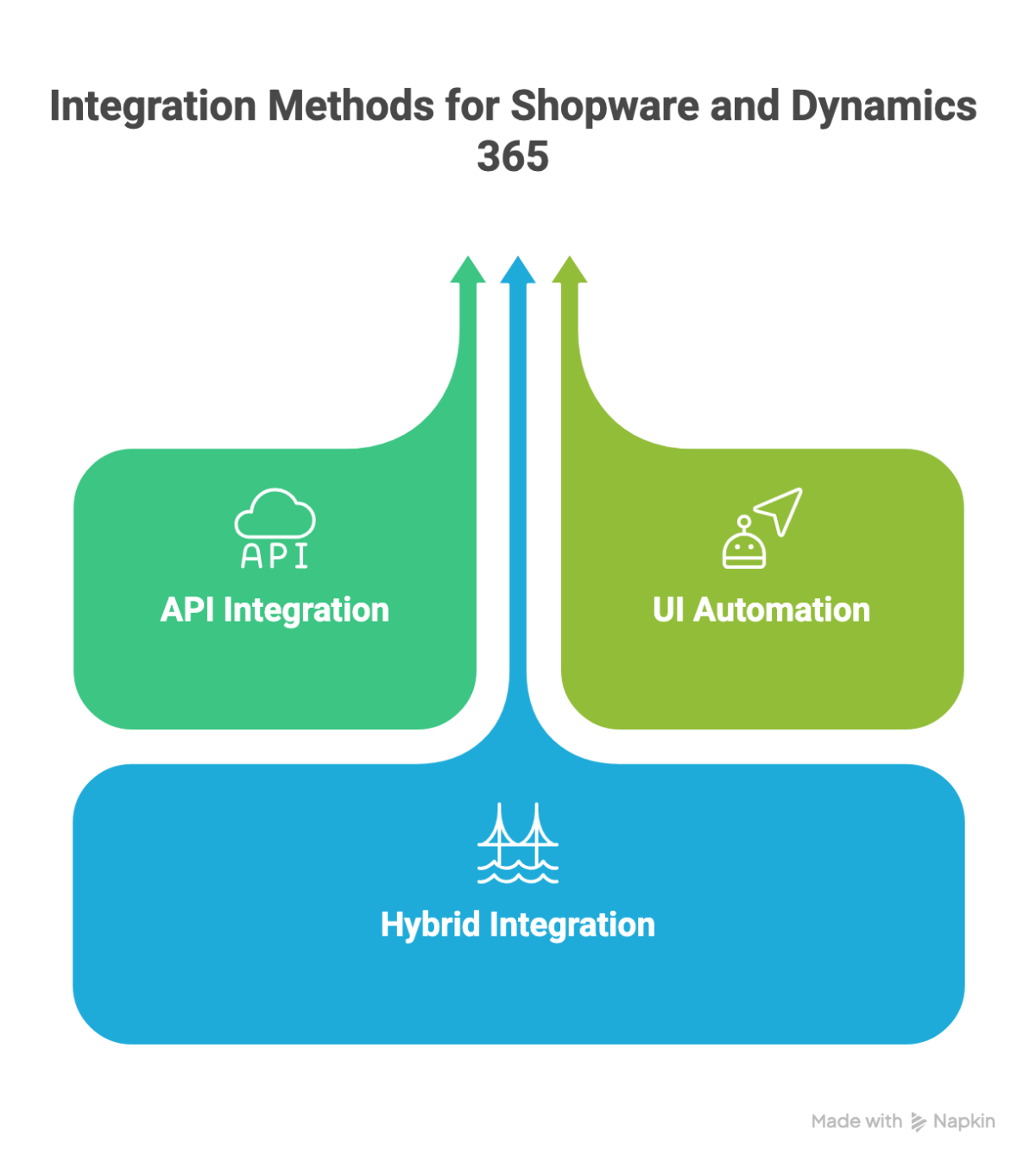
There are three main ways to connect Shopware and Dynamics 365 with RPA. Each has its strengths, and the right choice depends on your setup.
API Integration (Recommended)
This is the gold standard. Both Shopware 6 and Dynamics 365 offer robust REST APIs. Your RPA bot uses Shopware’s webhooks to detect new orders and Dynamics 365’s OData APIs or connectors to push data in. It’s fast, stable, and secure.
Best for: businesses with API access and some technical capacity.
UI Automation (Fallback)
When APIs aren’t available, maybe you’re running a legacy version of Dynamics NAV, or a third-party plugin doesn’t expose endpoints, UI automation steps in. The bot literally logs into the application, navigates the screens, types data into fields, and clicks buttons. It’s slower and more fragile, but it works when nothing else does.
Best for: legacy systems with no API access.
Hybrid Integration
The real-world answer is often a mix. Use APIs wherever they’re available and fall back to UI automation for the bits that don’t have clean endpoints. Most enterprise RPA platforms support both approaches in a single workflow.
Best for: complex environments with a mix of modern and legacy systems.
Step-by-Step Guide to Integrating Shopware With Dynamics 365
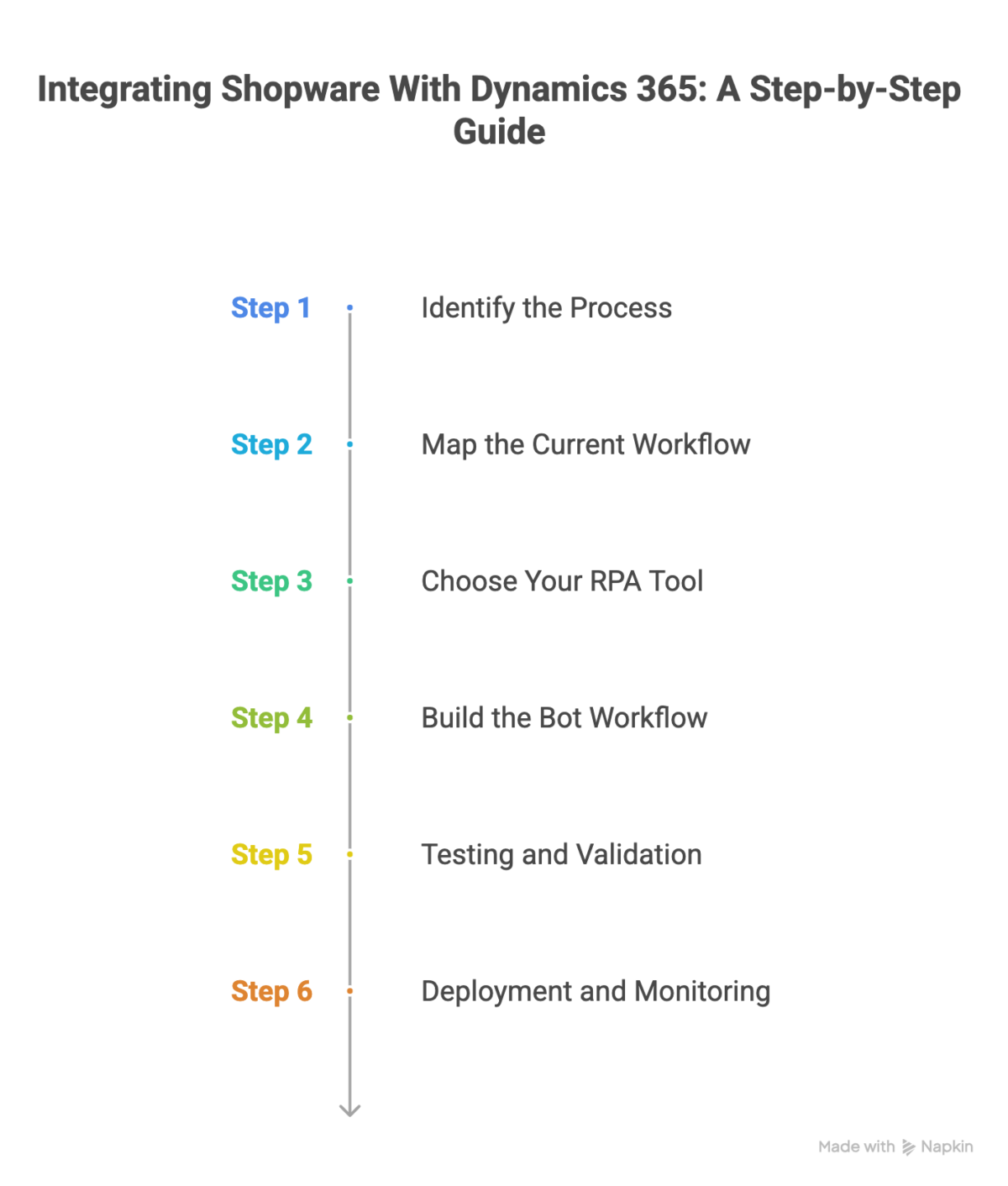
Ready to build? Here’s the playbook we use at 2HatsLogic when setting up RPA integrations for our clients.
Step 1: Identify the Process
Start with one high-impact process. For most e-commerce businesses, that’s sales order entry. Define exactly which data fields need to move from Shopware to Dynamics 365: customer name, email, shipping address, product SKUs, quantities, prices, and payment status.
Step 2: Map the Current Workflow
Document every single step your team currently takes, from the moment an order arrives in Shopware to the moment it’s fully entered into Dynamics 365. Include the clicks, the screens, the copy-paste actions. This becomes the blueprint for your bot.
While you’re at it, identify any unnecessary steps. Manual processes often accumulate extra steps over time that nobody questions. RPA is your chance to clean house.
Step 3: Choose Your RPA Tool
The three big players for Shopware-Dynamics 365 integration:
- Microsoft Power Automate: the natural choice if you’re already in the Microsoft ecosystem. Pre-built Dynamics 365 connectors make setup faster. Best for straightforward, API-based integrations.
- UiPath: the industry leader for complex, cross-system automation. Strong computer vision for UI automation on legacy apps. Best for hybrid environments.
- Automation Anywhere: cloud-native, enterprise-grade. Great for organizations that need to scale quickly across multiple processes. Best for large-scale deployments.
Pro Tip: Don’t overthink the RPA tool selection. If you’re already running Microsoft 365 and Dynamics, Power Automate is the path of least resistance. You can always bring in UiPath or Automation Anywhere later for more complex use cases.
Step 4: Build the Bot Workflow
Your bot workflow should follow this logic:
- Trigger: New order detected in Shopware (via webhook or scheduled polling).
- Extract: Pull customer data, product details, quantities, and pricing.
- Transform: Map Shopware data fields to Dynamics 365 fields (this is where field naming differences get resolved).
- Load: Create a new sales order in Dynamics 365 with all mapped data.
- Update: Adjust inventory levels in Dynamics 365 to reflect the sale.
- Confirm: Send an order confirmation and log the transaction for audit.
Step 5: Testing and Validation
Never deploy an untested bot. Run it through a sandbox environment first. Test with normal orders, edge cases (partial orders, international addresses, special characters in names), and high-volume batches. Check data accuracy at every step.
Warning: Edge cases are where RPA bots break. Test for: orders with 20+ line items, addresses with special characters (é, ü, ñ), split shipments, partial payments, and out-of-stock scenarios. If the bot can’t handle these gracefully, it’s not ready.
Step 6: Deployment and Monitoring
Start with a pilot. Run the bot alongside your manual process for a week. Compare results. Once you’re confident it’s accurate, switch over fully. Set up real-time monitoring and alerts so you’re notified immediately if the bot encounters an error or fails on a transaction.
Example Workflow: Shopware → Dynamics 365 Order Automation
Here’s what a fully automated order-to-ERP workflow looks like in practice:
- A customer places an order on your Shopware 6 storefront.
- Shopware fires a webhook. The RPA bot detects the new order instantly.
- The bot extracts all order details: customer info, line items, pricing, shipping, and payment method.
- The bot logs into Dynamics 365 (via API or UI) and creates a new sales order.
- Inventory levels in Dynamics 365 are automatically decremented.
- An invoice is generated and emailed to the customer.
- The bot logs the completed transaction and moves on to the next order.
End-to-end, this takes less than two minutes per order. For a business processing 500 orders a day, that’s roughly 16 hours of manual work eliminated every single day.
Best RPA Tools for Shopware-Dynamics Integration
Here’s how the top RPA platforms stack up for this specific use case:
Microsoft Power Automate
Best for Dynamics 365-native shops. Pre-built connectors, low learning curve, included in many Microsoft 365 licenses. Limited for complex UI automation.
UiPath
Industry’s strongest cross-platform automation. Excellent computer vision for legacy UI. Best for hybrid API + screen-scraping workflows. Steeper learning curve.
Automation Anywhere
Cloud-native, enterprise-scalable. Strong orchestration and bot management. Best for organizations planning to automate 50+ processes. Higher cost at the entry level.
Comparison Table:
| Feature / Criteria | What to Look For |
| Microsoft Power Automate | Best for Dynamics 365-native shops. Pre-built connectors, low learning curve, included in many Microsoft 365 licenses. Limited for complex UI automation. |
| UiPath | Industry’s strongest cross-platform automation. Excellent computer vision for legacy UI. Best for hybrid API + screen-scraping workflows. Steeper learning curve. |
| Automation Anywhere | Cloud-native, enterprise-scalable. Strong orchestration and bot management. Best for organizations planning to automate 50+ processes. Higher cost at entry level. |
| Open-source (Robot Framework, TagUI) | Free to use but requires developer expertise. Good for small teams with in-house technical capacity. Limited enterprise support and governance. |
Security and Compliance Best Practices
Automating data flow between your e-commerce platform and ERP means sensitive information, customer names, addresses, and payment details are moving through your systems constantly. You need to get security right from day one.
Secure Your Bot Credentials
- Use encrypted credential vaults (like Azure Key Vault or CyberArk) to store bot login credentials. Never hardcode passwords.
- Give each bot its own service account. No shared accounts, ever.
- Rotate credentials regularly and enforce multi-factor authentication where possible.
Implement Role-Based Access Control
Your RPA bot should have the minimum permissions it needs, nothing more. If the bot only creates sales orders, it shouldn’t have access to modify financial settings or delete records. Apply the principle of least privilege across every bot.
Maintain Audit Trails
Log every action the bot takes. When it reads from Shopware, when it writes to Dynamics 365, when it encounters an error, all of it. These logs are essential for troubleshooting, compliance audits (especially for GDPR if you’re in the EU), and building trust with your finance team.
Governance for ERP Automation
Create a Center of Excellence (CoE)
As your automation program grows beyond one or two bots, you need structure. A Center of Excellence standardizes how bots are built, tested, deployed, and maintained. It prevents the “shadow automation” problem, where departments build rogue bots that nobody tracks or governs.
Your CoE doesn’t need to be a massive team. Even two or three people can manage it effectively for a mid-sized company. The key roles: a process analyst who identifies and prioritizes automation candidates, a bot developer who builds and maintains workflows, and a governance lead who ensures security, compliance, and documentation standards are met. As your program grows, you can add dedicated roles for testing, monitoring, and change management.
Documentation
Two documents should be non-negotiable for every bot:
- Process Definition Document (PDD): describes the business process in detail, including inputs, outputs, exceptions, and business rules.
- Solution Design Document (SDD): describes the technical implementation, which APIs, fields, error handling logic, and recovery procedures.
Monitoring
Track bot performance continuously. Key metrics include: transactions processed per day, error rate, average processing time, and hours of manual work saved. Use these metrics to prove ROI and build the case for scaling automation to more processes.
Scaling ERP Automation
Your first bot is proof of concept. The real value comes when you scale.
Start Small, Think Big
Begin with one process. Get it rock-solid. Then expand to the next highest-impact process, maybe invoice processing or inventory sync. Each successful bot builds organizational confidence and funding for the next one.
Build Modular, Reusable Components
Don’t build monolithic bots. Break them into reusable modules: a “login to Dynamics 365” module, a “read Shopware order” module, and a “create sales order” module. When you need to build your next bot, you’re assembling from pre-built blocks instead of starting from scratch.
Continuous Improvement
ERP systems update. Shopware releases new versions. APIs change. Your bots need to evolve, too. Schedule regular reviews, quarterly at minimum, to update bot workflows, add new exception handling, and optimize performance.
Pro Tip: Think of your RPA program like building with Lego. The first bot is one set. But the real power comes when you have a library of modular, reusable bricks that snap together to automate new processes in days instead of weeks.
Common Challenges in ERP-RPA Integration
Let’s be real, RPA isn’t magic. There are pitfalls. Here’s what to watch for:
- API rate limits. Both Shopware and Dynamics 365 throttle API requests. Design your bot to batch requests and handle rate-limit responses gracefully.
- Data format mismatches. Shopware stores dates as ISO 8601. Dynamics 365 might expect a different format in certain fields. Build transformation logic into your bot.
- ERP updates breaking bots. When Microsoft pushes a Dynamics 365 update, your UI-based automations can break overnight. API integrations are more resilient, but still need version monitoring.
- Exception handling. What happens when an order has an invalid address? Or a product SKU doesn’t exist in Dynamics 365? Your bot needs clear exception paths, alert the team, log the error, and move on to the next order.
- Security restrictions. IT departments sometimes block bot access or require additional approvals. Get security involved early, not after you’ve built the bot.
The ROI of Automating Shopware → Dynamics 365
Let’s talk numbers. The ROI of ERP-RPA integration shows up in three areas:
Cost Savings
Manual order entry costs real money, not just in salaries, but in error correction, overtime during peak seasons, and the opportunity cost of having skilled people doing repetitive work. Companies that automate data entry between e-commerce and ERP systems typically see a significant reduction in operational costs within the first year.
Consider the math. If your team spends an average of 10 minutes manually entering each order, and you process 300 orders per day, that’s 50 hours of data entry work daily. Even at a modest hourly rate, those costs add up fast, especially when you factor in benefits, management overhead, and the error correction costs we mentioned earlier. An RPA bot running those same 300 orders costs a fraction of what a single full-time employee does.
Efficiency Gains
Processing time drops from minutes per order to seconds. For high-volume businesses, this means orders ship faster, customers get confirmations sooner, and your entire order-to-cash cycle tightens up.
Accuracy Improvement
Data entry errors are expensive. A wrong SKU can mean a wrong shipment, a return, a re-shipment, and an unhappy customer, all because someone misread a character. RPA eliminates this class of error almost entirely.
The Future of ERP Automation
Where is all this heading? The RPA market is growing fast, projected to reach over $35 billion in 2026 and expanding at a compound annual growth rate above 24% through 2035. Here’s what’s coming next:
- AI-powered document processing. Bots that don’t just read structured data from APIs, but understand invoices, purchase orders, and emails using OCR and natural language processing.
- Agentic automation. The next frontier is AI agents that don’t just follow scripts but make decisions, handle exceptions autonomously, and learn from past transactions. Instead of alerting a human when an address doesn’t validate, an agentic bot will look it up, correct it, and proceed.
- Real-time ERP analytics. RPA bots feed data into live dashboards that give you instant visibility into order pipelines, inventory levels, and fulfillment status. Think of it as turning your ERP into a real-time control tower for your entire e-commerce operation.
- Autonomous order fulfillment. End-to-end automation from order placement through warehouse picking, packing, and shipping, with minimal human oversight.
Want to understand the difference between RPA, AI, and Agentic AI? Check out our deep-dive on RPA vs AI vs Agentic AI.
Checklist: Shopware to Dynamics 365 Automation
Before you go live, make sure every box is checked:
- Target process identified and documented
- Current workflow mapped end-to-end
- RPA tool selected and licensed
- API access configured for both Shopware and Dynamics 365
- Bot workflow built and peer-reviewed
- Tested in sandbox with normal and edge-case scenarios
- Security configured: credential vault, RBAC, audit logging
- Monitoring and alerting active
- PDD and SDD documentation complete
- Pilot run completed successfully
- Team trained on bot monitoring and exception handling
Ready to Automate Your Shopware-to-ERP Workflow?
At 2HatsLogic, we’ve been building enterprise automation and ERP integration solutions for companies across Europe and the GCC region. Whether you need a Shopware-to-Dynamics 365 bot, a full-scale RPA program, or just a strategic roadmap, we’ve got you covered.
FAQ
Can RPA integrate Shopware with Dynamics 365?
Absolutely. RPA bots connect the two systems either through APIs (the preferred method) or by mimicking human actions on the screen (UI automation). Either way, the bot reads order data from Shopware and enters it into Dynamics 365 automatically. Many businesses already run this exact integration in production.
What is the best RPA tool for Dynamics 365?
If you're already in the Microsoft ecosystem, Power Automate is the natural starting point, it comes with pre-built Dynamics 365 connectors and is often included in existing licenses. For more complex, cross-platform scenarios, UiPath offers the deepest automation capabilities.
Is API integration better than screen scraping?
Yes, in almost every case. API integration is faster, more reliable, and less likely to break when the ERP gets updated. Screen scraping (UI automation) is a useful fallback for legacy systems that don't offer APIs, but it should be a last resort, not your first choice.
How long does ERP automation take?
A straightforward Shopware-to-Dynamics 365 order entry bot can typically be built and tested in four to six weeks. More complex integrations involving multiple processes, exception handling, and legacy systems can take two to four months. Starting with a single, well-defined process and expanding from there is the fastest path to results.
How much does RPA-ERP integration cost?
Costs vary widely based on the RPA tool, complexity of the integration, and number of processes automated. Power Automate starts at around $15 per user per month for basic flows. UiPath and Automation Anywhere licenses start higher but offer more enterprise-grade features. The real cost question is: how much is manual data entry costing you right now? For most mid-sized businesses, the RPA investment pays for itself within six to twelve months.
Table of contents
- Why ERP Data Entry Automation Matters
- What Is RPA? And How Does It Connect Shopware and Dynamics 365?
- Why Automate Data Entry Between Shopware and Dynamics 365?
- Which Processes Are Perfect for ERP Automation?
- Integration Methods for Shopware and Dynamics 365
- Step-by-Step Guide to Integrating Shopware With Dynamics 365
- Example Workflow: Shopware → Dynamics 365 Order Automation
- Best RPA Tools for Shopware-Dynamics Integration
- Security and Compliance Best Practices
- Governance for ERP Automation
- Scaling ERP Automation
- Common Challenges in ERP-RPA Integration
- The ROI of Automating Shopware → Dynamics 365
- The Future of ERP Automation
- Checklist: Shopware to Dynamics 365 Automation
- Ready to Automate Your Shopware-to-ERP Workflow?

Related Articles