Greetings! I'm Aneesh Sreedharan, CEO of 2Hats Logic Solutions. At 2Hats Logic Solutions, we are dedicated to providing technical expertise and resolving your concerns in the world of technology. Our blog page serves as a resource where we share insights and experiences, offering valuable perspectives on your queries.

If your business is still running Microsoft Dynamics NAV, you’re in good company. A lot of manufacturers, distributors, retailers, and service businesses still rely on NAV every day, and for many, it still “works.”
But here’s the catch: support timelines are closing in. Microsoft is ending extended support for NAV 2016 and NAV 2018 between 2026 and 2028. When that happens, you don’t just lose “nice-to-have” updates; you lose the safety net: security fixes, compliance updates, and reliability that businesses depend on.
So the real question becomes:
Is your ERP helping you grow… or quietly becoming a risk you’ll have to deal with later (usually at the worst possible time)?
This guide breaks down the 7 clearest signs that it’s time to move from NAV to Dynamics 365 Business Central, plus a simple readiness checklist and a practical migration roadmap.
The NAV End-of-Support Timeline
“End of support” isn’t just a Microsoft milestone. It’s the point at which security updates stop, leaving any new vulnerabilities open.
| NAV Version | Mainstream Support End | Extended Support End |
| NAV 2016 | Already ended | January 2027 |
| NAV 2017 | Already ended | January 2028 |
| NAV 2018 | Already ended | January 2028 |
Once extended support ends, you’re more exposed to:
- security vulnerabilities (and ransomware risk)
- compliance gaps (SOC 2, ISO 27001, and industry requirements)
- expensive emergency fixes when something breaks
And yes, for some businesses, unsupported software can complicate cyber insurance and audit outcomes.
7 Signs It’s Time to Move from NAV to Business Central
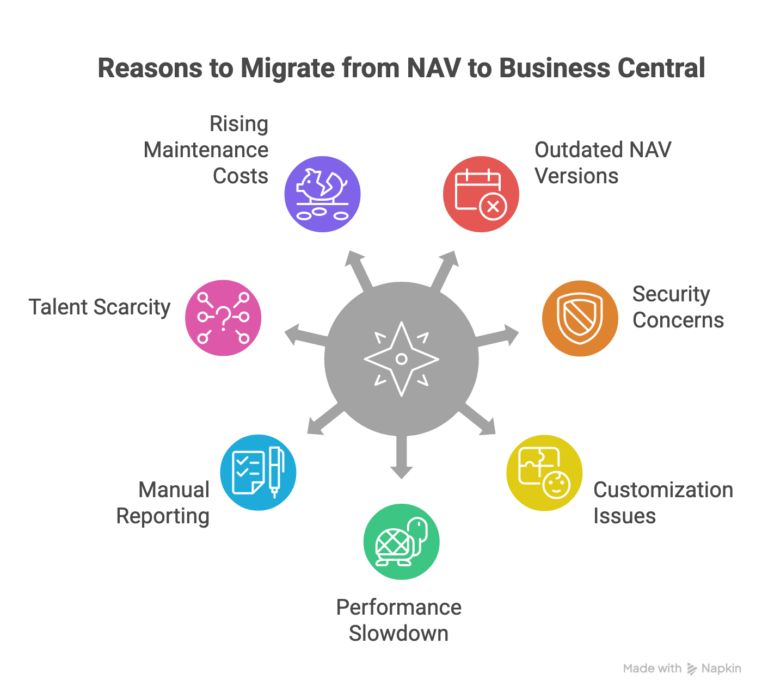
1) You’re on NAV 2016, 2017, or 2018.
This is the most obvious one. If you’re on these versions, you’re already on the clock. You can wait, but then the upgrade becomes reactive (driven by a security incident, failed audit, or system issue) instead of planned.
2) Security and compliance.
If your team is constantly applying workarounds, tightening access controls manually, or worrying about patch gaps, it’s a signal that the platform is reaching the end of the road.
With Business Central (especially cloud), you get:
- automatic security updates
- encryption and Microsoft Azure security
- compliance-ready infrastructure
3) Your customizations keep breaking.
NAV’s older customization model can become fragile over time. Even small changes can ripple into other parts of the system.
Business Central uses an extension-based approach, so custom functionality is easier to manage without constantly disturbing your core system.
Quick win before migrating: do a customization audit. Most businesses find that a chunk of older customizations are no longer needed because Business Central already covers the same workflows.
4) NAV is starting to slow you down as you grow.
If you’re seeing issues during peak order processing, struggling with multi-location inventory visibility, or hitting performance limits, NAV may be holding back your operations.
Business Central is designed to scale, especially in the cloud, without the same infrastructure ceiling.
5) Reporting still feels manual (and too slow).
If reporting means exporting to Excel, reconciling multiple reports, or waiting hours for financial consolidation, you’re not alone, but it’s also a sign you’ve outgrown what NAV can comfortably deliver today.
Business Central connects naturally with Power BI and can support more real-time reporting and decision-making.
Need clarity on where you stand?
6) Finding NAV talent is getting harder.
The NAV developer pool (especially C/AL) is shrinking. Many developers have already moved on to Business Central (AL), and that trend isn’t reversing.
This becomes a business continuity risk when:
- Only one or two people “know the system.”
- support becomes slow or costly
- Upgrades feel impossible because the right skills aren’t available.
7) Your on-prem maintenance costs are increasing.
NAV might feel “paid for,” but the surrounding costs add up:
- servers and hosting
- backups and disaster recovery
- patch weekends and downtime
- database + admin time
- support contracts
For many SMBs, when you compare total cost properly, Business Central’s subscription model can be competitive and often delivers more value because infrastructure and updates are included.
The Hidden Cost of Waiting
Putting off an upgrade feels like saving money until the risks start compounding:
- One failed patch turns into days of downtime.
- Compliance pressure increases
- Talented NAV resources get harder to find.
- Competitors move faster with better visibility and automation.
Waiting rarely makes migration cheaper; it usually makes it more urgent.
A Practical Migration Roadmap (NAV → Business Central)
Most SMB migrations take 3–6 months, depending on customizations and integrations.
Step 1: Assessment
We review your NAV setup: version, data, workflows, integrations, and customizations.
Step 2: Choose the right path
Decide what fits best:
- full cloud (most common for SMBs)
- hybrid or phased approach (when needed for integrations or regulations)
Step 3: Migration + configuration
Move master data and history (as needed), configure Business Central, rebuild essential customizations as extensions, and connect your tools (CRM, WMS, eCommerce, etc.).
Step 4: Testing + training
User acceptance testing, parallel runs (if required), and role-based training so the team is confident before go-live.
Step 5: Go-live + quick wins
This is where teams usually feel the difference fast:
- cleaner reporting
- better visibility
- easier workflows
- mobile access
- automation opportunities
Timing note: If you’re on NAV 2016 and support ends in January 2027, starting assessment by Q2 2026 is a smart buffer.
Conclusion
The businesses that plan early have the smoothest migrations and the fastest ROI. Whether you’re still exploring or ready to begin, the right partner makes the process simpler.
Ready to move from NAV to Business Central? Book your free NAV assessment with 2Hats Logic Solutions. We’ll review your current environment, recommend the best migration approach, and share a clear timeline and cost estimate.
FAQ
Can we keep running NAV after end-of-support?
Technically yes. Practically, it increases your security and compliance exposure, and support becomes more expensive and harder to find.
How much does migration cost?
It depends on data, user count, integrations, and customisations. A TCO comparison is the best way to evaluate it properly.
Will our NAV customisations work in Business Central?
Not directly, NAV customisations need to be rebuilt as extensions. The good news: many older customisations are no longer necessary because BC includes those capabilities out-of-the-box.
Can we do hybrid (cloud + on-prem)?
Yes, depending on your requirements. Many businesses still prefer cloud for simpler maintenance and automatic updates, but hybrid can make sense in specific cases.


Related Articles