Greetings! I'm Aneesh Sreedharan, CEO of 2Hats Logic Solutions. At 2Hats Logic Solutions, we are dedicated to providing technical expertise and resolving your concerns in the world of technology. Our blog page serves as a resource where we share insights and experiences, offering valuable perspectives on your queries.

Quick Summary
Shopify is one of the easiest ways for businesses to start selling online, but choosing it is really a question of fit, cost, and growth potential. This blog explains what Shopify is, what it does, how it works step by step, what you can sell with it, how much it may cost, and how it compares with WooCommerce, Shopware, and Magento. It also includes a practical look at the platform’s strengths and weaknesses, so readers can decide whether it is the right platform for their business.
Have you ever wondered, “What is Shopify?” while trying to figure out how to start selling online? Many entrepreneurs feel overwhelmed when first exploring eCommerce options.
Shopify is one of the most widely used platforms for building an online store. It gives businesses a way to sell products online without needing to build everything from scratch.
It is used by small businesses, growing brands, and larger companies because it combines store setup, product management, checkout, payments, and sales tracking in one place. If you are trying to understand what Shopify is, the simplest answer is this: it is a platform that helps you create, manage, and grow an online store.
Brands like Gymshark, Kylie Cosmetics, SKIMS, Mattel, and Heinz have also used Shopify, which shows that both fast-growing direct-to-consumer brands and major global companies trust the platform. These examples highlight Shopify’s ability to support businesses at different stages of growth, from emerging startups to well-known enterprise brands.
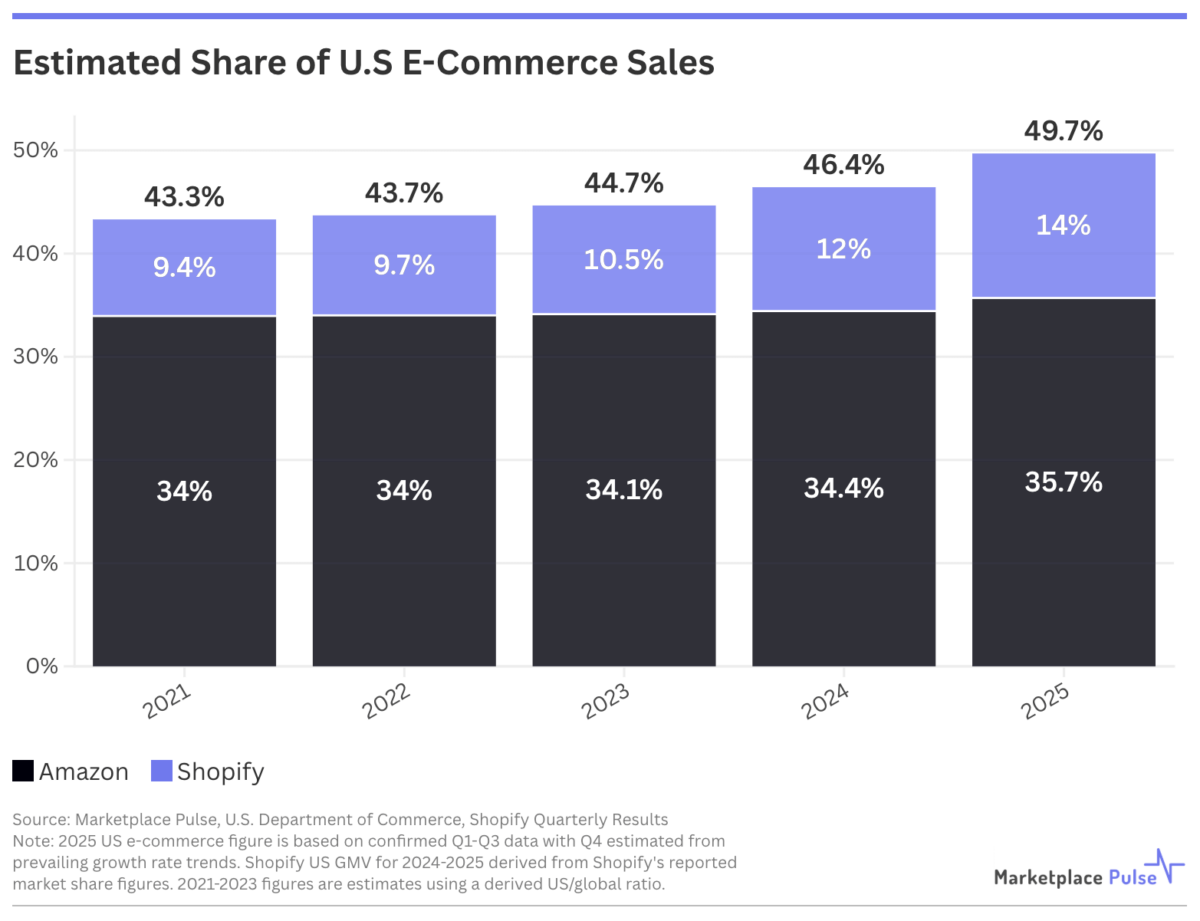
As of 2025, Shopify held about 14% of the U.S. eCommerce market and powered millions of stores worldwide, making it one of the most influential commerce platforms today.
Pro tip: Don’t overthink your store setup initially. Shopify is designed to evolve with your business, so you can start simple and add complexity as you grow.
Explore Shopify to see if it fits your business goals.
What Is Shopify?
Shopify is a hosted e-commerce platform that helps businesses create, manage, and grow online stores without needing to build everything from scratch. It gives merchants the tools to set up a storefront, add products, accept payments, manage orders, and handle sales from one system.
Because Shopify is built for selling across multiple channels, businesses can use it to sell through their website, social media platforms, marketplaces, and even in-person retail. This makes it a practical choice for brands that want to manage all their sales in one place instead of using separate systems.
Shopify is also more than just a website builder. It combines selling, payments, inventory, and operations in a way that works well for startups, small and mid-sized businesses, and growing brands. That is why many merchants see it as a central commerce platform rather than only an online storefront tool.
For larger businesses, Shopify offers Shopify Plus, which is the enterprise version of the platform. Shopify Plus is designed for high-volume merchants that need more advanced automation, deeper customization, and support for more complex operations.
The main difference between Shopify and Shopify Plus is scale and control. Standard Shopify plans are better suited for smaller and growing businesses that want simplicity and affordability, while Shopify Plus is built for larger brands that need enterprise-level features and flexibility. Pricing also reflects that difference, with Shopify Plus sitting at a much higher level than standard plans because it includes advanced tools and support.
Shopify Features You Should Know About
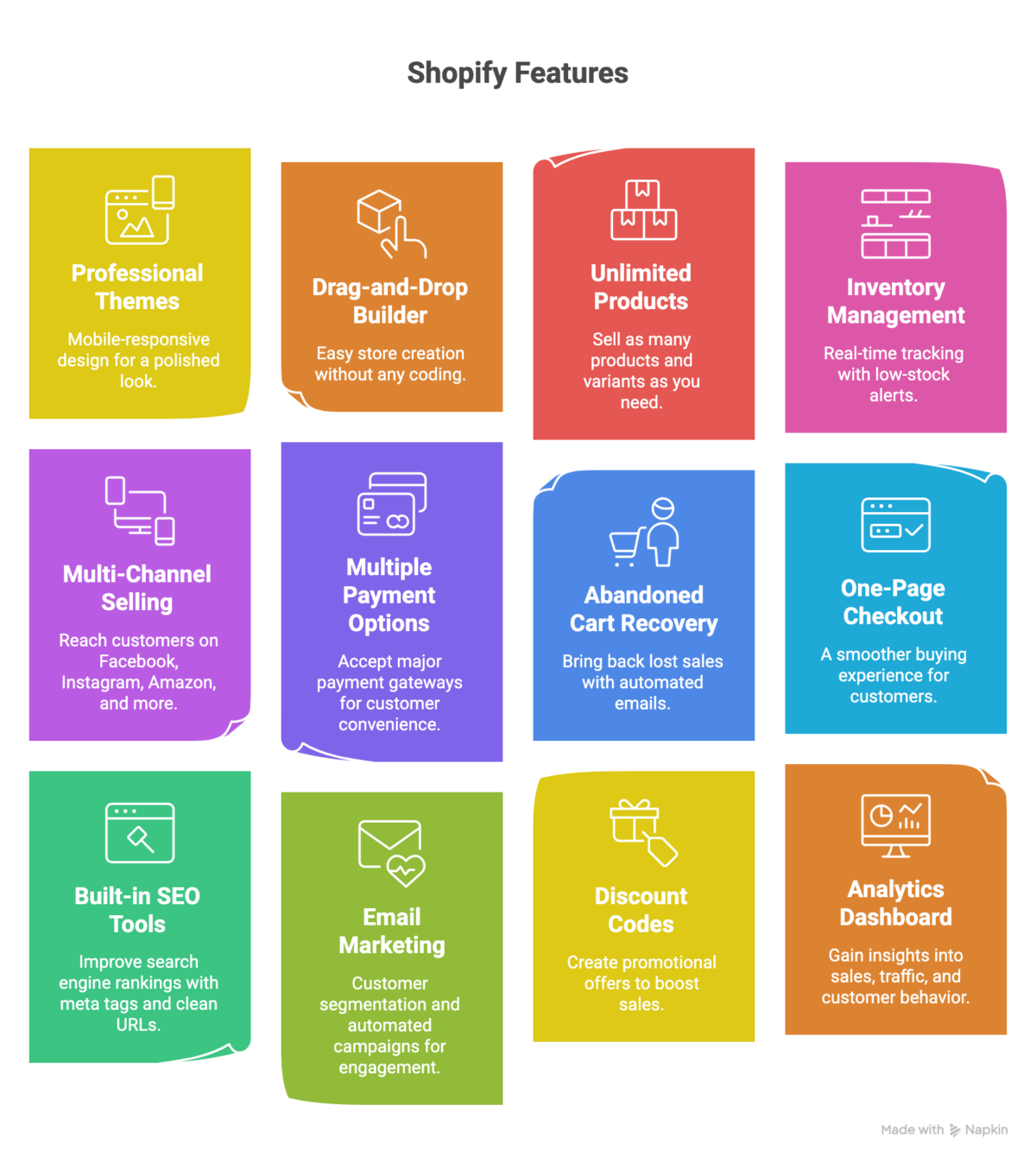
Shopify includes a wide range of features that help businesses create, manage, and grow an online store more efficiently.
Store Design and Setup
Professional themes, a drag-and-drop builder, and mobile-responsive design make it easier to build a store that looks polished without coding. This is one of the main reasons beginners often choose Shopify.
This is one of the strongest Shopify store design advantages because it helps brands create a professional-looking storefront quickly. Shopify themes, Theme Editor, and Online Store 2.0 make it easier to customize pages without heavy development work. For businesses that want a modern storefront design, Shopify can reduce both setup time and design complexity.
Product and Inventory Management
Shopify supports unlimited products, variants, and inventory tracking with low stock alerts. That helps businesses organize their catalog more clearly and keep stock levels under control.
Shopify’s product management is important for businesses that sell multiple product categories, sizes, colors, or bundles. Inventory management also helps merchants track stock, avoid overselling, and manage multi-location inventory more effectively.
Selling and Checkout
The platform supports multiple payment options, abandoned cart recovery, and checkout optimization. These features are important because they help improve conversion and reduce lost sales.
Shopify checkout is a major advantage because it supports smoother purchasing experiences and faster transactions. Features like Shopify Shop Pay, one-page checkout, and accelerated checkout help reduce friction at the final step of the buyer journey.
Marketing and SEO
The platform includes meta tags, clean URLs, discounts, and email segmentation features. These tools help businesses promote their products and improve visibility in search engines.
Shopify marketing features matter because they help merchants promote offers, run campaigns, and support customer retention. SEO features, such as clean URLs and meta tags, help improve discoverability, while email marketing and customer segmentation support more targeted communication.
Sales Channels and Omnichannel Selling
Shopify supports multi-channel selling (Facebook, Instagram, Amazon, and more), marketplace connections, and POS. That means merchants can sell online and offline from one platform while keeping product and order data connected.
Shopify omnichannel selling supports social channels, Facebook integration, Instagram Shopping, TikTok, marketplace integrations, and POS. For many businesses, this creates a more unified commerce experience across digital and physical touchpoints.
Shipping and Fulfillment
Shipping setup, order handling, and international selling support make the platform useful for businesses that want to serve customers across regions. Fulfillment becomes easier when the store and operations are connected.
Shopify shipping tools help merchants manage shipping rates, shipping labels, and fulfillment workflows more efficiently. Automated shipping can further streamline the process by helping businesses handle shipping rules, order routing, and label generation with less manual effort. The fulfillment features are especially important for businesses that ship at scale or work with third-party logistics partners.
Analytics and AI Tools
Shopify provides sales reports, customer insights, and AI-assisted setup and content. These newer tools help merchants save time and make better decisions as they grow.
Shopify analytics helps businesses understand what is selling, where customers are coming from, and how performance changes over time. Shopify’s AI tools, such as Magic and Sidekick, can also support faster setup, content generation, and day-to-day productivity. These tools make the platform feel modern and useful for busy merchants.
Need help choosing the right Shopify setup?
How Does Shopify Work?
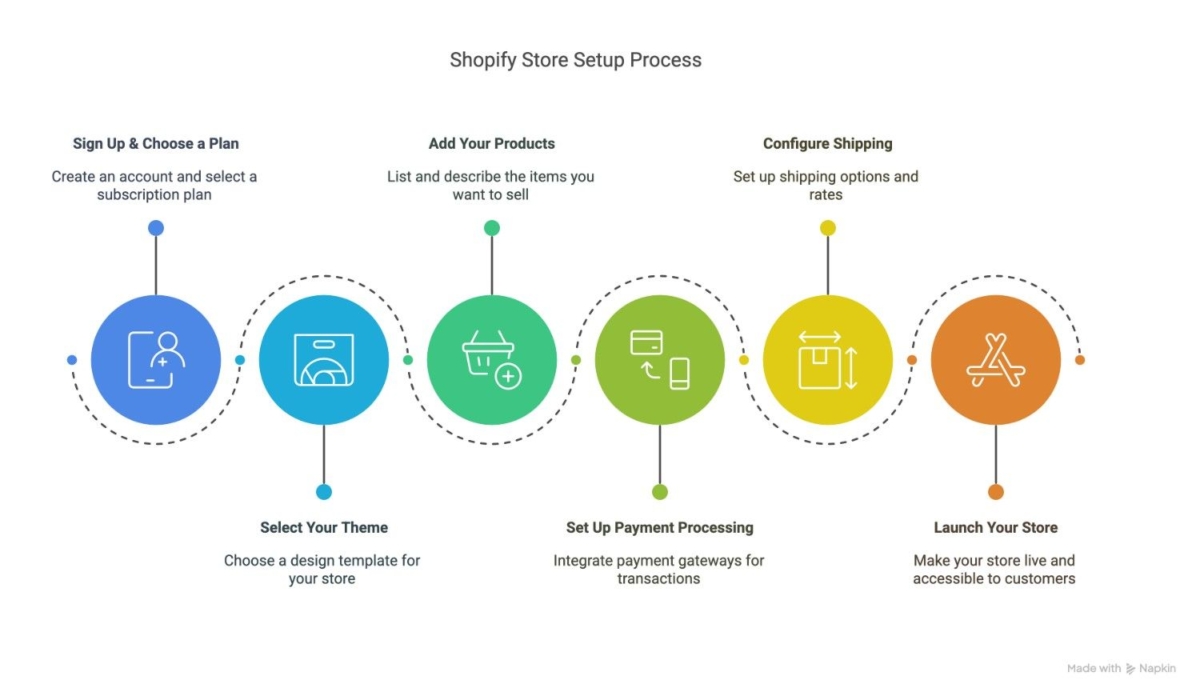
Ever wondered, “What is Shopify and how does it work?” Let’s break down the process into simple steps:
1. Create a Store
Start with a 3-day free trial (no credit card required), then select from tiered pricing plans based on your needs.
To create a Shopify store, you begin by setting up an account, selecting your store information, and preparing the foundation for your online business. This is often the fastest way to start a Shopify store because the process is designed to be beginner-friendly.
2. Select Your Theme
Select a storefront design and customize the layout and colors. This helps create a branded shopping experience that matches your business.
When you choose a theme, you are shaping how the store feels to the customer. The right Shopify theme selection can improve branding, usability, and trust. Many merchants start with free themes before moving to more customized options as their store grows.
3. Add Your Products
Upload product details, set variants, images, and pricing, and organize products into collections.
To add products, you can manually enter product data or use bulk add products methods, such as CSV import. This step is important because clear product images, pricing, and variants help customers make decisions more easily.
4. Add key pages.
You create pages like About, Contact, Shipping, Returns, and FAQs.
5. Set Up Payment Processing
Connect payment options, configure the checkout flow, and enable secure transactions so you can receive money from sales.
Shopify payment setup is one of the most important parts of launching the store. Shopify Payments, PayPal, and other payment gateways help merchants accept payments with confidence. A smooth checkout setup also helps improve trust and conversion.
6. Manage Orders
Track incoming orders, update status, and handle customer communication.
Managing orders on Shopify is easier when everything is centralized in one dashboard. Merchants can track order status updates, send customer notifications, and keep the order workflow organized from purchase to fulfillment.
7. Fulfill Products
Ship orders manually or with partners, manage inventory movement, and keep customers informed.
The order fulfillment process can include in-house shipping, third-party fulfillment, setups, or 3PL integration. This step helps merchants move from order confirmation to delivery in a structured way.
8. Test the checkout process.
Before going live, you check whether everything works correctly.
9. Launch Your Store
Activate your chosen domain and open your store to customers.
To monitor store performance, merchants use the Shopify dashboard and reports to see what is working and what needs improvement. Over time, this helps businesses optimize store performance, expand sales channels, and scale with more confidence.
Behind the scenes, it handles all the technical complexities:
- Secure hosting (no need to worry about servers)
- SSL certification (keeps customer data safe)
- Mobile optimization (looks great on all devices)
- Regular security updates (protection against threats)
Take the next step toward a more organized online business.
What Can You Sell on Shopify?
Shopify is used to build and manage online stores. It helps businesses sell directly to customers without relying only on marketplaces or physical shops. Shopify supports a wide range of use cases, making it flexible for different business models.
Physical Product Sales
Many businesses use Shopify for fashion stores, consumer goods, beauty products, electronics, and home goods. The platform handles shipping rates, inventory tracking, and order management for tangible goods.
Shopify also supports virtual try-on features through AR-enabled apps, which help fashion, eyewear, beauty, and accessory brands give customers a more interactive shopping experience before they buy.
Selling Digital Products
Ebooks, courses, templates, memberships, and downloadable resources can also be sold through Shopify.
This is a practical solution for creators and digital sellers who want to sell digital products on Shopify. Shopify digital downloads can support ebooks, memberships, templates, and even SaaS sales models.
Services and Consultations
It is not limited to products. Businesses can use it for bookable services, expert offerings, and local business services.
For service businesses, Shopify supports consulting offers, appointments, and scheduling-based bookings. This makes the platform useful beyond traditional product retail.
Dropshipping Businesses
Low-inventory models like dropshipping and print-on-demand work well because Shopify connects with supplier-based workflows and automated product fulfillment.
Shopify dropshipping and print-on-demand models are popular because they reduce the need to hold stock upfront. Tools and apps such as Printful, Printify, and DSers make these business models easier to manage.
Omnichannel Selling
Shopify supports both online and offline sales. That makes it possible to manage in-store and digital orders from one system and give customers a more unified experience.
This is where the Shopify omnichannel use case becomes especially valuable. Businesses can use online and offline selling to create a more connected experience through POS, retail integration, and multi-channel selling.
For example, a clothing brand can sell shirts and accessories, while a trainer can sell workout plans or consultations. A local store can use Shopify to expand beyond its physical location, and a digital creator can sell downloadable resources.
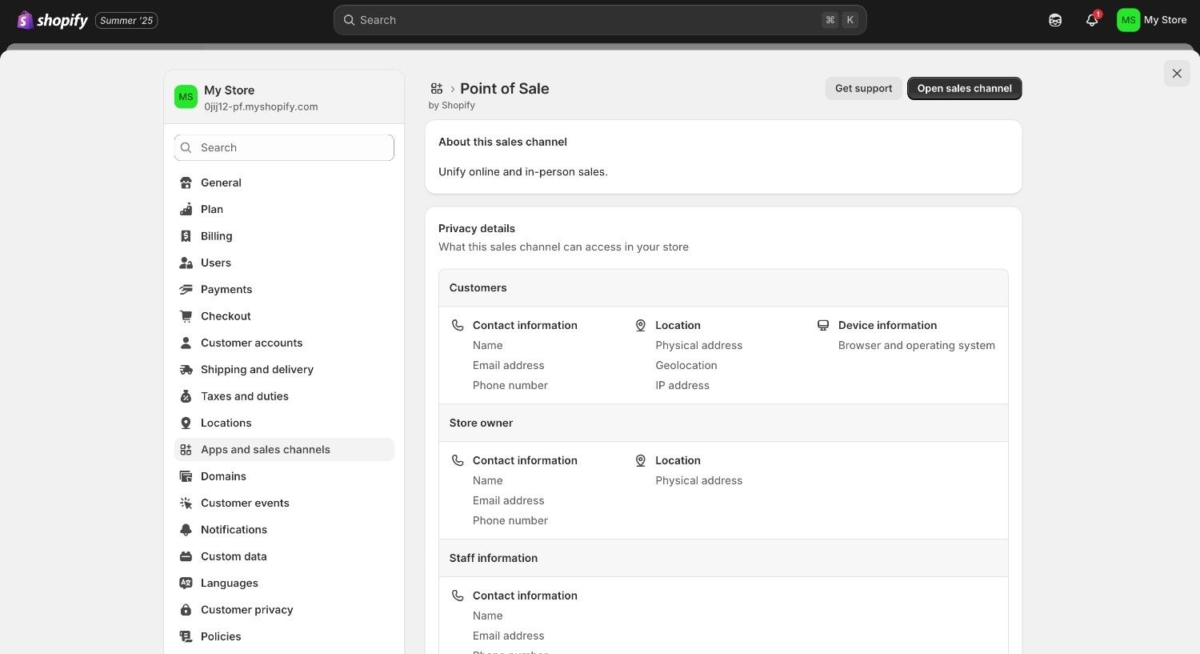
You can also source products through Shopify’s wider ecosystem. Businesses can work with print-on-demand services, dropshipping apps, wholesale suppliers, or other brands, which makes it easier to start without holding all inventory upfront.
Traditional website vs. Shopify store
| Traditional Website | Shopify Store |
|---|---|
| Need separate eCommerce plugins | All-in-one solution |
| Self-managed security | Built-in security features |
| Manual backups required | Automatic backups |
| Limited payment options | 100+ payment gateways |
How Easy Is Shopify to Use?
Shopify is considered easy to use, especially for people who are new to e-commerce. The platform gives you a visual interface, so you do not need to build everything manually.
For Beginners
You can choose a theme, add products, set prices, and manage orders without knowing how to code. That makes the platform attractive for first-time store owners.
Shopify for beginners is one of its biggest advantages because the setup process is simple and clear. A no-code workflow helps non-technical users launch faster and learn the platform more easily.
For Growing Businesses
As a business grows, Shopify can expand with apps, products, and sales channels. It can handle increasing store complexity without forcing a complete rebuild.
Shopify for growing businesses works well because the platform can scale with changing needs. As businesses add more products, automate tasks, and expand into new channels, Shopify can support that growth path.
Where the Learning Curve Starts
Advanced customization, SEO setup, app selection, and theme changes may require more time or technical help. That is normal for a platform that is designed to scale with the business.
How Shopify Scales With Your Business
Shopify is built to grow with the business. Instead of paying for every feature upfront, merchants can keep the core platform lean and add capabilities through apps as needed. This makes Shopify’s scalability practical rather than theoretical.
Scaling Through the Shopify App Ecosystem
The Shopify App Store includes thousands of apps that extend store functionality. Most merchants start with a few essentials and add more as the business grows.
Common app categories used for scaling include:
- Email marketing and automation (Klaviyo, Omnisend)
- Reviews and social proof (Judge.me, Loox)
- Upsell and cross-sell (ReConvert, Bold Upsell)
- Subscriptions (Recharge, Appstle)
- Customer support (Gorgias, Reamaze)
- Shipping and fulfillment (ShipStation, AfterShip)
- Loyalty and rewards (Smile.io, Yotpo)
This ecosystem lets merchants plug in features only when needed. But app selection matters, too many apps can slow the store, raise monthly costs, and create overlap. A periodic app audit helps keep the store lean.
Shopify Integrations
Shopify integrates with a wide range of tools that help businesses manage marketing, sales, shipping, inventory, and operations more efficiently. These integrations make it easier to connect Shopify with email platforms, social channels, marketplaces, accounting software, ERP systems, and fulfillment tools. For growing businesses, this is especially useful because it allows the store to scale without replacing the core platform.
Alongside apps and integrations, Shopify also scales through its sales channels, which were covered earlier in this blog.
Why This Scaling Model Works
Shopify separates the core platform from the growth layer. Hosting, checkout, and store management stay stable, while apps and channels adapt as the business evolves. Merchants can start small, avoid replatforming later, and control costs by adding or removing tools as needed.
Migrating to Shopify
Migrating to Shopify is a common step for businesses that want ease of use and stronger store management.
Why Businesses Move to Shopify
Businesses often move because it offers better scalability, less maintenance than self-hosted systems, and more control over store operations.
Many businesses switch to Shopify when they want a simpler operational model and better long-term flexibility.
What Can Be Migrated
Products, customers, orders, pages, blog content, collections, and images/media can usually be migrated with the right process.
This makes Shopify data migration possible for many businesses moving from other platforms. A good migration plan helps preserve content and reduce disruption.
Common Migration Sources
Many businesses migrate from WooCommerce, Magento, BigCommerce, Wix, Squarespace, or custom-built stores. The move is usually driven by convenience, maintainability, or scalability.
Key Migration Challenges
The biggest challenges are SEO redirects, data cleanup, theme differences, app replacements, and payment and shipping setup. These need to be handled carefully to avoid disruption.
Successful Shopify migration challenges are usually tied to planning and execution. Handling SEO redirects properly is especially important because it protects organic visibility during the move.
Shopify Pricing in 2026
Shopify pricing is based on the plan you choose, but the real cost usually includes more than just the monthly subscription. Many stores also spend on themes, apps, and related tools.
Shopify offers the Basic plan, the Grow plan, the Advanced plan, and the Plus plan for larger businesses.
These pricing plans serve different business sizes and needs. Comparing the plans helps merchants decide what level of support and functionality they need.
A basic setup may stay affordable at the beginning, but growing stores often add extra costs as they scale. These can include email tools, review apps, upsell apps, shipping tools, and premium themes. So when people ask about Shopify pricing, they usually need to understand both the visible cost and the hidden cost.
| Plan | Best For | Pricing Note |
| Basic | Very small or social-first selling | Starts at $25 per month |
| Grow | New online stores | $79 per month when billed annually |
| Advanced | Stores that need more features | Higher monthly cost depending on features |
| Plus | Larger or complex businesses | Higher cost for advanced tools and scale |
Not sure which plan is right for your business?
Is Shopify Worth It?
For small businesses, it can be a practical and affordable starting point. For scaling brands, the value often comes from convenience, reliability, and growth readiness.
A way to evaluate Shopify is to think about ROI and cost versus business impact. If the platform helps save time, reduce maintenance, and support growth, then the value can outweigh the monthly cost.
Real cost examples
A small store may begin with a basic plan and a few free apps. A growing store may need a premium theme, a reviews app, email automation, and shipping tools, which increases the monthly cost. That is why the actual business cost is often higher than the subscription fee alone.
Shopify also supports larger businesses with more advanced plans. These are built for stores that need stronger reporting, greater customization, and more complex commerce operations.
Why Use Shopify Over Other Platforms?
When entrepreneurs ask why they should use Shopify instead of alternatives, the answer usually comes down to speed, simplicity, and scalability.
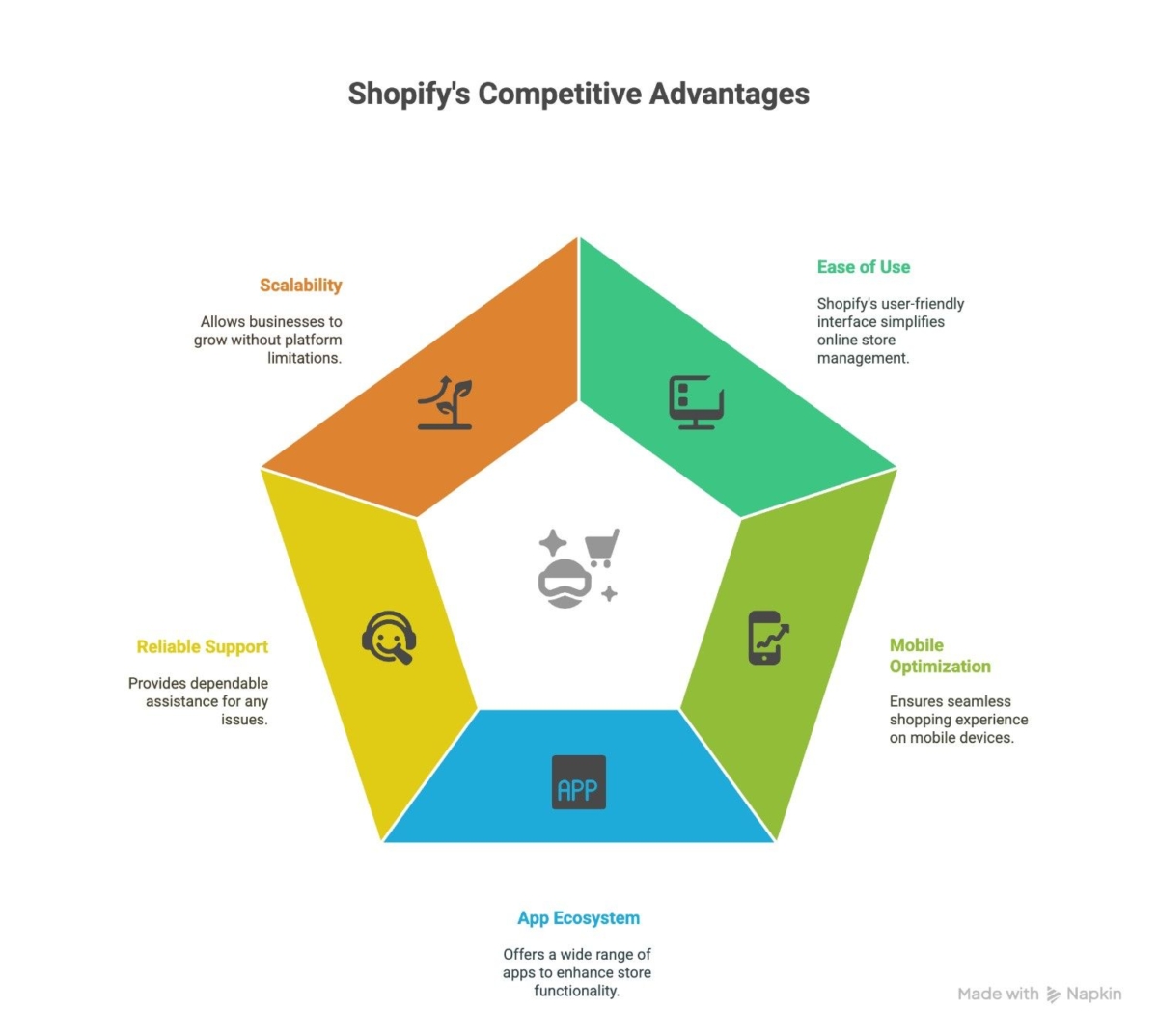
Fast Setup
Launch without technical skills; if you can use email, you can manage a Shopify store.
Shopify’s quick setup is one of the strongest reasons businesses choose the platform. It makes it easier to launch a store quickly and start selling without a long development cycle.
Scalability
The platform grows with the business and supports more products and channels as needed.
This is a Shopify scalability advantage because the platform can support high-volume growth, expansion, and multi-channel selling. This makes it a reliable long-term option for businesses.
Built-in Mobile Optimization
All themes are automatically optimized for phones and tablets (crucial since over 70% of online shopping happens on mobile).
Ease of Management
The interface is simple enough for everyday use, which helps merchants stay focused on selling.
Shopify’s ease of management is a practical benefit for business owners who want to spend less time on technical administration and more time on sales, marketing, and customers.
Ecosystem and Support
Apps, themes, partners, and documentation make it easier to extend the platform and solve problems as the business grows.
This Shopify ecosystem gives merchants access to tools, experts, and support when needed. It is one reason the platform remains attractive as businesses become more advanced.
Reliable Support
24/7 help via chat, email, and phone, something many platforms don’t offer.
When we migrated a client from WooCommerce to Shopify, their page load times decreased by 40% and conversion rates increased by 28% within the first month, largely due to Shopify’s optimized infrastructure.
Pro tip: Don’t get distracted by endless customization options. Focus first on getting your core products listed with quality images and descriptions; you can perfect the design details later.
Shopify Pros and Cons
Shopify has clear strengths, but it also has trade-offs. A fair comparison helps readers trust the content more.
| Pros | Cons |
| Easy to start | Monthly costs can rise with apps |
| Good for beginners | Some advanced changes need developer help |
| Strong checkout experience | Less flexible than fully custom builds |
| Built for growth | Can become expensive at scale |
| Large app ecosystem | Too many apps can make the store heavier |
This section is important because readers often want reassurance, not just praise. A balanced view helps them understand where Shopify is strong and where it may need support.
Ready to move your existing store to Shopify?
Best Fit vs Poor Fit
It is best for growth-focused brands, but less ideal for highly custom builds. The right fit depends on business goals.
This helps clarify who Shopify is best for and when to use Shopify versus another option. It is a strong fit for many merchants, but not for every highly specialized use case.
Shopify vs. Other E-Commerce Platforms
Shopify is often compared with WooCommerce, Shopware, and Magento because each platform serves a different kind of business. A quick comparison makes the choice much clearer.
| Platform | Ease of Use | Setup Effort | Flexibility | Maintenance | Best For |
| Shopify | Very easy | Low | Medium | Low | Businesses that want speed and simplicity |
| WooCommerce | Moderate | Medium | High | Medium to high | WordPress users who want control and flexibility |
| Shopware | Moderate | Medium | High | Medium | Businesses that want a more structured commerce setup |
| Magento | Harder | High | Very high | High | Large, complex businesses with technical teams |
Shopify is typically the best fit for businesses that want to launch quickly and keep things manageable. WooCommerce suits businesses already using WordPress and wanting more control. Shopware is strong for businesses that want a more organized commerce structure. Magento is powerful, but it usually makes sense only when the business has more complexity, a larger budget, and technical support.
Shopify vs WooCommerce
WooCommerce suits businesses already using WordPress and wanting more control.
This comparison is useful for readers looking for a hosted vs self-hosted e-commerce decision. Shopify is often preferred for simplicity, while WooCommerce is often chosen for flexibility.
Shopify vs Magento
Magento is powerful, but it usually makes sense only when the business has more complexity, a larger budget, and technical support.
Shopify vs BigCommerce
BigCommerce is another hosted option, but the right choice depends on the business’s needs, workflow, and growth stage.
Shopify and AI
AI is becoming a bigger part of how Shopify stores are built and managed.
AI in Store Setup
AI can help with faster onboarding, content assistance, and theme or product help.
This makes the AI store setup more efficient for merchants who want to move quickly. It can support Shopify Magic content creation and faster setup workflows.
AI in Marketing
Personalized recommendations, customer segmentation, and smarter email support make marketing more efficient.
AI marketing tools can support better targeting, faster campaign execution, and more relevant customer communication. That makes AI useful not just for automation, but also for growth.
AI in Operations
Workflow automation, inventory insights, and better decision-making help reduce manual effort.
This is where Shopify AI operations can be especially helpful for merchants with busy teams. AI can support workflow automation and reduce repetitive work.
Why AI Matters for Shopify Merchants
It saves time, reduces manual work, and helps stores scale faster.
That is why AI is becoming a valuable part of Shopify for small businesses and larger merchants alike. It supports efficiency while also improving the customer experience.
Who is Shopify Best Suited For?
Shopify is best suited for businesses that want to sell online without a heavy technical burden. It works well for small brands, growing stores, and companies that want an easy way to manage sales.
Startups
It gives startups a quick launch and a low technical barrier. Shopify for startups is ideal when speed matters and the business needs a simple path to market.
Small and Mid-Sized Businesses
It works well for businesses that need practical store management and growth readiness.
Shopify is ideal for small and mid-sized businesses because it is easy to manage and flexible enough to scale as the brand grows.
DTC Brands
It is a strong fit for direct customer control and brand-led selling. Shopify for DTC brands works well when the business wants a stronger brand identity and more direct relationships with customers.
Agencies and Merchants
It also supports manageable workflows, multi-store operations, and client-friendly setup. Shopify for agencies is helpful when teams need to manage multiple stores or client accounts efficiently.
Common Myths About Shopify
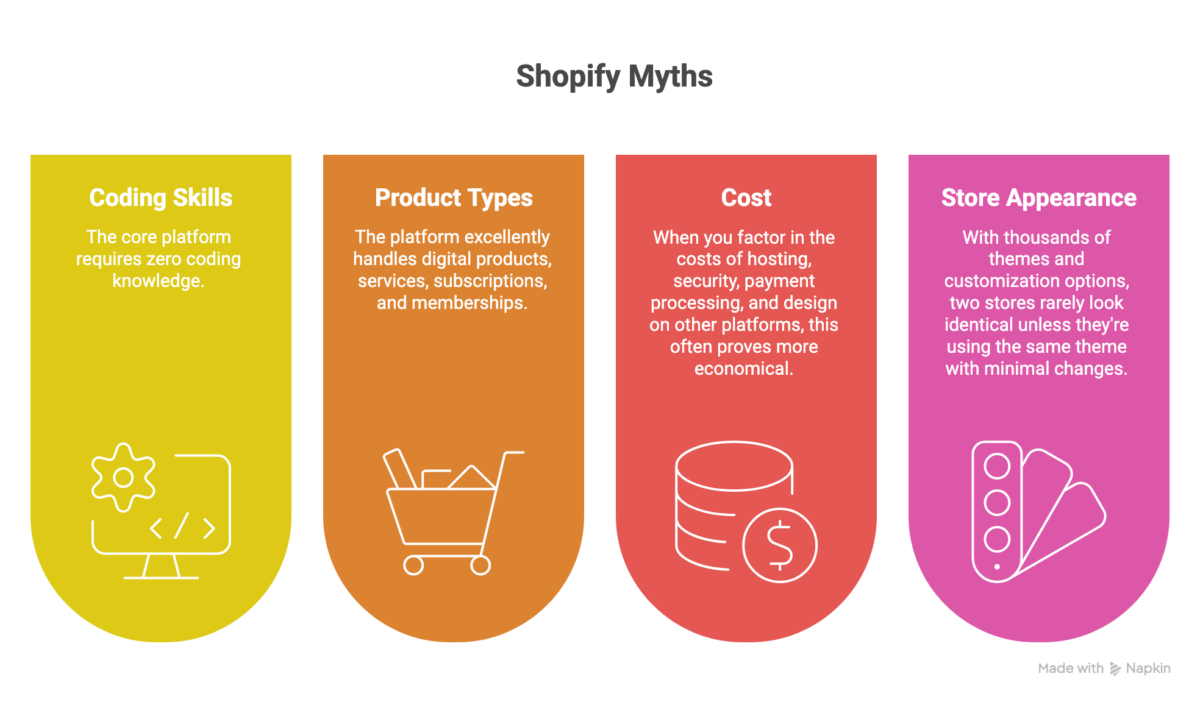
Let’s debunk some misconceptions about what Shopify is and isn’t:
Shopify Is Only for Beginners
Not true. It is used by both small and large businesses.
You need coding skills to use.
The core platform requires zero coding knowledge. You can build and manage a complete store using just the visual editor.
Shopify is only for physical products.
Not true. It supports digital goods and services too. Shopify digital products, services, and subscriptions all fit within the platform’s broader commerce use cases.
It’s too expensive for beginners.
That depends on business size and usage. In many cases, the value outweighs the cost. This is why Shopify cost analysis should focus on return, not just price. In many situations, the platform’s convenience and scalability justify the investment.
Shopify Cannot Scale
Not true. Many businesses continue using it as they grow. Shopify can support growth when the store is built and managed well.
Shopify stores all look the same.
With thousands of themes and customization options, two stores rarely look identical unless they’re using the same theme with minimal changes.
Pro tip: Start with your home market before expanding internationally. Perfect your operations locally, then use Shopify’s international tools to scale globally when you’re ready.
Conclusion
After helping dozens of businesses launch successful eCommerce operations, here’s what we’ve learned: It offers the best balance of simplicity and sophistication for most online sellers.
If you’re asking, “What is Shopify, and should I use it?”, the answer largely depends on your goals. It’s particularly well-suited for:
- Businesses wanting to launch quickly without technical headaches
- Brands focusing on growth rather than infrastructure management
- Companies need unified online and offline sales systems
The platform’s limitations mainly affect businesses with highly specific custom needs or those requiring complex B2B wholesale configurations. However, even these can often be addressed with advanced customization.
At 2HatsLogic, we specialize in Shopify development services to help businesses not just set up stores but optimize them for conversion and growth through headless commerce implementations.
Whether you’re just starting or looking to take your existing Shopify store to the next level, our team of experts can help you navigate the process.
Not sure which Shopify setup is right for your store?
FAQ
What is Shopify used for?
It is used to build and manage online stores for products, services, and digital goods.
How does Shopify work?
You choose a plan, create your store, add products, set up payments, and launch the store.
What does Shopify do for a business?
It helps businesses sell online by handling store setup, checkout, payments, and order management.
What are the hidden costs of running a Shopify store?
Beyond the monthly plan, most stores spend on premium themes, paid apps, transaction fees (if not using Shopify Payments), custom domain, email marketing tools, and sometimes developer support. A realistic monthly cost is often two to three times the base plan price.
What makes Shopify different from Amazon?
Amazon is a marketplace where you list products alongside millions of other sellers. Shopify is your own independent store where you control the brand experience, customer relationships, and data.
Is Shopify free to start?
Shopify offers a 3-day free trial, but after that, you'll need to select a paid plan to keep your store running.
Can I sell internationally with Shopify?
Yes, Shopify supports multiple currencies, languages, and international payment methods, making global selling straightforward.
What is the difference between Shopify and Shopify Plus?
Shopify is built for small to mid-sized businesses, while Shopify Plus is designed for high-volume and enterprise merchants. Plus adds advanced automation (Shopify Flow), custom checkout, B2B features, dedicated support, higher API limits, and multi-store management.
What are the most common reasons Shopify stores fail?
The most common reasons are poor product-market fit, weak marketing strategy, low-quality product pages, slow store performance, and over-reliance on paid ads without strong organic or retention strategies. The platform itself is rarely the cause.
Does Shopify own my customer data?
No. Merchants own their customer data and can export it at any time. However, Shopify manages how the data is stored and processed on its infrastructure, and merchants must comply with Shopify's terms of service and applicable privacy laws.
Table of contents
- What Is Shopify?
- Shopify Features
- How Does Shopify Work?
- What Can You Sell on Shopify?
- How Easy Is Shopify to Use?
- Migrating to Shopify
- Shopify Pricing in 2026
- Why Use Shopify Over Other Platforms?
- Shopify Pros and Cons
- Shopify vs. Other E-Commerce Platforms
- Shopify and AI
- Who is Shopify Best Suited For?
- Common Myths About Shopify
- Conclusion

Related Articles