Greetings! I'm Aneesh Sreedharan, CEO of 2Hats Logic Solutions. At 2Hats Logic Solutions, we are dedicated to providing technical expertise and resolving your concerns in the world of technology. Our blog page serves as a resource where we share insights and experiences, offering valuable perspectives on your queries.

Quick Summary
This blog explains how email data extraction for B2B order automation helps businesses convert unstructured emails, PDFs, Excel files, and images into structured, usable data. It covers how AI extracts and processes order information, why businesses still rely on email-based ordering, and how extracted data can be used in ERP systems to automate order creation.
The blog also explores how this approach reduces manual data entry, minimizes errors, and improves the speed and efficiency of B2B order processing workflows.
Email data extraction for B2B order automation is the process of automatically capturing and structuring information from incoming emails, PDFs, spreadsheets, and scanned documents. Businesses can use this data directly in systems such as ERP, CRM, or e-commerce platforms.
In many B2B companies, critical business data such as purchase orders, product lists, and delivery instructions still arrive through email. These emails are often unstructured and vary in format depending on the customer. As a result, teams spend significant time manually reading emails and entering data into internal systems.
Email data extraction solves this by using AI and document processing technologies to read incoming emails and attachments and identify key information. Then it converts it into structured data that business systems can automatically process.
In simple terms, it transforms emails from static communication into actionable business data that can flow directly into your operations without manual intervention.
What is Email Data Extraction?
Email data extraction is a process that uses AI, optical character recognition (OCR), and natural language processing to automatically identify, extract, and structure important business information from incoming emails and their attachments.
Instead of manually reading each email and copying details into different systems, businesses can automate this entire process. The system scans the email content, understands its context, and converts relevant information into structured data that can be used directly by software systems like ERP, CRM, accounting tools, or e-commerce platforms.
This extracted data typically includes key business fields such as
- Customer information
- Product names or SKUs
- Quantities and pricing
- Order or purchase references
- Delivery instructions and special notes
Email data extraction is especially useful in B2B environments where order information does not follow a fixed format. Customers may send data through emails, PDFs, Excel files, scanned documents, or even images of handwritten orders. Traditional systems cannot process this variability efficiently, which leads to delays and a manual workload.
By standardizing unstructured email data into structured formats, email extraction system becomes the foundation for automation. These downstream processes include order creation, validation, and ERP integration.
Why B2B Companies Still Rely on Email Orders
Despite the availability of modern e-commerce portals and ERP-connected ordering systems, email continues to be one of the most widely used channels for B2B order placement. This is not because it is the most efficient method, but because it fits naturally into existing business workflows.
Many customers prefer email because it is flexible and does not require them to log into separate systems or follow strict ordering formats. It allows them to send orders in whatever format is easiest for them at the moment.
In real-world B2B environments, order information is commonly sent through the following:
- Standard email messages with product lists
- PDF purchase orders generated from internal systems
- Excel or CSV files with structured item details
- Scanned documents from legacy processes
- Mobile photos of handwritten order notes
Another key reason is that many companies already have internal processes built around these formats. Some organizations still use legacy ERP systems that automatically generate PDFs. Others rely on manual workflows where procurement teams simply forward emails or reuse previous order formats.
This creates a highly fragmented input system for suppliers, where every customer sends orders differently. While this works for the buyer side, it creates operational challenges for the receiving business.
As a result, suppliers are forced to manually interpret and re-enter data into their internal systems, which increases processing time and introduces a higher risk of errors.
This is where email data extraction becomes critical, as it standardizes all incoming formats into a single structured data flow that can be processed consistently.
How Does Email Extraction Work?
Email data extraction uses AI models, OCR (Optical Character Recognition), and rule-based validation systems to convert unstructured email content into structured, usable business data. The process is fully automated and works across multiple input formats, including emails, PDFs, Excel files, scanned documents, and images.
Instead of manually reading and entering order details, the system follows a structured workflow to process each incoming email.
1. Collects the incoming email
The system connects to one or more inboxes and continuously monitors incoming messages. Any email containing order-related content or attachments is captured for processing.
2. Reads email content and attachments
The email body and all attachments are scanned, including:
- PDF purchase orders
- Excel or CSV files
- Scanned documents
- Images or photos of order sheets
AI models interpret the structure and context of the content, even when formats vary between customers.
3. Extracts key business information
The system identifies and extracts relevant data points such as:
- Customer details
- Product names or SKUs
- Quantities and pricing
- Delivery instructions
- Order references or special notes
This step converts unstructured content into structured, machine-readable data.
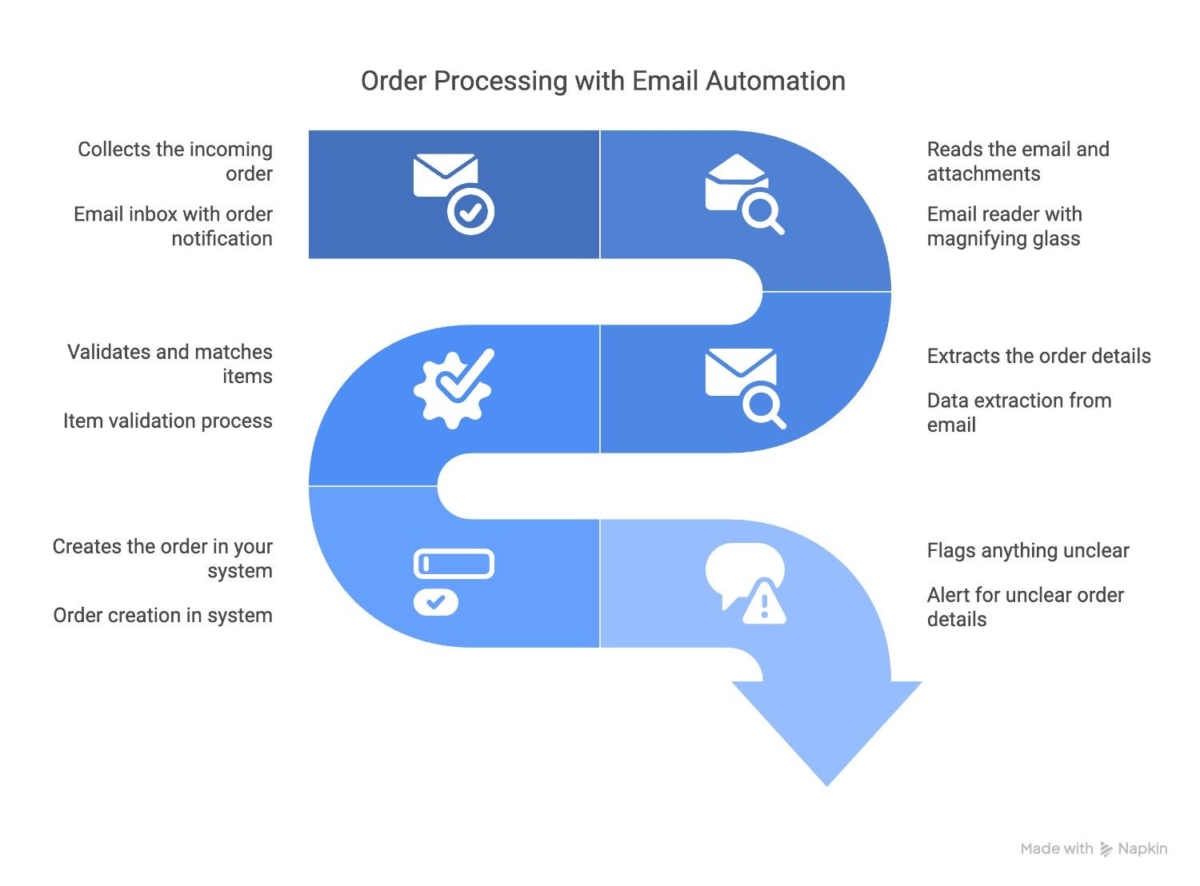
4. Validates extracted data
Before sending data further, the system checks for accuracy and completeness. This includes:
- Ensuring required fields are present
- Verifying formats for quantities, SKUs, and pricing
- Detecting inconsistencies or duplicates
- Applying business rules such as customer-specific pricing or order limits
5. Matches products with master data
Extracted product information is mapped against the company’s product or ERP catalog. This ensures:
- Correct SKU identification
- Accurate product variants
- Alignment with pricing and inventory data
6. Outputs structured data for downstream systems
Once validated and mapped, the data is converted into a structured format that can be directly used by ERP, CRM, or order management systems. This enables seamless automation of order creation and processing.
How Email Data Extraction Connects to ERP Systems
Email data extraction acts as the critical bridge between unstructured customer communication and structured business execution inside ERP systems. While emails, PDFs, and spreadsheets are designed for human readability, ERP systems require clean, standardized, and structured data to process orders correctly.
Without this bridge, businesses are forced to manually interpret emails and re-enter data into ERP systems, which slows down operations and increases the risk of errors. The email extraction system removes this dependency by transforming incoming communication into ERP-ready data.
The entire flow typically works in a continuous sequence:
1. Email arrives in the system
Customer or supplier orders are received through email in various formats such as plain text messages, PDFs, Excel files, scanned documents, or images. These emails often contain complete order details but lack a consistent structure.
2. AI converts email content into structured data
The system processes the email content and extracts key business information such as customer details, product lines, quantities, pricing, and delivery instructions. This step standardizes all incoming formats into a unified data structure.
3. Data is validated before ERP entry
Before integration, the extracted data is validated to ensure accuracy. This includes checking for missing fields, verifying product codes, validating quantities, and applying business rules such as customer-specific pricing or order constraints.
4. Products are matched with ERP master data
The system aligns extracted product information with the ERP’s master database. This ensures correct SKU mapping, accurate product variants, and consistency with pricing and inventory records.
5. The ERP system creates the order automatically
Once validated and mapped, the structured data is pushed into the ERP system as a formal sales or purchase order. From here, the ERP system can immediately trigger downstream processes such as inventory checks, invoicing, and fulfillment.
Key Components of an Email Data Extraction System
A complete email data extraction system is not a single tool but a combination of multiple components working together to convert unstructured email content into structured, ERP-ready data. Each layer plays a specific role in ensuring accuracy, consistency, and automation across the entire workflow.
1. Inbox Connector
The inbox connector links the system to one or more email accounts and continuously captures incoming messages. It ensures that every order email, regardless of format or source, is automatically collected and sent for processing without manual intervention.
2. Document Processing Engine (AI + OCR)
This layer reads and interprets all types of attachments and content formats, including PDFs, Excel files, scanned documents, and images. AI models combined with OCR technology extract readable text even from low-quality or handwritten inputs.
3. Data Extraction Engine
The extraction engine identifies and pulls out relevant business information from the processed content. This includes:
- Customer details
- Product names or SKUs
- Quantities and pricing
- Delivery instructions
- Order references and notes
It converts unstructured information into structured data fields.
4. Product and SKU Matching Layer
Once data is extracted, it is mapped against the company’s product catalog or ERP master data. This ensures:
- Correct SKU identification
- Accurate product variant mapping
- Alignment with pricing and inventory systems
This step prevents mismatches between customer requests and internal product records.
5. Validation and Rule Engine
The validation layer checks the extracted data for accuracy and completeness. It applies business rules such as:
- Mandatory field verification
- Quantity and pricing validation
- Customer-specific rules or pricing logic
- Duplicate or inconsistent order detection
This ensures only clean and reliable data moves forward.
6. ERP Integration Module
This module connects the system to ERP platforms such as SAP, Odoo, Shopware, or other custom systems. Once data is validated, it is automatically pushed into the ERP as a structured sales or purchase order.
7. Monitoring and Review Dashboard
A dashboard allows teams to monitor processed emails, review flagged items, and manage exceptions. It provides visibility into the entire workflow and ensures human oversight where necessary.
Benefits of Email Data Extraction in B2B Operations
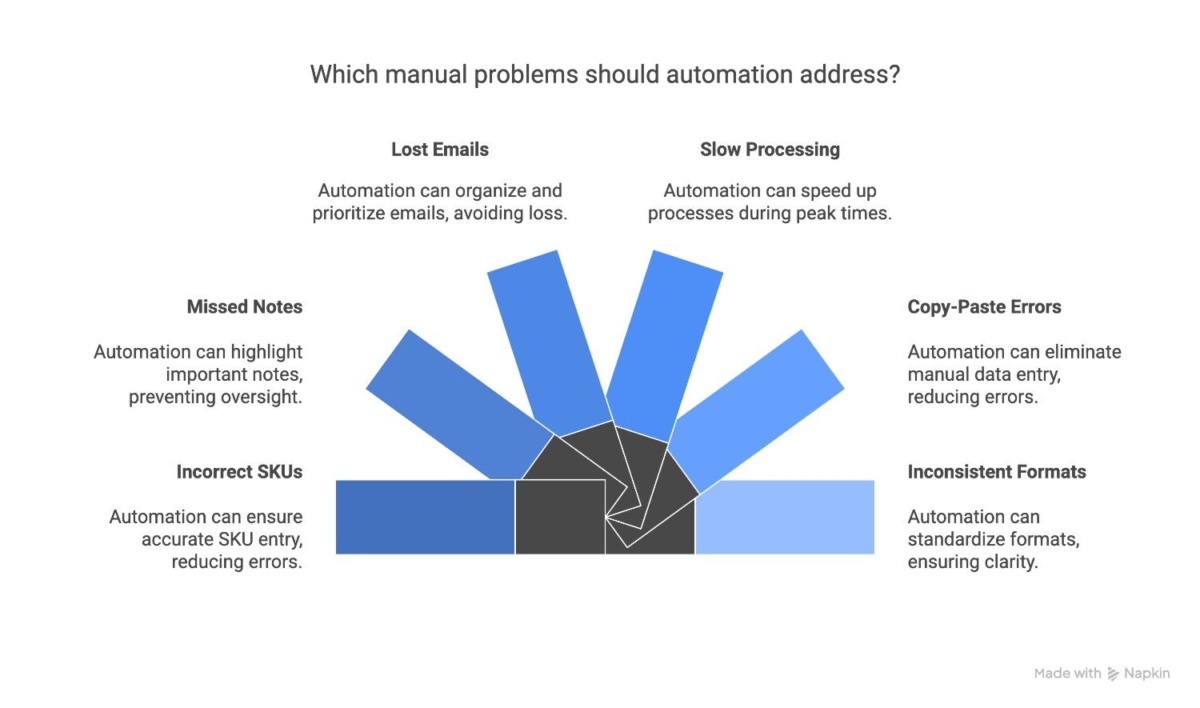
Order data extraction significantly improves how B2B companies handle order processing by removing manual effort, reducing errors, and speeding up overall operations. Since most B2B orders still arrive through email in unstructured formats, automation directly impacts efficiency at scale.
1. Faster order processing
Manual order entry slows down operations, especially when teams need to interpret emails, open attachments, and retype data into ERP systems. Email data extraction automates this entire process, allowing orders to move from inbox to ERP in seconds instead of hours.
2. Reduced manual errors
Human errors such as incorrect SKUs, wrong quantities, or missed order details are common in manual workflows. Automated extraction ensures consistent data interpretation, significantly reducing costly mistakes in fulfillment and invoicing.
3. Improved operational efficiency
By removing repetitive data entry tasks, teams can focus on higher-value activities such as customer support, exception handling, and supply chain optimization. This improves overall productivity across departments.
4. Better handling of multiple formats
B2B orders rarely follow a single format. They come as PDFs, Excel sheets, scanned documents, or even images. Order data extraction systems can process all these formats uniformly, ensuring no order is missed or delayed.
5. Scalable order management
As order volume grows, manual processing does not scale efficiently. Automation allows businesses to handle increasing order volumes without needing proportional increases in staff or operational costs.
6. Faster fulfillment cycles
Since orders are processed and sent directly into ERP systems, downstream processes such as inventory checks, invoicing, and shipping are triggered faster. This leads to quicker delivery timelines and improved customer satisfaction.
7. Improved data accuracy in ERP systems
Clean and structured data ensures that ERP systems operate with accurate information. This improves reporting, forecasting, and decision-making across the organization.
What Types of Orders Can Be Automated?
Email data extraction systems are designed to handle a wide variety of order formats commonly used in B2B transactions. Since customers do not follow a standardized method for placing orders, the system must be flexible enough to process multiple input types without manual intervention.
1. Typed email orders
These are simple order emails where customers list products, quantities, and instructions directly in the email body. The system reads the text, identifies order patterns, and converts them into structured data.
2. PDF purchase orders
One of the most common formats in B2B workflows. Customers often generate PDFs from their internal ERP or procurement systems. Order data extraction tools can read these documents and extract structured order details accurately.
3. Excel or CSV files
Many businesses send structured order sheets in spreadsheet format. The system processes rows and columns to extract product codes, quantities, pricing, and other order-related information.
4. Scanned documents
Some organizations still rely on printed purchase orders that are scanned and emailed. Using OCR technology, these documents are converted into readable text and structured data.
5. Mobile photos of order sheets
Orders captured as images from mobile phones, such as handwritten notes or warehouse checklists, can also be processed. AI models interpret the image content and extract relevant order details.
6. Forwarded or repeated orders
Customers often resend previous order emails with minor modifications. The system can recognize patterns, extract existing order structures, and update quantities or items accordingly.
7. Mixed-format orders
In some cases, a single order may include multiple formats, such as an email body with an attached PDF and an Excel file. Email data extraction systems can process all inputs together and consolidate them into a single structured order.
Real-Life Examples of How Businesses Use Email Data Extraction
Email data extraction is widely used across industries where orders, requests, and operational data still flow through email. Since B2B communication rarely follows a single structured format, automation helps standardize and process information consistently across different business scenarios.
1. Wholesale distributors processing PDF purchase orders
Wholesale distributors often receive purchase orders as PDFs generated from customer ERP or procurement systems. Email data extraction reads these documents, extracts product details, and converts them into structured orders that can be directly pushed into the ERP system for fulfillment.
2. Food and beverage suppliers handling handwritten orders
Restaurants, cafés, and retail stores sometimes send handwritten order lists as photos or scanned images. The system uses OCR and AI models to interpret these images and extract product names, quantities, and delivery instructions accurately.
3. Retail chains managing Excel-based replenishment orders
Retailers frequently send replenishment orders in Excel or CSV formats. These files contain structured product and quantity data, which the system automatically processes and converts into ERP-ready order entries.
4. Manufacturing companies processing scanned purchase orders
Manufacturing units often rely on scanned documents for purchase requests. Email data extraction converts these scanned files into structured digital data, ensuring smooth integration with ERP and production planning systems.
5. Field sales teams submitting email-based orders
Sales representatives working in the field often send order details directly via email after customer visits. The system captures these emails, extracts order data, and immediately creates entries in the ERP system for faster processing.
6. Customers placing repeat or forwarded orders
Many B2B customers simply forward previous order emails with minor changes in quantities or items. The system recognizes the existing structure, updates the relevant fields, and generates a new structured order without manual re-entry.
Not sure if your order formats can be automated?
When Businesses Need Email Data Extraction
Email data extraction becomes essential when manual email processing starts creating operational delays, errors, or scalability challenges. Most B2B companies do not implement automation from day one. But reach a point where email-based workflows become too time-consuming to manage efficiently.
If your business is experiencing any of the following situations, it is a strong indicator that email data extraction can significantly improve your operations.
1. High volume of incoming order emails
When orders arrive daily or in large volumes through email, teams spend a significant amount of time reading, sorting, and manually entering data into ERP systems. This quickly becomes a bottleneck as order volume increases.
2. Multiple order formats from customers
If customers send orders in different formats, such as PDFs, Excel files, scanned documents, or images, it becomes difficult to maintain a consistent processing workflow without automation.
3. Increasing manual workload on ERP teams
When skilled employees spend most of their time copying data from emails into ERP systems, it reduces overall productivity and limits their ability to focus on higher-value tasks like exception handling or customer support.
4. Frequent order entry errors
Manual data entry often leads to mistakes such as incorrect SKUs, missing quantities, or misinterpreted customer instructions. These errors can result in shipment delays, returns, or customer dissatisfaction.
5. Delays in order processing and fulfillment
If there is a noticeable gap between receiving an order and entering it into the ERP system, it slows down downstream processes like inventory allocation, invoicing, and dispatch.
6. Business growth without operational scaling
As order volume increases, manual processes do not scale effectively. Hiring additional staff only increases cost while still leaving room for human error and inefficiency.
If you don’t want to handle the setup, we can implement the entire AI-powered workflow for you.
Conclusion
Email orders to ERP automation solves one of the biggest hidden challenges in B2B operations: manually processing orders that come through email, PDFs, photos, and spreadsheets. Even as e-commerce grows, customers still rely on these formats because they’re simple and familiar.
Automation bridges the gap by turning all these unstructured order formats into clean, accurate, and ready-to-process orders inside your ERP or e-commerce system.
The result is a smoother workflow, fewer mistakes, faster processing, and more time for teams to focus on customer service and business growth. For companies handling frequent email orders, this becomes a practical and scalable way to modernize operations without changing how customers prefer to order.
For companies handling frequent email orders, this becomes a practical way to modernize operations without changing how customers prefer to order. We develop AI automation solutions tailored to different ERP platforms and business workflows.
FAQ
How does email order processing work for emails with PDFs, photos, or Excel sheets?
Email order processing automatically reads the attachments, extracts item details, and converts them into a digital order.
How does email data extraction work for PDFs, photos, and Excel files?
Email data extraction uses AI and OCR to read emails and their attachments such as PDFs, images, Excel sheets, and scanned documents. It identifies important business information like products, quantities, pricing, and customer details, then converts it into structured data that can be used in ERP or other business systems.
What information can be extracted from emails and order documents?
AI eliminates manual work by automatically reading incoming emails, identifying relevant order details, and structuring them into usable data. This reduces the need for employees to manually copy information into ERP or order management systems, minimizing errors and saving time.
How does AI reduce manual data entry in B2B order processing?
You can use email-to-order automation that reads incoming orders as they are (emails, PDFs, and photos) and turns them into structured orders instantly.
Can email data extraction work without changing how customers place orders?
Yes. Email data extraction works with existing communication methods such as emails, PDFs, Excel files, and even photos. Businesses do not need to change how customers send orders because the system adapts to existing formats and converts them into structured data automatically.
Table of contents
- What is Email Data Extraction?
- Why B2B Companies Still Rely on Email Orders
- How Does Email Extraction Work?
- How Email Data Extraction Connects to ERP Systems
- Key Components of an Email Data Extraction System
- Benefits of Email Data Extraction in B2B Operations
- What Types of Orders Can Be Automated?
- Real-Life Examples of How Businesses Use Email Data Extraction
- When Businesses Need Email Data Extraction
- Conclusion

Related Articles