Greetings! I'm Aneesh Sreedharan, CEO of 2Hats Logic Solutions. At 2Hats Logic Solutions, we are dedicated to providing technical expertise and resolving your concerns in the world of technology. Our blog page serves as a resource where we share insights and experiences, offering valuable perspectives on your queries.

Quick Summary
Furniture e-commerce has two unsolved problems: customers can’t describe what they want, and they can’t picture it in their space. AI visual search for furniture solves the first; room planning solves the second.
The impact: Retailers who implement these tools typically see lower returns, higher conversion rates, and larger shopping baskets. Most start with 2D room planning across their full catalogue, add 3D for bestsellers once usage data justifies it, and reserve AR for flagship products.
The prerequisite: Clean product data (dimensions, photography, attributes) is 80% of the work. Implementation takes 2-12 weeks, depending on your platform and catalogue size.
What’s covered here: How each tool works, why they matter commercially, the five best use cases, and a step-by-step implementation roadmap.
Furniture is one of the few product categories where a customer can look at exactly what they want and still not be able to buy it. They see a chair on Instagram, a sideboard in a friend’s hallway, a sofa in a hotel lobby, and then they open a search bar with no idea what to type. “Mid-century walnut credenza with brass legs” is not how anyone actually shops. It’s how they’d describe it after someone already told them what it was called.
That’s the first question online furniture stores routinely fail to answer: what is this called?
The second is just as costly: will it fit my room? A sofa that looks perfect in a product photo shot in a bright, oversized studio can look completely wrong in a customer’s actual living room, wrong scale, wrong tone against their walls, wrong proportion next to furniture they already own.
Both problems point to the same underlying gap: furniture e-commerce still runs on text search and static photography, in a category that is inherently visual and spatial. That gap is exactly why AI visual search for furniture and room planning has moved from “innovative extra” to one of the defining furniture e-commerce trends of the next few years. Retailers who close this gap aren’t just adding a feature; they’re removing the two biggest reasons a browsing customer leaves without buying.
This guide covers what these tools do, the business case for investing in them, the best use cases specific to furniture, and, the real center of this guide, how to implement visual search and room planning on your ecommerce platform without over-building or under-delivering.
What Your Customers Experience: Visual Search and Room Planning Explained
Before getting into implementation, it’s worth being precise about what each tool does for the shopper, because the two get conflated constantly, and they solve different problems. While AI visual search for furniture capabilities and room planning both improve the customer experience, they work in fundamentally different ways.
AI Visual Search
AI visual search lets a customer upload or snap a photo, a piece they saw in a showroom, a screenshot from social media, a picture of their neighbor’s dining table, and get matching or visually similar products back from your catalogue. It lets shoppers upload an image of a piece they like, and the system identifies similar products without requiring them to describe what they want in words.
The underlying capability is often referred to more broadly as visual discovery, surfacing products through images rather than queries. For furniture retailers specifically, this closes the “what is this called?” problem directly: the customer never needs the vocabulary to describe the product, because they never have to type a description at all.
Room Planning
Room planning, delivered through a room layout planner, virtual room planner, or furniture room planner, lets a shopper place true-to-scale versions of your products into a model of their own room, using either a floor plan they draw or a photo they upload. Instead of imagining whether a sectional fits against their window, they can see it, sized correctly, in their actual space.
This is one of the highest-converting tools in furniture ecommerce because it attacks the second problem head-on: will it fit my room? stops being a guess. An online room planner turns a spatial question into a visual answer, and it’s the reason “see furniture in my room” is a search phrase with real, sustained demand. Shoppers are actively looking for stores that let them do this.
Book a demo of our AI visual search and room planning solution.
From 2D Room Planner to 3D Room Design Tool to AR
Room planning isn’t a single feature; it’s a spectrum, and retailers don’t need to start at the top of it.
2D room planner: A top-down floor plan where furniture is dragged and dropped to scale. Cheapest to implement, fastest to ship, and often sufficient for early validation.
3D room planner / 3D room design tool: A rendered, navigable room where products appear with realistic materials and lighting. Higher production cost, but significantly higher engagement and confidence, especially for statement pieces.
AR (augmented reality): The customer points their phone camera at their actual living room, and the product appears overlaid in real space. This is the most convincing experience and the most expensive to produce well, since it typically requires accurate 3D models per SKU.
Most furniture retailers don’t need to commit to all three immediately, and shouldn’t. More on the phased approach below.
How the AI Works Behind the Scenes
Both tools are powered by the same underlying capability: a model trained to recognize furniture by style, shape, color, material, and category, rather than by the text in a product title. This is what makes AI furniture placement and broader AI furniture placement suggestions possible; the system doesn’t just match “sofa to sofa,” it can suggest a rug, a side table, or a lamp that stylistically belongs with a piece the customer is already viewing.
This same matching logic underpins what’s marketed as an AI interior design tool, AI room design, or virtual interior design feature, style-aware recommendations that go beyond a single product page and start assembling a room. For a retailer, this is the mechanism that turns a single-item browse into a multi-item cart, which is where the real revenue impact of this technology shows up.
The Business Case: What These Tools Change for Furniture Retailers
So far, we’ve looked at these tools from the shopper’s side. Let’s switch chairs and look at what they do for the business, because the commercial case is just as strong as the experience case. Implementing AI visual search furniture technology and room planning isn’t just about having trendy features; it’s about directly impacting your bottom line.
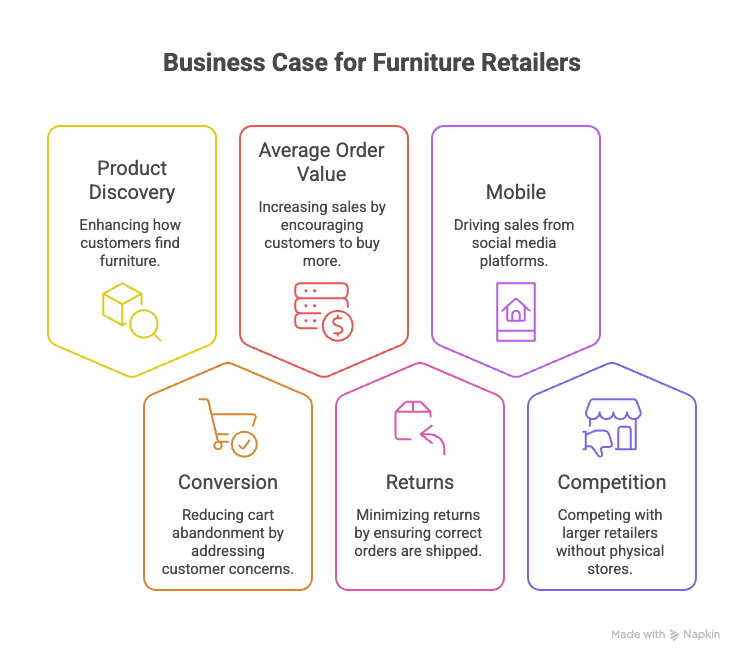
Product Discovery
Most furniture catalogues have far more depth than their search bar ever reveals. A shopper who doesn’t know the word “credenza” will never find your credenzas through keyword search, no matter how many you carry. AI visual search furniture solves this by surfacing inventory that text search structurally can’t reach; it’s a discovery layer sitting on top of a catalogue you’ve already paid to photograph and list.
Conversion: Removing the Size and Style Doubts That Kill Furniture Carts
Furniture has one of the highest cart-abandonment rates in ecommerce, and “will this actually work in my space” is a leading, quiet reason; quiet because shoppers don’t abandon with a complaint, they just leave. Room planning answers that doubt before it becomes a bounce.
Average Order Value: Selling Rooms, Not Single Products
An online furniture configurator or full room-planning flow naturally invites multi-item thinking. A customer who plans out a living room, rather than eyeballing a single sofa, tends to add a rug, a coffee table, and lighting to the same session; this is where AOV gains concentration.
Returns: Fixing Wrong-Size and Wrong-Look Orders Before They Ship
Returns on oversized or ill-fitting furniture are expensive in a way most categories aren’t; freight, restocking, and damage risk are all higher. A furniture layout planner or furniture fitting tool that confirms scale before checkout directly reduces this specific, costly return reason.
Reduce returns with better product visualization.
Mobile: Turning Instagram and Pinterest Moments into Purchases
Furniture inspiration overwhelmingly happens on mobile, in a feed, in a moment that has nothing to do with your store. AI visual search for furniture functionality is built for exactly that moment, a customer can screenshot inspiration from Instagram or Pinterest and immediately search your catalogue against it, capturing intent that would otherwise dissipate by the time they sit down at a desktop.
Competing With the Big Players Without Showroom Rent
Large furniture retailers can afford flagship showrooms in every major city. Independent and mid-size retailers can’t, but a strong virtual room planner or 3D room design tool narrows that experiential gap online, without a single square foot of retail space.
Best Use Cases for Furniture Stores
Benefits are abstract until you see them in action. These five scenarios come up again and again in furniture retail, and they’re the ones where visual search and room planning earn their keep.
Furniture Finder From Photo
A shopper photographs a piece somewhere, a café, an Airbnb, a friend’s home, and searches your catalogue against that photo instead of trying to describe it. This is pure top-of-funnel capture: demand that existed before your brand did.
Sofa Preview in the Customer’s Living Room (The Highest-Stakes Purchase)
Sofas carry the highest price point, the highest size-risk, and the highest return cost in most furniture catalogues. They’re also the single best product to lead with when launching room planning, since the confidence gain is largest exactly where the purchase risk is largest.
Matching New Pieces With Existing Decor
A customer replacing one piece, a chair, a lamp, or an accent table, wants to know it will sit comfortably next to furniture they already own. Visual search lets them upload a photo of their existing room and find complementary, not just similar, pieces.
Size Confidence: Furniture Fitting and Layout Planning
A furniture placement planner or furniture layout planner that checks a product’s dimensions against a room’s actual footprint solves the single most common pre-purchase question in the category: Does this fit?
Full Room Setups With an Online Furniture Configurator
At the top of the ambition scale, a full furniture design tool or online furniture configurator lets a shopper build an entire room from your catalogue, sofa, rug, coffee table, lighting, and check out the whole set at once. This is the AOV-maximizing endpoint of the whole visualization stack, but it’s also the most resource-intensive to build well, which is why it belongs later in a phased rollout rather than first.
How to Implement This in Your Store
This is the section that separates a successful rollout from a stalled one.
What Your Product Data Needs First: Dimensions, Image Quality, Structured Attributes
Visual search and room planning are only as good as the data behind them. Before any tool goes live, a retailer needs:`
- Accurate dimensions for every SKU: length, width, height, and ideally depth of individual components (arms, cushions) for larger pieces.
- Consistent, clean product photography: multiple angles, neutral backgrounds, consistent lighting. AI matching models perform noticeably worse on inconsistent photo sets.
- Structured attributes: material, color family, style category (mid-century, industrial, Scandinavian, traditional), tagged consistently across the catalogue, not just described in free text.
Skipping this step is the single most common reason these tools underperform after launch. No matching model can compensate for missing or inconsistent source data.
Do You Need 3D Models? A Phased Approach
Most retailers don’t need to 3D-model an entire catalogue on day one, and shouldn’t try to. A workable phased sequence:
Phase 1: 2D layouts across the full catalogue. Fast to implement, works from dimension data you likely already have, and validates whether customers use room planning before a heavier investment.
Phase 2: 3D models for bestsellers only. Once usage data shows which categories drive engagement (sofas and sectionals almost always do), invest 3D modeling budget there first.
Phase 3: AR for flagship or hero products. Reserved for the highest-consideration, highest-price items, where the conversion lift justifies the higher production cost per SKU.
This sequencing avoids the most common implementation mistake: spending a 3D-modeling budget broadly across a catalogue before knowing which products actually benefit from it.
Integration Options Across Ecommerce Platforms
There are three broad implementation paths, and the right one depends on catalogue size, technical resources, and how differentiated the experience needs to be:
Plugin / app-store solution: Available on most major platforms (Shopify, BigCommerce, WooCommerce, Adobe Commerce, and others). Fastest to launch, lower upfront cost, but limited customization. Often licensed per-catalogue-size, which can get expensive as the SKU count grows.
API integration: A visual search or room-planning provider’s API wired into your existing storefront. More development effort than a plugin, but gives control over placement, UI, and how results are merchandised alongside the rest of the site. Works across any platform with API access.
Custom build: Fully bespoke, typically justified only for retailers with catalogue sizes or brand requirements that off-the-shelf tools don’t serve well. Highest cost, longest timeline, but no ceiling on customization.
For most mid-size furniture retailers, starting with a plugin or API integration and only moving to custom development once usage data justifies it is the lower-risk path.
How to Measure Success
Before launch, agree on what “working” looks like. The four metrics worth tracking from day one:
- Discovery rate: the share of sessions where visual search surfaces a product the customer goes on to view or add to cart.
- Planner engagement: the percentage of product-page visitors who open the room planner, and how long they stay in it.
- Return rate: specifically for size- or fit-related reasons, isolated from other return causes, to measure the tool’s direct effect.
- AOV: compared between sessions that used a planner or configurator and sessions that didn’t, to quantify the room-selling effect described earlier.
Without these baselines, it’s difficult to justify Phase 2 and Phase 3 investment later, since there’s no data showing where Phase 1 actually paid off.
Common Pitfalls to Avoid
Most failed rollouts trace back to one of three mistakes, and none of them are technology problems.
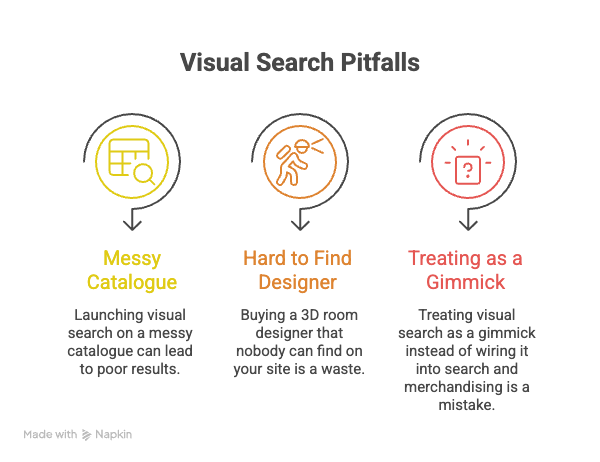
Launching Visual Search on a Messy Catalogue
If product photography is inconsistent, dimensions are missing, or attributes aren’t tagged, visual search will return poor matches, and a customer’s first experience with the tool will be its worst one. Data cleanup isn’t optional groundwork; it’s the majority of the actual work.
Buying a 3D Room Designer Nobody Can Find on Your Site
A powerful room planner buried three clicks deep, or only accessible from a single category page, gets almost no usage regardless of how good the underlying technology is. Placement, on product pages, in category browsing, in cart, matters as much as the tool itself.
Treating It as a Gimmick Instead of Wiring It Into Search and Merchandising
The retailers who see the strongest results treat visual search as a genuine discovery channel, feeding its results into merchandising rules, tracking it in analytics like any other traffic source, rather than as a novelty widget sitting apart from the rest of the store’s commerce logic.
Conclusion
These features are moving from competitive differentiator to baseline shopper expectation, the same way zoomable product photography and size guides did a decade earlier. Retailers implementing now are building the data foundation and usage baselines while it’s still a differentiator, not catching up once it’s simply assumed.
If you’re evaluating where to start, the phased approach outlined above, clean data first, 2D room planning across the catalogue, 3D, and AR reserved for what the usage data justifies, is the lowest-risk way in. Specialized agencies and implementation partners now offer everything from data audits through to full visual search and room planning rollouts, working across the major ecommerce platforms.
FAQ
What is AI visual search in furniture ecommerce?
It's a tool that lets a shopper search your catalogue using a photo instead of keywords, matching products by visual similarity, style, shape, color, and material, rather than by text description.
How does a room planner reduce furniture returns?
By letting customers place true-to-scale products into a model of their own room before purchase, room planners catch size and fit mismatches that would otherwise only surface after delivery.
Do I need 3D models of every product?
No. A phased approach, 2D layouts across the catalogue first, 3D modeling reserved for bestsellers, AR for flagship items, is the more common and more cost-effective path than 3D-modeling everything upfront.
Can this be added to an existing ecommerce store?
Yes, typically through a plugin, an API integration, or a custom build, depending on your platform, catalogue size, and how differentiated the experience needs to be.
What does AI visual search implementation typically involve?
Cleaning and structuring product data (dimensions, photography, attributes), choosing an implementation path, launching in phases, and measuring discovery rate, planner engagement, return rate, and AOV against a baseline.

Related Articles