Greetings! I'm Aneesh Sreedharan, CEO of 2Hats Logic Solutions. At 2Hats Logic Solutions, we are dedicated to providing technical expertise and resolving your concerns in the world of technology. Our blog page serves as a resource where we share insights and experiences, offering valuable perspectives on your queries.
Most Shopify migration blogs read like sales pitches. They sell you on the benefits, gloss over the messy middle, and quietly assume you’ve already decided.
This one is different. It’s written for the person running the project, the e-commerce manager, founder, or operations lead who needs to walk into a meeting with leadership and defend the decision. That means honest tradeoffs, real timelines, real budget ranges, and the things other migration guides leave out.
We’ll cover when migration is the right call (and when it isn’t), what a Shopify migration looks like from Magento, WooCommerce, WordPress, BigCommerce, Volusion, and a few other platforms, what you’ll genuinely lose when you move, when Shopify Plus is the right tier instead of standard Shopify, and how to choose between running the project internally or bringing in a Shopify migration agency.
If you’re looking for a broader overview of Shopify itself, our “What is Shopify?” guide covers the platform end to end. This piece picks up where that one leaves off, for readers who’ve decided Shopify is the destination and now need to figure out how to get there.
Should You Migrate to Shopify?
Migration is expensive, time-consuming, and disruptive. Before you read the rest of this guide, here’s a gut check: should you actually do it?
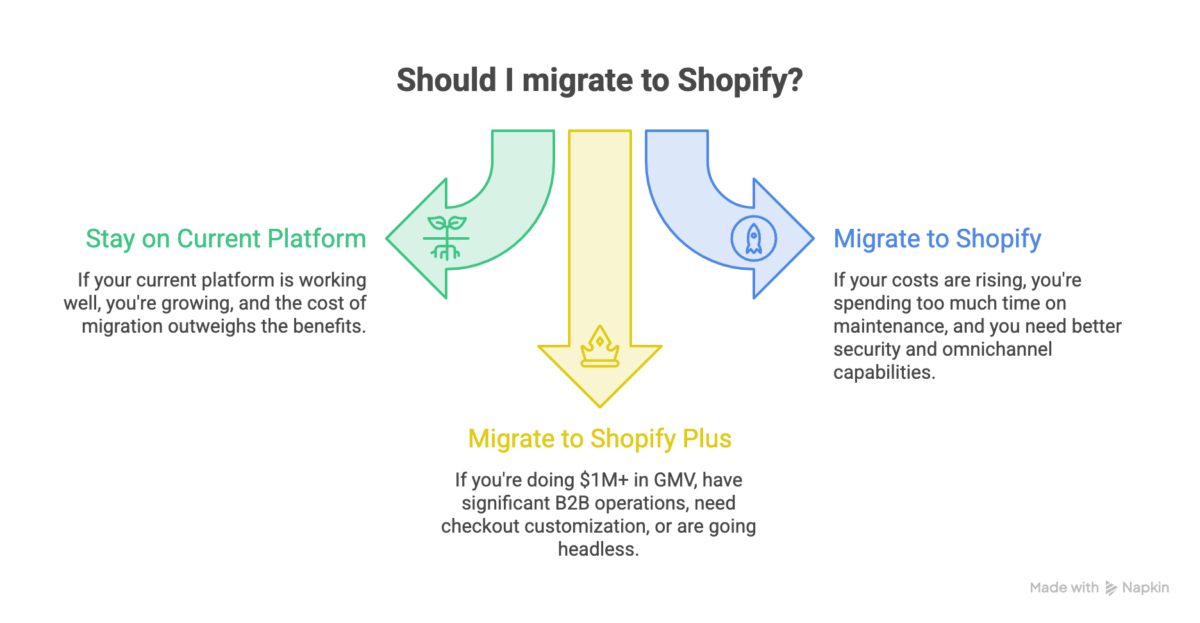
Stay on your current platform if…
- It’s working, and you’re growing. “Working” means the site is stable, your team isn’t burning hours on workarounds, and revenue is trending up. Don’t migrate because a thread on Reddit told you to.
- Your only complaint is the theme. A redesign is cheaper than a replatform. Try that first.
- You just rebuilt or replatformed in the last 18 months. The total cost of ownership rarely justifies a second migration so soon. Let the stack settle.
- Your custom features are deeply tied to your operating model. If your old platform powers something competitively unique, a configurator, a quoting flow, a B2B portal, and rebuilding it on Shopify is non-trivial, the migration risk may outweigh the platform benefit.
- You don’t have internal capacity for a 60–90 day project. A botched migration costs more than staying. If your team can’t dedicate real hours to testing, content review, and post-launch triage, push the migration to when they can.
Migrate to Shopify if…
- Your total cost of ownership is climbing faster than your revenue. Hosting, security patching, developer hours, plugin renewals, downtime cost, add it all up. If the curve is steep, Shopify’s flat pricing wins.
- You’re spending more time maintaining the platform than running the business. This is the single clearest signal. If your weekly standups are about server issues instead of marketing, the platform is in your way.
- Security and compliance are becoming your problem. PCI scope, GDPR, accessibility: Shopify shoulders a lot of this. Self-hosted stacks don’t.
- You want omnichannel without building it. POS, social channels, marketplaces: Shopify connects these natively. On most other platforms, you assemble it yourself.
- Your developer dependency is a single point of failure. If one freelancer or one in-house developer knows where every wire is buried, your platform is a liability.
- You’re scaling toward enterprise. Shopify gives you a clean upgrade lane from the standard plan to Shopify Plus.
- You want access to Shopify’s AI-powered features. The 2025 Summer Editions introduced over 150 new capabilities across AI, B2B, and international selling, including AI-assisted product descriptions, Sidekick (Shopify’s built-in AI assistant), and smarter analytics. Legacy platforms simply aren’t keeping pace with this rate of innovation.
Migrate to Shopify Plus if…
- You’re doing $1M+ annual GMV or expect to within 12 months.
- B2B is a meaningful part of your business, including wholesale catalogs, net terms, and customer-specific pricing.
- You need checkout customization, custom fields, custom logic, and server-side flows
- You’re going headless, Hydrogen, custom storefronts, and composable commerce
- You need multiple stores under one organization, brand portfolios, regional storefronts, B2B, and DTC splits.
The honest middle ground: fix what’s broken first
Sometimes the right move isn’t “migrate” or “don’t migrate,” it’s “fix what’s actually broken first.” If your Magento store is slow, a performance audit might solve the real problem. If your WooCommerce site is plugin-bloated, an audit and cleanup might be enough. Migration is the right answer often, but not always. A good migration agency will tell you that before quoting the project.
If you’ve decided migration is the right move, the next question is what it actually looks like for your specific platform.
popup-cta type=”contact” contact_form_id=”fd17ddb” title=”Not sure if migration is the right call?” content=”” button_text=”Book a free migration assessment”]
Migrating from Your Platform: What Actually Changes
Every Shopify migration looks slightly different depending on where you’re coming from. The data model is different, the SEO structure is different, and the dependencies you’ve built are different. Here’s what changes by platform.
From Magento to Shopify Migration
Magento has the largest migration audience for Shopify by far, partly because Magento merchants tend to feel the pain hardest. Hosting costs that climb, security patches that demand immediate attention, extensions that conflict, and developer dependency that becomes a single point of failure.
If you’re planning to migrate from Magento to Shopify, here’s what to expect.
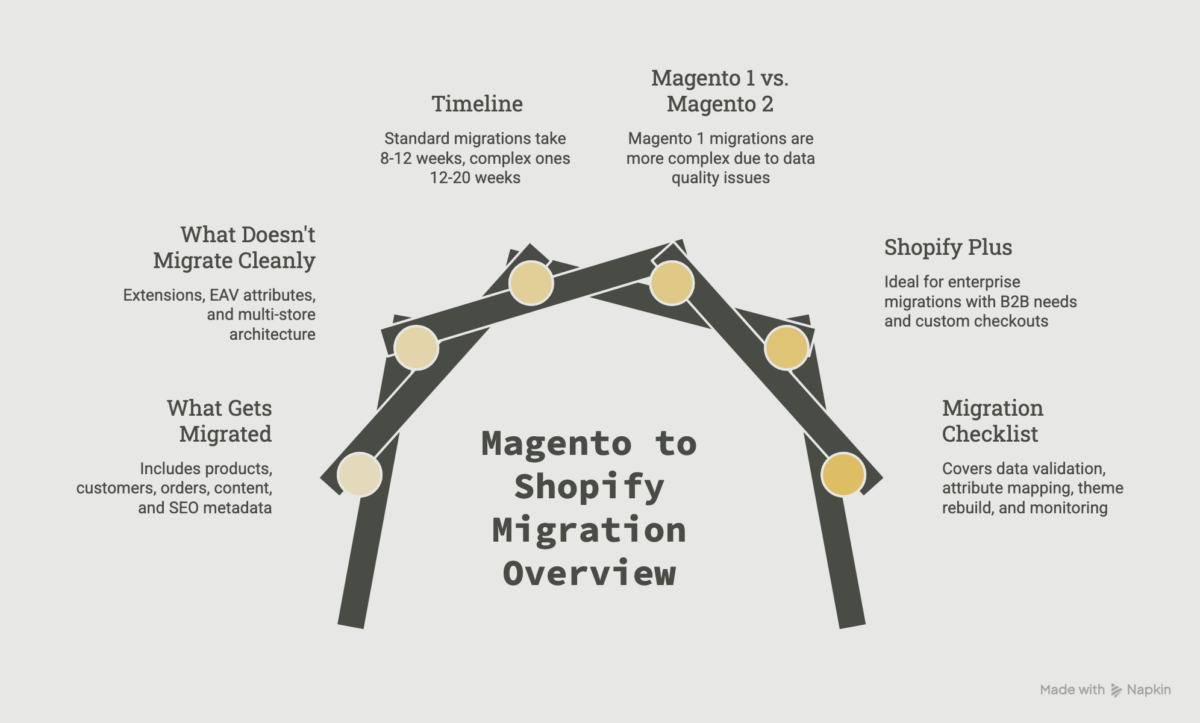
What gets migrated: products, customers, orders, content pages, blog posts, SEO metadata, and basic redirects. Customer passwords do not transfer; they never do, on any platform. Customers will reset on first login.
What doesn’t migrate cleanly:
- Magento extensions don’t have 1:1 equivalents on Shopify; expect a full app stack audit
- Custom EAV attributes need to be remapped to Shopify metafields
- Magento’s multi-store architecture maps to Shopify Markets and (for larger setups) Shopify Plus expansion stores
- Customer group pricing and B2B logic usually require Shopify Plus
Timeline: A standard Magento to Shopify migration takes 8-12 weeks. Complex stores with heavy customization, ERP integration, or B2B logic run 12-20 weeks.
Magento 1 vs. Magento 2: If you’re still on Magento 1, you’re past end-of-life and the migration is overdue. Magento 1 to Shopify migration is structurally similar to Magento 2, but you’ll often find data quality issues, abandoned extensions, and broken integrations that need cleanup before the move. Magento 2 to Shopify migration is cleaner, with better data export, more reliable APIs, and fewer ghost records.
Where Shopify Plus enters the picture: Most enterprise Magento and Adobe Commerce migrations land on Shopify Plus, not standard Shopify. If you have B2B catalogs, multi-store needs, or custom checkout requirements, the Magento to Shopify Plus migration is the right path.
A good Magento to Shopify migration checklist covers six things: data export validation, product attribute mapping, theme rebuild, app replacement, SEO redirect mapping, and post-launch monitoring. Skip any of these, and you’re inviting trouble.
From WooCommerce to Shopify Migration
The second-largest migration audience. If you’re planning to migrate WooCommerce to Shopify, the mental shift is significant: you’re moving from a plugin model to an app model, from self-hosted to fully hosted, and from a content-first platform to a commerce-first one.
A quick clarification before diving in: most searches around WordPress to Shopify migration are really WooCommerce migrations, since WordPress on its own isn’t an e-commerce platform. If you’re running WooCommerce on WordPress, this section covers you. If your WordPress site is purely content with no commerce layer, the migration is simpler, mostly blog posts, pages, and images moving into Shopify’s lighter blog system. Just know that custom post types, ACF fields, and advanced taxonomies don’t transfer.
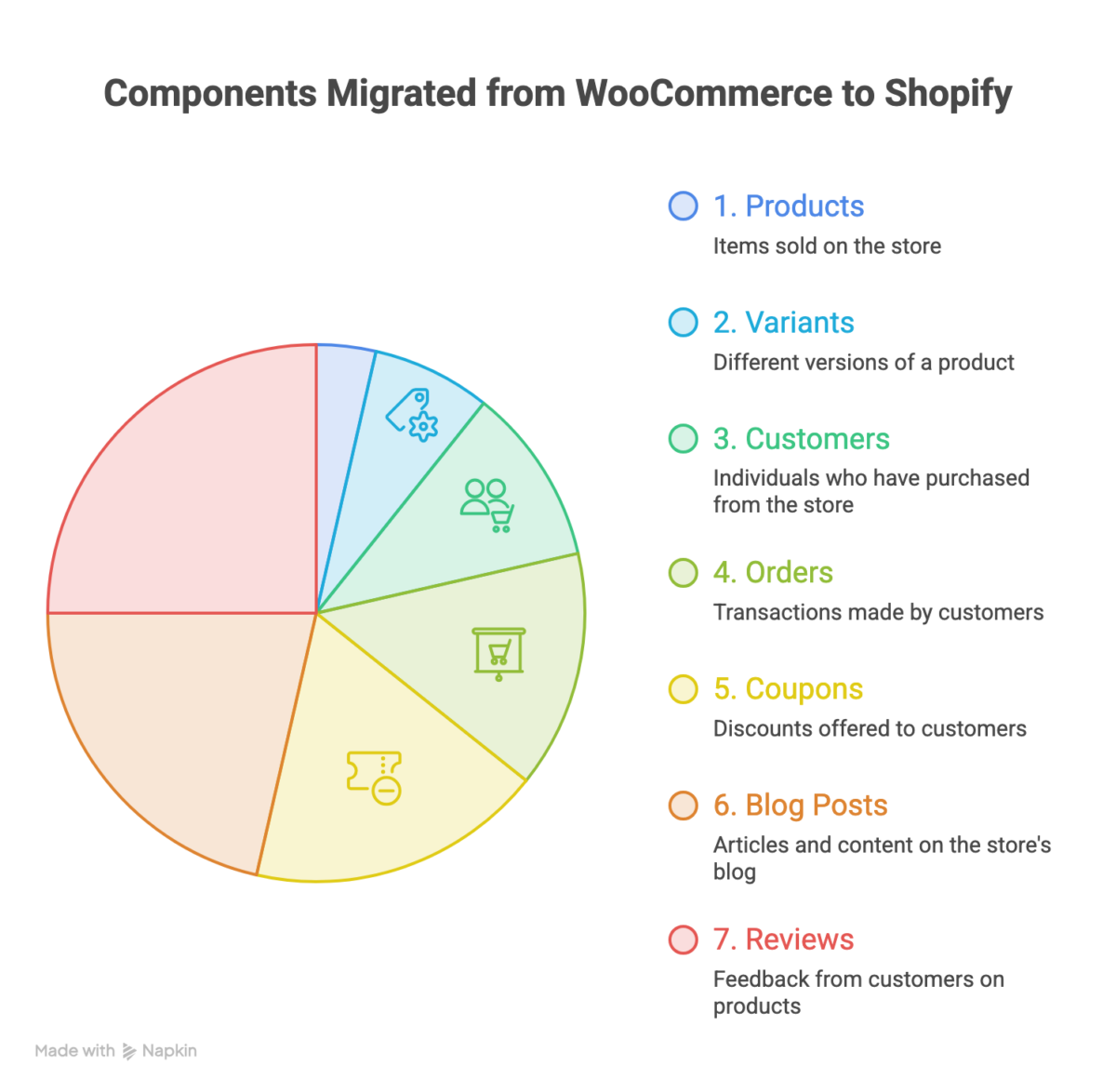
What gets migrated: products, variants, customers, orders, coupons, and blog posts. Reviews migrate with an app. SEO redirects need to be mapped carefully; WooCommerce URL structures don’t match Shopify’s by default.
What changes most:
- Hosting and security move from your responsibility to Shopify’s
- Plugins don’t translate directly to apps; expect to rebuild your stack
- Page builders (Elementor, Divi, Bricks) don’t exist on Shopify; your theme will need to be rebuilt
- WordPress hooks and filters that customize WooCommerce behavior don’t carry over
On customer data: customer records export as CSV and import cleanly into Shopify. Passwords don’t carry over regardless of source platform; every customer resets on first login.
Timeline: A standard WooCommerce to Shopify migration takes 6-10 weeks. Stores with heavy plugin customization or complex content run longer.
SEO consideration: WooCommerce sites often have deep blog content and long URL structures. The migration is your chance to clean up both, but only if the redirect map is built carefully. Skip the redirect mapping, and you’ll lose rankings for 60-90 days.
From BigCommerce to Shopify Migration
The cleanest platform-to-platform migration of the group. BigCommerce to Shopify migration is structurally simpler than Magento or WooCommerce because both platforms have similar data models and modern APIs.
Why merchants leave BigCommerce:
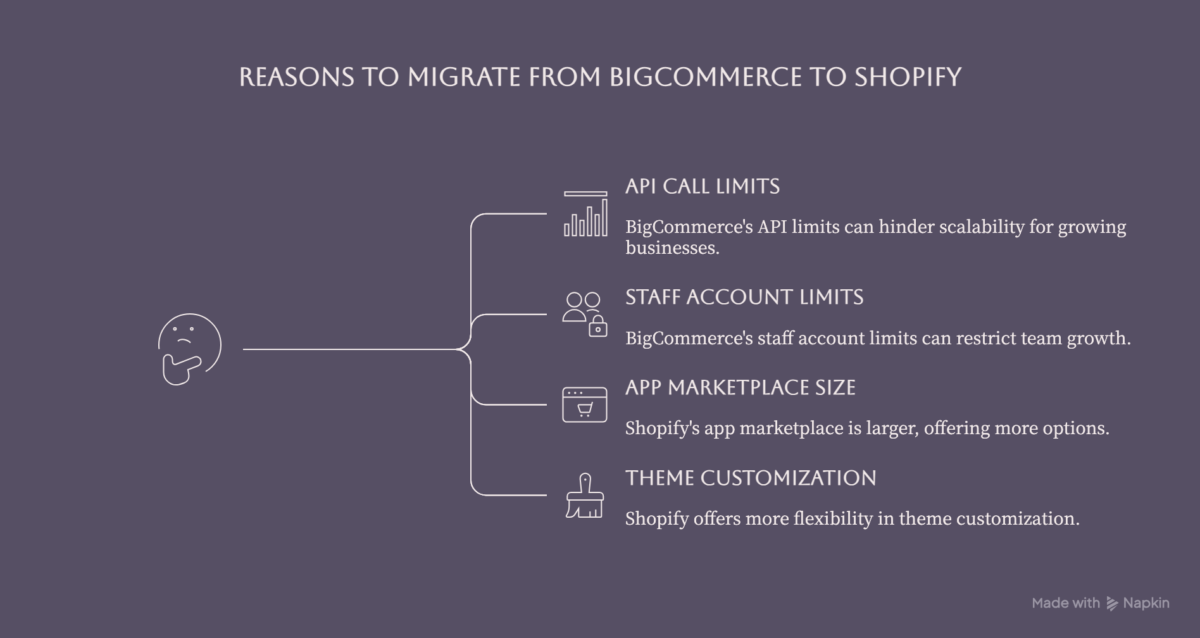
- API call limits start hurting at scale
- Staff account limits constrain growing teams
- The app marketplace is smaller than Shopify’s
- Theme customization is more constrained
What gets migrated: products, variants, customers, orders, content pages, and blog posts. Both platforms have solid export options.
What you should know:
- BigCommerce does not add platform transaction fees on top of payment processor fees; Shopify charges them unless you use Shopify Payments. For high-AOV stores, model the cost difference before you commit.
- BigCommerce ships with multi-currency, faceted search, and abandoned cart natively; on Shopify, you’ll need apps for some of these. Your app stack cost will likely rise.
Timeline: 6-10 weeks for a typical BigCommerce to Shopify migration.
From Volusion to Shopify Migration
Volusion powered many small and mid-sized U.S. online stores through the 2000s and early 2010s. Over the last several years, the platform has been in steady decline, with fewer new features, a shrinking app ecosystem, and a smaller pool of developers. As a result, “Volusion migration” almost always means moving to a more actively developed platform, most often Shopify.
The URL structure problem: Volusion uses URL structures that are notoriously SEO-unfriendly (think /categoryid-N and /productdetails.asp?productcode=X). The migration is your chance to fix this, but only if you build a careful redirect map. Skip it, and your existing rankings disappear.
Data export quirks: Volusion’s export functionality is more limited than modern platforms. Some fields export cleanly; others need manual mapping. Customer data, product data, and order history all need careful handling.
Bundled feature loss: Volusion bundles a lot, including domain, SSL, hosting, and basic email marketing, into one price. Shopify is more modular, which means more line items in your monthly cost. Budget for this upfront so the move doesn’t feel like a surprise tax.
Timeline: 6-10 weeks. Volusion migrations are often more urgent than other platform moves because the platform itself is stagnating; waiting another year means more lost ground.
From Wix, Squarespace, and Etsy to Shopify Migration
Wix to Shopify Migration: Usually about exporting product data, recreating the theme, and mapping redirects. 4–8 weeks for most stores.
Squarespace to Shopify Migration: Similar profile to Wix. Squarespace’s commerce features are limited, so most migrations happen when a brand outgrows the platform. Content migration is straightforward; product data exports cleanly.
Etsy to Shopify Migration: Most Etsy sellers migrate to add a Shopify store alongside Etsy, not to replace it. Most Etsy-to-Shopify projects are 2–4 weeks for product import and storefront setup.
popup-cta type=”contact” contact_form_id=”fd17ddb” title=”Migrating from Magento, WooCommerce, or BigCommerce?” content=”” button_text=”Get a platform-specific scoping call”]
What You’ll Lose Moving to Shopify
Most migration blogs sell you on what Shopify gains you. This section does the opposite; here’s what you’ll actually give up when you move, broken down by where you’re coming from. Read it before you commit, not after.
What Magento merchants lose
- Deep B2B logic out of the box. Customer-group-specific catalogs, tiered pricing per account, quote-to-order workflows, and net payment terms all live natively in Magento. On standard Shopify, you’ll either lose them or rebuild them through apps. Shopify Plus has B2B built in (and it’s improved significantly), but complex B2B migration is genuinely harder than the marketing suggests.
- Multi-store from one backend. Magento’s multi-website architecture lets one admin manage many storefronts with shared catalogs. Shopify handles this through Markets and Shopify Plus expansion stores, but the mental model is different.
- Total schema control. Custom attributes, EAV flexibility, and arbitrary product structures. Shopify metafields are powerful but not unlimited. One significant improvement worth noting: as of late 2025, Shopify Plus removed the old 100-variant-per-product limit. With the new Combined Listings system, a single product can now support up to 2,048 variants, which removes a long-standing objection for large catalog merchants.
- Self-hosted control. If your dev team likes owning the server, the database, and the deployment pipeline, Shopify will feel like a walled garden.
What WooCommerce and WordPress merchants lose
- The content engine. WordPress is a content platform first, commerce second. Custom post types, ACF (Advanced Custom Fields), Yoast-level SEO control, and the entire content ecosystem don’t translate cleanly. Shopify’s blog is functional but feels like an afterthought next to WordPress.
- Plugin-level customization freedom. On WooCommerce, if you don’t like how something works, you write a hook. On Shopify, you wait for an app or build a private one.
- Hosting flexibility. You picked your host, your stack, your caching layer. On Shopify, infrastructure decisions are made for you.
- Page builders. Elementor, Divi, Bricks, none exist on Shopify. The theme editor is improving, but it’s a different paradigm.
What BigCommerce merchants lose
- The zero-transaction-fee structure. BigCommerce charges no transaction fees regardless of the payment processor. Shopify charges them unless you use Shopify Payments. For high-AOV stores, this is real money.
- More built-in features without apps. BigCommerce ships with multi-currency, faceted search, abandoned cart, and other features that require apps on Shopify. Your app stack cost will likely rise.
What Volusion merchants lose
- Bundled simplicity. Volusion bundles a lot into one price. Shopify is more modular, which means more line items.
- Familiar (if outdated) workflows. Anyone who’s used Volusion for years knows its quirks. Shopify is faster and more capable, but there’s a learning curve for staff.
What everyone loses
- Check out customization on standard Shopify. The checkout is locked down unless you’re on Shopify Plus. Custom fields, custom logic, and custom flows are all restricted on lower plans.
Note: Shopify’s new checkout foundation uses Checkout Extensibility. For non-Plus stores, Thank you and Order Status page upgrades must be completed by August 26, 2026. If you are migrating now, you should plan around the new architecture from the start. - Direct database access. No SQL queries, no custom joins, no ad-hoc reporting at the database level. You work through Shopify’s APIs and reporting tools.
- Specific shipping rule complexity. Weight + zone + product-tag + customer-group combinations that worked through code on your old platform may need apps like Advanced Shipping Rules on Shopify.
- Custom discount and script logic, with a critical 2026 deadline. Shopify Scripts can no longer be edited or published as of April 15, 2026, and all Scripts stop executing on June 30, 2026. Any stores still relying on Scripts should already be rebuilding that logic in Shopify Functions before launch.
June 30, 2026. Deadline: Shopify Scripts Are Shutting Down
Shopify Scripts stop executing on June 30, 2026, and editing/publishing new Scripts ended on April 15, 2026. If your store relies on Scripts for discounts, shipping, or cart logic, that functionality should be migrated to Shopify Functions or another replacement before launch.
None of this means Shopify is the wrong choice. It means going in with eyes open. For most merchants, what you gain: speed, security, ecosystem, and scalability, outweighs what you lose. But knowing what you’re trading helps you scope the migration honestly, budget for the right apps, and decide whether standard Shopify or Shopify Plus is the right tier.
Standard Shopify or Shopify Plus?
The tier decision is often the question your leadership cares about most, because it directly affects the budget. Here’s how to think about it.
GMV thresholds where Plus starts mattering
Shopify Plus migration typically makes sense at:
- $1M+ annual GMV as a baseline signal
- $3M+ annual GMV is where Plus pays for itself in most cases
- $10M+ is where Plus becomes the obvious choice; standard Shopify will start feeling constrained
These are guidelines, not rules. Plenty of $500K stores choose Plus because they need specific features. Plenty of $5M stores stay on Advanced Shopify because they don’t.
B2B, headless, multi-store: where Plus earns its price
Revenue is the easy threshold. The harder thresholds are functional:
- B2B at scale. Wholesale catalogs, customer-specific pricing, net payment terms, quote-to-order. Plus has these built in. On standard Shopify, you’re stitching together apps.
- Headless or composable storefronts. Hydrogen, Oxygen, custom React frontends. Plus gives you the API limits and architecture to do this cleanly.
- Multi-store under one organization. Brand portfolios, regional storefronts, B2B and DTC splits. Plus’s expansion stores are designed for this.
- Checkout customization. Custom fields, custom validation, and custom logic at checkout. Available on Plus through the new Checkout Extensibility framework, the right architecture is built for the long term.
- Higher API call limits and staff accounts. If you’ve outgrown those on your current platform, Plus is the answer.
Starting on Plus vs. upgrading later
If you know you’ll need Plus within 12 months, start there. The migration cost is the same. Upgrading later means another migration-adjacent project, theme adjustments, checkout reconfiguration, and app stack changes that you could have avoided.
If Plus is 2-3 years away and your current needs are modest, start on Advanced Shopify and upgrade when the signals are real.
A simple decision rule
If two or more of these are true today, you should be on Plus from day one:
- You’re doing $1M+ annual GMV
- B2B is a meaningful part of your business
- You need checkout customization
- You need multiple stores
- You need a headless
If only one is true, the answer depends on the growth trajectory. If none are true, standard Shopify is fine.
Enterprise Magento merchants almost always belong on Plus, not on standard Shopify. The features they use daily on Magento (B2B, multi-store, complex pricing) map to Plus features, not standard ones.
Not sure whether Standard or Plus is right for your store?
What a Shopify Migration Involves
Most blogs gloss over this part. Here’s the real shape of a Shopify migration project, including what trips most teams up.
One thing worth addressing before diving in: legacy product catalogs often contain outdated, duplicated, or incomplete records that should be cleaned up before migration. That means before you move a single SKU, you’re likely carrying a third of your catalog as dead weight. The migration is your chance to fix that, but only if you plan for it.
The phases of a real migration
A complete Shopify migration moves through eight phases:
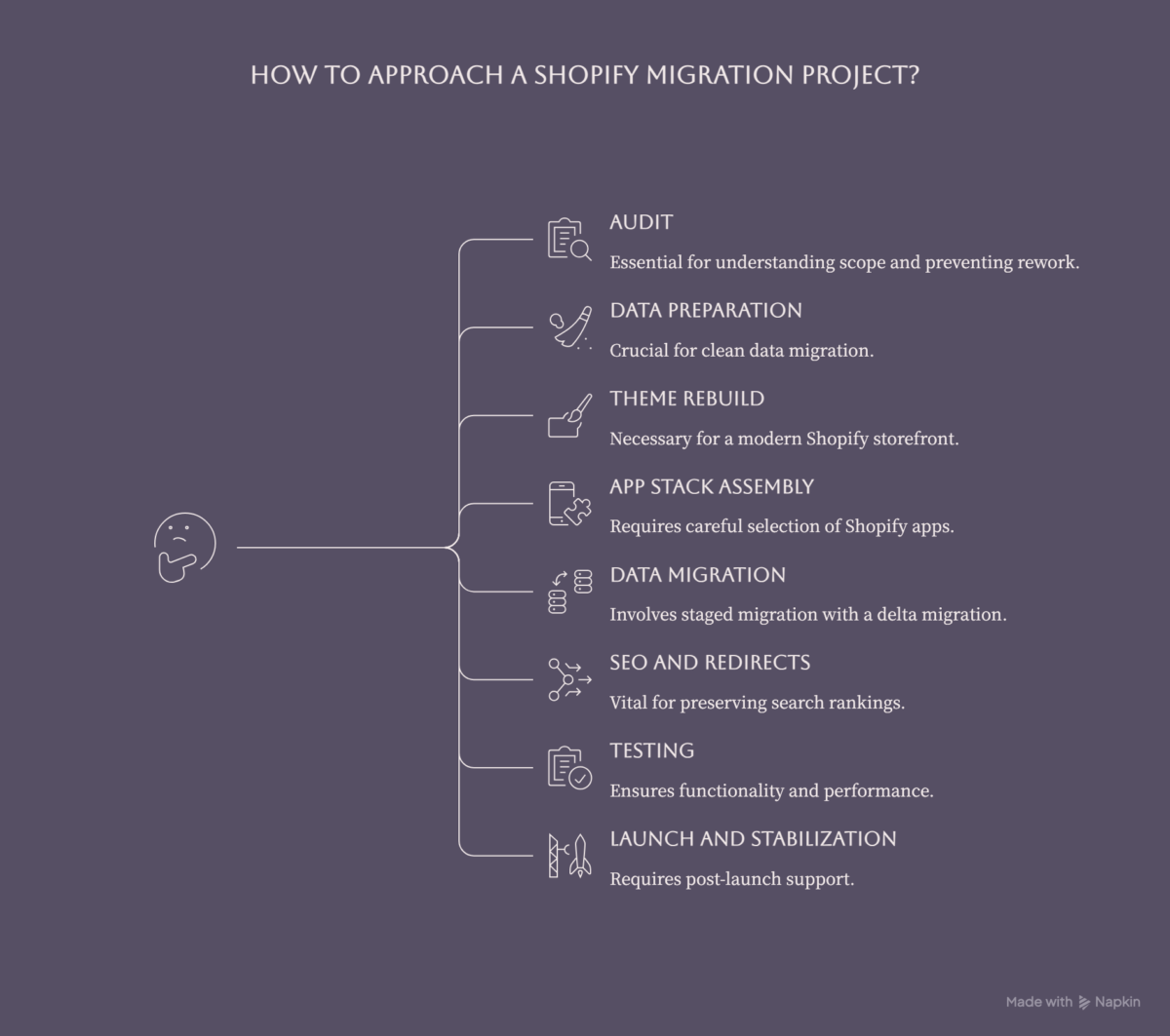
1. Audit
Inventory of products, customers, orders, content, integrations, apps/plugins, themes, custom code, redirects, and SEO assets. This is where most projects underestimate scope. A thorough audit takes 1–2 weeks and saves months of rework.
2. Data preparation and export
Cleaning the data before it moves. Deduplicating customers, normalizing product attributes, fixing broken images, and handling discontinued SKUs. You do not want to migrate messy data. This phase often takes longer than teams expect because legacy catalogs usually contain outdated, duplicated, or incomplete records.
3. Theme rebuild
Themes don’t transfer between platforms. Your Shopify theme is built fresh, either from a Shopify template customized for your brand or from a custom build for complex storefronts. If you’re moving to Checkout Extensibility (the standard for all Shopify stores from 2025 onward), post-purchase pages and analytics pixels need to be rebuilt as checkout UI extensions, not as Liquid templates.
4. App stack assembly
Replace your old plugins/extensions with Shopify apps. This always takes longer than expected because no two platforms have the same app ecosystem. Budget for app subscriptions in your post-launch monthly cost.
5. Data migration
Products, customers, orders, and content. Done in stages, often with a final delta migration right before launch to catch anything that changed during the build.
6. SEO and redirects
Building the 301 redirect map from old URLs to new ones. This is the single most important SEO task in the migration. Done well, you preserve 80–95% of your rankings. Done badly, you lose 30–60% for months.
7. Testing
Functional testing, payment testing, integration testing, mobile testing, performance testing, accessibility testing. Two weeks minimum for any serious store.
8. Launch and stabilization
The cutover itself is fast. The 30 days after are not. Expect support tickets, abandoned cart anomalies, edge-case bugs, and SEO ranking shifts. Plan for it.
Realistic timelines
- Simple migrations (Wix, Squarespace, basic): 4-8 weeks
- Mid-complexity (BigCommerce, simple Magento, WooCommerce): 6-12 weeks
- Complex (Magento with B2B, WooCommerce with heavy customization, custom integrations): 12-20 weeks
- Enterprise (Shopify Plus, ERP integration, headless, multi-store): 16-28 weeks
The variables that move timelines: data complexity, integration depth (especially ERP, PIM, warehouse systems), theme customization, B2B requirements, and stakeholder alignment. If your project has all five, plan for the long end.
Realistic budget ranges
Pricing varies based on the complexity of the migration, the volume and quality of data, theme rebuild requirements, integration depth, and the level of testing and launch support involved.
Where teams typically underestimate the work
- The data audit. Most teams assume their data is cleaner than it is. Legacy product records often contain outdated, duplicated, or incomplete information, and that cleanup usually takes more time than expected.
- App replacement. Finding a Shopify app that does exactly what your old plugin did is harder than expected. Sometimes it requires two apps. Sometimes it requires custom development.
- Integration rebuilds. ERP, PIM, marketing automation, shipping platforms; every integration needs to be reconnected, and the logic rarely ports 1:1.
- Shopify Functions migration. If your old platform used custom discount or shipping logic (including Shopify Scripts), that logic must be rebuilt as Shopify Functions before the June 30, 2026, deadline. This is a technical rebuild, not a configuration task.
- Content review. Product descriptions, category pages, blog posts. Migration is your chance to clean and refresh. Most teams underestimate how long this takes.
- Stakeholder review cycles. Internal feedback rounds always take longer than planned. Build a buffer into the timeline.
Building the business case internally?
What Goes Wrong (And How to Stay Ahead of It)
Every migration has a few moments where something breaks. The difference between a smooth migration and a painful one is how prepared you are for these specific failure modes.
SEO and 301 redirect mapping
The biggest risk in any Shopify migration is search traffic loss. Industry audits show that nearly 80% of e-commerce migrations suffer significant SEO regressions when technical mapping is overlooked. Even with perfect redirects, expect a 15-30% dip in organic traffic for 30-60 days post-launch. Recovery usually happens by day 90 if the migration was executed well.
The redirect map is the work that determines how big the dip is. Every old URL needs a destination on the new site. Every category page, every product, every blog post, every landing page. Skip URLs and they 404. 404s lose rankings fast.
Plan for it: export every URL from your current site (use Screaming Frog or similar), map each one to its Shopify equivalent, and load the redirects before launch. Monitor 404s daily for the first 30 days.
The customer password problem
Customer passwords never transfer in a Shopify migration. Not from Magento, not from WooCommerce, not from BigCommerce. The platforms hash passwords differently, and there’s no way to export them in a usable form.
Every existing customer will be prompted to reset their password on their first login post-migration. Expect a spike in support tickets in the first 30 days from customers who don’t realize this is normal.
Plan for it: send a pre-migration email explaining the change. Send a launch-day email walking customers through the reset. Train your support team on the wording. Build a clear FAQ page.
Shopify Scripts sunset – June 30, 2026
This is the migration risk most teams in 2026 are underestimating. Shopify Scripts, the Ruby-based runtime used for custom discount logic, shipping rules, and cart transformation, will stop executing entirely on June 30, 2026. They can no longer be edited or published after April 15, 2026.
For migrating stores, this means any equivalent custom discount or shipping logic from your old platform must be rebuilt as Shopify Functions, WebAssembly-based replacements, before launch. This is not a Liquid edit or an app configuration task. It’s a developer rebuild. If your migration scope doesn’t include this explicitly, it will surface as a broken feature on launch day.
Plan for it: during the audit phase, inventory every custom rule, discount stack, and shipping calculation on your current platform. Map each one to a Shopify Functions equivalent. Scope the rebuild explicitly and build it into the project timeline.
Checkout Extensibility: entering the new architecture
If you’re migrating to Shopify now, you’re entering a post-checkout.liquid world. The legacy system is fully deprecated. Shopify began auto-upgrading stores in January 2026. Non-Plus stores have until August 26, 2026, to complete the migration of Thank You and Order Status pages.
In practice, this means analytics pixels, upsell apps, and post-purchase tools that previously lived on a Liquid Thank You page need to be rebuilt as checkout UI extensions or Web Pixels. Any agency or developer who doesn’t flag this upfront in your migration scope hasn’t done enough Plus migrations to know what they’re doing.
Plan for it: verify that every post-purchase tracking and marketing automation tool is compatible with Checkout Extensibility before you go live, not after.
App replacement and the hidden cost audit
The plugin or extension you used on your old platform doesn’t have a 1:1 Shopify equivalent, almost ever. Sometimes a single old plugin needs to be replaced by two or three Shopify apps. Sometimes the closest Shopify app is more expensive than your old plugin. Sometimes there’s no equivalent at all, and you need a custom app.
This is a hidden cost that teams almost always underestimate.
Plan for it: during the audit phase, list every plugin/extension you currently use, identify its Shopify equivalent, note the monthly cost, and add it all up. Your monthly app spend post-migration is often higher than you expect.
Want a second opinion on your migration plan?
Conclusion
If you’ve read this far, you’re serious about the migration. Three options for the next step, depending on where you are in the decision:
If you’re still deciding whether migration makes sense for your business, start with the decision framework. If two or more of the “migrate to Shopify if…” signals apply, the answer is probably yes. If you’re still unsure, an external perspective helps. We offer free migration assessments, no pitch attached.
If you’re building the internal business case, the section on tier decision (Standard vs. Plus) and the budget ranges should give you the numbers to put in your slide deck. We can also do a scoping call to help you map your specific timeline and budget, which is useful if you’re presenting to leadership.
If you’re already evaluating agencies: 2Hats Logic’s Shopify migration service handles complex migrations across Magento, WooCommerce, BigCommerce, and Volusion, including Shopify Plus and ERP integration. Send us your project brief, and we’ll come back with a proposal.
For a broader view of Shopify itself, our What is Shopify guide covers the platform end-to-end.
Whichever path you choose, migrate with eyes open, knowing what you’ll gain, what you’ll trade off, what deadlines are live on the platform right now, and what to expect in the 30 days after launch. That’s what turns a Shopify migration from a risky project into a clean upgrade.
Ready to start your Shopify migration?
FAQ
How long does a Shopify migration take?
A typical Shopify migration takes 6–12 weeks. Simple stores migrate in 4–8 weeks; complex stores with B2B, ERP integration, or heavy customization take 12–20 weeks. Enterprise Shopify Plus migrations can run 16–28 weeks. The biggest variables are data complexity, integration depth, and theme customization.
Will I lose SEO rankings when I migrate to Shopify?
Expect a 15–30% dip in organic traffic for 30–60 days after launch, even with perfect redirects. Recovery typically happens by day 90 if the migration was executed well. Industry audits show that nearly 80% of migrations that suffer SEO regressions skipped or rushed technical mapping. Don't be in that 80%.
What is the Shopify Scripts shutdown deadline?
Shopify Scripts stop executing entirely on June 30, 2026. They can no longer be edited or published after April 15, 2026. All custom discount, shipping, and cart logic must be rebuilt as Shopify Functions before that date. If your migration involves any custom discount logic or shipping rules, this is a non-negotiable pre-launch task.
What is Checkout Extensibility, and does it affect my migration?
Checkout Extensibility is Shopify's replacement for the legacy checkout.liquid system, which was fully deprecated in 2025. Every Shopify store now runs on the new architecture. For migrating stores, this means post-purchase pages, analytics pixels, and upsell tools need to be implemented as checkout UI extensions or Web Pixels. Non-Plus stores have until August 26, 2026, to complete the migration of Thank You and Order Status pages.
What happened to the 100-variant limit on Shopify?
As of late 2025, Shopify Plus removed the 100-variant-per-product limit. With the new Combined Listings system, a single product can now support up to 2,048 variants. If variant limits were a reason you hadn't migrated yet, that barrier is gone.
How much does a Shopify migration cost?
The cost of a Shopify migration depends on the complexity of your store, the platform you're migrating from, the amount of data involved, design requirements, integrations, and any custom functionality that needs to be rebuilt.

Related Articles