Greetings! I'm Aneesh Sreedharan, CEO of 2Hats Logic Solutions. At 2Hats Logic Solutions, we are dedicated to providing technical expertise and resolving your concerns in the world of technology. Our blog page serves as a resource where we share insights and experiences, offering valuable perspectives on your queries.

Quick Summary
Ignoring web accessibility doesn’t just risk legal trouble. It also means missing out on over 1 billion potential customers around the world. Making your website accessible helps more people use it easily, boosts your SEO, and keeps you safe from lawsuits. For online stores, accessibility isn’t just the right thing to do. It plays a big role in how well your business performs. It can improve your conversion rates, make customers happier, and help your business grow in the long run.
Have you ever visited a website that was frustratingly difficult to navigate? Now imagine facing that experience daily, with nearly every site you visit.
This is the reality for millions of users with disabilities who encounter inaccessible websites. For businesses, accessibility isn’t just about compliance.
It’s about reaching your entire potential audience and protecting your organization from significant legal and financial consequences.
Not sure if your website is accessible to everyone? Get a free accessibility audit and find out.
“Accessibility is not a feature or a nice-to-have; it’s a fundamental aspect of product quality and user experience that businesses can no longer afford to ignore.”
Tim Berners-Lee, inventor of the World Wide Web
What Is the Real Cost of Ignoring Web Accessibility?
Ignoring web accessibility can cost businesses far more than they realize. While legal penalties often receive the most attention, the impact extends to lost revenue, reduced search visibility, and damage to customer trust. For e-commerce businesses, even small accessibility barriers can prevent potential customers from completing purchases, resulting in missed sales opportunities.
The real cost of ignoring web accessibility typically falls into four key areas:
Legal and Compliance Risks
Accessibility regulations continue to evolve worldwide, and businesses that fail to meet accessibility requirements may face complaints, legal action, or costly remediation efforts. Laws such as the Americans with Disabilities Act (ADA) in the United States and the European Accessibility Act (EAA) in Europe have increased the focus on digital accessibility and compliance.
Lost Revenue and Missed Customers
More than one billion people worldwide live with some form of disability. If users cannot browse products, navigate menus, complete forms, or finish the checkout process, they are likely to leave and choose a competitor instead. Every inaccessible interaction creates a potential loss of revenue and customer loyalty.
Reduced Search Visibility
Many accessibility best practices also support search engine optimization. Features such as descriptive image alt text, proper heading structures, semantic HTML, and clear navigation help search engines understand and index website content more effectively. Ignoring web accessibility can therefore limit the ability to perform well in search results.
Damage to Brand Reputation
Customers increasingly expect businesses to provide inclusive digital experiences. An inaccessible website can create frustration, negative reviews, and a perception that the business does not value all users equally. In contrast, accessible websites demonstrate a commitment to usability, inclusion, and customer experience.
Quick Answer
The cost of ignoring web accessibility includes legal risks, lost sales, lower search engine visibility, reduced customer satisfaction, and potential reputational damage. For many businesses, the cost of fixing accessibility issues after complaints or legal action is significantly higher than building accessibility into the website from the beginning.
What Are the Legal Risks of Ignoring Digital Accessibility Standards?
Businesses that overlook digital accessibility may face more than usability issues. As accessibility regulations continue to evolve, non-compliant websites can expose organizations to legal, financial, and operational risks. The exact requirements vary by region, but the overall trend is clear: digital accessibility is becoming a business necessity rather than an optional enhancement.
Accessibility Lawsuits
One of the most significant risks is legal action from users who cannot access website content, services, or online purchasing processes. Courts in several jurisdictions have increasingly recognized websites and digital services as part of the customer experience, making accessibility-related complaints more common.
For e-commerce businesses, inaccessible navigation, forms, checkout processes, or product information can become grounds for legal disputes and costly settlements.
Regulatory Compliance Risks
Businesses operating across different markets may need to comply with multiple accessibility regulations. Requirements such as the Americans with Disabilities Act (ADA), the European Accessibility Act (EAA), and other regional accessibility laws continue to place greater emphasis on inclusive digital experiences.
Failure to meet applicable accessibility standards can result in investigations, enforcement actions, penalties, or mandatory remediation efforts.
Lost Business Opportunities and Contracts
Accessibility compliance is increasingly becoming a requirement in procurement processes, particularly for government organizations, educational institutions, and large enterprises. Businesses that cannot demonstrate accessibility compliance may find themselves excluded from contracts, partnerships, or vendor opportunities.
For organizations serving international markets, accessibility can also become a deciding factor during supplier evaluations.
Emergency Remediation Costs
Many businesses postpone accessibility improvements until complaints, legal notices, or compliance deadlines force action. At that stage, fixing accessibility issues often becomes more expensive than addressing them during the design and development process.
Emergency remediation may require:
- Comprehensive accessibility audits
- Website redesigns
- Development rework
- Additional testing and documentation
- Ongoing compliance monitoring
How to Reduce Legal Risk
The most effective way to reduce accessibility-related legal exposure is to take a proactive approach. Regular accessibility audits, adherence to WCAG guidelines, ongoing testing, and accessibility-focused development practices can help identify and resolve issues before they impact users or create compliance concerns.
Business Protection Tip: Conduct quarterly accessibility audits of your digital properties against WCAG 2.1 AA standards to identify and remediate potential compliance issues before they become legal problems.
How Much Revenue Can an Inaccessible E-Commerce Website Cost?
An inaccessible e-commerce website can lead to significant revenue loss, often in ways that are difficult to measure at first. When customers encounter barriers while browsing products, adding items to their cart, or completing a purchase, many simply leave and shop elsewhere.
While the exact impact varies by business, accessibility issues can affect every stage of the customer journey, resulting in lost sales, lower conversion rates, and reduced customer loyalty.
Customers May Leave Before Making a Purchase
If users cannot navigate your website using a keyboard, read important content with assistive technologies, or understand product information due to accessibility barriers, they are unlikely to continue shopping.
Research consistently shows that many users with disabilities abandon websites that are difficult to access and prefer competitors that offer a more inclusive experience.
Checkout Barriers Can Reduce Conversions
The checkout process is one of the most critical areas of an online store. Accessibility issues such as unlabeled form fields, unclear error messages, poor color contrast, or inaccessible payment options can prevent customers from completing their purchases.
Even minor obstacles can lead to cart abandonment and directly impact revenue.
Missed Opportunities in a Large Consumer Market
More than one billion people worldwide live with some form of disability. Together, this audience represents substantial purchasing power and influences the buying decisions of family members, caregivers, and broader communities.
Businesses that prioritize accessibility can reach a wider audience, while those that ignore it risk excluding a significant segment of potential customers.
Lower Customer Retention and Loyalty
Accessibility is not only about acquiring customers. It also affects retention. When users consistently experience frustration while interacting with a website, they are less likely to return for future purchases.
Accessible websites help create smoother experiences, encourage repeat business, and strengthen customer trust over time.
Accessibility Creates a Competitive Advantage
Many businesses still treat accessibility as an afterthought. This creates an opportunity for organizations that invest in inclusive digital experiences.
An accessible website can:
- Improve customer satisfaction
- Increase conversion opportunities
- Expand audience reach
- Support SEO performance
- Strengthen brand reputation
By removing barriers, businesses make it easier for more customers to engage, purchase, and return.
Key Takeaway
The cost of an inaccessible e-commerce website goes beyond legal compliance. It can result in lost sales, abandoned carts, reduced customer loyalty, and missed opportunities to serve a broader market. Investing in accessibility helps create a better shopping experience for all users while supporting long-term business growth.
How Accessibility Improves SEO and User Experience
Web accessibility and search engine optimization (SEO) share many of the same best practices. Features that help users navigate and understand your website also help search engines crawl, interpret, and index your content more effectively.
As a result, accessibility improvements often contribute to better user experiences, stronger search visibility, and improved website performance.
Better Website Structure Helps Search Engines Understand Content
Accessibility guidelines encourage the use of proper heading structures, semantic HTML, and clear navigation. These elements help users understand page content and make it easier for search engines to determine the relevance and hierarchy of information.
Examples include:
- Logical heading structures (H1, H2, H3)
- Descriptive page titles
- Semantic HTML elements
- Clear navigation menus
A well-structured website benefits both visitors and search engine crawlers.
Alt Text Improves Accessibility and Search Visibility
Alternative text (alt text) allows screen readers to describe images to users who cannot see them. At the same time, it helps search engines understand the content and context of images.
Effective alt text can:
- Improve image search visibility
- Provide context when images fail to load
- Enhance the user experience for assistive technology users
Accessible Content Can Reduce Bounce Rates
Users are more likely to stay on a website when content is easy to read, navigate, and interact with. Features such as readable fonts, sufficient color contrast, descriptive links, and intuitive layouts help create a smoother browsing experience.
When visitors can find information quickly and complete tasks without frustration, they are more likely to remain engaged and continue exploring the site.
Improved Accessibility Benefits All Users
Accessibility improvements are often associated with users who have disabilities, but they can enhance the experience for everyone.
Examples include:
- Captions that help users in noisy environments
- Larger touch targets that improve mobile usability
- Clear navigation that helps all visitors find information faster
- Readable content that improves comprehension across devices
These improvements contribute to a more user-friendly website regardless of a visitor’s abilities or circumstances.
Accessibility and SEO Work Best Together
Accessibility and SEO should not be viewed as separate initiatives. Both focus on improving usability, discoverability, and overall website quality.
By making your website easier to access and understand, you create a better experience for users while helping search engines interpret your content more effectively. This combination can support stronger engagement, improved search performance, and higher conversion potential over time.
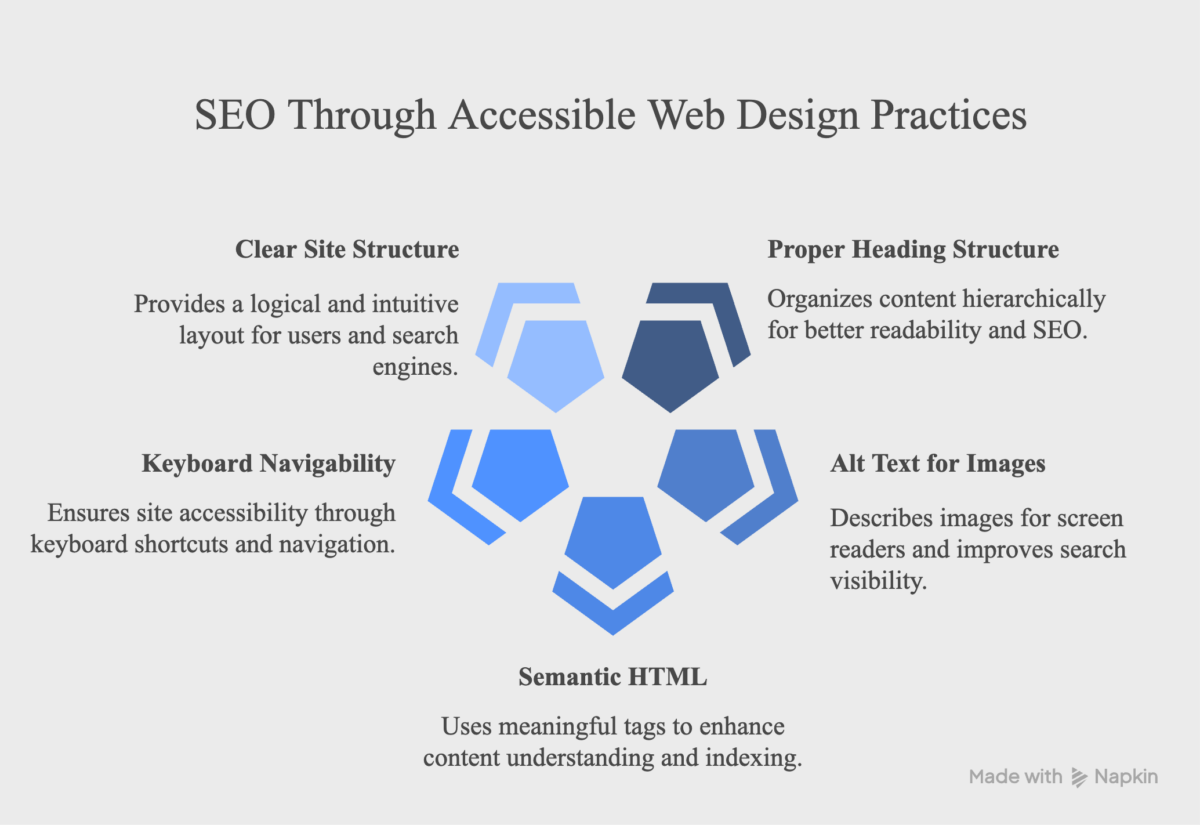
- Proper heading structure
- Alt text for images
- Semantic HTML
- Keyboard navigability
- Clear site structure
| Accessibility Feature | SEO Benefit |
| Descriptive alt text | Enhanced image search visibility |
| Proper heading hierarchy | Improved content indexing |
| Transcripts for audio/video | Additional indexable content |
| Keyboard navigability | Better site crawlability |
| Readable text with good contrast | Reduced bounce rates |
Why Accessibility Matters More Than Ever in 2026
Website accessibility is no longer viewed as a niche requirement or a compliance checkbox. As digital experiences become central to how businesses operate, accessibility is increasingly recognized as a critical part of customer experience, legal compliance, and business growth.
Several factors are driving this shift, making accessibility more important than ever in 2026.
Increasing Accessibility Regulations
Governments and regulatory bodies around the world continue to strengthen accessibility requirements for digital products and services. Businesses that serve customers across multiple regions must pay closer attention to accessibility obligations and evolving compliance standards.
Organizations that proactively address accessibility are better positioned to adapt to regulatory changes and avoid costly remediation projects later.
The Impact of the European Accessibility Act (EAA)
The European Accessibility Act has increased awareness of digital accessibility requirements across the European market. Businesses that provide products or services to customers within the European Union may need to ensure their websites, mobile applications, and digital services meet applicable accessibility standards.
For companies with international operations, accessibility is becoming an important part of market readiness and long-term compliance planning.
Accessibility Influences Purchasing Decisions
Customers increasingly expect businesses to provide inclusive and user-friendly digital experiences. A website that is difficult to navigate can negatively affect customer perception and influence purchasing decisions.
In competitive markets, accessibility can become a differentiator that helps businesses build trust and improve customer satisfaction.
Accessibility Is Becoming Part of Procurement Requirements
Many government agencies, educational institutions, and large enterprises now consider accessibility during vendor evaluations and procurement processes. Organizations seeking partnerships, contracts, or enterprise clients may be asked to demonstrate compliance with accessibility standards as part of the selection process.
Businesses that invest in accessibility today are better prepared for these requirements as they continue to expand across industries.
Accessibility Supports Long-Term Digital Growth
Accessibility improvements often contribute to broader business objectives, including:
- Better user experiences
- Improved search visibility
- Higher customer satisfaction
- Greater audience reach
- Reduced compliance risk
Rather than treating accessibility as a one-time project, forward-thinking organizations are incorporating it into their long-term digital strategies.
Key Takeaway
In 2026, accessibility is no longer just about avoiding legal issues. It is becoming an essential part of delivering better digital experiences, meeting compliance expectations, and reaching a broader audience. Businesses that prioritize accessibility today are likely to be better positioned for future growth and evolving customer expectations.
Why Businesses Still Struggle with Website Accessibility
Despite growing awareness of web accessibility and its legal and commercial importance, many businesses still struggle to implement it effectively. In most cases, the challenge is not intention but execution.
Several common barriers prevent organizations from making consistent progress.
Accessibility Is Often Treated as a Secondary Priority
In many digital projects, accessibility is introduced late in the process or treated as an optional enhancement. When deadlines are tight, it is often deprioritized in favor of new features or visual design improvements.
This approach leads to higher long-term costs, as fixing accessibility issues after development is significantly more complex than addressing them during the design phase.
Lack of Internal Expertise
Many development and design teams are not fully trained in accessibility standards such as WCAG guidelines. As a result, common issues such as poor heading structure, missing form labels, or improper color contrast can go unnoticed during development.
Without proper expertise, accessibility becomes reactive rather than built into the workflow.
Misconception That Accessibility Is Too Expensive
A common misconception is that accessibility requires a large upfront investment. While remediation can be costly if done late, integrating accessibility from the beginning is often far more efficient.
In reality, the cost of ignoring web accessibility is typically higher than the cost of implementing it correctly during development.
Unclear Ownership Within Teams
Accessibility often falls between multiple roles — design, development, QA, and content — without clear ownership. This can result in gaps where no one is fully responsible for ensuring compliance and usability across the entire user journey.
Organizations that assign clear accountability tend to make more consistent progress.
Key Takeaway
Most accessibility challenges are caused by process gaps, prioritization issues, and limited expertise. Businesses that integrate accessibility into their core development workflow are better positioned. They can avoid legal risks, improve user experience, and reduce long-term costs.
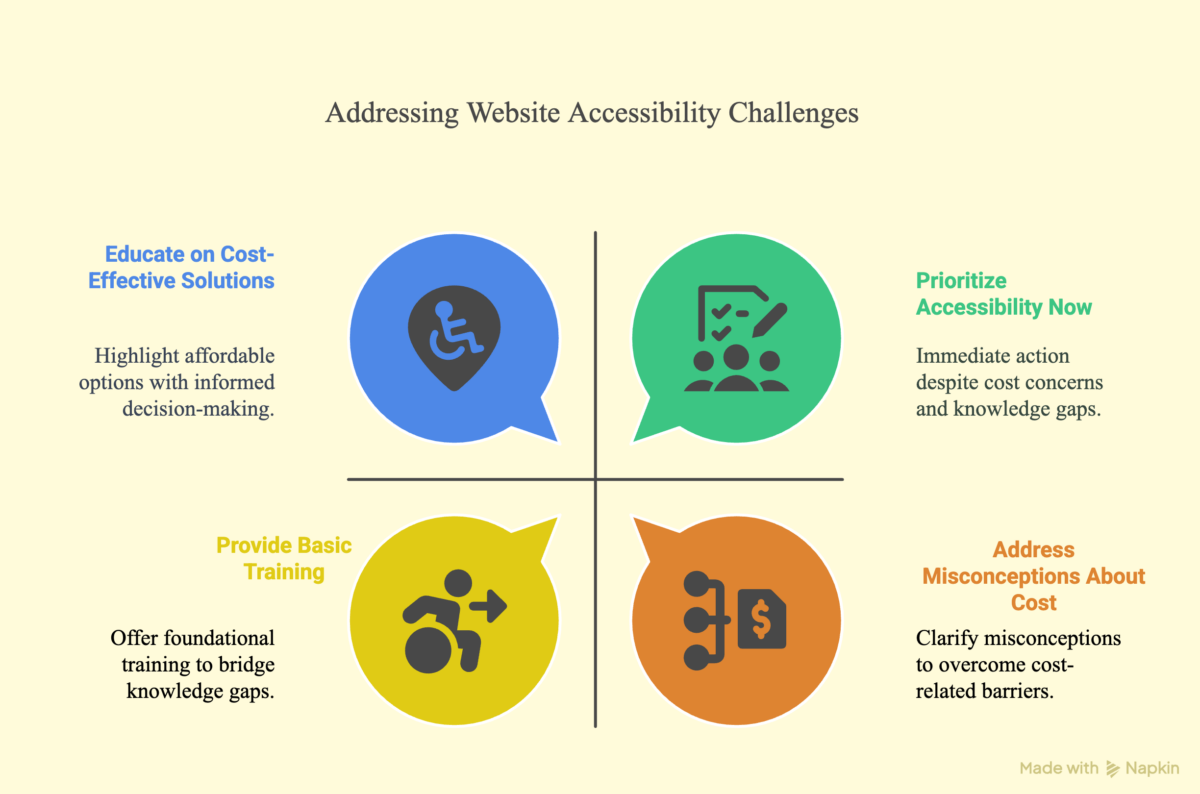
Despite the clear business case for accessibility, many organizations continue to underinvest in this critical area. Common barriers include:
Take a look at how you can address these issues and make your website accessible.
Accessibility Compliance Checklist for Businesses
Ensuring web accessibility requires a combination of design, development, and content practices. The following checklist outlines the most important areas businesses should review to improve compliance with accessibility standards such as WCAG 2.1/2.2.
1. Keyboard Navigation
Users should be able to navigate the entire website without a mouse.
- All interactive elements (buttons, links, forms) are accessible via keyboard
- Focus states are clearly visible
- No keyboard traps exist within modals or menus
2. Text and Content Accessibility
Content should be readable and understandable for all users.
- Clear and consistent heading structure (H1–H6)
- Simple and readable language, where possible
- Proper spacing and line height for readability
3. Images and Media
Visual and audio content must be accessible to assistive technologies.
- All meaningful images include descriptive alt text
- Decorative images are marked appropriately
- Videos include captions and/or transcripts
4. Forms and Input Fields
Forms must be usable by screen readers and keyboard users.
- Every form field has a visible label
- Error messages are clear and indicate how to fix issues
- Required fields are clearly marked
5. Color and Contrast
Content must remain readable in different viewing conditions.
- Sufficient color contrast between text and background
- Information is not conveyed through color alone
- Interactive elements are distinguishable
Page Structure and Navigation
A clear structure helps both users and search engines understand content.
- Consistent navigation across pages
- Logical reading order of content
- Proper use of semantic HTML elements
Mobile Accessibility
Accessibility must extend to mobile users as well.
- Touch targets are large enough to interact with easily
- Content adapts properly to different screen sizes
- No horizontal scrolling required for core content
Assistive Technology Compatibility
The website should work smoothly with screen readers and assistive tools.
- ARIA labels are used where necessary
- Dynamic content updates are announced properly
- Interactive components are properly described
Key Takeaway
A compliant website is not just about meeting technical standards. It is about ensuring every user can interact with your content without barriers. Regular audits and testing are essential to maintain accessibility over time.
How to Make Your Website Accessible
Improving web accessibility is not a one-time task. It is an ongoing process that involves auditing, prioritizing issues, implementing fixes, and maintaining compliance as your website evolves.
A structured approach helps businesses reduce risks while improving usability and performance.
Step 1: Conduct a Comprehensive Accessibility Audit
The first step is to understand the current accessibility status of your website.
A proper audit should include:
- Automated testing using tools like Axe or WAVE
- Manual testing across key pages and user flows
- Screen reader testing to evaluate real-world usability
- Keyboard-only navigation testing
The goal is to identify barriers that prevent users from accessing content, especially in high-impact areas like product pages, forms, and checkout flows.
Step 2: Prioritize Accessibility Issues
Not all issues have the same level of impact. Once problems are identified, they should be categorized based on severity and business impact.
Prioritization should consider:
- Critical barriers affecting checkout or conversions
- Issues that impact core user journeys
- Frequency of use of affected pages
- Effort required to implement fixes
By doing so you will address high-risk and high-impact issues first.
Step 3: Integrate Accessibility Into Development Workflows
Accessibility is not a separate phase. Embed it into the design and development process.
Best practices include:
- Including accessibility in the definition of “done” for development tasks
- Using design systems that support accessible components
- Adding automated accessibility checks to CI/CD pipelines
- Training designers, developers, and content teams on WCAG guidelines
This reduces the risk of recurring issues in future releases.
Step 4: Test Continuously and Monitor Compliance
Accessibility is not static. Every update to your website can introduce new issues.
To maintain compliance:
- Perform regular accessibility audits
- Test new features before release
- Monitor real user feedback where possible
- Re-test critical user flows periodically
Ongoing monitoring keeps in check that accessibility standards are consistently met over time.
Step 5: Document Efforts and Maintain Records
Documentation plays an important role in both governance and legal protection.
Businesses should maintain records of:
- Accessibility audits and reports
- Fixes and remediation efforts
- Testing procedures and tools used
- Internal accessibility guidelines
Well-documented efforts demonstrate a proactive approach to compliance and continuous improvement.
Legal protection note: Well-documented good-faith efforts toward accessibility can significantly mitigate legal risks, even when perfect compliance hasn’t yet been achieved.
E-commerce-Specific Accessibility Challenges
E-commerce websites face unique accessibility challenges because they involve complex user journeys, dynamic content, and high-conversion processes such as product discovery and checkout. Even small accessibility gaps in these areas can directly impact sales and user experience.
Product Pages and Product Information
Product pages are often the first point of interaction for potential customers. If these pages are not accessible, users may struggle to understand or compare products.
Common issues include:
- Missing or unclear alternative text for product images
- Product descriptions that rely only on visual cues
- Poor heading structure that makes information hard to scan
- Inconsistent layout across product listings
When users cannot access key product details, they are less likely to proceed to purchase.
Search, Filters, and Product Discovery
Search and filtering tools are critical for helping users find relevant products quickly. However, these components are often not fully accessible.
Typical challenges include the following:
- Filters that cannot be operated using a keyboard
- Search results are not properly announced by screen readers
- Dynamic content updates that are not communicated to assistive technologies
- Lack of clear labeling for sorting and filtering options
If users cannot easily find products, they are more likely to leave the website entirely.
Shopping Cart Experience
The cart is a high-intent stage where users are close to completing a purchase. Accessibility issues here can directly lead to cart abandonment.
Common issues include:
- Unclear quantity updates or cart changes
- Missing error feedback when items cannot be updated
- Poor focus management when items are added or removed
- Inaccessible cart icons or buttons
Even small friction in the cart experience can interrupt the purchase flow.
Checkout and Payment Flow
The checkout process is one of the most critical areas for accessibility compliance. It is also where many businesses lose revenue due to usability barriers.
Common challenges include:
- Form fields without proper labels
- Error messages that are not descriptive or screen-reader friendly
- Time-limited sessions without warnings or extensions
- Inaccessible payment gateways or third-party components
If users cannot complete checkout smoothly, the purchase is often abandoned permanently.
User Accounts and Forms
Account creation, login, and profile management are often overlooked in accessibility planning.
Issues may include:
- Weak or missing form instructions
- Password requirements not clearly communicated
- Inaccessible multi-step forms
- Lack of keyboard navigation support
These barriers affect both new customer acquisition and repeat purchases.
Key Takeaways
E-commerce accessibility is not just about compliance; it directly impacts revenue. From product discovery to checkout completion, every inaccessible interaction increases the risk of losing a customer to a competitor.
Ready to make your site accessible? Let’s fix those challenges together.
Conclusion
Web accessibility is no longer optional for modern businesses. It directly influences how users interact with your website, how search engines interpret your content, and how safely your business operates in an increasingly regulated digital environment.
As we’ve seen, the cost of ignoring web accessibility goes far beyond compliance issues. It can result in legal risks, lost revenue, reduced search visibility, and a poor user experience that drives potential customers away. For e-commerce businesses in particular, even small accessibility barriers can have a measurable impact on conversions and long-term customer retention.
At the same time, accessibility is not just about avoiding problems. It is an opportunity to build better digital experiences that are faster, clearer, and more inclusive for all users. Businesses that invest in accessibility early are better positioned. This will help to improve performance, reach wider audiences, and stay ahead of regulatory expectations.
The key takeaway is simple: accessibility should be treated as a core part of digital strategy. If your website has not been reviewed for accessibility compliance, identifying issues early can help reduce risk and improve overall usability before they impact customers or revenue.
FAQ
What are the legal risks of ignoring web accessibility?
Ignoring web accessibility can expose businesses to lawsuits, regulatory penalties, and compliance actions depending on the region they operate in. In many countries, digital services are expected to meet accessibility standards such as WCAG guidelines or equivalent legal frameworks. Businesses may also face settlement costs, legal fees, and mandatory website remediation if accessibility issues are reported or challenged.
Can a business be sued for not having an accessible website?
Yes, businesses can face legal action if their website is not accessible to users with disabilities. Courts in several regions have increasingly treated websites as part of public-facing services, meaning they must be usable by everyone. E-commerce businesses are especially at risk when inaccessible checkout flows, forms, or navigation prevent users from completing purchases.
How much revenue can be lost due to an inaccessible website?
Revenue loss depends on the severity of accessibility barriers, but even small issues can lead to significant drop-offs in conversions. If users cannot navigate product pages, use filters, or complete checkout, they are likely to abandon the site. Considering that over 1 billion people globally live with disabilities, inaccessible websites may be missing a large and valuable customer segment.
How often should a website be checked for accessibility?
Websites should be audited regularly, especially after major updates, redesigns, or feature releases. Many businesses conduct quarterly or biannual accessibility audits to ensure ongoing compliance. Continuous testing is recommended for e-commerce websites where product pages, checkout flows, and content are frequently updated.
Is accessibility only important for disabled users?
No, accessibility benefits all users. Features like clear navigation, readable text, captions, and responsive design improve usability for everyone, including mobile users, users in low-bandwidth environments, and those with temporary limitations such as injuries or situational constraints.
Table of contents
- What Is the Real Cost of Ignoring Web Accessibility?
- What Are the Legal Risks of Ignoring Digital Accessibility Standards?
- How Much Revenue Can an Inaccessible E-Commerce Website Cost?
- How Accessibility Improves SEO and User Experience
- Why Accessibility Matters More Than Ever in 2026
- Why Businesses Still Struggle with Website Accessibility
- Accessibility Compliance Checklist for Businesses
- How to Make Your Website Accessible
- E-commerce-Specific Accessibility Challenges
- Conclusion


Related Articles