Greetings! I'm Aneesh Sreedharan, CEO of 2Hats Logic Solutions. At 2Hats Logic Solutions, we are dedicated to providing technical expertise and resolving your concerns in the world of technology. Our blog page serves as a resource where we share insights and experiences, offering valuable perspectives on your queries.

Quick Summary
When your Shopify store starts scaling, the messy stuff shows up fast: stock mismatches, manual order handling, unclear margins, and multi-store chaos. A Shopify Business Central integration connects Shopify to Microsoft Dynamics 365 Business Central using Microsoft’s native connector. So orders, inventory, customers, fulfilment, and financials stay in sync automatically. This guide explains what the integration does, why brands choose it, and how to get started without drowning in technical jargon.
You’ve built something real.
Orders are coming in. The team is busy. Growth is happening.
And yet… somewhere between the “we’re scaling” excitement and the day-to-day operations, it starts to feel harder than it should. The inventory doesn’t match. Finance wants cleaner numbers. Fulfillment needs faster processing. And your app stack keeps growing, but the problems don’t disappear.
That’s usually the moment Shopify brands start looking for a proper back-office system.
For a lot of growing teams, Microsoft Dynamics 365 Business Central becomes the answer, not because it’s trendy, but because it fixes the operational bottlenecks that Shopify (and a patchwork of apps) can’t solve at scale.
Let’s break it down.
What is Shopify Business Central Integration?
A Shopify Business Central integration connects your Shopify store to Dynamics 365 Business Central (Microsoft’s cloud ERP) using Microsoft’s native Shopify connector.
Think of it like this: Shopify runs your shopfront. Business Central runs your business operations. The connector keeps both sides aligned, without spreadsheets, exports, or constant manual fixing.
With the connector in place, you can sync:
- Orders (Shopify → Business Central)
- Inventory (Business Central → Shopify, so Shopify shows accurate stock)
- Products/variants
- Customers (and B2B companies)
- Fulfillment status and tracking (Business Central → Shopify)
- Pricing rules (including B2B scenarios)
- Financial posting support (so your reporting makes sense)
Want to know if Business Central is a fit for your store?
Shopify Growth Pains You’re Probably Feeling
Before we talk solutions, let’s call out what’s happening inside most scaling Shopify teams.
Manual inventory headaches
Stock gets updated in too many places. Someone adjusts Shopify, someone else updates a sheet, and someone else tweaks a warehouse tool. At some point, overselling happens, and you only find out after a customer complains.
Order delays from disconnected workflows
Shopify captures the order perfectly. But then the “real work” starts: fulfilment, invoicing, accounting, returns, and reporting. If those steps live outside Shopify, you’re stuck exporting CSVs or copy-pasting data between systems.
The app stack problem
Most brands don’t “choose” complexity. It just happens one app at a time:
- inventory app
- accounting app
- shipping app
- B2B pricing app
- reporting tool
…and suddenly processing one order requires five logins and three workarounds.
Quick reality check: if your team spends 2+ hours/week manually moving data between Shopify and accounting/inventory systems, you’re already paying the “growth tax”. That’s exactly what Business Central helps eliminate.
Why Business Central Wins for Shopify Brands
Business Central isn’t just another tool; it’s the system that helps you stop duct-taping tools together.
Real-time inventory sync (even across locations and stores)
Business Central can keep Shopify stock levels accurate based on what’s available in your business, across warehouses and locations.
Selling across regions? Running more than one Shopify store? Business Central can support multi-store Shopify BC setups where multiple shops feed into one central operational system (with store-level configuration).
Automated order processing and fulfilment
Orders can flow into Business Central automatically through the connector’s job queue. That means fewer manual steps, fewer errors, and faster processing.
When fulfilment happens in Business Central, tracking details can sync back to Shopify, so customers stay informed without your team doing extra work.
Financial visibility that’s usable
This is a big reason brands switch.
Instead of trying to piece together revenue, fees, costs, and margins across platforms, Business Central gives you one place to see the real story: sales, costs, inventory value, and profitability.
If you’re tired of “finance math” living in spreadsheets at month-end, this is the fix.
Cloud scalability without the upgrade drama
Business Central is SaaS. Microsoft handles updates and infrastructure, so you can scale without planning expensive upgrade projects every few years.
Pro tip: Use a sandbox environment to test connector behaviour before going live, especially if you have multiple stores, complex pricing, or non-standard SKUs.
Shopify + Business Central
| Capability | Shopify + Business Central |
| Inventory management | Real-time sync across locations |
| Order processing | Automated order flow + fulfilment sync |
| Financial reporting | Built-in P&L / cash flow / multi-currency support |
| Multi-store operations | Centralised view + consolidated control |
| B2B capabilities | B2B pricing, companies, and catalogs |
| Scalability | Built for higher volumes and complexity |
| Analytics | Power BI-ready reporting and dashboards |
Bottom line: Shopify is an excellent selling platform. Business Central helps you run the business behind it, cleanly.
Talk to Our Shopify+Business Central Expert
Reasons Brands Make the Move (What Improves First)
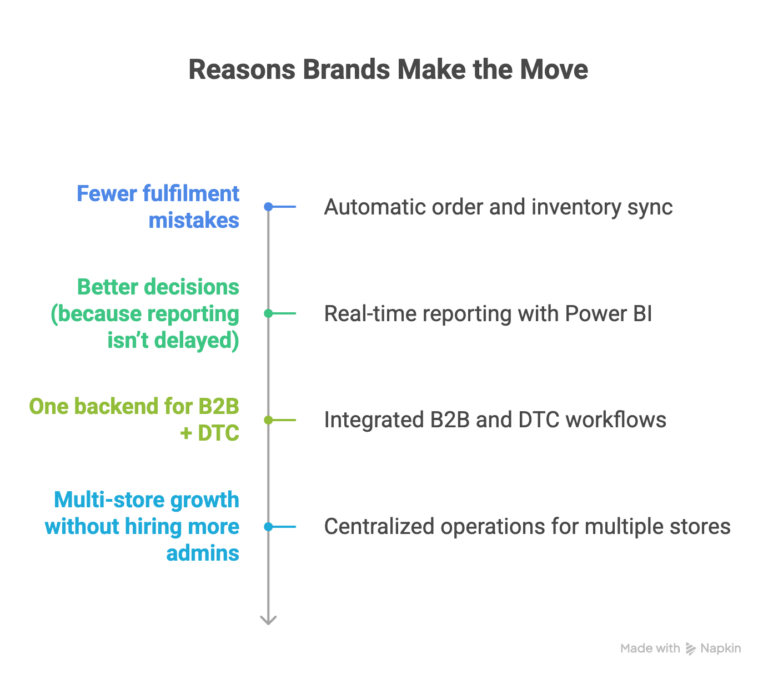
Fewer fulfillment mistakes
When orders and inventory sync automatically, the manual “touchpoints” disappear, and that’s where most errors happen (wrong quantity, missed updates, shipping delays).
Better decisions (because reporting isn’t delayed)
Business Central works well with Power BI, so you can build dashboards that reflect actual operations, sales performance, stock health, profitability, and cash flow.
Instead of reacting after the month ends, you can see issues while they’re still fixable.
One backend for B2B + DTC
If you’re doing wholesale + DTC, you already know the pain: separate pricing, separate workflows, and messy customer management.
Business Central supports B2B workflows natively, and the connector can support customer/company mapping and matching, making Dynamics 365 Shopify integration a strong choice for hybrid business models.
Multi-store growth without hiring more admins
A second Shopify store shouldn’t mean doubling the operations work. With Business Central, multiple stores can roll up into one operational layer, so growth doesn’t automatically mean headcount.
Success Story
Fashion brand (DTC + wholesale)
Before:
- 2–3 hours/day spent reconciling inventory
- Overselling due to lag and manual adjustments
- Wholesale orders managed through email and spreadsheets
- Month-end close taking 5+ days
After Shopify + Business Central:
- Reconciliation becomes minimal (sync handles the heavy lifting)
- Overselling drops dramatically because Shopify reflects real availability.
- Wholesale pricing and workflows live inside Business Central.
- Month-end close becomes faster because data isn’t scattered.
Get a Free Shopify-BC Assessment
How the Sync Works
The connector uses Shopify’s Admin API (GraphQL) to exchange data and runs synchronisation through a job queue in Business Central. You can schedule sync intervals or trigger sync manually.
Typically synced both ways:
- products + variants (often including barcodes, tags, images, etc.)
- customers and companies (with smart matching rules)
- orders (Shopify → BC)
- fulfilment status + tracking (BC → Shopify)
- inventory levels (BC → Shopify)
Typically one-way (BC → Shopify):
- posted invoices (so customers can access them)
- extended product/marketing text (depending on setup)
Important: Microsoft updates Business Central and connector capabilities regularly. Keeping your BC environment current helps ensure compatibility with Shopify API versions and feature support.
What the Native Connector Covers (And Where You Might Need Help)
The native connector is great for:
- standard product/inventory/order flows
- multi-store setups
- scheduled sync + automation
- B2B customer mapping and pricing scenarios
- centralised inventory across locations
A partner solution helps when you have:
- complex pricing logic beyond standard rules
- non-standard fulfilment workflows
- 3PL integrations
- legacy ERP migration and historical data
- advanced reporting requirements
Also worth noting: if your broader architecture includes other Dynamics apps (beyond Business Central), you may need a more custom integration approach.
Practical Setup Steps
Here’s a simple path most teams follow:
1. Clean up Shopify data first: Standardize SKUs, review variants, remove duplicates, and confirm location setup.
2. Prepare Business Central: Start with a trial or ensure your environment is on a current release.
Getting started
3. Install/configure the connector: In Business Central, create a Shopify Shop record and authorize it in the Shopify admin.
4. Map data and test in the sandbox: Decide what syncs (products, locations, customers, pricing). Please conduct early testing, address any mismatches, and then
5. Go live + schedule automation: Configure job queue frequency based on volume (higher volume = more frequent sync).
Conclusion
If you’re tired of manual fixes, app overload, and unclear numbers, a Business Central Shopify connector can turn your Shopify store into a scalable operation, with clean inventory, faster fulfillment, and finance you can trust.
At 2HatsLogic, we help Shopify brands across the USA and Europe implement Shopify Business Central integration the right way, fast, clean, and without painful surprises.
Get Your Free Shopify-BC Assessment
FAQ
Does Business Central work with Shopify Plus?
Yes. The connector supports standard Shopify and Shopify Plus. Shopify Plus can add stronger B2B storefront options, which pair well with Business Central’s B2B backend capabilities.
Will this overwrite my Shopify data?
Your Shopify store remains intact. The connector syncs/imports data; testing in a sandbox is the safest way to validate behavior before production.
Is the native connector enough?
For most growing brands, yes. Third-party middleware is typically only needed for edge cases like heavy customization, complex 3PL setups, or legacy ERP constraints.
Can it support multiple Shopify stores?
Yes, multi-store Shopify BC setups are one of the most valuable wins for scaling brands.
Table of contents


Related Articles