Greetings! I'm Aneesh Sreedharan, CEO of 2Hats Logic Solutions. At 2Hats Logic Solutions, we are dedicated to providing technical expertise and resolving your concerns in the world of technology. Our blog page serves as a resource where we share insights and experiences, offering valuable perspectives on your queries.

Quick Summary
Intelligent Document Processing (IDP) is the quiet powerhouse behind how modern retailers automate invoices, purchase orders, and supply-chain paperwork. This guide breaks down what IDP actually is, how it plugs into your ERP, and the exact retail workflows where it delivers real ROI, no fluff.
If you’re running a retail operation, you already know the grind. Every single day, a fresh wave of supplier invoices, purchase orders, delivery confirmations, and returns paperwork lands in your inbox. Some of it’s a clean PDF. Some of it’s a scanned image of a crumpled fax. And a surprising amount of it? Still manually typed into your ERP by someone on the team.
That’s the bottleneck. And it’s costing you more than you think.
The good news? There’s a smarter way to handle this. It’s called Intelligent Document Processing, and it’s quickly becoming one of the most impactful automation tools in retail operations.
What Is Intelligent Document Processing?
IDP is a technology that automatically captures, reads, classifies, and extracts data from documents, regardless of format, and routes that data into your business systems. We’re talking invoices, purchase orders, shipping manifests, returns forms, and more. It uses a combination of OCR (Optical Character Recognition), Natural Language Processing (NLP), and Machine Learning (ML) to do what used to take a human several minutes in seconds.
Here’s what IDP is not: it’s not just fancy OCR. Traditional OCR scans a document and spits out text. IDP goes several layers deeper; it understands context. It knows the difference between an invoice number and a vendor reference code. It can handle messy, inconsistent formats from dozens of different suppliers without needing a new template for each one.
Pro Tip: When evaluating IDP vendors, always ask for a demo using your actual supplier documents, not their sample test files. Real-world retail invoices are messy, inconsistent, and multilingual. If a solution can’t handle your needs out of the box, it won’t deliver the ROI you’re expecting.
IDP vs. Traditional Automation
Before we go deeper, let’s clear up a common point of confusion. A lot of retailers already have some automation running, maybe a basic rule-based system or a simple OCR scanner hooked up to their ERP. That’s a start, but it’s not the same thing as IDP. Here’s how they actually stack up:
| Feature | Traditional Automation | Intelligent Document Processing |
| Document Handling | Requires fixed templates for each document type | Adapts to varied, unstructured formats automatically |
| Learning Ability | Static, needs manual updates when formats change | Self-learning improves accuracy with each document processed |
| Error Rate | Higher, especially with messy or handwritten docs | 90%+ accuracy from day one, improving over time |
| ERP Integration | Often requires custom coding per system | Pre-built connectors for SAP, Dynamics, NetSuite, and more |
| Scalability | Struggles with volume spikes (e.g., holiday season) | Cloud-native, scales on demand without extra setup |
| Setup Time | Weeks to months of configuration | Days, thanks to pre-trained AI models |
See the gap? Traditional automation gets you partway there. IDP gets you the rest of the way, and then keeps improving on its own.
Wondering if IDP is the right fit for your retail ops?
How Email-to-ERP and IDP Work Together
Here’s where it gets interesting. Most retail document workflows start the same way: a supplier sends an invoice or a delivery note, usually via email. That document then needs to end up, cleanly, correctly inside your ERP system.
Without IDP, that middle step is manual. Someone downloads the attachment, opens it, reads it, and types the data into the ERP. Rinse and repeat, dozens or hundreds of times a day.
With IDP, the workflow looks like this:
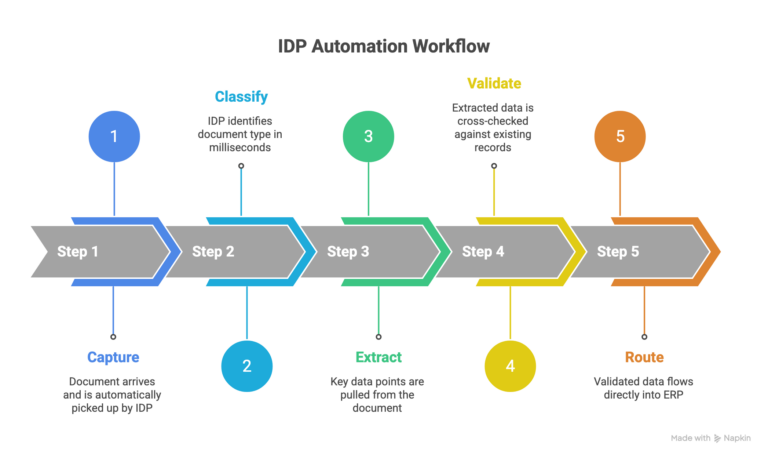
Step 1 – Capture: The document arrives (email, scan, or upload). IDP picks it up automatically.
Step 2 – Classify: The system identifies what kind of document it is. Invoice? Purchase order? Delivery confirmation? Done in milliseconds.
Step 3 – Extract: Key data points are pulled out, vendor name, invoice number, line items, totals, and due dates.
Step 4 – Validate: The extracted data is cross-checked against your purchase orders and existing records. If something doesn’t match, it flags it for a human to review.
Step 5 – Route: Validated data flows directly into your ERP. No copy-paste. No manual entry.
Watch Out: Don’t skip the validation step. It’s tempting to go fully touchless right away, but even the best IDP systems benefit from a human-in-the-loop check during the first few weeks. This is how the system learns your specific supplier formats and gets even more accurate over time.
What Retailers Use IDP For
Enough theory. Let’s get into the real-world use cases that are moving the needle for retail businesses right now.
Supplier Invoice Processing
This is the big one. Retailers receive invoices in every format imaginable: PDFs, scans, emails, even photos of paper invoices. IDP handles all of them. It extracts the key data, matches it against purchase orders, and pushes it into the ERP for payment processing. An online furniture retailer cut its manual invoice processing time by 70% using IDP, and that’s a pretty typical result.
Purchase Order & Goods Receipt Matching
When goods arrive, they come with packing lists, delivery notes, and sometimes handwritten manifests. IDP captures the details, quantities, lot numbers, SKUs, and updates your warehouse or inventory system automatically. No more manual counts and mismatches eating up your team’s time at the dock.
Returns & Refund Documentation
Returns are one of the messiest parts of retail. The paperwork is inconsistent, the formats vary by customer and carrier, and delays in processing refunds directly hurt customer satisfaction. IDP can auto-classify return forms, extract order references, and trigger the refund workflow in your system without anyone manually touching the document.
Pro Tip: Start IDP with one high-volume document type first, usually supplier invoices. Get that workflow dialed in and running smoothly before expanding to PO matching or returns. This approach lowers risk and gives you fast, measurable ROI to justify further rollout internally.
Ready to Cut the Paper Trail?<br />
How to Implement IDP in Retail
Alright! So you’re convinced IDP is worth exploring. The next question is: how do you roll it out without a massive IT overhaul?
The good news is that modern IDP solutions are designed to slot into your existing tech stack, not replace it. Here’s how a typical retail IDP implementation looks:
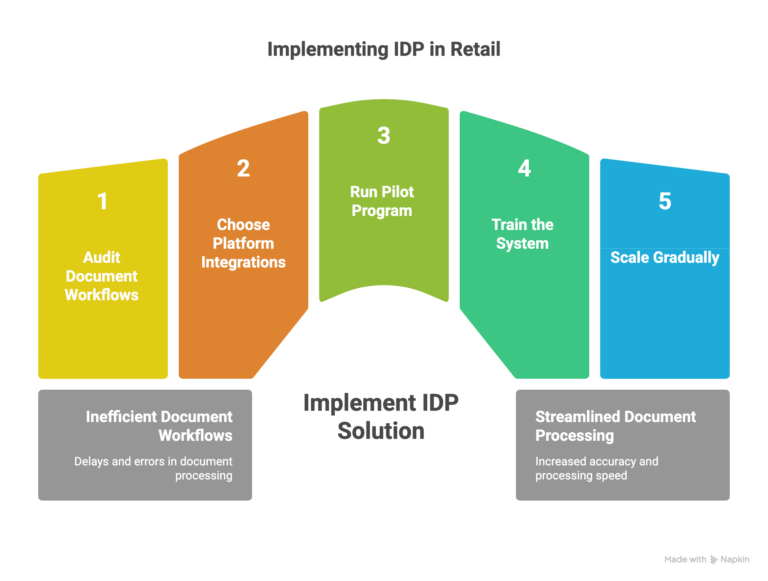
1. Audit your document workflows first. Map out where documents enter, how they move through your team, and where delays and errors actually occur. This is your baseline. Without it, you’re guessing.
2. Choose a platform that fits your ERP. If you’re running SAP, Microsoft Dynamics 365, NetSuite, or a commerce platform like Shopware, your IDP solution needs native or well-supported integrations. Pre-built API connectors are non-negotiable here; custom middleware is expensive and slow.
3. Run a pilot on one document type. Pick your highest-volume document, usually invoices, and run a 2–4 week pilot. Measure accuracy, processing speed, and error rates against your current manual process.
4. Train the system, not just your team. IDP learns from the documents it processes. Feed it real examples early, provide feedback on any misclassifications, and let it improve. Your team’s job in the first weeks is to validate, not to manually re-enter.
5. Scale gradually. Once your pilot document type is running smoothly, expand to the next one. PO matching, delivery notes, returns, layer them in as confidence builds.
Compliance Heads-Up: If you’re operating in the EU or GCC markets, document automation isn’t just about speed; it’s about regulatory alignment. In Europe, GDPR (DSGVO) compliance means your IDP solution must handle personal data securely, maintain audit trails, and support data residency requirements. In GCC regions, VAT documentation standards and e-invoicing mandates (especially in Saudi Arabia and the UAE) add another layer. Choose an IDP platform that supports region-specific document formats and compliance rules out of the box.
What to Look for When Choosing an IDP Solution
The IDP market is growing fast, valued at $10.57 billion in 2025 and projected to hit $91.02 billion by 2034, growing at a CAGR of 26.20%, which means there are a lot of options out there. Not all of them are created equal, especially for retail.
Here’s what matters when you’re evaluating:
Accuracy out of the box. Top IDP solutions deliver 90%+ accuracy from day one thanks to pre-trained models. If a vendor can’t show you real accuracy benchmarks on retail, walk away.
ERP compatibility. Your IDP tool needs to talk to your ERP cleanly. Native connectors for SAP, Dynamics, NetSuite, and Odoo are the baseline. If integration requires heavy custom development, that’s a red flag.
Handling of unstructured documents. Retail suppliers aren’t going to send you perfectly formatted PDFs every time. Your IDP solution needs to handle scanned images, handwritten notes, and multi-language documents without breaking.
Cloud-native deployment. Cloud-based IDP scales with your volume, critical for retailers who hit major spikes during holidays or seasonal sales. On-premise solutions can work, but they require significantly more infrastructure investment.
Self-learning capability. The best IDP systems get smarter over time. If the solution relies on static rules and templates, you’ll be doing manual maintenance every time a supplier changes their invoice format.
Conclusion
The days of manually keying invoice data into your ERP are numbered. Intelligent Document Processing isn’t a future technology, it’s happening right now, and the retailers adopting it early are the ones pulling ahead on efficiency, accuracy, and vendor relationships.
You don’t need a massive IT budget or a full-on digital transformation project to get started. A focused pilot on your highest-volume document type, paired with the right IDP platform, can deliver measurable results in weeks, not months.
The question isn’t really whether IDP makes sense for your retail operation. It’s how fast you want to stop doing the work manually.
FAQ
We already have OCR running. Why do we need IDP on top of that?
OCR reads text off a page. IDP actually understands it, it classifies the document, extracts the right fields, validates them against your records, and routes everything into your ERP. Automatically.
What happens when we hit peak season and volumes spike?
Cloud-based IDP scales automatically. Whether you're processing 200 or 2,000 invoices a day, it handles it, no extra servers, no temp hires for data entry. This is exactly where rule-based automation falls apart.
Our invoices come in different languages. Can IDP handle that?
Yes. Modern IDP seamlessly handles multilingual documents, including German, Arabic, English, and mixed languages, and accurately transfers the data into your ERP system. No manual translation needed.
Returns paperwork is a mess for us. Can IDP fix that?
Yes. IDP auto-classifies return documents, pulls out order references, and triggers the right refund workflow, regardless of carrier or format. Faster refunds, less manual chasing.


Related Articles