Greetings! I'm Aneesh Sreedharan, CEO of 2Hats Logic Solutions. At 2Hats Logic Solutions, we are dedicated to providing technical expertise and resolving your concerns in the world of technology. Our blog page serves as a resource where we share insights and experiences, offering valuable perspectives on your queries.

Imagine hiring someone whose entire job is to sit between your email inbox and your ERP system. They open every invoice, every purchase order, every packing slip. They read every line. They type every field into the right place. They never take a lunch break, never misread a number, and never accidentally post an invoice to the wrong vendor.
That’s what Intelligent Document Processing does. Except it works across your ecommerce platform, too. And it gets faster and more accurate the longer it runs.
The reality for most mid-market companies today? That “someone” is actually three or four people on your ops and finance team, doing this work alongside their real responsibilities, and making about 100 errors per 10,000 entries along the way. With the IDP market growing at over 33% annually and now valued at $3.2 billion (Precedence Research), businesses are figuring out there’s a better way. This guide walks you through how to connect IDP with your ERP and ecommerce stack, from architecture to platform specifics to the mistakes you’ll want to avoid.
What Is IDP?
Intelligent Document Processing uses AI, machine learning, and natural language processing to read, understand, and extract data from documents. Unlike basic OCR that reads characters, IDP understands context. It sees “15/03/2026” next to “Invoice Date” and knows that’s a date field for your ERP, not just a string of numbers.
The IDP pipeline runs in four stages:
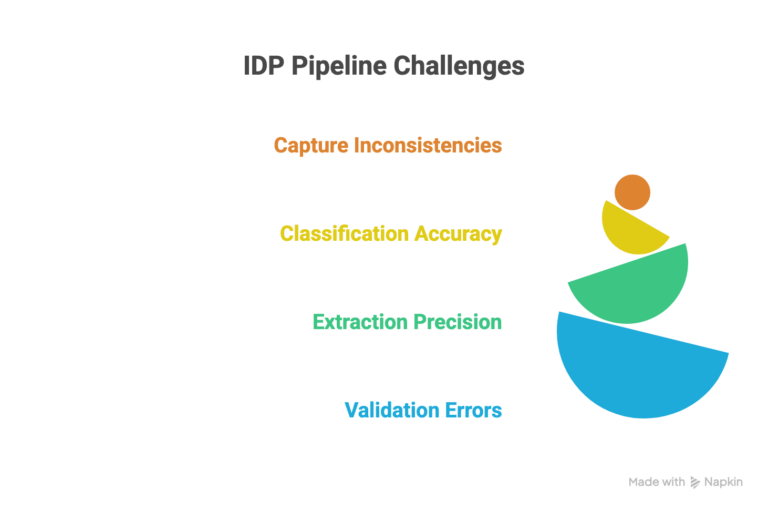
- Capture: Document arrives via email, upload, scan, or API.
- Classify: System identifies the document type, invoice, PO, packing slip, and return form.
- Extract: AI pulls key fields, line items, totals, dates, SKUs, and tax amounts.
- Validate & Export: Data is checked against business rules and pushed to your ERP or ecommerce platform.
It handles structured documents (forms), semi-structured ones (vendor invoices that vary in layout), and fully unstructured content (emails, scanned contracts). If someone’s currently eyeballing a document and typing its contents into a system, IDP can handle it.
How IDP Connects With Your ERP System
Connecting IDP to your ERP means building a data bridge between unstructured documents and structured database tables. Three common integration patterns:
- Direct API: IDP sends data straight to your ERP’s API. Cleanest option, but needs modern APIs.
- Middleware/iPaaS: Power Automate, Workato, or MuleSoft handles transformation and routing between IDP and ERP.
- RPA bridge: For older systems without APIs, bots mimic user actions to input data. Not elegant, but effective as a transitional fix.
Business Central: Power Automate is the natural connector. Typical flow: supplier invoice arrives → IDP extracts vendor ID, line items, GL codes, tax → Power Automate validates against open POs → auto-posts or flags for review. Watch out for multi-currency and tax code mismatches.
SAP: Integrate via SAP BTP or third-party middleware. SAP’s strict field validation means your data mapping must be airtight, especially around master data alignment.
NetSuite/Odoo: Both offer solid REST API access. The critical factor: matching extracted records against existing master data. No match = route to a human.
Legacy ERPs (NAV, Sage): Limited API access means you’ll rely on CSV/XML drops, database writes, or middleware bridges. This challenge often triggers the broader ERP migration conversation.
Pro Tip: Start with supplier invoices, they’re high-volume and high-impact. A quick win here builds internal buy-in faster than any business case presentation.
How IDP Connects With Your E-commerce Platform
E-commerce looks fully digital, but documents are everywhere, especially in B2B. Supplier catalogs, wholesale price lists, B2B purchase orders, packing slips, customs docs, return requests, and warranty claims all require someone to read, interpret, and enter data manually. IDP automates that entire loop.
Shopify/Shopify Plus: Admin API + Shopify Flow ingest IDP data. Example: B2B buyers send PDF purchase orders → IDP extracts line items and quantities → auto-creates draft orders in Shopify. What took an hour per order now takes seconds.
WooCommerce: REST API and webhooks handle IDP-triggered actions, auto-processing return PDFs, updating catalogs from supplier data sheets.
Shopware: API-first architecture is a natural fit. Particularly relevant for DACH markets where German invoicing standards (Zugferd, XRechnung) add complexity that IDP + RPA handles at scale.
The real power emerges when IDP feeds both systems simultaneously. A supplier ships goods, the packing slip gets scanned, IDP extracts quantities, your ERP updates inventory and posts the AP entry, and your ecommerce store updates stock levels, all in real time. No double entry, no lag, no “which system has the right number?” confusion.
Processing hundreds of documents weekly across your ERP and store?
Choosing the Right Integration Approach
The right method depends on document volume, system complexity, team skills, and budget:
| Approach | Best For | Key Limitation |
| iPaaS (Power Automate, Workato) | Cloud stacks, mid-volume, limited dev resources | Limited edge-case customization; costs scale per transaction |
| Custom API Integration | High-volume, multi-system workflows; in-house dev teams | Higher upfront cost; ongoing maintenance |
| RPA + IDP Combination | Legacy systems; transitional automation during ERP migration | Brittle if UIs change; not long-term |
Sizing guide
Under 500 docs/month → iPaaS.
500–5,000 → custom API or advanced iPaaS.
Above 5,000 → dedicated middleware with transformation and exception handling.
Companies mid-ERP-migration can use RPA + IDP as a bridge, then shift to API-based integration post-migration.
5 Mistakes That Derail IDP Integration
1. Skipping the document audit. Jumping into tool selection without cataloging your document types, volumes, sources, and formats leads to an IDP tool that works for invoices but chokes on everything else.
2. Ignoring master data quality. IDP extracts perfectly, but if your vendor master or GL codes are messy, nothing matches. Clean your master data before or alongside implementation.
3. Over-automating too early. Going from 100% manual to 100% automated overnight invites costly errors. Start with human-in-the-loop validation, then gradually increase auto-approval thresholds.
4. Treating IDP as a one-time setup. Formats change. Suppliers change. The model needs ongoing tuning. Build retraining into your ops cadence.
5. Choosing the wrong integration method. Using RPA permanently when APIs exist, or building custom when iPaaS would suffice. Match the approach to your actual reality, not aspirational architecture.
Pro Tip: Manual data entry averages about a 1% error rate per field. Sounds small, but across thousands of entries monthly, it compounds into invoice disputes, wrong shipments, and reconciliation nightmares. IDP doesn’t just save time; it saves you from bad data’s ripple effects.
Your 5-Step Action Plan
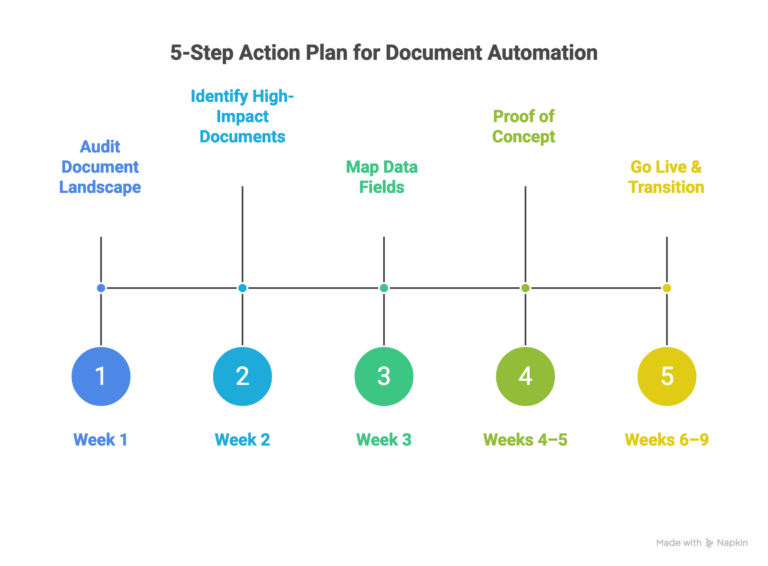
Step 1: Audit your document landscape. Catalog every document type, note volume, sources, and processing time.
Step 2: Identify your top 2-3 highest-impact documents by volume, error rate, or delay. Supplier invoices are almost always the best starting point.
Step 3: Map data fields between systems. List exact fields, identify format mismatches (dates, currencies, SKUs), and define auto-post vs. human-review rules.
Step 4: Run a 2-week proof of concept with real production documents, messy ones, not clean samples. Measure accuracy, speed, and exception rate.
Step 5: Go live with parallel processing for 2-4 weeks, then transition to IDP-primary. Within 6 weeks, you’re fully operational.
Conclusion
Your documents shouldn’t be a bottleneck. They should be fuel.
IDP takes the invoices, purchase orders, packing slips, and return forms that are currently eating up your team’s time and turns them into clean, structured data, flowing directly into your ERP and ecommerce platform. No manual typing. No compounding errors. No more guessing which system has the right number.
Start small. One document type. One proof of concept. One quick win. Then scale from there.
Ready to connect IDP with your ERP and ecommerce platform?
FAQ
What document types can IDP process?
Invoices, POs, receipts, packing slips, customs docs, product data sheets, contracts, any structured, semi-structured, or unstructured business document.
How accurate is IDP vs. manual entry?
Modern IDP achieves 90–99% accuracy, improving over time. Manual entry runs 96–99% but degrades with volume. Automated systems make roughly 100x fewer errors at scale.
Can IDP work with legacy ERPs?
Yes, via file-based exports, database writes, RPA bridges, or middleware translation layers.
Do I need to replace my ERP or ecommerce platform?
No. IDP layers on top via APIs, middleware, or file connections. No rip-and-replace required.


Related Articles