Greetings! I'm Aneesh Sreedharan, CEO of 2Hats Logic Solutions. At 2Hats Logic Solutions, we are dedicated to providing technical expertise and resolving your concerns in the world of technology. Our blog page serves as a resource where we share insights and experiences, offering valuable perspectives on your queries.

You’ve just rolled out that shiny new AI document capture tool for your AP invoices.
The promise was simple: scan PDFs, extract data, post to ERP, save hours of manual work.
But three weeks in, you’re dealing with duplicate vendor payments, stock mismatches from wrong purchase orders, and your finance team is furious because reconciliation is taking longer than before.
Sound familiar?
Here’s the thing: AI-powered tools can absolutely transform how you process invoices and purchase orders. But here’s what the sales pitch doesn’t tell you, AI sometimes gets things wrong. And in the world of ERP and finance, “sometimes wrong” means incorrect payments, compliance headaches, and very angry auditors.
Think of it this way: would you let a new employee post invoices to your accounting system without anyone checking their work first? Probably not. Your AI tool deserves the same level of oversight.
This guide walks you through the exact validation frameworks we’ve built for companies running SAP, Business Central, Odoo, and Oracle. You’ll learn how to catch errors before they become expensive problems, stop duplicate payments in their tracks, and build confidence that your AI is helping rather than creating new headaches.
Let’s dive in.
Core Challenges in AI-Extracted Data Before Posting to ERP
Before we talk solutions, let’s call out the real problems you’re facing.
Common AI extraction errors:
- Confidence score failures: AI reads “1,234.56” as “1234.S6” because of poor scan quality
- Field mismatches: Invoice date captured as vendor code, amount as PO number
- Missing mandatory fields: Tax ID, cost center, GL account left blank
- Format inconsistencies: Date formats (DD/MM vs MM/DD), currency symbols, decimal separators
Impact on your operations:
- AP teams waste hours fixing posting errors and duplicate payments
- Procurement can’t match GRNs to invoices because quantities don’t align
- Audit flags pop up because there’s no trail showing who approved the AI-extracted data
- Vendor relationships suffer when you pay the wrong amounts or double-pay
The root cause? Most AI document capture tools focus on extraction speed, not validation depth.
You need both.
Best Practices for Validating AI-Extracted Data
Field-level validation is your first line of defense. Here’s how to set it up:
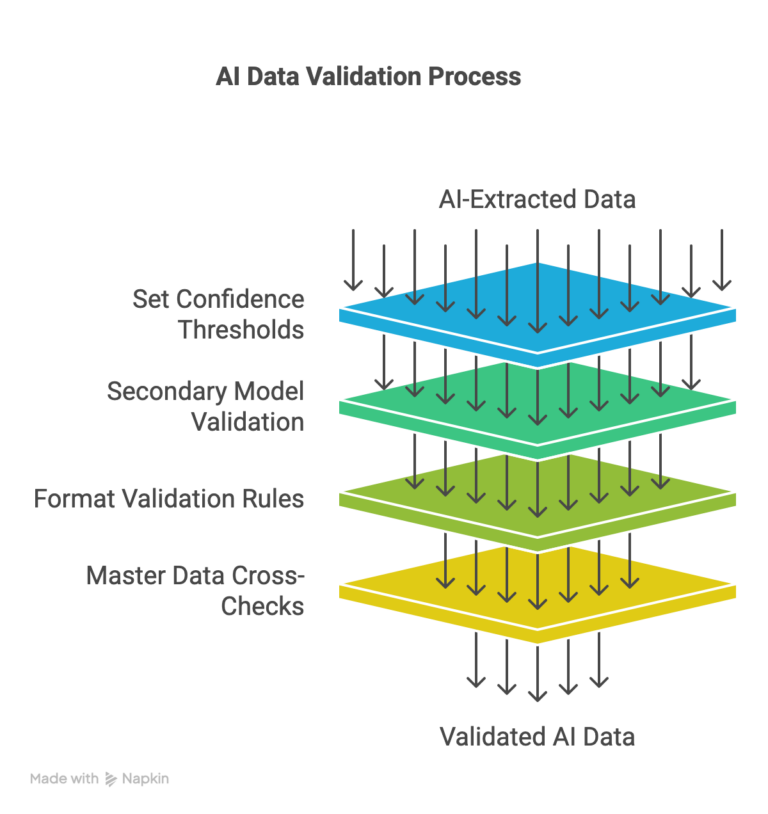
1. Set Confidence Score Thresholds
AI tools assign confidence scores (0-100%) to each extracted field.
Don’t accept everything blindly.
Recommended thresholds:
- 97%+ for financial fields: Invoice amount, payment amount, tax calculations
- 95%+ for critical identifiers: Vendor code, invoice number, PO number
- 90%+ for standard fields: Invoice date, delivery date, line items
- 85%+ for descriptive fields: Item descriptions, notes, addresses
Anything below these thresholds? Route it to a human review queue or trigger secondary validation.
2. Secondary Model Validation
When your primary AI model returns low confidence, don’t immediately flag it for manual review.
Run it through a secondary validation layer first:
- Use a different OCR engine for cross-verification
- Apply specialized models for specific field types (date extractors, currency parsers)
- Leverage LLM-based validation for context understanding
This catches errors that one model alone might miss.
3. Format Validation Rules
Use regex patterns and data type checks to catch format errors before they reach ERP:
- Invoice numbers: Alphanumeric with specific patterns (e.g., INV-\d{6})
- Tax IDs: Country-specific formats (German USt-IdNr, UAE TRN, US EIN)
- Bank accounts: IBAN validation with country codes and checksum verification
- Currencies: ISO 4217 codes (USD, EUR, AED) with proper decimal places
- Dates: Standardize to ISO 8601 format before posting
Example: If your vendor master only accepts USD and EUR, reject any invoice with JPY or GBP before posting.
4. Master Data Cross-Checks
This is where validation gets powerful.
Before posting, verify extracted data against your ERP master tables via API:
- Vendor code exists and is active? Check vendor master (SAP LFA1, Business Central Vendor table)
- GL account valid for the current period? Validate the chart of accounts
- Is the cost center active and assigned? Cross-check organizational structure
- Tax code matches jurisdiction? Verify tax configuration
- Does the item/SKU exist in the inventory master? Validate material master
Real example from a client: Their AI tool extracted a vendor code “V12345” that didn’t exist in SAP. Without validation, it would’ve created a new vendor record with incorrect tax settings. Field-level checks caught it, flagged it for AP review, and prevented a compliance issue.
Tip: Before implementing any AI extraction tool, map out every mandatory field in your ERP posting transactions. Missing even one field means rejected postings and manual rework.
Best Practices for Validating AI-Extracted Data: Workflow and Governance
Validation isn’t just about rules, it’s about who reviews what, when.
Human-in-the-Loop (HITL) Design
Not every extracted document needs human review. Design your exception queues smartly:
Auto-approve if:
- All confidence scores >95%
- All field and cross-doc validations pass
- Vendor has 100% historical posting success rate
Route to review if:
- Any confidence score <90%
- Validation warnings (within tolerance but flagged)
- New vendor, first-time PO, or amount >$10,000
Escalate to AP manager if:
- Hard validation failures (duplicate, missing PO, blocked vendor)
- Amount variance >10%
- Tax calculation mismatches
Audit Trail Requirements
Every validation step must be logged for compliance:
- Timestamp: When extraction happened, when validation ran, when approval occurred
- User ID: Who performed manual reviews or overrides
- Confidence scores: Store original AI scores for every field
- Validation results: Pass/fail for each rule, with error messages
- Changes: Document any manual corrections with before/after values
Make these logs immutable and exportable for audits.
Tip: Set up real-time dashboards showing validation pass rates, top error types, and average processing time. This helps you continuously improve your rule sets.
Want help designing your validation workflow?
ERP-Specific Validation for AI-Extracted Data Before Posting
Different ERPs need different approaches. Here’s what works:
SAP S/4HANA
- Use posting blocks (BKPF-BSTAT) to hold documents with validation warnings
- Implement BAdIs (Business Add-Ins) for custom validation logic at posting time
- Leverage workflow tasks (SWI1) for exception routing
Microsoft Dynamics 365 Business Central
- Build Power Automate flows with approval steps for flagged documents
- Use posting previews to validate GL impact before commit
- Create custom validation codeunits triggered on document insert
Odoo ERP
- Configure automated workflows with Python server actions
- Implement constraint validations on invoice models
- Use activity tracking for audit trails
Download Guide
Get our comprehensive guide delivered to your inbox.
Conclusion
Here’s what you now know: AI-extracted data can transform your ERP workflows, but only when you validate before posting.
The framework is straightforward:
- Field-level checks catch extraction errors
- Cross-document matching prevents logical mistakes
- Human-in-the-loop handles edge cases
- Audit trails keep you compliant
Start with one document type. Get validation working perfectly. Then scale.
The companies winning with AI + ERP aren’t the ones with the fanciest tools, they’re the ones who built rock-solid validation frameworks first.
Ready to implement validation best practices for your ERP?
At 2HatsLogic, we’ve helped dozens of companies build bulletproof AI-to-ERP integrations with zero posting errors and full audit compliance.
FAQ
How do I prevent duplicate invoices with AI extraction?
Implement a three-layer check: (1) Hash key matching on vendor+invoice#, (2) Fuzzy matching on vendor+amount+date, (3) Maintain a processed invoice registry table that all new extractions check against before posting.
Should validation happen in the AI tool or in middleware?
Both. Use the AI tool for confidence scoring and basic format checks. Use middleware (iPaaS or custom integration layer) for master data validation and cross-document matching. This separation makes your architecture more maintainable.
What confidence score threshold should I use for invoice amounts?
Start with 95%. This balances accuracy with manual review burden. If your OCR quality is exceptional, you can lower to 92-93%, but never go below 90% for financial fields.


Related Articles