Greetings! I'm Aneesh Sreedharan, CEO of 2Hats Logic Solutions. At 2Hats Logic Solutions, we are dedicated to providing technical expertise and resolving your concerns in the world of technology. Our blog page serves as a resource where we share insights and experiences, offering valuable perspectives on your queries.

You’ve got a pile of invoices sitting in your inbox. Another stack of bills of lading from three different carriers. A customs declaration that someone scanned at an angle on their phone.
And somewhere in your office, a very tired person is manually keying all of that data into your ERP. Sound familiar?
If you’re in accounts payable, logistics, or supply chain operations, you already know the pain. Manual document processing is slow, expensive, and error-prone. One wrong digit on a freight charge can snowball into payment disputes, shipment delays, and a reconciliation headache that eats up your entire afternoon.
Here’s the thing: OCR technology has been around for decades. But the OCR you tried five years ago? It’s not the same technology making headlines today. AI-based OCR has fundamentally changed the game, and the accuracy numbers are finally worth paying attention to.
Let’s break down exactly how accurate AI OCR for invoices and logistics documents really is right now, no hype, just benchmarks, and practical guidance.
What Is AI-Based OCR And Why Should You Care?
Let’s get the basics straight before we dive into accuracy numbers.
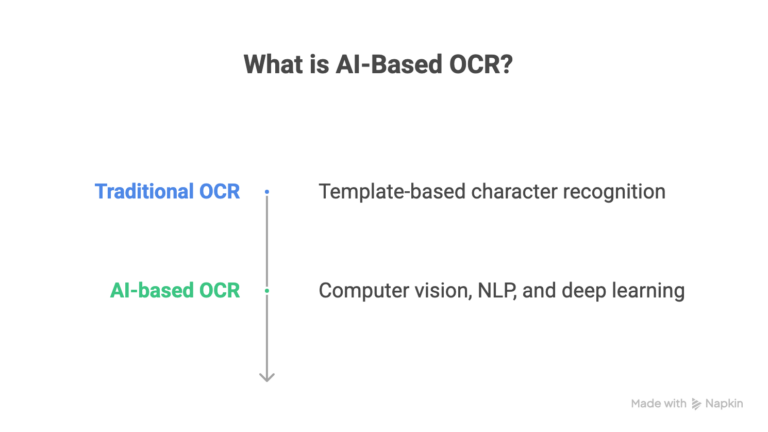
Traditional OCR is template-based character recognition. It reads characters from fixed zones on a page. Give it a perfectly formatted, single-layout invoice? It works fine. Give it a handwritten bill of lading scanned at a weird angle? It falls apart.
Think of traditional OCR like a tourist reading a foreign menu; it recognizes the letters but completely misses the meaning.
AI-based OCR is a different animal. It combines computer vision, natural language processing (NLP), and deep learning to actually understand what a document is saying. It doesn’t just read characters; it identifies fields like invoice numbers, line items, tax amounts, and PO references without needing a pre-built template for every vendor.
The key difference? Traditional OCR reads text. AI OCR understands documents.
And that distinction matters enormously when you’re processing hundreds of invoices from dozens of vendors, each with a completely different layout.
AI OCR vs Traditional OCR for Invoices
Before you evaluate any intelligent document processing solution, you need to understand what’s actually changed. Here’s a straightforward comparison:
| Feature | Traditional OCR | AI-Based OCR |
| Character accuracy on clean docs | 95-98% | 98-99.5% |
| Field-level extraction accuracy | 70-85% (template-dependent) | 85-99% (context-aware) |
| Template dependency | Requires a template per layout | Template-free extraction |
| Handling of handwriting | Very poor | Moderate to good |
| Multi-language support | Limited | Broad (50+ languages) |
| Learning over time | None, static rules | Improves with feedback loops |
| Setup complexity | High (per-template config) | Lower (trains on your data) |
The takeaway here is simple. If you’re processing invoices from more than a handful of vendors or dealing with any logistics paperwork at all, traditional OCR is going to let you down.
AI-powered invoice data extraction handles the variability that traditional systems simply can’t.
How AI OCR Processes Your Invoices
Understanding the pipeline helps you evaluate where accuracy gains (and losses) happen. Here’s the step-by-step:
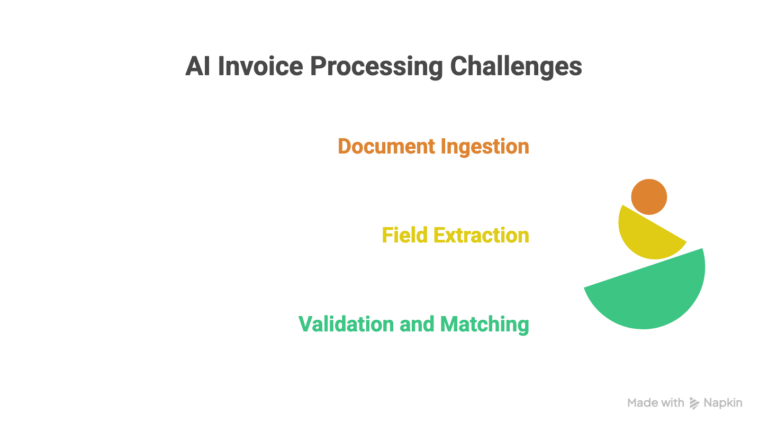
Step 1: Document Ingestion and Pre-Processing. The system accepts scanned images, PDFs, photos, email attachments, and faxed documents. It auto-corrects skew, rotation, noise, and low resolution before extraction even begins. A classification engine identifies whether the document is an invoice, credit note, delivery receipt, or something else entirely.
Step 2: Field Extraction and Contextual Understanding. The model locates key fields: vendor name, invoice number, date, line items, totals, tax breakdowns, and PO references. The NLP layer interprets context, so it knows the difference between “Ship To” and “Bill To.” It assigns confidence scores to every extraction, flagging uncertain fields for human review.
Step 3: Validation, Matching, and ERP Handoff. Extracted data gets cross-referenced against purchase orders, vendor master records, and your business rules. Three-way matching (invoice vs. PO vs. goods receipt) can be fully automated. Clean, validated data is then pushed directly into your ERP, whether that’s Dynamics 365, SAP, NetSuite, or Odoo.
Pro Tip: The biggest accuracy killer isn’t the AI model itself; it’s poor scan quality at the ingestion stage. If your team is snapping invoices with phone cameras in bad lighting, even the best AI OCR will struggle. Invest in a simple scanning protocol before you invest in software.
How Accurate Is AI OCR for Invoice Processing?
This is the question everyone asks. And the honest answer is: it depends on what you’re measuring.
Character-Level vs. Field-Level vs. Document-Level Accuracy
Here’s where most vendors get sneaky.
Character-level accuracy (99%+) sounds impressive, but it’s misleading. If an AI reads “5,432.00” as “5,482.00,” that’s 99.7% character accuracy, but a completely wrong invoice total.
Field-level accuracy is what actually matters for your operations. It measures whether the AI extracted the right value for the right field. Did it correctly pull the invoice number? The line-item quantities? The tax amount?
Document-level accuracy is the gold standard, where every single field on the entire invoice is captured correctly. This is the hardest benchmark to hit.
When you’re evaluating any OCR technology for invoice processing, always ask for field-level and document-level accuracy numbers. Ignore character-level stats.
Real-World Accuracy Benchmarks
Based on current industry data and our own deployment experience at 2HatsLogic, here’s what you can realistically expect from AI-based OCR accuracy in 2026:
Structured invoices (ERP-generated, consistent layout): 95–99% field-level accuracy achievable out of the box.
Semi-structured invoices (varying vendor formats): 85–95% accuracy, improving significantly with training data over the first 90 days.
Unstructured or handwritten invoices: 70–85% accuracy, still requires human-in-the-loop review for now.
The “last mile” problem is real. Going from 90% to 98% accuracy requires more effort, training data, better feedback loops, and tighter validation rules.
What Affects Accuracy the Most?
Five variables that most teams overlook:
- Document scan quality and resolution: smartphone photos vs. high-resolution scans make a massive difference.
- Language and currency diversity across your vendor base.
- Volume and variety of training data available to the AI model.
- Complexity of line items: multi-line descriptions, discount structures, partial shipments.
- How well the model has been fine-tuned for your specific document types.
We'll run a free document processing pilot on your real invoices.
AI OCR Accuracy for Logistics Documents
Logistics documents are significantly tougher than invoices for AI OCR. Here’s why:
Extreme variability. You’re dealing with handwritten bills of lading, thermal-printed shipping labels, and multi-carrier customs forms, often from different countries with different standards.
Mixed data formats. Critical information is embedded in tables, stamps, barcodes, and handwritten annotations, all on the same page.
Real-world consequences. Errors in weight, quantity, or destination codes don’t just cause accounting headaches. They cause misdirected freight, customs holds, and demurrage charges.
Accuracy Benchmarks by Logistics Document Type
Here’s what we’re seeing across AI OCR for logistics and shipping documents in real deployments:
- Bills of lading: 80-92% field-level accuracy (printed vs. handwritten fields is the biggest variable).
- Commercial invoices for customs: 88-95% for machine-printed; drops significantly with handwritten entries.
- Packing lists and delivery receipts: 85-93%, challenged by inconsistent formats across vendors and carriers.
- Shipping labels and barcodes: 95%+ when paired with barcode recognition; lower for damaged or partially printed labels.
The compound value here is significant. Every 1% accuracy improvement in BOL processing can reduce exception handling by 10-15% in manual corrections. Accurate automated capture also enables real-time shipment visibility and faster customs clearance.
Pro Tip: Start your AI OCR pilot with your messiest, most time-consuming logistics document type, not your cleanest invoices. That’s where you’ll see the fastest ROI and build the strongest business case for scaling.
Common Mistakes That Kill AI OCR Accuracy
We’ve seen these patterns repeatedly across implementations. Don’t make the same mistakes.
Skipping the document audit. Deploying AI OCR without first understanding your actual document variety is like buying software without knowing your requirements. Catalog every document type, layout variation, and quality level before you start.
Choosing a solution based on demo accuracy. Vendors demo with their best documents. Insist on a pilot with your actual invoice and logistics documents. That’s the only accuracy number that matters.
Ignoring confidence scores. The AI flags uncertain extractions for a reason. Auto-approving low-confidence results defeats the purpose of intelligent document processing for invoices.
Not closing the feedback loop. When human reviewers correct extraction errors, those corrections need to feed back into the AI model. If you don’t close this loop, the AI can’t learn and accuracy plateaus.
Treating it as set-and-forget. AI OCR improves with active management. Plan for ongoing model tuning, not just initial deployment.
The ROI Reality Check
Let’s be practical about investment vs. returns:
- Realistic cost savings: 40-70% reduction in manual processing time within the first six months.
- Break-even: Typically occurs within 3-6 months for teams processing 1,000+ documents monthly.
- Hidden costs to budget for: Integration work, training data preparation, ongoing model tuning, and change management.
What’s Next
The technology isn’t standing still. Here’s what’s coming:
Multimodal AI and large document models. Next-generation models will process text, tables, handwriting, stamps, and images in a single pass. Foundation models pre-trained on millions of business documents will dramatically reduce setup time.
From extraction to autonomous processing. AI is moving beyond just data capture to actual decision-making, auto-approving invoices, flagging anomalies, and triggering payments without human intervention. Agentic AI workflows that handle exception resolution autonomously are already emerging.
Real-time processing at the point of receipt. Document automation for invoices and logistics documents will happen at the warehouse dock, the customs checkpoint, and the email inbox, not in a batch processing queue hours later.
Your 5-Step Plan to Get Started With AI OCR
Ready to move from manual data entry to automated invoice data capture using AI OCR? Here’s your action plan:
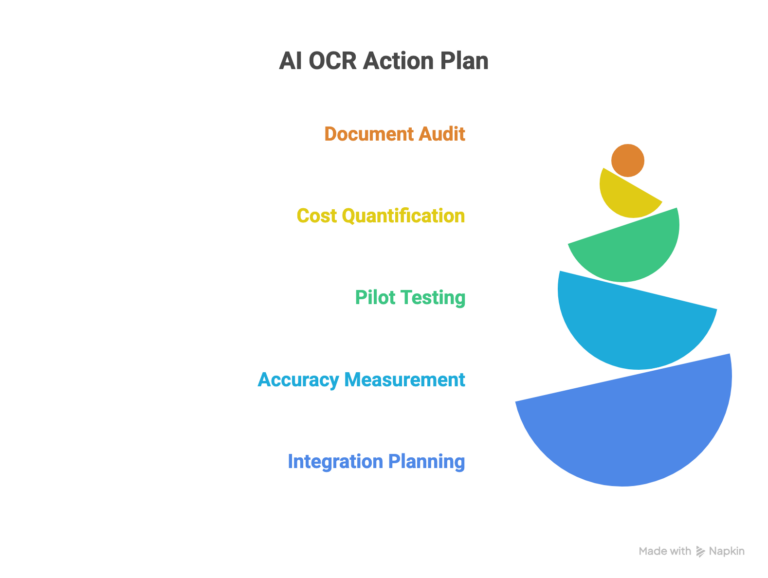
- Audit your document landscape. Catalog every invoice and logistics document type, volume, and source you process monthly.
- Quantify the cost of your current process. Hours spent, error rates, delayed payments, vendor disputes, put a number on it.
- Run a focused pilot. Test AI OCR on your 3-5 highest-volume or most error-prone document types. Use your real documents, not demo sets.
- Measure what matters. Track field-level and document-level accuracy, not character accuracy. Compare against your current manual error rate.
- Plan integration before scaling. Map out your ERP integration and human-in-the-loop workflow before expanding from pilot to production.
Conclusion
Here’s the truth accuracy benchmarks on a blog are useful, but they don’t tell you what matters most: how well AI OCR performs on your specific invoices and logistics documents.
At 2HatsLogic, we’ve helped companies across e-commerce, manufacturing, distribution, and logistics automate their document processing with intelligent OCR solutions integrated directly into their ERP systems.
FAQ
How accurate is AI OCR for invoice processing?
Field-level accuracy ranges from 85% to 99% depending on document quality, layout consistency, and model training. Structured, machine-generated invoices sit at the higher end, while handwritten or highly variable formats sit at the lower end.
What's the difference between AI OCR and traditional OCR?
Traditional OCR reads characters from fixed template zones. AI OCR uses deep learning to understand document structure and context, handling variable layouts without manual template configuration.
How long does it take to implement AI OCR for invoices?
A basic pilot can run within 2-4 weeks. Full production deployment with ERP integration typically takes 6-12 weeks, depending on document variety and system complexity.
How does AI OCR improve over time?
Through feedback loops. When human reviewers correct extraction errors, those corrections feed back into the AI model during retraining, gradually increasing accuracy for your specific document types.
Table of contents
- What Is AI-Based OCR And Why Should You Care?
- AI OCR vs Traditional OCR for Invoices
- How AI OCR Processes Your Invoices
- How Accurate Is AI OCR for Invoice Processing?
- AI OCR Accuracy for Logistics Documents
- Common Mistakes That Kill AI OCR Accuracy
- What's Next
- Your 5-Step Plan to Get Started With AI OCR
- Conclusion


Related Articles