Greetings! I'm Aneesh Sreedharan, CEO of 2Hats Logic Solutions. At 2Hats Logic Solutions, we are dedicated to providing technical expertise and resolving your concerns in the world of technology. Our blog page serves as a resource where we share insights and experiences, offering valuable perspectives on your queries.

Let me guess, you’re staring at your analytics dashboard right now, watching potential customers add products to their cart, get all the way to checkout, and then… vanish.
Poof. Gone.
And you’re wondering: “Is there a way to bring them back without hiring three more people or spending hours crafting recovery emails?”
Here’s the thing: You’re not alone in this struggle. Cart abandonment hits around 70% across e-commerce stores globally. That’s not just a number, it’s real revenue walking away from your business every single day.
But what if I told you there’s a way to recover 20-40% of those lost sales using tools you likely already have? No coding required. No expensive third-party platforms. Just Business Central, Power Automate, and a little bit of AI magic.
Ready to turn those abandoned carts into actual revenue? Let’s dive in.
The $18 Billion Problem Nobody’s Talking About
In the GCC region alone, cart abandonment costs businesses an estimated $18 billion annually.
Think about that for a second.
That’s money sitting on the table because customers got distracted, had second thoughts, or simply needed a gentle nudge to complete their purchase.
Here’s what typically happens:
- Customer browses your store
- Adds items to the cart
- Gets to the checkout page
- Phone rings, or they get distracted
- Tab closes, purchase forgotten
Meanwhile, you’re left with incomplete sales data in Business Central, wondering what went wrong.
The traditional approach? Manually reviewing abandoned carts, crafting individual follow-up emails, and hoping someone on your team catches these in time.
Spoiler alert: That approach doesn’t scale. And it’s costing you big time.
Want to see what's possible for your specific business?
Why Business Central + Power Automate Is Your Secret Weapon
Here’s where things get interesting.
Most e-commerce managers don’t realize that Business Central already captures real-time data about every cart, every customer interaction, and every abandoned sale.
The problem? That data just sits there, unused.
Power Automate changes the game completely. It acts as the bridge between your Business Central data and automated recovery actions, turning passive data into active revenue recovery.
Think of it this way:
- Business Central = Your brain (storing all the data)
- Power Automate = Your nervous system (triggering instant responses)
- AI = Your decision-maker (personalizing every interaction)
Together, they create a recovery system that works 24/7 without human intervention.
Pro Tip: The businesses seeing the highest recovery rates (35%+) are those that implement automation within the first 24 hours of cart abandonment. Every hour you wait, recovery rates drop by 3-5%.
The Reality Check: Manual vs. AI Recovery
Let’s be honest about what manual cart recovery looks like:
Manual Recovery Process:
- Export abandoned cart data from Business Central
- Manually segment customers
- Write individual recovery emails
- Schedule sends (maybe)
- Track responses in spreadsheets
- Hope you didn’t miss anyone
Time per cart: 10-15 minutes
Recovery rate: 8-12%
24/7 coverage: Nope
AI-Powered Automated Recovery:
- Cart abandoned → Instant trigger
- AI analyzes customer history
- Personalized message generated
- Multi-channel delivery (email, SMS, WhatsApp)
- Real-time tracking and optimization
Time per cart: 0 minutes (fully automated)
Recovery rate: 20-40%
24/7 coverage: Yes
Here’s the comparison that really matters:
| Metric | Manual Recovery | AI Automated Recovery |
| Recovery Rate | 8-12% | 20-40% |
| Time per Cart | 10-15 minutes | Fully automated |
| Personalization | Generic templates | AI-driven custom messages |
| 24/7 Coverage | No | Yes |
The math is pretty clear, right?
How Business Central Powers Your Recovery Machine
Before we build the automation, let’s understand what makes Business Central perfect for this.
Business Central automatically tracks:
- Every product added to the cart
- Customer browsing behavior
- Inventory availability in real-time
- Customer purchase history
- Pricing and discount eligibility
This isn’t theoretical, this data exists right now in your system.
The game-changing triggers:
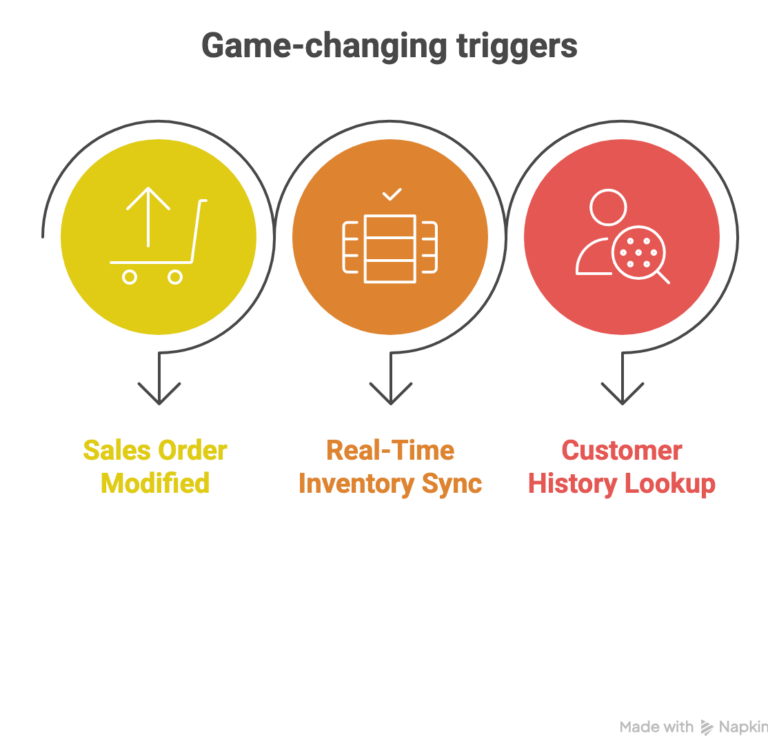
1. Sales Order Modified Trigger
Every time a customer creates a cart (draft sales order) but doesn’t complete checkout, Business Central logs it. Power Automate can detect this exact moment and spring into action.
2. Real-Time Inventory Sync
Nothing’s worse than sending a recovery email for a product that’s now out of stock. Business Central’s real-time inventory data prevents this embarrassment and keeps your recovery efforts credible.
3. Customer History Lookup
Business Central knows if this customer has purchased before, their average order value, preferred products, and even their response to previous campaigns. This data makes personalization actually personal.
Building Your First Recovery Flow in 5 Minutes
Let’s start simple. You don’t need to be a developer to build this.
Flow 1: The Basic Abandonment Detector
Step 1: Set Up the Trigger
- Open Power Automate
- Create new automated flow
- Select “When a record is created or modified” trigger
- Connect to your Business Central environment
- Choose “Sales Orders” table
- Filter for status = “Draft”
Step 2: Add Time Condition
- Add a “Delay until” action
- Set to 1 hour after cart creation
- This gives customers breathing room before the reminder
Step 3: Create Simple Email Reminder
- Add “Send an email” action
- Pull customer email from Business Central record
- Use this template:
“Hi [Customer Name], we noticed you left some items in your cart. Your [Product Name] is still available and waiting for you. Complete your order now: [Checkout Link]”
Step 4: Test and Deploy
- Run the flow on a test cart
- Verify email delivery
- Turn on the flow
Done. You now have basic cart recovery running 24/7.
Real result from a GCC retailer: This basic flow alone recovered 15% of abandoned carts in the first month.
Level Up: AI-Powered Personalization
Basic recovery is good. AI-powered recovery is where the real money comes in.
Flow 2: Smart Personalization (15-Minute Setup)
Here’s what makes this powerful, AI Builder analyzes your customer’s past behavior and generates custom messages that actually resonate.
Step 1: Add AI Builder Analysis
- In your Power Automate flow
- Add “Predict” action from AI Builder
- Connect to Business Central customer data
- AI analyzes purchase history, cart value, browsing patterns
Step 2: Dynamic Content Generation
- Based on AI insights, create personalized messages:
- High-value customers: Exclusive VIP discount
- First-time browsers: Welcome offer
- Repeat buyers: “Miss us?” re-engagement
- Price-sensitive: Limited-time price alert
Step 3: Timing Optimization
- AI determines the best send time based on customer’s previous engagement patterns
- Some customers respond better to immediate reminders
- Others need 2-3 hours before they’re receptive
Real example:
A fashion retailer in Dubai implemented this and saw their recovery rate jump from 15% to 32% in six weeks. The difference? Every message felt like it was written specifically for that customer, because, technically, it was.
Pro Tip: The AI improves over time. Your recovery rates in month three will be significantly better than month one as the system learns what works for your specific audience.
Going Multi-Channel: Meet Your Customers Where They Are
Email is great. But what if your customer doesn’t check email regularly?
Flow 3: Multi-Channel Recovery (Advanced)
Modern cart recovery doesn’t rely on just one channel. Here’s how to build an omnichannel approach:
Channel Strategy:
- First touch (1 hour): Email reminder
- Second touch (6 hours): SMS if no response
- Third touch (24 hours): WhatsApp message
- Final touch (48 hours): Retargeting ad trigger
Setting Up Multi-Channel:
For SMS (via Twilio):
- Add Twilio connector to your flow
- Pull customer phone from Business Central
- Send short, urgent message: “Your cart expires in 2 hours! Complete order: [link]”
For WhatsApp:
- Use WhatsApp Business API connector
- More conversational tone works here
- Include product images from Business Central
- Enable two-way conversation
For Retargeting:
- Trigger Facebook/Google Pixel events
- Customer sees ads for exact products they abandoned
- Synchronized with email/SMS timing
The psychology here matters: Different customers prefer different channels. By meeting them where they are, you dramatically increase recovery odds.
Advanced Optimization Strategies
Once your basic recovery system is running, here’s how to squeeze even more performance out of it:
1. Batch Processing for High-Traffic Stores
If you’re handling 1,000+ abandoned carts daily, processing them individually can strain your Power Automate limits.
Solution: Implement batch processing
- Collect abandoned carts every 30 minutes
- Process them in groups of 50
- Prioritize by cart value (high-value first)
2. Power BI Recovery Analytics
Connect your recovery flows to Power BI dashboards to track:
- Recovery rate by customer segment
- Most effective recovery channels
- Optimal timing for your audience
- Revenue recovered by product category
- A/B test results
3. A/B Testing Your Templates
Never settle for “good enough” recovery rates. Constantly test:
- Subject lines (urgency vs. benefit)
- Discount offers (percentage vs. fixed amount)
- Send timing (immediate vs. delayed)
- Message length (short vs. detailed)
- Call-to-action wording
Real example of A/B testing impact:
One of our clients tested two subject lines:
- Version A: “Complete Your Order Now”
- Version B: “Your Cart Expires in 2 Hours!”
Version B had 23% higher open rates and 31% better recovery rates.
Small changes = big results.
Pro Tip: Set up automated A/B tests in Power Automate. The system can automatically switch to the winning variant after 100 sends, continuously optimizing without manual intervention.
Common Pitfalls (And How to Avoid Them)
After implementing dozens of cart recovery systems, we have seen the same mistakes repeatedly. Learn from others’ errors:
Mistake 1: Sending Too Many Reminders
Sending 5+ recovery messages makes customers annoyed, not converted. Stick to 2-3 maximum.
Mistake 2: Generic Messages
“You left items in your cart” performs 40% worse than “Your Nike Air Max 270 in size 9 is still available.”
Mistake 3: Ignoring Mobile Optimization
65% of cart abandonments happen on mobile. If your recovery emails don’t look great on phones, you’re losing half your potential recoveries.
Mistake 4: No Expiration Urgency
Messages without time pressure get ignored. “Complete your order before midnight” converts 28% better than no deadline.
Mistake 5: Not Testing the Flow
ALWAYS test with real abandoned carts before going live. Nothing damages credibility like sending broken links or wrong product names.
Conclusion
Look, we get it. Implementing new automation can feel overwhelming when you’re already managing a million things.
But here’s what we know from working with hundreds of e-commerce businesses: The cost of doing nothing is way higher than the effort of setting this up.
Every day without cart recovery automation, you’re literally watching money disappear.
Start small:
- Week 1: Implement the basic 5-minute flow
- Week 2: Add AI personalization
- Week 3: Enable multi-channel if needed
- Week 4: Analyze results and optimize
Most businesses see ROI within the first month. The regional retailer I mentioned earlier? They recovered their entire implementation cost in the first week.
Here’s my challenge to you: Pick one abandoned cart from yesterday. Calculate what that lost sale was worth. Multiply it by 365 days.
That number you’re looking at? You could recover 20-40% of it automatically.


Related Articles