Greetings! I'm Aneesh Sreedharan, CEO of 2Hats Logic Solutions. At 2Hats Logic Solutions, we are dedicated to providing technical expertise and resolving your concerns in the world of technology. Our blog page serves as a resource where we share insights and experiences, offering valuable perspectives on your queries.
Every e-commerce agency working in the DACH market knows the conversation. A client calls on a Tuesday morning, and conversion rates on their best-performing product dropped 18% last week. The campaign budget kept running. No one noticed until the weekly review.
This incident is not a data problem. Most Shopify stores have an abundance of data. It is an intelligence problem, specifically the absence of a system that continuously monitors the data and raises a flag before the damage compounds.
That is exactly the gap that Shopify Sidekick Pulse was built to close. Announced as part of Shopify’s Winter ’26 Edition, the so-called RenAIssance Edition, Pulse marks a fundamental shift in how Shopify’s AI assistant operates. Rather than waiting to be asked, it monitors store data in the background and proactively surfaces prioritized, actionable recommendations.
For agencies managing multiple Shopify clients in Germany, Austria, and Switzerland, this shift has real implications. The question is not whether proactive AI insights add value; they clearly do. The question is whether Sidekick Pulse is the right tool for your clients or just one piece of a larger stack.
This article gives you an honest, criteria-based comparison to answer that question.
What Is Shopify Sidekick Pulse?
Before comparing tools, agencies need a precise understanding of what Shopify Sidekick Pulse does and what it does not.
Sidekick has existed since 2023 as a conversational AI assistant embedded in the Shopify admin. In its earlier form, it was reactive: you asked it a question, and it answered. Useful, but limited.
The Winter ’26 update transformed the model. Sidekick Pulse operates continuously in the background, analyzing two layers of data simultaneously:
- Store-specific signals: your own sales data, traffic patterns, inventory levels, conversion funnels, and customer behavior.
- Shopify-wide signals: aggregate trend data across Shopify’s merchant network, allowing Pulse to benchmark your store against broader market movements.
From these inputs, Pulse generates personalized recommendations, not generic alerts, but specific, prioritized actions tied to your store’s current context. A drop in checkout completions, an underperforming collection, and an inventory risk before a peak season: Pulse identifies these patterns and presents them as actionable next steps directly inside the Shopify admin.
Key distinction: Sidekick Pulse is not a reporting dashboard. It does not replace analytics. It is a prioritization layer, an AI that tells you where to focus and, increasingly, helps you act on that focus without leaving the admin.
The Evaluation Framework for German E-Commerce Agencies
Recommending analytics or AI tools to DACH clients is not merely a feature-comparison exercise. The German market applies specific constraints and expectations that must be part of any evaluation framework. Below are the six criteria we use in this comparison.
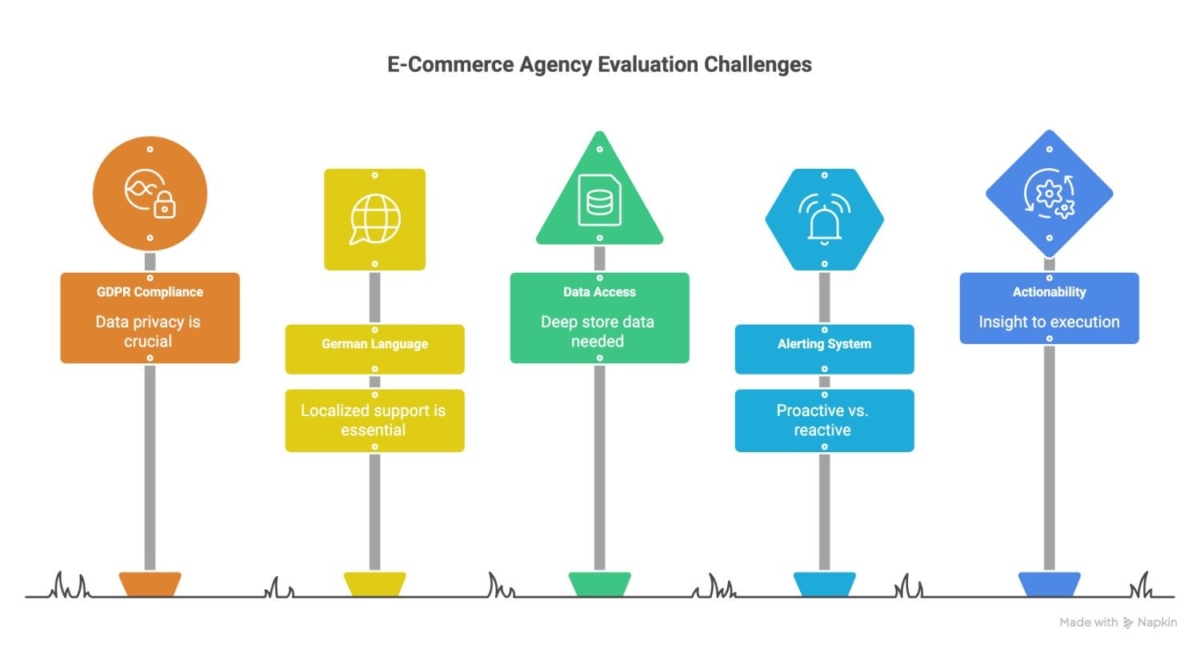
DSGVO / GDPR Compliance
German clients operate under strict data protection requirements enforced by both EU GDPR and the German Federal Data Protection Act (BDSG). Any tool that processes customer or behavioral data must offer EU-based data residency options, clear data processing agreements (DPAs), and compatibility with Consent Mode V2, where applicable. Tools that require third-party data exports or US-only server infrastructure will face pushback from German legal and compliance teams.
German Language Support
This extends beyond interface localization. German B2B clients expect documentation, support, and ideally AI-generated recommendations in German. For agencies acting as intermediaries, English-only tooling increases your operational burden when translating insights for clients.
Depth of Store-Native Data Access
The most actionable insights come from tools that access the full depth of Shopify’s data model, not just surface-level metrics available via API. Native integrations typically outperform third-party connectors here, particularly for real-time or near-real-time signal processing.
Proactive Alerting vs. Reactive Dashboards
There is a meaningful operational difference between a tool that tells you something has happened and one that flags it as it is happening or, better, before it fully materializes. For agencies managing multiple client accounts, proactive alerting significantly reduces per-client monitoring overhead.
Actionability: From Insight to Execution
An insight that requires four tool switches and a developer to act on is worth considerably less than one that can be executed in two clicks. Particularly for lean client teams, the gap between insight and action is a significant barrier to adoption.
Agency Reporting and White-Label Fit
Agencies need to present insights to clients in a format that builds credibility and justifies retainer value. Tools that offer exportable, customizable, or white-labeled reports give agencies more room to demonstrate impact. Embedded admin tools like Pulse, by contrast, require clients to log in directly, which is fine for some workflows but problematic for others.
Head-to-Head Comparison: Shopify Sidekick Pulse vs. Alternatives
The table below maps Shopify Sidekick Pulse against three categories of alternative tools commonly used by Shopify agencies in the DACH market: dedicated e-commerce BI platforms (such as Glew or Lifetimely), retention and email analytics platforms (Klaviyo Analytics), and custom analytics stacks built on GA4 and Looker Studio.
| Criteria | Sidekick Pulse | Dedicated BI Tools(e.g. Glew, Lifetimely) | Klaviyo Analytics | Custom GA4 + Looker |
| DSGVO/GDPR Compliance | ✓ Shopify-native, EU hosting options | Varies by vendor; audit required | ✓ EU-compliant with configuration | ✓ With Consent Mode V2 |
| German Language Support | Limited (EN primary) | Varies | ✓ Multi-language | Interface only; data is language-agnostic |
| Store-Native Data Depth | ★★★★★ Full Shopify access | ★★★ Requires connector | ★★★ Order + email data | ★★ Surface-level without custom events |
| Proactive Alerting | ✓ Core feature (Pulse) | ✗ Mostly reactive dashboards | Partial (flow triggers) | ✗ Requires custom alerting setup |
| Actionability (execute from insight) | ✓ Act directly in admin | ✗ Insight only | ✓ Within Klaviyo workflows | ✗ Insight only |
| Agency Reporting Fit | Limited export options | ✓ Strong white-label reporting | ✓ Shareable dashboards | ✓ Fully customizable |
| Setup Overhead | Zero — built-in | Medium (integration) | Low–Medium | High (GTM + GA4 + Looker) |
| Shopify Plan Requirement | Plus for full Pulse features | Any (app-based) | Any (app-based) | Any (external tool) |
Where Sidekick Pulse Excels, and Where It Falls Short
Where It Excels
Unmatched Store-Native Data Depth
No third-party analytics tool has the same level of access to Shopify’s internal data model that Pulse does. Third-party BI connectors pull data via API, which introduces latency, coverage gaps, and dependency on connector maintenance. Pulse reads the same signals that Shopify’s own infrastructure monitors. This capability enables faster, more comprehensive pattern detection across inventory, checkout behavior, product performance, and campaign attribution.
Zero Integration Overhead
For agencies onboarding new Shopify clients, setup time is a real cost. Pulse requires no connector configuration, no API key management, and no third-party subscription. Enable Network Intelligence in privacy settings, activate Pulse, and the system begins monitoring. For clients who have resisted analytics tools due to setup complexity, this is a genuine advantage for adoption.
Closing the Insight-to-Action Gap
This is Shopify Sidekick Pulse’s most distinctive capability. When Pulse flags that a specific product collection is underperforming, a merchant does not need to open a separate tool, export data, and brief a developer. They can act on the recommendation directly in the admin, updating descriptions, adjusting discounts, and editing automations via Shopify Flow, all in the same session. For resource-constrained client teams, this frictionless execution path has meaningful operational value.
Improving With Store History
Unlike static dashboards, Pulse learns over time. As it accumulates more data on a specific store’s seasonal patterns, customer behavior, and product performance, its recommendations become more contextually accurate. Agencies that implement Pulse early for clients are effectively building a compounding intelligence asset.
Where It Falls Short
German Language Support Is Incomplete
Pulse’s recommendations surface in English. For agencies whose DACH clients interact directly with the admin, this is a usability gap that Shopify has not yet addressed. It is likely to improve, but agencies should set expectations with clients for onboarding now.
Limited Agency-Side Visibility
There is currently no multi-store dashboard or agency-level view for Pulse. Agencies managing 10 or 20 Shopify clients cannot review Pulse insights across accounts in a single interface. Each store must be accessed individually. For large portfolios, this restriction is a material constraint on the workflow.
Shopify Plus Gating on Advanced Features
The most analytically rich Pulse capabilities are available only with Shopify Plus. For agencies with SMB clients on Basic or Grow plans, the proactive insight layer is thinner and less personalized. This creates a two-tier experience that may complicate how agencies position Pulse across their client base.
No Customer-Facing Intelligence
Pulse monitors and advises on store operations, but it does not engage customers. Guided selling, personalized product recommendations, agent-assisted checkout, and AI-driven customer conversations require purpose-built third-party tools. Agencies serving clients seeking AI across the full customer journey will need to layer Pulse on top of a customer-facing solution.
Conclusion: Building the Right AI Insights Stack in 2026
Shopify Sidekick Pulse represents one of the most meaningful shifts in Shopify’s product history. This is a move from a reactive assistant to a proactive intelligence layer. For agencies managing German e-commerce stores, it solves a genuine problem: the gap between data availability and operational attention.
At the same time, it is not a universal solution. Its strength is store operations intelligence delivered natively, with zero setup friction and direct execution capability. Its limitations are real: no multi-store agency dashboard, incomplete German localization, Plus-tier gating on advanced features, and no customer-facing AI capability.
Proactive AI insights are no longer a competitive differentiator. They are becoming table stakes. The agencies that establish this infrastructure for their clients now and develop the expertise to interpret it will be significantly harder to displace a year from now.
FAQ
Does Shopify Sidekick Pulse work on all Shopify plans, or do German stores need to upgrade to Plus?
Pulse is available across all plans, but advanced insight features, deeper trend analysis, and granular recommendations are gated behind Shopify Plus. For German stores, also note that Shopify Network Intelligence must be enabled first, which warrants a quick DSGVO compliance assessment before activation.
Should German Shopify stores use Shopify Sidekick Pulse instead of Google Analytics for store performance insights?
They serve different purposes. Pulse handles operational intelligence inside your store (inventory, checkout behavior, and product performance), while GA4 covers traffic sources, user journeys, and campaign attribution. Run both, but ensure GA4 is configured with Consent Mode V2 and a DSGVO-compliant CMP to stay legally sound in Germany.
Can Shopify agencies use Sidekick Pulse to manage insights across multiple German client stores from one place?
Not currently, there is no multi-store agency dashboard, meaning each client's Pulse insights must be accessed individually from within their Shopify admin. Until Shopify introduces a centralized partner view, the practical workaround is pairing Pulse with a white-label BI tool for cross-account visibility.

Related Articles