Greetings! I'm Aneesh Sreedharan, CEO of 2Hats Logic Solutions. At 2Hats Logic Solutions, we are dedicated to providing technical expertise and resolving your concerns in the world of technology. Our blog page serves as a resource where we share insights and experiences, offering valuable perspectives on your queries.

Order management works fine when you’re shipping a few hundred packages a week. The real test comes when that number hits a few thousand or tens of thousands. At that scale, the manual workflows that once felt manageable start to collapse under their own weight. Staff spend hours copying order data between systems. Inventory counts drift out of sync across sales channels. Shipping labels are generated late or contain incorrect addresses.
This is where Robotic Process Automation (RPA) enters the picture, not as a futuristic concept, but as a practical, already-deployed solution that e-commerce operations teams are using right now to automate order processing, keep inventory accurate across channels, and streamline fulfillment from label generation to final delivery.
RPA bots mimic the repetitive digital tasks humans perform every day, such as clicking, typing, copying data, and reconciling records across systems. When configured correctly, they do it faster, more consistently, and around the clock, without burning out or making transcription errors.
This guide covers everything operations managers and e-commerce leaders need to know about RPA in practice. You’ll find specific use cases, end-to-end workflow examples, an implementation roadmap, best practices, and the metrics worth tracking. If you’re evaluating whether RPA is the right move for your e-commerce stack, this is where to start.
Why E-Commerce Ops Break at Scale
Growing order volume doesn’t just mean more work, it means exponentially more complexity. Every new sales channel adds another data source. Every new carrier adds another portal to check. Every new warehouse adds another inventory location to reconcile.
Manual order processing creates a predictable chain of problems. Staff enter the same data across multiple platforms. Inventory gets updated in the OMS, but not the marketplace listing. A customer’s shipping address gets copied incorrectly. An oversell occurs when the stock count on one platform doesn’t reflect a return processed on another.
The consequences are concrete: delayed shipments, incorrect orders, refund requests, and reviews that tank a seller’s marketplace rating. These aren’t rare edge cases; they’re what happens when manual processes try to keep pace with high-volume e-commerce.
RPA addresses the root cause by removing the “copy-paste” layer entirely. Bots sit between your storefronts, marketplaces, OMS, WMS, ERP, and shipping tools, automatically passing data, consistently applying business rules, and flagging exceptions for human review rather than letting them slip through undetected.
Ready to Get Started?
Get in touch with our experts and let's discuss your project.
What RPA Means in E-Commerce Operations
RPA stands for Robotic Process Automation. The “robotic” part is somewhat misleading; no physical robots are involved. RPA bots are software programs that replicate human actions on a computer: opening applications, reading data, entering values into fields, clicking buttons, and moving information from one system to another.
What makes RPA particularly well-suited to e-commerce is the nature of the work. Order management, inventory reconciliation, and shipment processing are all high-volume, rule-based tasks. The same steps repeat hundreds or thousands of times per day. The data formats are predictable. The business rules are well-defined. These are exactly the conditions under which RPA delivers reliable, consistent results.
RPA vs. “Full Warehouse Automation”
A common point of confusion is the difference between RPA and physical warehouse automation. They’re not the same thing, and they don’t compete.
RPA is software automation that operates across digital systems: storefronts, ERPs, shipping platforms, and CRMs. It handles front-office and back-office processes that involve data movement and system interaction.
Warehouse robotics, such as Automated Storage and Retrieval Systems (AS/RS) or robotic picking arms, handle physical automation by moving goods through a fulfillment center.
Most e-commerce teams start with software automation first. The implementation cost is lower, the ROI timeline is faster, and the results are immediately measurable. Physical automation typically comes later, once digital processes are streamlined and the business case for capital-intensive infrastructure is clear.
Where RPA Fits in the E-Commerce Tech Stack
E-commerce operations typically involve a fragmented stack. RPA acts as the connective tissue between:
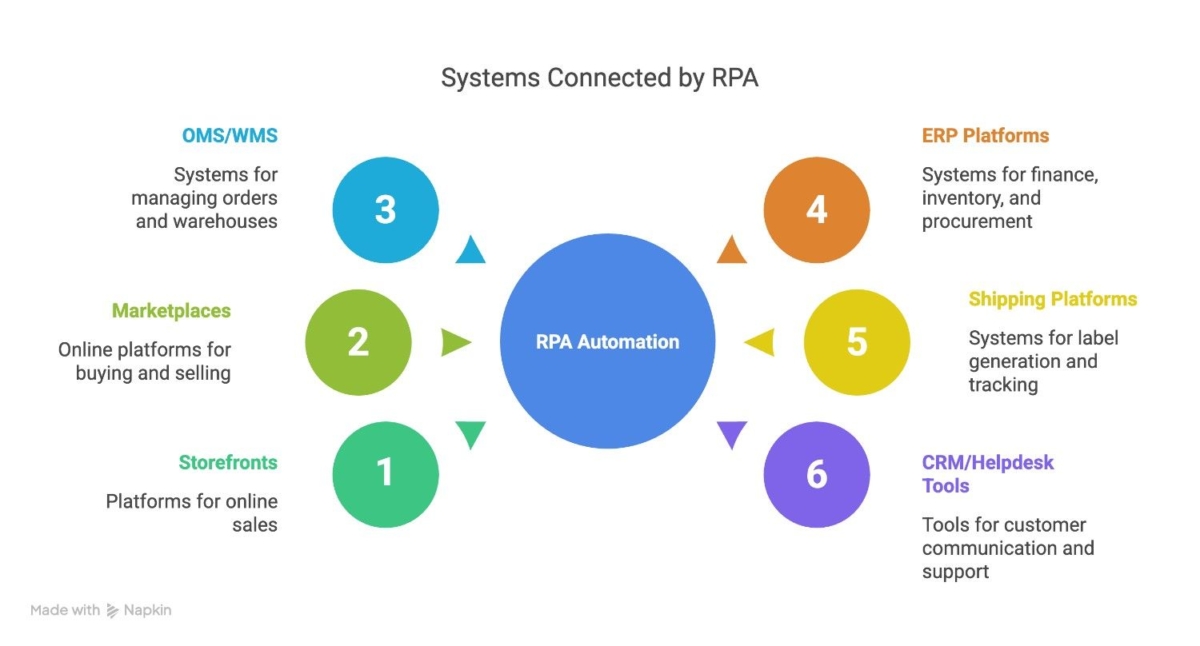
- Storefronts: Shopify, Shopware, Magento, WooCommerce
- Marketplaces: Amazon, eBay, Walmart Marketplace, Etsy
- Order Management Systems (OMS) and Warehouse Management Systems (WMS)
- ERP platforms: SAP, NetSuite, Microsoft Dynamics (for finance, inventory, and procurement)
- Shipping and carrier platforms: for label generation, tracking, and pickup scheduling
- CRM and helpdesk tools: Salesforce, Zendesk, Freshdesk (for customer communications and ticket creation)
Without automation, data must be moved between these systems manually. A single order might require entries in the OMS, ERP, carrier portal, and CRM, with each step dependent on a human completing the previous one. RPA replaces that chain with automated workflows that execute in seconds.
Integration Options
The way RPA bots “connect” to systems matters enormously for long-term stability.
API and webhook integrations are the preferred approach. They’re fast, reliable, and don’t break when a UI changes. When a system offers a well-documented API, that should be the default integration method.
UI automation is used as a fallback when systems lack APIs, typically older or legacy platforms. The bot interacts with the user interface directly, mimicking mouse clicks and keyboard inputs. This works, but it’s more fragile. Any change to the interface (a button moved, a field renamed) can break the automation.
Hybrid approaches combine both methods: API for the primary integration where possible, UI automation for the parts of the workflow that don’t expose API endpoints. Most real-world e-commerce RPA deployments use some mix of the two.
RPA Use Case #1: Automated Order Processing (Order-to-Cash Basics)
Order Capture and Consolidation Across Channels
Multi-channel selling creates a fragmentation problem immediately. Orders arrive from Shopify, Amazon, eBay, and your own direct storefront, each in a different format, at different times, with different field structures.
RPA bots pull orders from every source on a scheduled or real-time basis, standardize the data format, and route everything into a single OMS or ERP. The result: a unified order queue that your fulfillment team works from, regardless of where the original sale happened.
Automated Order Entry and Data Validation
Once orders are consolidated, bots handle the data entry tasks that previously required manual effort. They extract key fields, customer name and address, SKU codes, quantities, pricing, tax amounts, discount codes, and populate them into downstream systems.
Crucially, bots also validate this data against predefined rules. Is the address complete and correctly formatted? Does the SKU exist in the product catalog? Are the quantities within acceptable thresholds? Do the payment totals match? Any field that fails validation gets flagged for review rather than pushed forward with bad data.
Bots can also detect duplicate orders and identify patterns associated with suspicious activity, unusual quantities, mismatched billing and shipping addresses, or repeated failed payment attempts.
Payment Checks and Fraud Screening
RPA integrates with payment gateways and fraud screening tools to verify payment status before orders move to fulfillment. Bots check that funds have been captured, reconcile payment data across the OMS and ERP, and trigger hold workflows when payment validation fails.
This isn’t about replacing dedicated fraud detection platforms; it’s about automating the data reconciliation steps that would otherwise require a human to cross-reference multiple systems manually.
Exceptions Handling (What Bots Should NOT “Guess”)
A well-designed RPA workflow knows its limits. Bots should not attempt to resolve ambiguous situations by making assumptions. Address errors that can’t be automatically corrected, out-of-stock items, backorder scenarios, and high-risk orders flagged by fraud rules should all route to a human review queue.
The principle here is human-in-the-loop: bots handle the standard path efficiently, and escalate exceptions to the right person with the right context. This keeps automation moving quickly while preserving judgment for the situations that genuinely require it.
RPA Use Case #2: Inventory Updates and Stock Accuracy
Real-Time Stock Sync (Prevent Overselling)
Overselling is one of the most damaging problems in multi-channel e-commerce. It generates cancellations, negative reviews, and the kind of marketplace penalties that are hard to recover from. The root cause is almost always a stock sync lag, a sale happens on one channel before inventory counts have updated everywhere else.
RPA bots address this by triggering inventory updates across all sales channels immediately after each transaction. A sale on Amazon reduces available stock in Shopify, the WMS, and the ERP in the same automated sequence. Returns and cancellations are reflected the same way, and inventory counts stay accurate regardless of which channel the activity originated from.
Low-Stock Alerts and Automated Reordering
Bots can be configured to monitor inventory levels against defined thresholds. When a SKU drops below its reorder point, the bot triggers an alert to the procurement team or automatically generates a purchase order in the ERP.
This removes the manual effort of monitoring stock dashboards and writing reorder requests. More importantly, it reduces the risk of stockouts that result from someone forgetting to check a report.
Catalog Maintenance Support
Beyond stock counts, RPA supports catalog hygiene. Bots can scan for mismatched SKUs across platforms, flag pricing conflicts between channels, update product availability status when items are discontinued or temporarily out of stock, and identify listings with missing required attributes.
Catalog errors are slow to surface and expensive to fix after the fact. Automated catalog maintenance keeps data clean at the source.
RPA Use Case #3: Shipping and Fulfillment Automation
Shipping Label Generation and Carrier Selection
Label generation is one of the most straightforward candidates for automation; it’s high volume, rule-based, and easily standardized. RPA bots create shipping labels automatically once an order clears validation, pulling the relevant data from the OMS and populating it into the carrier platform.
Carrier selection can also be automated using configurable rules: choose the cheapest carrier for standard domestic shipments, prioritize speed for express orders, route international shipments through specific carriers based on destination, and apply weight-based rules to select the appropriate service tier. These rules are defined once and applied consistently across every order.
Pickup Scheduling and Courier Coordination
Once labels are generated, bots can schedule carrier pickups automatically, pushing shipment details to carrier portals without manual intervention. Pickup windows, volume estimates, and location details are submitted programmatically, eliminating the daily back-and-forth with carrier representatives.
Tracking Updates and Internal Visibility
Tracking information is valuable at two levels: for the customer, and for your operations team. RPA bots pull tracking updates from carrier APIs and push them to the OMS, CRM, storefront, and any customer-facing communication tool simultaneously.
Operations teams get a centralized view of shipment status without logging into carrier portals individually. Customers receive timely updates. Exception workflows trigger automatically when packages are delayed, lost, or returned to the sender.
Bonus Use Case: Returns, Refunds, and Post-Purchase Operations
Returns Processing
Returns processing is operationally intensive and often handled manually. RPA bots can automate the creation of return cases in the OMS, update inventory counts when returned items are received, and trigger restock workflows based on item condition and predefined rules.
Refund Automation
When a return meets the criteria for a refund, verified receipt, within the return window, and item condition is acceptable, bots can issue the refund automatically through the payment gateway using predefined logic. Disputed cases, partial refunds, and out-of-policy requests get routed to a human review queue rather than processed automatically.
Post-Purchase Customer Service Automation
Support ticket creation is another area where RPA reduces manual workload. Bots can auto-create tickets in the helpdesk platform for specific exception events: late deliveries, failed payment retries, address validation failures, and undeliverable packages. The ticket is created with the relevant order context already populated, so the support agent starts with full information rather than spending time gathering it.
End-to-End Workflow Examples
Workflow 1: Order to Shipment (Standard Path)
- Order placed on any channel
- Bot pulls order and validates data (address, SKU, payment status)
- Inventory reserved in WMS / OMS
- Order entered into ERP; finance records updated
- Shipping label generated; carrier selected based on rules
- Pickup scheduled with the carrier
- Tracking number pushed to the storefront, CRM, and customer
Total elapsed time with automation: minutes. Without it: hours, depending on team capacity and shift coverage.
Workflow 2: Inventory Sync Across Channels (Multi-Store)
- Sale occurs on Channel A (e.g., Amazon)
- Bot triggers inventory update in real time
- Stock count reduced in Channel B (Shopify), Channel C (eBay), WMS, and ERP simultaneously
- If the stock falls below the threshold, a reorder alert or PO generation is triggered
Workflow 3: Exception Route (Human-in-the-Loop)
- Order arrives with fraud flag (or out-of-stock SKU)
- The bot pauses the workflow and creates an exception record
- Notification sent to the operations team with order details and the reason for the hold
- Ops team reviews and approves or cancels the order
- Bot resumes the standard workflow on approval
Business Benefits
Operational Gains
The operational impact of e-commerce RPA is measurable and immediate:
- Faster order cycle time: Orders that previously took hours to process manually move through the pipeline in minutes
- Higher data accuracy: Eliminating manual entry eliminates transcription errors across orders, inventory, and shipping records
- Scalable throughput: Order volume can increase significantly without proportional headcount growth. The bots scale up during peak periods without overtime costs
Customer Experience Gains
Customers don’t care about back-office workflows. They only care about whether their order arrives correctly and on time. RPA delivers:
- Faster shipping confirmation and tracking updates
- Fewer wrong orders and cancellations caused by manual errors
- More transparent delivery visibility, reducing “where’s my order” support tickets
Financial Gains
- Reduced labor cost on repetitive, low-value tasks
- Lower financial exposure from errors, chargebacks, and avoidable returns
- Better inventory control reduces two expensive problems simultaneously: lost sales from stockouts and carrying costs from overstock
RPA vs. Manual Order Processing
| Factor | Manual Processing | RPA-Powered Processing |
| Speed | Slow; limited by human capacity | Fast; executes in seconds |
| Consistency | Variable; prone to human error | Consistent; rules applied uniformly |
| Scalability | Requires proportional headcount | Scales without equivalent hiring |
| Availability | Business hours only | 24/7 operation |
| Exception handling | Default path | Escalates to humans when needed |
| Cost at scale | Increases linearly with volume | Increases marginally with volume |
The right approach isn’t to automate everything. It’s to automate the high-volume, rule-based steps while keeping human judgment for decisions that genuinely require it. RPA handles the repetitive work reliably; humans handle the exceptions intelligently.
Implementation Roadmap for E-Commerce
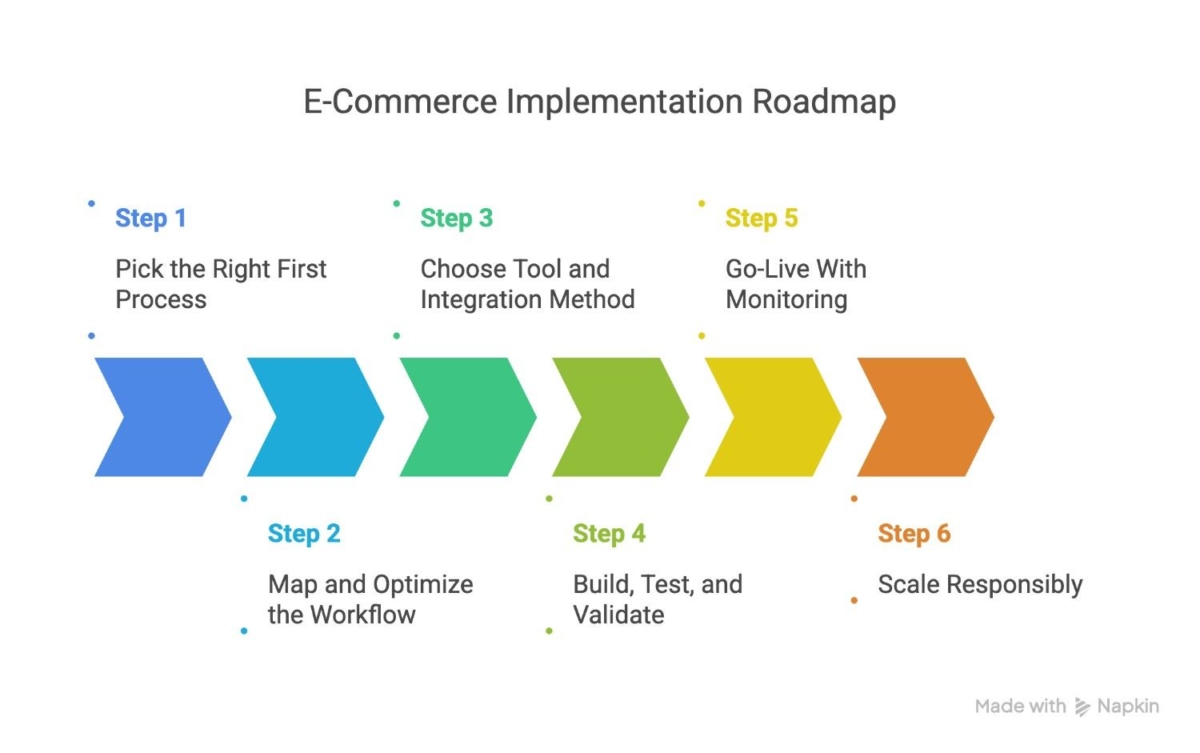
Step 1: Pick the Right First Process
Don’t start with your most complex workflow. Start with the process that is highest in volume, most rule-based, and lowest in exceptions. Order entry and inventory sync are both strong first candidates. They’re easy to document, deliver fast ROI, and build confidence in the automation approach before you tackle harder problems.
Step 2: Map and Optimize the Workflow
Before building anything, document the existing process in detail. Every step, every system touched, every data field, every exception scenario. This process map becomes the specification for the bot. It also often reveals inefficiencies in the manual process that should be fixed before automation. This automating a broken process just makes it break faster.
Step 3: Choose Tool and Integration Method
Select your RPA tooling and determine how bots will connect to each system. API-first is the default wherever APIs are available. Use UI automation only when no API option exists. Build a data mapping document that defines how fields translate between systems, this prevents data mismatches downstream.
Step 4: Build, Test, and Validate
Development should happen in a sandbox environment that mirrors production data without affecting live operations. Test the standard path first, then systematically work through edge cases: split shipments, partial refunds, address mismatches, backorders, duplicate orders. Don’t skip edge case testing; these are exactly the scenarios that surface in production.
Step 5: Go-Live With Monitoring
Launch with full observability in place: real-time failure alerts, centralized logs, and a rollback plan if something breaks unexpectedly. The first few weeks in production will surface scenarios that didn’t appear in testing. Monitoring ensures they’re caught and resolved quickly.
Step 6: Scale Responsibly
Once the first automation is stable, expand systematically. Add shipping automation, then returns processing, then automated reordering, then financial reconciliations. Each new automation should follow the same documentation, testing, and monitoring standards as the first.
Eliminate overselling and stockouts with automated inventory sync for fast ROI.
Best Practices for Reliable E-Commerce RPA
API-First Design
UI automation is brittle by nature. A supplier’s website update, a marketplace interface redesign, or a platform upgrade can break bots that rely on scraping screen elements. Wherever APIs or webhooks exist, use them. Reserve UI automation for situations where there’s no alternative, and document those dependencies so the team knows to monitor them.
Standardize Data and Rules
Inconsistent data is one of the most common sources of bot failures. Standardize SKU naming conventions across platforms before building inventory sync automations. Define address validation rules that cover international format variations. Specify how tax and shipping logic should be applied in different jurisdictions. Bots apply rules exactly as written; if the rules are ambiguous, the results will be unpredictable.
Build Modular Automations
Design bots as reusable components rather than monolithic scripts. A “get order” module, a “validate address” module, and a “create shipment” module can be tested independently, updated without rebuilding the whole workflow, and reused across different automation sequences. This approach also makes troubleshooting significantly faster.
Monitoring and Alerting (Observability)
Automation that runs silently is automation that fails silently. Every bot workflow should generate logs, report on execution status, and trigger alerts when failures occur. Real-time dashboards let operations teams see what’s running, what’s failed, and what’s queued. Retry logic handles transient failures automatically; persistent failures escalate to the appropriate owner.
Security and Access Control
RPA bots interact with systems using credentials, and those credentials need to be managed carefully. Use role-based access control (RBAC) to limit each bot’s permissions to only what it needs. Store credentials in a secure vault rather than hardcoding them in bot scripts. Audit access periodically as bots and teams evolve.
Documentation and Audit Trails
Every automation should have a documented process definition and a runbook that describes what the bot does, what systems it touches, what exceptions it handles, and who owns it. Maintain change logs that record every update to bot logic. In regulated industries and during audit periods, these records are non-negotiable.
Common Challenges and How to Fix Them
UI changes breaking bots: If a marketplace or carrier portal updates its interface, bots using UI automation may stop working. The fix is to migrate to API-based integration where possible. Where UI automation is unavoidable, invest in robust selector strategies and test environments that catch interface changes before they reach production.
Data mismatches across platforms: When the same data exists in multiple systems, inconsistencies emerge over time. The solution is to enforce data standards at the point of entry, maintain field mapping tables that define how data translates between platforms, and run periodic reconciliation checks.
Overselling despite sync: Real-time inventory sync reduces overselling but doesn’t eliminate it if there are race conditions, multiple orders coming in simultaneously before any sync can execute. Add inventory reservation logic that holds stock at the point of order validation, before fulfillment is confirmed.
Peak season load: Bot performance that’s adequate during normal volume may degrade during Black Friday or holiday peaks. Design automations with queuing and scheduling in mind, and ensure your RPA platform can scale bot instances during high-demand periods.
Change management: Automation changes how teams work. If staff aren’t trained on the new workflows, or if ownership of bot maintenance isn’t clearly assigned. This will cause the adoption to slow down, and issues will go unresolved. Define who owns each automation, establish escalation rules, and invest in training before go-live.
Key Metrics and KPIs to Track
Measuring the performance of e-commerce RPA requires both operational and automation-specific metrics:
- Order cycle time: From order placement to shipped confirmation, this is the headline metric for fulfillment performance
- Error rate: Percentage of orders with data issues (wrong address, wrong SKU, payment failures) before and after automation
- Oversell incidents: Frequency of orders placed for out-of-stock items
- Refund and return processing time: How long from return initiation to refund issued
- Bot uptime and failure frequency: Availability of automation workflows; how often they fail and require intervention
- Cost per order processed: Total operational cost divided by order volume, the core efficiency metric for automation ROI
Track these metrics before and after implementation. The delta is your business case.
Future Trends in E-Commerce Automation
RPA is evolving. The next wave of e-commerce automation is characterized by the integration of AI capabilities into existing RPA frameworks:
RPA + AI for smarter exception handling: AI models can read unstructured documents (supplier invoices, carrier notifications, customer emails), classify them, and extract relevant data, feeding it into RPA workflows that previously required human interpretation.
Predictive inventory signals: Machine learning models that forecast demand can feed directly into reorder automations, making procurement proactive rather than reactive.
Event-driven automation: Moving from scheduled batch processing toward real-time, event-triggered workflows using webhooks and orchestration platforms. Every order, every stock change, every shipment update becomes an event that triggers an automated response.
Governance as bot counts grow: As automation scales, managing and auditing bot portfolios becomes its own operational challenge. Expect more investment in RPA governance frameworks, centralized bot inventories, and automated testing pipelines for bot maintenance.
Implementation Checklist
Before going live with any e-commerce RPA automation, run through this checklist:
☐ High-volume workflow identified and prioritized
☐ API and webhook options confirmed for target systems
☐ Data validation rules and exception criteria defined
☐ Modular bot components designed and documented
☐ Edge cases tested (split shipments, address mismatches, partial refunds, backorders)
☐ Monitoring, alerting, and logging configured
☐ Runbook and ownership documentation complete
☐ Rollout plan for shipping automation, returns processing, and reorder workflows
Build the Operations Stack That Scales With Your Business
Manual order processing has a ceiling. At some point, the volume exceeds what your team can handle accurately, and the errors start compounding into customer experience problems and financial losses.
RPA removes that ceiling. Not by eliminating your operations team, but by taking the repetitive, rule-based work off their plates, so they can focus on the decisions that actually require human thinking.
The organizations seeing the strongest results are those that treat automation as a structured discipline: starting with the right first process, building modular and well-monitored automations, and expanding methodically as each workflow proves stable.
Start with one high-volume process. Map it precisely. Build it right. Then scale with a structured approach to AI process automation.
FAQ
What e-commerce processes are best for RPA?
The best starting points are high-volume, rule-based processes with predictable data structures. Order entry and validation, inventory sync across channels, and shipping label generation consistently deliver fast ROI and manageable implementation complexity. Processes with many exceptions or judgment-based decisions are better candidates for later phases, once your team has built automation maturity.
Can RPA sync inventory across Shopify, Amazon, and ERP?
Yes. RPA bots can connect to Shopify and Amazon via their APIs, and to most ERP platforms via API or direct database integration. The bot monitors for inventory-affecting events, sales, returns, cancellations, restocks, and propagates updates across all connected systems in real time. The key requirement is a clear data mapping that defines how SKUs, quantities, and warehouse locations are represented in each system.
Is RPA better than native API integration?
They serve different purposes. Native API integration (built directly into your platforms) is faster and more stable for point-to-point connections. RPA adds value when you need to orchestrate complex, multi-step workflows across many systems, especially where some systems lack API coverage. In practice, most e-commerce operations benefit from both API integrations for direct platform connections and RPA for cross-system workflow orchestration.
How do bots handle fraud checks and exceptions?
Bots apply predefined rules to validate orders: checking payment status, running address verification, and flagging patterns associated with fraud. When an order fails validation, the bot pauses the workflow, creates an exception record, and routes it to a human review queue with context about why it was flagged. The bot resumes only after a human approves the order; this is the human-in-the-loop model that keeps automation reliable without removing judgment where it matters.
How do you prevent bots from breaking when websites change?
The most effective prevention is to minimize dependence on UI automation by using APIs wherever possible. For UI-based automations, use robust selector strategies (targeting stable attributes rather than position-based selectors), implement automated testing that runs against staging environments regularly, and set up alerts that detect when a bot fails multiple consecutive runs. Over time, replace UI-dependent automations with API integrations, treating them as technical debt.
Table of contents
- Why E-Commerce Ops Break at Scale
- What RPA Means in E-Commerce Operations
- Where RPA Fits in the E-Commerce Tech Stack
- RPA Use Case #1: Automated Order Processing (Order-to-Cash Basics)
- RPA Use Case #2: Inventory Updates and Stock Accuracy
- RPA Use Case #3: Shipping and Fulfillment Automation
- Bonus Use Case: Returns, Refunds, and Post-Purchase Operations
- End-to-End Workflow Examples
- Business Benefits
- RPA vs. Manual Order Processing
- Implementation Roadmap for E-Commerce
- Best Practices for Reliable E-Commerce RPA
- Common Challenges and How to Fix Them
- Key Metrics and KPIs to Track
- Future Trends in E-Commerce Automation
- Implementation Checklist
- Build the Operations Stack That Scales With Your Business

Related Articles