Greetings! I'm Aneesh Sreedharan, CEO of 2Hats Logic Solutions. At 2Hats Logic Solutions, we are dedicated to providing technical expertise and resolving your concerns in the world of technology. Our blog page serves as a resource where we share insights and experiences, offering valuable perspectives on your queries.

Quick Summary
This guide compares the four leading RPA platforms, like UiPath, Automation Anywhere, Blue Prism, and Microsoft Power Automate, across ease of use, pricing, AI capabilities, scalability, and industry fit. You’ll learn what RPA software actually does, which tool suits your company’s size and goals, and what to avoid when making your final decision. By the end, you’ll have a clear picture of which platform deserves your investment in 2026 and beyond.
Picking the wrong RPA platform can cost your organization months of wasted time, thousands of dollars in licensing costs, and a team of frustrated developers. The good news? You don’t have to figure it out through trial and error.
Robotic Process Automation (RPA) has moved from a niche IT experiment to a business-critical investment. According to Gartner, the RPA software market reached $2.9 billion in 2022, and growth shows no signs of slowing. By 2030, experts predict automation will touch nearly every industry, from banking and healthcare to retail and government.
But here’s the real challenge: the market is crowded, and not every tool is built the same way. UiPath dominates enterprise conversations. Automation Anywhere is carving out serious ground in the cloud. Blue Prism has long been the go-to for regulated industries. And Microsoft Power Automate is quietly becoming the default choice for businesses already living inside the Microsoft ecosystem.
Each of these platforms has real strengths and real limitations. Choosing the right one requires more than reading a vendor’s homepage. It requires understanding your company’s size, your technical team’s capabilities, the complexity of your workflows, and where you want your automation program to be in five years.
This guide breaks it all down. You’ll get a detailed review of each platform, a side-by-side comparison table, pricing insights, use case recommendations, and a clear final verdict. By the end, you’ll know exactly which RPA tool fits your business and why.
What Is RPA Software?
At its core, RPA software uses software robots (bots) to mimic human actions on a computer. That includes clicking, copying, pasting, reading forms, entering data, sending emails, and navigating applications.
What makes RPA powerful is that it works across virtually any system, CRM platforms, ERP software, spreadsheets, email clients, web browsers, and legacy applications. This works without requiring complex integrations. The bot interacts with software the same way a person would: through the user interface.
This makes RPA especially effective for high-volume, rule-based tasks that would otherwise consume hours of employee time. Think invoice processing, employee onboarding, report generation, customer data updates, or IT helpdesk ticket management.
RPA vs AI vs Intelligent Automation
It’s worth clarifying how RPA fits alongside other automation technologies, because the terms are often used interchangeably, and they shouldn’t be.
- Robotic Process Automation follows rules. It automates structured, repetitive tasks based on predefined logic. If A happens, do B.
- AI understands data. It learns from patterns, makes predictions, and handles unstructured inputs like images, text, or voice.
- Agentic AI makes decisions. Rather than waiting for instructions, agentic AI-powered bots can plan, reason, and act autonomously to achieve a goal.
Modern RPA platforms are blurring these lines. The leading tools now incorporate AI capabilities like Optical Character Recognition (OCR), Natural Language Processing (NLP), and machine learning directly into their automation workflows. This combination is often called Intelligent Automation (IA).
Understanding where each platform sits on this spectrum is essential when evaluating which tool fits your goals.
Looking to automate your business processes but not sure where to start?
Why Businesses Use RPA Tools
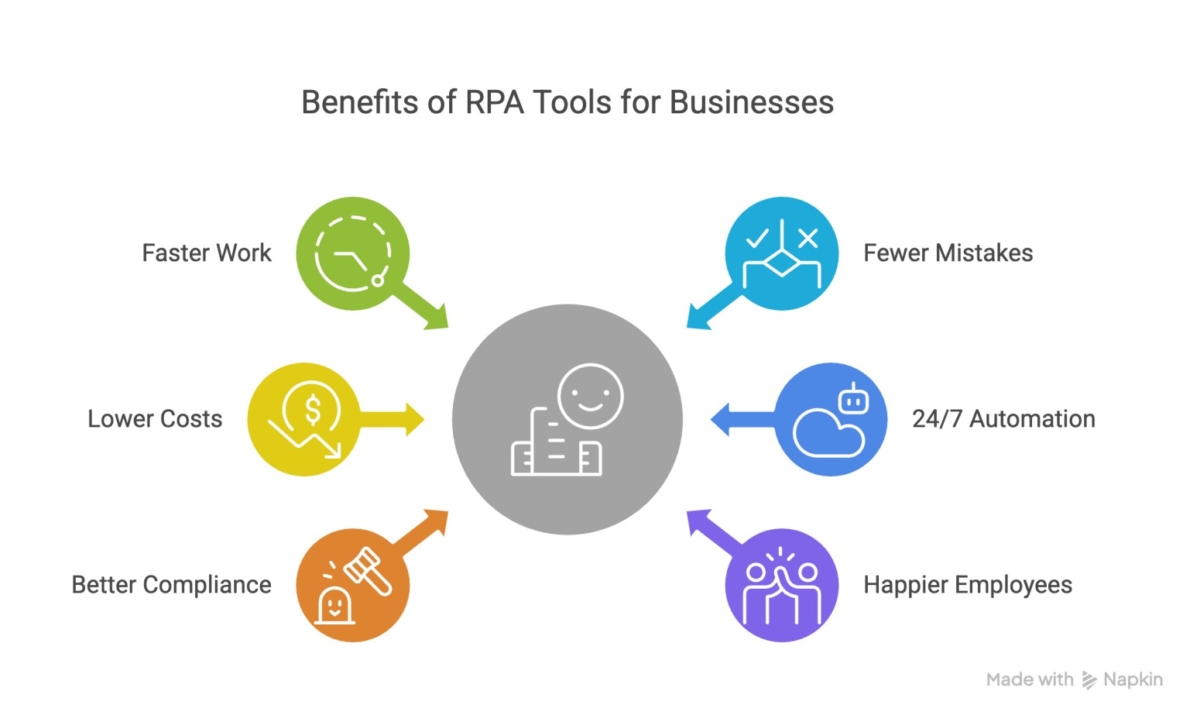
The case for RPA has never been stronger. Organizations that implement automation effectively consistently report:
- Faster work: Bots execute tasks significantly faster than humans, with no breaks and no context-switching.
- Fewer mistakes: Automated processes follow exact instructions every time, eliminating the human errors that creep into manual data entry and processing.
- Lower costs: By automating repetitive tasks, teams free up time for higher-value work, reducing operational overhead over time.
- 24/7 automation: Unlike employees, bots don’t have office hours. Unattended automation runs around the clock, keeping workflows moving outside business hours.
- Better compliance: Every bot action is logged, auditable, and consistent, making it far easier to demonstrate regulatory compliance.
- Happier employees: When tedious, repetitive tasks are automated, employees spend more time on meaningful work, improving morale and reducing burnout.
Real Business Impact
RPA delivers measurable results across virtually every department:
- Finance: Automating accounts payable, invoice matching, and financial reporting reduces processing time and improves accuracy.
- Customer service: Bots handle data lookups, ticket routing, and status updates, freeing agents to focus on complex queries.
- HR: Automating onboarding workflows, document collection, and system provisioning dramatically reduces new-hire setup time.
- IT helpdesk: Automating password resets, system alerts, and routine requests reduces ticket volume and response time.
Types of RPA Automation
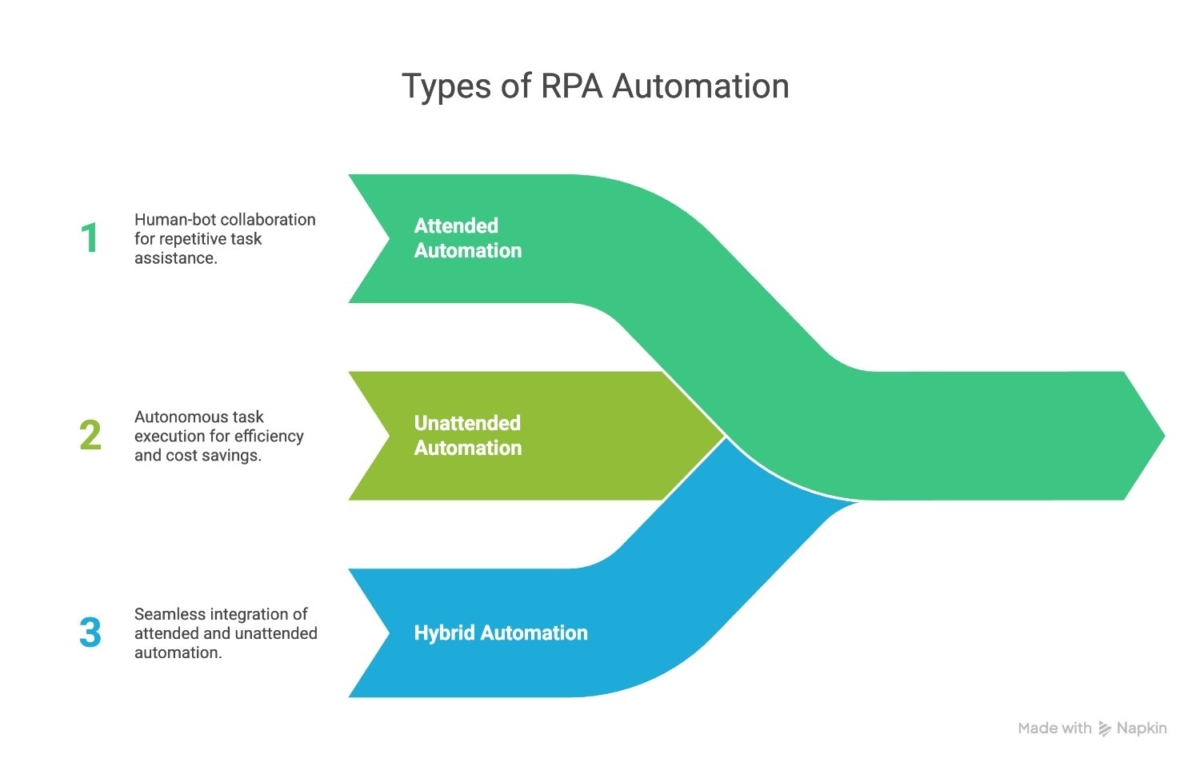
Attended Automation
Attended automation works alongside human employees in real time. The bot assists users during their work, triggering actions based on desktop activity or manual prompts. This type is especially useful in customer service, where an agent might need quick data lookups or automated form-filling during a live call.
Unattended Automation
Unattended automation runs entirely in the background, no human required. Schedules or system events trigger these bots and are ideal for high-volume, back-office tasks like invoice processing, nightly data transfers, batch reporting, and data entry. They run 24/7, independent of human interaction.
Hybrid Automation
Hybrid automation combines attended and unattended capabilities within a single workflow. A bot might process most of a task autonomously but pause for human review at a sensitive decision point before continuing. This model works best for end-to-end workflows that span both front-office and back-office functions.
Key Features to Look for in an RPA Tool
Must-Have Features
Before evaluating any specific platform, establish your baseline requirements. Every enterprise-grade RPA tool should offer:
- Drag-and-drop bot builder: Visual workflow design tools reduce dependency on developers and accelerate deployment.
- Workflow orchestration: The ability to manage, schedule, and monitor multiple bots running simultaneously across teams and locations.
- API and app integrations: Native connectors for popular tools (Salesforce, SAP, ServiceNow, etc.) make automation faster to deploy.
- Exception handling: When a process doesn’t go as expected, the bot needs to handle errors gracefully rather than crashing silently.
- Analytics and reporting: Real-time dashboards showing bot performance, task completion rates, and ROI metrics.
- Security and governance: Role-based access controls, audit trails, and encryption are especially important in regulated industries.
Advanced Features (2026 Trends)
As RPA matures, the gap between platforms is increasingly defined by advanced capabilities:
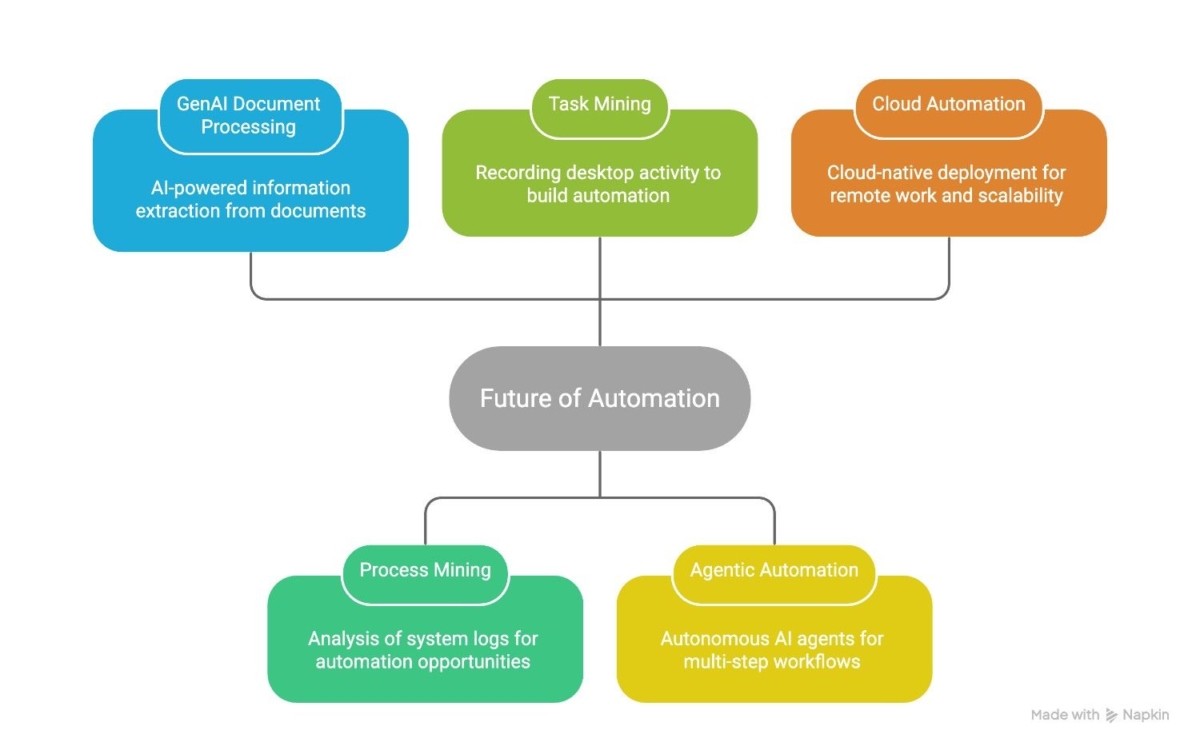
- GenAI document processing: Using Generative AI to understand and extract information from unstructured documents, contracts, invoices, emails, and PDFs.
- Process mining: Automatically analyzing system logs to identify the best automation opportunities.
- Task mining: Recording desktop activity to understand how employees complete tasks, then using that data to build automation.
- Agentic automation: Deploying AI agents that can plan and execute multi-step workflows autonomously, without pre-built rules.
- Cloud automation: Cloud-native or cloud-first deployment models that support remote workforces and scalable infrastructure.
How We Compared These RPA Tools
Comparison Criteria
This comparison evaluates each platform across seven dimensions that matter most to decision-makers:
- Ease of use – How quickly can non-developers get started?
- Pricing – What does it cost at various scales?
- Scalability – Can it grow from a pilot project to enterprise-wide deployment?
- AI capabilities – How deeply is AI integrated into the platform?
- Security – What compliance and governance tools are available?
- Integration ecosystem – How many pre-built connectors and APIs are available?
- Customer support – What resources, training, and community support exist?
Overview of the Top RPA Tools
| Platform | Best For | Ease of Use | AI Features | Scalability | Ideal Company Size | Deployment |
| UiPath | Complex workflows | ★★★★☆ | ★★★★★ | ★★★★★ | Mid to Enterprise | Cloud, On-Prem, Hybrid |
| Automation Anywhere | Cloud-first orgs | ★★★★☆ | ★★★★★ | ★★★★★ | Mid to Enterprise | Cloud-native |
| Blue Prism | Regulated industries | ★★★☆☆ | ★★★★☆ | ★★★★★ | Enterprise | On-Prem, Cloud |
| Power Automate | Microsoft ecosystems | ★★★★★ | ★★★☆☆ | ★★★☆☆ | SMB to Mid-size | Cloud (Microsoft) |
UiPath Review
What Is UiPath?
UiPath is widely regarded as the market leader in enterprise RPA. Founded in Bucharest in 2005 and headquartered in New York, UiPath has built one of the largest automation ecosystems in the industry, spanning developers, enterprises, and academic institutions.
Its strength lies in its balance of accessibility and power. Business users can build automations without writing code, while developers can leverage advanced scripting for complex workflows. Add to this one of the richest training ecosystems in the market, UiPath Academy offers hundreds of free courses, and you have a platform that scales well from first-time automators to large enterprise deployments.
Key Features
- UiPath Studio: A visual, drag-and-drop workflow designer suitable for both developers and citizen developers.
- Orchestrator: A centralized management console for deploying, monitoring, and managing bots across the organization.
- AI Center: Integrates machine learning models directly into automation workflows for intelligent document processing, prediction, and classification.
- Task Capture: Records user actions to automatically generate process documentation and bot templates.
- Process Mining & Task Mining: Built-in discovery tools that identify automation opportunities from system logs and desktop activity.
- UiPath Apps: A low-code application builder for creating custom front-end interfaces that trigger automated workflows.
Pros
- Beginner-friendly visual interface with a gentle learning curve
- Massive global community and extensive free training via UiPath Academy
- Deep AI and GenAI integrations for intelligent automation
- Robust analytics with detailed ROI reporting
- Supports attended, unattended, and hybrid automation
- Strong partner and technology ecosystem
Cons
- The licensing structure is complex and can be difficult to forecast costs at scale
- Can be expensive for smaller teams or organizations with limited automation needs
- The breadth of features can be overwhelming for organizations just starting out
Best Use Cases
UiPath is the strongest fit for:
- Large enterprises running complex, multi-department automation programs
- Organizations with varied technical skill levels that need both no-code and developer-grade tools
- Data scraping and document processing use cases requiring AI-powered extraction
- Companies that value training and community as part of their automation rollout strategy
Automation Anywhere Review
What Is Automation Anywhere?
Automation Anywhere is a cloud-native RPA platform that has positioned itself at the forefront of intelligent automation. Headquartered in San Jose, California, the company has made significant investments in AI, including its own Generative AI features and an agentic automation framework, making it one of the most forward-looking platforms in the market.
Unlike platforms that added cloud capability as an afterthought, Automation Anywhere was re-architected from the ground up as a cloud-first platform (Automation 360). This architecture gives it a natural advantage for organizations that prioritize agility, remote deployment, and scalability without heavy IT infrastructure.
Key Features
- Control Room: A cloud-based operations center for managing bots, scheduling workflows, and monitoring performance.
- IQ Bot: An AI-powered document automation tool that reads and extracts information from semi-structured and unstructured documents.
- AARI (Automation Co-Pilot): An AI assistant that enables attended automation and lets employees interact with bots through a conversational interface.
- Bot Insight: Real-time analytics dashboard with customizable KPIs and performance metrics.
- Security & Compliance Tools: Enterprise-grade encryption, role-based access, and compliance support for SOC 2, GDPR, and HIPAA.
- Process Discovery: An AI-powered tool that identifies automation opportunities by analyzing process data.
Pros
- Cloud-native architecture makes deployment and scaling significantly faster
- AARI enables intuitive, employee-friendly attended automation
- Strong AI and GenAI capabilities for document intelligence and decision automation
- Excellent security and compliance tools for enterprise environments
- Modern, clean dashboard that simplifies bot monitoring
Cons
- There’s a learning curve, particularly for teams migrating from other RPA platforms
- Pricing can become complex as automation scale increases
- On-premise deployments, while possible, are less seamless than a cloud-native setup
Best Use Cases
Automation Anywhere excels for:
- IT consulting firms managing automation programs across multiple clients
- Financial services organizations requiring robust compliance and document automation
- Cloud-first companies that want minimal on-premise infrastructure
- Enterprises exploring agentic automation and AI-driven decision making
Blue Prism Review
What Is Blue Prism?
Blue Prism, now part of SS&C Technologies, is one of the original enterprise RPA platforms, and it remains the most trusted option for organizations in heavily regulated industries. Founded in the UK in 2001, Blue Prism pioneered the concept of a “digital workforce”: software robots that operate with the same governance and accountability as human employees.
Its architecture was built with IT, compliance, and security teams in mind. As a result, it offers tighter governance controls than almost any other platform in the market, at the cost of some user-friendliness. Blue Prism is not the easiest platform to set up or maintain, but for industries where regulatory compliance is non-negotiable, that trade-off is often worth making.
Key Features
- Digital Workforce Model: Blue Prism treats bots as enterprise employees, governed, auditable, and managed through structured workflows.
- Process Mining: Built-in tools for analyzing process performance and identifying automation opportunities.
- Object-Based Automation: Modular design that allows reusable automation components, reducing duplication and maintenance overhead.
- Decipher IDP: An intelligent document processing tool powered by AI and OCR.
- Chorus BPM Integration: Business Process Management tools that connect automation with broader organizational workflows.
- Robust Audit Logs: Comprehensive logging of every bot action for compliance and reporting purposes.
Pros
- Best-in-class governance and compliance tools, ideal for regulated industries
- Highly scalable across large enterprise deployments
- Strong security architecture with encryption and role-based access controls
- Vendor-neutral approach supports integration with a wide range of systems
- Long track record in banking, insurance, and healthcare automation
Cons
- Setup and configuration are more complex than UiPath or Power Automate
- Less beginner-friendly, typically requires experienced developers to manage
- Smaller community compared to UiPath
- The user interface is more technical and less intuitive for business users
Best Use Cases
Blue Prism is the strongest fit for:
- Banks and financial institutions require strict regulatory compliance
- Healthcare organizations managing sensitive patient data under HIPAA or local regulations
- Government agencies with high security and auditability requirements
- Insurance companies running complex, rule-based claims and underwriting automation
Microsoft Power Automate Review
What Is Power Automate?
Microsoft Power Automate (formerly Microsoft Flow) is Microsoft’s low-code automation platform, embedded within the Microsoft 365 and Azure ecosystems. It’s designed to make automation accessible to non-technical users, letting employees build workflows using a library of pre-built connectors across hundreds of apps and services.
Power Automate occupies a distinct segment of the RPA market. It’s not competing with Blue Prism on enterprise governance or with UiPath on complex workflow orchestration. Instead, it targets productivity automation, helping individuals and teams automate day-to-day tasks within familiar Microsoft tools like Outlook, Teams, SharePoint, Excel, and Dynamics 365.
For organizations already deeply embedded in the Microsoft ecosystem, Power Automate is often the fastest and most cost-effective path to automation.
Key Features
- Deep Microsoft 365 Integration: Native connections to Outlook, Teams, SharePoint, Excel, OneDrive, Dynamics 365, and Azure services.
- Low-Code/No-Code Interface: A simple, visual workflow builder that requires little to no technical expertise.
- Power Automate Desktop: Supports robotic process automation for desktop-based tasks, extending automation beyond cloud apps to legacy systems.
- AI Builder: Integrates AI capabilities, like form processing, object detection, and sentiment analysis, into Power Automate workflows.
- Pre-Built Connector Library: Over 1,000 connectors to popular apps and services, including Salesforce, ServiceNow, and SAP.
- Copilot Integration: Microsoft’s AI Copilot helps users build automations using natural language prompts.
Pros
- Most affordable RPA option plans start from around $15/user/month
- Extremely easy for business users to get started, especially within Microsoft environments
- Copilot integration enables natural-language automation building
- Fast deployment for Microsoft-centric workflows
- Strong for productivity automation at the individual or team level
Cons
- Vendor lock-in is a real risk for organizations that later want to diversify their technology stack
- Limited enterprise scaling of complex, multi-system workflows can strain the platform
- Less robust governance and compliance tools compared to Blue Prism or Automation Anywhere
- Not ideal for heavy-duty, unattended automation at scale
Best Use Cases
Power Automate is the strongest fit for:
- Small and mid-size businesses looking for affordable, accessible automation
- Microsoft-heavy environments where Teams, SharePoint, and Dynamics 365 are central tools
- Individual employees and departments are automating repetitive daily tasks
- Organizations starting their automation journey before scaling to enterprise platforms
Side-by-Side RPA Tools Comparison Table
| Feature | UiPath | Automation Anywhere | Blue Prism | Power Automate |
| Best For | Complex workflows | Cloud automation | Regulated industries | Microsoft ecosystems |
| Ease of Use | High | Medium-High | Medium | Very High |
| Starting Price | Enterprise (custom) | Enterprise (custom) | Enterprise (custom) | ~$15/user/month |
| AI Features | Advanced | Advanced | Moderate | Basic-Moderate |
| Scalability | Enterprise | Enterprise | Enterprise | SMB to Mid-size |
| Ideal Company Size | Mid to Large | Mid to Large | Large Enterprise | SMB to Mid |
| Deployment Options | Cloud, On-Prem, Hybrid | Cloud-native | On-Prem, Cloud | Cloud (Microsoft) |
| Compliance Tools | Strong | Strong | Best-in-class | Basic |
| Community & Training | Excellent | Good | Limited | Good |
| Integration Ecosystem | Very Large | Large | Large | 1,000+ connectors |
Pricing Comparison
Pricing transparency is one area where the RPA industry has room to improve. Most enterprise platforms don’t publish fixed pricing; costs vary depending on the number of bots, deployment model, modules selected, and contract terms.
UiPath uses a consumption-based and license-based model. Costs are structured around the number of attended and unattended robots, plus Orchestrator licenses. Enterprise contracts are typically negotiated directly with sales teams. Smaller teams can access a free community edition for limited use cases.
Automation Anywhere also uses custom enterprise pricing based on the number of bots, the deployment model (cloud vs. on-prem), and add-on modules like IQ Bot. Automation Anywhere does offer a Community Edition with limited features for smaller users.
Blue Prism operates on an enterprise licensing model, typically sold as an annual subscription. Costs reflect the number of digital workers (bots) deployed and the scale of the implementation. Blue Prism is generally positioned at the higher end of the pricing spectrum, reflecting its enterprise-grade governance capabilities.
Microsoft Power Automate is the most transparently priced of the four. Plans start at around $15/user/month for the standard plan, with a Power Automate Premium tier at around $40/user/month for more advanced capabilities, including full RPA features. Hosted RPA (Power Automate Process) is available at an additional cost. For organizations already holding Microsoft 365 licenses, some Power Automate capabilities are included at no extra charge.
Which RPA Tool Should You Choose?
By Company Size
Startups and small businesses: Start with Microsoft Power Automate. The low cost, easy onboarding, and Microsoft integration make it the fastest path to automation value. You don’t need enterprise-grade governance when your priority is demonstrating ROI and building internal confidence in automation.
Mid-size companies: UiPath or Automation Anywhere offer the best combination of scalability, AI capability, and workflow complexity. UiPath’s training ecosystem makes it easier to build internal expertise. Automation Anywhere is the stronger choice if you’re already cloud-first.
Large enterprises: Blue Prism or UiPath are the most defensible choices. Blue Prism wins if governance, security, and regulatory compliance are the top priorities. UiPath wins if flexibility, AI, and developer ecosystem matter most.
By Industry
- Finance and banking: Blue Prism’s compliance tools, audit trails, and governance architecture make it the safest choice in regulated financial environments.
- IT services and consulting: Automation Anywhere’s cloud-native platform and scalability make it well-suited to IT teams managing automation across distributed environments or multiple clients.
- Microsoft-heavy organizations: Power Automate is the natural fit—especially for automating workflows within Teams, SharePoint, and Dynamics 365.
- Healthcare: Blue Prism’s security and compliance credentials, combined with strong audit capabilities, make it the preferred choice for healthcare data automation.
By Automation Goals
- Simple, task-level automation: Power Automate. Fast, affordable, no technical expertise required.
- Complex, multi-system workflows: UiPath. The combination of visual design, AI capability, and developer tooling handles sophisticated automation at scale.
- Governance, compliance, and auditability: Blue Prism. No other platform in this comparison comes close to enterprise governance.
- Cloud-first, AI-driven automation: Automation Anywhere. Its cloud architecture and AI integrations put it ahead for organizations prioritizing intelligent, scalable automation.
Future of RPA Tools (2026–2030)
The RPA market is in the middle of a significant transformation. The shift from rule-based bots to intelligent, autonomous automation is already underway, and by 2030, the tools that survive will look very different from what we know today.
Key trends to watch:
- AI-powered bots: Every major platform is embedding AI directly into automation workflows, enabling bots to handle unstructured data, make contextual decisions, and improve over time.
- Agentic automation: The biggest shift on the horizon. Agentic AI frameworks allow bots to plan and execute multi-step goals autonomously, without pre-built rules or human triggers.
- Self-healing workflows: Bots that detect and fix their own errors when application interfaces change, dramatically reducing maintenance overhead.
- Autonomous digital workers: Rather than single-purpose bots, future platforms will deploy AI agents capable of managing entire end-to-end business processes with minimal human oversight.
- Hyperautomation platforms: The convergence of RPA, process mining, AI, and low-code development into unified hyperautomation platforms, removing silos between tools.
Organizations that invest in platforms already aligned with these trends, especially around AI and cloud architecture, will be better positioned to scale their automation programs through the decade.
Common Mistakes When Choosing RPA Tools
Even experienced IT leaders make avoidable mistakes when selecting an RPA platform. Watch out for these:
Choosing based only on price: Power Automate may look like the cheapest option, and for small teams, it is. But for enterprise deployments, the cost of limited scalability, rework, and eventual migration often exceeds the savings. Total cost of ownership matters more than license price.
Skipping process discovery: Jumping straight to automation without identifying which processes are actually worth automating is one of the most common (and costly) mistakes. Before evaluating tools, use process mining or structured process audits to prioritize high-ROI candidates.
Ignoring scalability: A tool that works perfectly for a 5-bot pilot program may not hold up when you’re running 500 bots across multiple departments. Always evaluate platforms against your 3–5 year automation roadmap, not just your current needs.
Not running a pilot project: Making a full platform commitment based on demos and vendor presentations is risky. Run a structured pilot with real processes, real users, and defined success metrics before signing an enterprise contract.
Final Verdict – Which RPA Tool Wins?
There’s no universal winner, but there is a right answer for every organization.
- Best overall: UiPath– The most well-rounded platform on the market. Excellent AI capability, developer-friendly tooling, a rich training ecosystem, and proven enterprise scalability make UiPath the strongest default choice for most mid-to-large organizations.
- Best cloud-native platform: Automation Anywhere– For organizations prioritizing cloud architecture, modern AI, and agentic automation, Automation Anywhere is the most future-ready option in this comparison.
- Best for enterprise governance: Blue Prism– Banks, healthcare providers, insurers, and government agencies should give Blue Prism serious consideration. Its compliance tools, security architecture, and audit capabilities are unmatched.
- Best budget choice: Microsoft Power Automate– For startups, small businesses, and Microsoft-heavy environments, Power Automate offers the fastest path to automation value at the lowest cost of entry.
FAQ
What is the best RPA tool for beginners?
Microsoft Power Automate is the most beginner-friendly RPA platform. Its low-code interface, deep integration with familiar Microsoft tools, and affordable pricing make it the easiest starting point. UiPath is also relatively accessible, especially with its free UiPath Academy training courses that guide beginners from foundational concepts to advanced automation.
Which RPA tool is the cheapest?
Microsoft Power Automate offers the most transparent and affordable pricing, starting at around $15/user/month. UiPath, Automation Anywhere, and Blue Prism all use enterprise pricing models, meaning costs vary depending on the scale of deployment, modules selected, and contract terms. For organizations already using Microsoft 365, some Power Automate functionality is included at no extra charge.
What RPA tool works best with Microsoft?
Microsoft Power Automate is the clear winner for Microsoft environments. It integrates natively with the entire Microsoft 365 suite, including Outlook, Teams, SharePoint, and Excel. Dynamics 365 and Azure include Copilot AI features for building automations using natural language. No other platform offers this level of Microsoft-native integration.
Is UiPath better than Automation Anywhere?
It depends on your priorities. UiPath has a larger community, more extensive training resources, and a more flexible deployment model—making it the stronger choice for organizations that value ease of adoption and developer tooling. Automation Anywhere has the edge in cloud-native architecture and AI-driven automation, making it the better fit for cloud-first enterprises and organizations investing heavily in intelligent automation.
Which RPA tool is best for large enterprises?
For large enterprises, the answer comes down to priorities. UiPath is the most versatile enterprise platform, handling everything from simple task automation to complex, AI-driven workflows. Blue Prism is the better choice when governance, compliance, and security are the top priority, particularly in regulated industries like finance, healthcare, and government. Automation Anywhere is the leading option for large enterprises committed to cloud-native, AI-first automation at scale.
Table of contents
- What Is RPA Software?
- Why Businesses Use RPA Tools
- Types of RPA Automation
- Key Features to Look for in an RPA Tool
- How We Compared These RPA Tools
- Overview of the Top RPA Tools
- UiPath Review
- Automation Anywhere Review
- Blue Prism Review
- Microsoft Power Automate Review
- Side-by-Side RPA Tools Comparison Table
- Pricing Comparison
- Which RPA Tool Should You Choose?
- Future of RPA Tools (2026–2030)
- Common Mistakes When Choosing RPA Tools
- Final Verdict – Which RPA Tool Wins?

Related Articles