
Greetings! I'm Aneesh Sreedharan, CEO of 2Hats Logic Solutions. At 2Hats Logic Solutions, we are dedicated to providing technical expertise and resolving your concerns in the world of technology. Our blog page serves as a resource where we share insights and experiences, offering valuable perspectives on your queries.

Customer support is taking up too much of your time.
The same questions repeat every day: order tracking, shipping times, returns, sizing. You’re responding to 50+ emails daily, and customers still wait hours for answers.
The solution? An AI support assistant for e-commerce.
It handles routine questions automatically, 24/7, no breaks. Your team steps in only for complex cases. Setup is no-code, and most stores finish in under an hour.
In this guide, we’ll walk through exactly how to implement an AI support assistant for e-commerce, step by step.
Who Needs an AI Support Assistant in E-Commerce?
AI support isn’t only for giant brands. It helps most when you’re in the “busy but not huge” stage.
You’ll get the most value if you:
- Run a Shopify, WooCommerce, BigCommerce, Shopware, or similar store
- Get 5,000-100,000 monthly visitors
- Handle 50+ customer queries a day (or even fewer, but they’re constant)
- Sell in GCC, India, Europe, or serve customers across time zones
- Keep seeing the same questions over and over: delivery timelines, return policy, order tracking, sizing, COD, warranty, etc.
A very common scenario: a fashion store gets a lot of evening traffic, but support goes offline after 6 PM. Customers have one quick sizing or shipping question… and instead of buying, they leave.
If that sounds familiar, AI support is worth testing.
Why Add AI Support to Your Online Store?
Let’s keep it simple: AI support helps because it’s fast, consistent, and always available.
Here’s what it typically improves:
1) Fewer repetitive tickets
Most stores are flooded with the same 10-20 questions. An AI assistant can handle those instantly, so your team can focus on real issues.
2) 24/7 responses (without hiring night support)
A lot of shopping happens outside business hours, nights, weekends, and holidays. AI fills that gap without adding headcount.
3) Better checkout confidence
Customers abandon carts when they’re unsure. Fast answers during checkout (shipping, delivery dates, return rules, payment options) can directly improve conversions.
4) Lower cost per resolution
Manual support is expensive, not just salaries, but time and delays. If AI resolves even a portion of tickets, it pays back quickly.
Quick win tip: Start by automating your top 20 questions. In many stores, that’s the majority of support volume.
Important reality check: AI shouldn’t replace your support team. It should protect them. Escalations, refunds, complaints, and sensitive cases still need human judgment and empathy.
How Shop Owners Search for AI Support Tools (So You Can Choose Better)
Most store owners find tools in three places:
- Google (“best AI chatbot for online store”, “automate customer service e-commerce”, “Shopify AI chat app”)
- Platform app stores (Shopify apps, WooCommerce plugins, BigCommerce marketplace)
- YouTube tutorials (because everyone wants to see the setup before committing)
One more shift to note: people now search more conversationally (especially on mobile/voice). Instead of “AI chatbot,” they ask things like:
- “How do I add automated support to my shop?”
- “Can I set up AI customer service without coding?”
So when we pick a tool, we want one with clear onboarding, good documentation, and ideally short, practical videos.
Need expert help getting started?
What Store Owners Want From AI Implementation Guides
No one wants a 40-page technical manual. Store teams want:
- No-code setup
- Real screenshots / real steps
- Clear pricing
- A free trial or genuinely useful free plan
- Region-ready support (Arabic, German, French, Hindi, depending on your audience)
- Proof it works (not just vague “boosts conversions” claims)
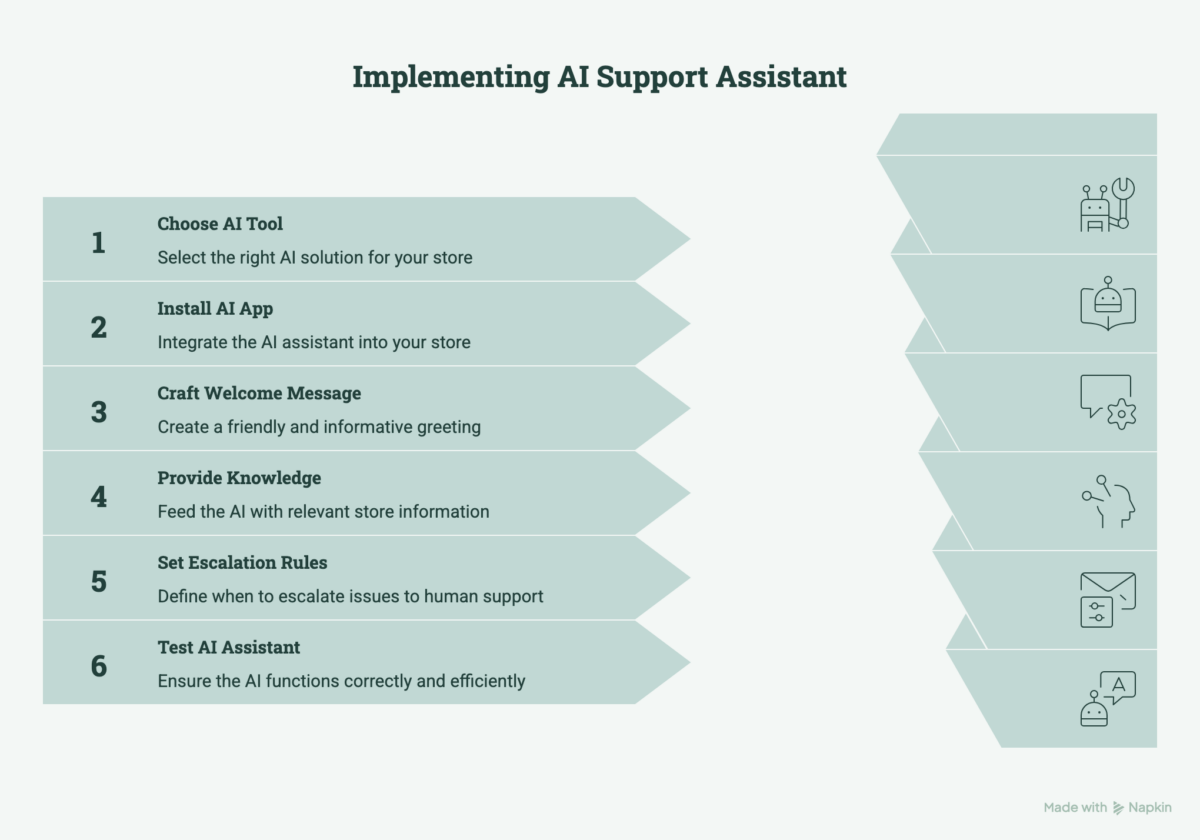
How to Implement an AI Support Assistant in Your Store
Here’s the practical setup path. No fluff.
Step 1: Confirm Your Platform + Your Goal
Before we touch tools, answer two questions:
- What platform are you on (Shopify/WooCommerce/etc)?
- What do you want AI to handle first?
- Order tracking?
- Delivery ETA?
- Returns?
- Product questions?
- Sizing?
- COD/payment questions?
This keeps the setup focused and prevents “we installed it, but nothing changed.”
Step 2: Pick a Tool (Free or Paid) That Fits Your Store
Not every “AI chatbot” is actually useful. The best ones have:
- A real free tier or fair trial
- Set up, you can finish in under 30-60 minutes
- Multilingual support (if needed)
- Strong integration (orders, shipping, product catalogue)
- Clear pricing (avoid tools that hide everything behind “contact sales”)
Common 2026 options (based on typical e-commerce needs):
- Tidio (good SMB starting point, Shopify/WooCommerce friendly)
- Gorgias (strong for e-commerce support workflows)
- Zendesk AI (powerful when you’re scaling)
- Intercom (great for B2B or high-consideration purchases)
Not sure which AI tool fits your store?
Warning: Be careful with “lifetime deal” tools that don’t have a long-term roadmap. Support software needs regular updates.
Step 3: Install the App/Plugin (No-Code)
This part should feel like installing any app:
- Go to your platform’s app marketplace
- Search the tool name
- Click Install / Add
- Approve permissions (orders/customer data, only what’s necessary)
If permissions feel too broad, pause and check the tool’s documentation before proceeding.
Step 4: Write a Human Welcome Message
Avoid the “I am an AI assistant…” vibe.
Try something like:
“Hi! I can help with order tracking, shipping, returns, and product questions. What are you looking for today?”
Short, friendly, and clear.
Step 5: Feed It the Right Knowledge (This is Where Results Come From)
Your AI is only as helpful as the information you give it.
Start with:
- Shipping details (regions, delivery times, fees, cut-off times)
- Returns + refunds policy (windows, exclusions, steps)
- FAQs (payments, COD, warranty, cancellations)
- Sizing guide or fit help (if relevant)
- “Contact us” and escalation rules
If your tool supports it, connect:
- Order tracking (Shopify/WooCommerce orders, courier tracking)
- Product catalogue links (so it can point customers to the right items)
Step 6: Set Escalation Rules
A good AI assistant knows when to hand off.
Escalate to a human for:
- Refund approvals
- Complaints or angry messages
- Fraud/chargeback hints
- Account/payment issues
- Anything sensitive or unclear
Also set:
- Business hours for human support
- Email/Slack alerts for escalations
- A fallback option (“Leave your email and order number, we’ll respond ASAP”)
Step 7: Test It Properly
Don’t launch and pray. Test like you’re a customer.
For the first 1–2 weeks:
- Review transcripts daily
- Fix wrong answers immediately
- Add missing FAQs based on real questions
- Update tone (make it sound like your brand)
Then track:
- AI resolution rate (target 70%+ for basic queries)
- Response time (under 30 seconds)
- CSAT (aim 4.2+/5)
- Cost per resolved ticket (goal: under $2 for AI-handled issues)
Overwhelmed by the setup process? We can handle implementation for you
Real Example: Dubai Home Décor Store
A Dubai-based home décor retailer (50,000 monthly visitors) was drowning in repetitive customer support questions.
THE PROBLEM (Before AI):
- 320 support tickets per month
- 4.5-hour average response time
- 38% cart abandonment rate
- $3,200/month support cost (2 full-time agents)
- Customers waiting hours for simple answers (order tracking, shipping times, returns)
THE SOLUTION:
They implemented an AI support assistant and focused on ONE thing: automating their top 20 repeat questions.
Knowledge fed to AI: Shipping policy, returns guide, order tracking, sizing, payment options
THE RESULTS (After 90 Days):
- 48 tickets needing humans (≈ 85% reduction)
- Instant responses for 92% of queries (under 30 seconds)
- Cart abandonment dropped to 22% (16% improvement)
- Support cost: $1,100/month (AI + 1 part-time agent)
- Monthly savings: $2,100 ($25,200/year)
- Customer satisfaction: 4.7/5 (was 3.9/5)
This is what happens when you implement AI support correctly.
Conclusion
Implementing an AI support assistant for e-commerce is simple:
1. Pick the right tool for your platform (Shopify, WooCommerce, Shopware)
2. Follow the 7-step process (no coding needed)
3. Test for 2 weeks, then track results.
Most stores finish setup in under 60 minutes and see 85% ticket reduction within 30 days. AI support doesn’t replace your team; it protects them. Let AI handle repetitive questions while your team focuses on complex issues. At 2HatsLogic, we’ve helped 50+ e-commerce stores implement AI support with 85% average ticket reduction and 30-day ROI.
Get Your Free AI Support Audit
FAQ
Will AI replace my customer service team?
No. It replaces repetitive work, not human judgment. AI handles the quick wins; your team handles the situations that need empathy and decision-making.
Can AI handle returns and complaints?
It can start the process (collect order details, reason, and guide the steps). But most stores keep approvals/refunds under human control.
What if my customers prefer human support?
Offer both. Let customers choose "Chat with AI" or "Talk to a human" upfront. Many prefer AI for simple questions because it's faster. Complex issues still get routed to your team.
Will AI confuse customers with wrong answers?
Properly trained AI (with your FAQs, policies, and shipping details) handles 90%+ correctly. Review transcripts daily for the first 2 weeks and fix wrong answers immediately. Most tools let you update the knowledge base instantly.
Is AI support secure for customer data?
Yes, when you choose reputable tools with proper permissions. Only grant access to necessary data (orders, tracking). Avoid tools requesting broad customer database access. Look for tools with GDPR compliance.
Table of contents

Related Articles