Greetings! I'm Aneesh Sreedharan, CEO of 2Hats Logic Solutions. At 2Hats Logic Solutions, we are dedicated to providing technical expertise and resolving your concerns in the world of technology. Our blog page serves as a resource where we share insights and experiences, offering valuable perspectives on your queries.

Manually typing order details from emails into Odoo wastes hours every week and introduces costly errors. If you’re looking to sync email orders to Odoo ERP automatically, you have options, from Odoo’s built-in features to advanced PDF parsing and custom integrations.
This guide explains how to sync orders to Odoo from emails and PDF attachments, what each approach handles well, and when you need professional help for complex automation.
What you’ll learn:
- How email-to-order automation works in Odoo
- When PDF parsing makes sense for your workflow
- Realistic expectations for each method
- How to choose the right approach for your business
Understanding Order Automation in Odoo
Order automation eliminates manual data entry by connecting your email inbox directly to Odoo. When orders arrive via email or PDF attachment, Odoo reads the content, extracts customer information and line items, and then creates a draft order for you to review and confirm.
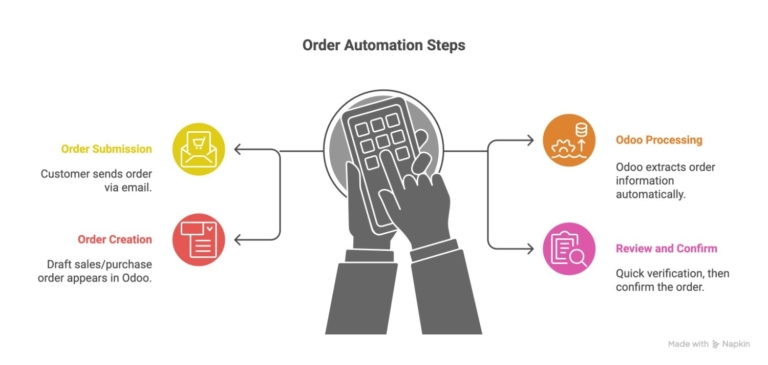
The basic workflow:
- Customer sends order → Email arrives with details or PDF attachment
- Odoo processes → Extracts order information automatically
- Order created → Draft sales/purchase order appears in Odoo
- You review → Quick verification, then confirm
What automation handles:
- Customer/vendor identification from email address
- Product matching from SKU codes or descriptions
- Quantity and pricing extraction
- Order reference numbers
- Basic validation
What still needs human review:
- New customers not in your system
- Products with unclear references
- Unusual pricing or quantities
- Complex special instructions
Method 1: Email Gateway for Text-Based Orders
Odoo includes a built-in email gateway that monitors specific email addresses and converts incoming messages into orders automatically. It’s free, works with any email provider, and requires no coding.
How it works
You configure Odoo to check a dedicated inbox (like [email protected]). When emails arrive in the expected format, Odoo parses the content, matches the sender to a customer, extracts product codes, and creates a draft order.
What you need
- Dedicated email address for orders
- IMAP access to your email account
- Customers in your Odoo contacts with matching email addresses
- Products with consistent SKU codes or internal references
- Orders arriving in a predictable text format
Realistic expectations
Success rate: 85-90% for orders in a consistent format
Setup complexity: Low (can be configured in 30-60 minutes)
Maintenance: Minimal once working
Best for: 20-100 orders/day from regular customers
What works well
- Customers who send orders in a consistent format
- Simple text-based order lists (product code + quantity)
- Email-based workflows where orders aren’t attachments
- Businesses using standardized product references
Common challenges
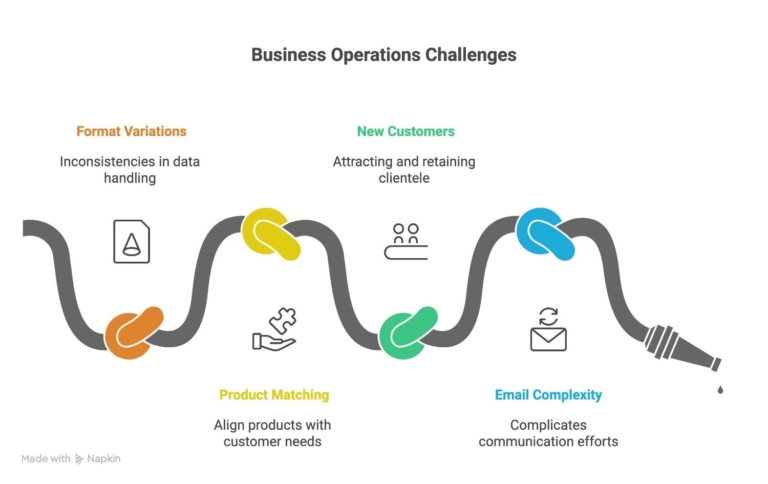
Format variations: Customers who write orders differently each time reduce accuracy. Solution: Provide an order template or train key customers on the format.
Product matching: If customers use descriptions instead of exact SKU codes, Odoo can’t match automatically. Solution: Maintain a clean product catalog with all common variations as references.
New customers: First-time buyers not in your system create orders under a generic user. Solution: Quickly add new contacts, then reassign orders.
Email complexity: Long emails with conversations mixed in confuse the parser. Solution: Ask customers to send clean order emails without previous message threads.
When this method isn’t enough
- Orders arrive as PDF attachments
- Multiple formats from different sources
- Complex table-based order forms
- Need advanced validation before order creation
- High volume requiring guaranteed processing
Method 2: PDF Parsing for Document-Based Orders
When orders arrive as PDF attachments, common with B2B suppliers and formal purchase orders, you need OCR (Optical Character Recognition) to extract data. Odoo Enterprise includes document management with OCR capabilities.
How PDF extraction works
Odoo’s Documents module captures PDF attachments, runs OCR to read the text, and then uses workflow rules to extract relevant fields (vendor, date, and line items) and create orders automatically.
What you need
- Odoo Enterprise Edition (Documents module not in Community)
- OCR service configured (built-in or third-party)
- Consistent PDF formats or custom-trained models
- Clean supplier/customer data for matching
Realistic expectations
Success rate: 80-90% for standard PDFs, 95%+ with trained models
Setup complexity: Medium (1-2 hours initial configuration)
Maintenance: Requires updates when new PDF formats arrive
Best for: 50-500 PDF orders/week from regular sources
What works well
- Digital PDFs (not scanned images) with clear text
- Table-based order formats with consistent layout
- Regular suppliers using the same PDF template
- Enterprise businesses already on Odoo Enterprise
Common challenges
Scanned PDFs: Image-based PDFs from scanned documents have lower accuracy.
Solution: Use advanced OCR providers or request digital PDFs from suppliers.
Varied layouts: Each supplier uses a different PDF structure, requiring a separate configuration. Solution: Train custom models for high-volume suppliers.
Complex tables: Multi-page orders with subtotals and calculations can confuse extraction.
Solution: Custom parsing rules or professional development.
Product matching: Suppliers using their own product codes that don’t match your catalog.
Solution: Maintain vendor-specific product cross-references.
When this method isn’t enough
- Dozens of different PDF layouts
- Scanned or handwritten order forms
- Multi-page complex documents with mixed content
- Need real-time processing of hundreds of PDFs daily
- Require integration with warehouse or accounting systems
When to Consider Professional Help
DIY automation handles straightforward scenarios, but some situations need custom development for reliability and efficiency.
Signs you need professional integration
Complex requirements:
- Multiple suppliers with different formats (email, PDF, EDI, API)
- Advanced business logic (credit checks, inventory verification, approval workflows)
- Integration with existing systems (WMS, accounting, CRM)
Volume demands:
- Processing hundreds of orders daily with zero error tolerance
- Peak periods requiring guaranteed processing speed
- Need near-perfect automation instead of 85-90%
Time and cost justify investment:
- Manual processing consumes significant staff hours
- Teams sare pending time on data entry instead of customer service
- Errors causing costly mistakes (wrong shipments, unhappy customers)
What professional services are provided?
- Advanced parsing that handles any format
- Intelligent matching for product variations and typos
- Multi-system integration with your existing tools
- Custom validation and approval workflows
- Performance optimization for high volume
- Ongoing support when suppliers change formats
Making the decision
Professional development makes sense when automation complexity exceeds what standard tools handle, or when volume demands reliability you can’t achieve with DIY approaches. Most businesses find the investment pays back within months through time savings and error reduction.
Conclusion
Syncing email and PDF orders to Odoo ERP eliminates hours of manual data entry while reducing errors. Start with Odoo’s built-in email gateway for simple text orders, move to PDF parsing for document-based workflows, or invest in custom development for complex multi-source automation.
Key takeaways:
- The email gateway works for straightforward email orders with minimal setup
- PDF parsing handles document-based orders but requires Odoo Enterprise
- Custom development makes sense for high-volume or complex requirements
- Clean master data is essential for any automation approach
- Start with your highest-volume, most consistent order source
Next steps:
- Audit your current order sources and formats
- Estimate the time spent on manual entry weekly
- Test email gateway with sample orders if formats are consistent
- Consider PDF parsing if attachments are your primary source
- Reach out for professional help with complex automation needs
The right automation approach depends on your order volume, format consistency, and tolerance for manual review. Most businesses find significant value even with basic automation, then expand as they see what works.
FAQ
How accurate is automatic order syncing?
Email gateway: 85-90% for consistent formats. PDF parsing: 80-95% depending on document quality. Custom development: 98%+ with proper error handling.
Can I sync orders from multiple email addresses?
Yes, set up multiple email aliases, one for sales orders, one for purchase orders, or separate addresses for different departments or order types.
What if my PDFs are scanned images, not digital text?
Scanned PDFs have lower OCR accuracy (75-85%) compared to digital PDFs (90-95%). Use advanced OCR providers or request digital PDFs from suppliers when possible.


Related Articles