Greetings! I'm Aneesh Sreedharan, CEO of 2Hats Logic Solutions. At 2Hats Logic Solutions, we are dedicated to providing technical expertise and resolving your concerns in the world of technology. Our blog page serves as a resource where we share insights and experiences, offering valuable perspectives on your queries.

Quick Summary
NAV is a proven on-prem ERP that supported SMBs for decades, but it’s now legacy technology with increasing support, security, and scalability concerns. Business Central is Microsoft’s forward path: cloud-first, continuously updated, easier to integrate with Microsoft tools, and generally better suited to modern workflows, analytics, and growth. For most businesses, it’s not “if” you’ll move, it’s when and how well you plan the move.
If you’re comparing Microsoft Dynamics NAV and Dynamics 365 Business Central, you’re not alone, and the confusion is understandable.
Maybe NAV has been running your finance and operations for years, and it’s doing the job. But lately, you’re hearing things like “end of support,” “cloud migration,” and “Business Central” from your IT team or Microsoft partner. Or maybe you’re researching ERPs for the first time, and both names keep showing up in the same conversations.
So what’s the real story?
NAV and Business Central aren’t the same product, even though Business Central grew out of NAV. And the difference isn’t just branding. It affects your costs, security, scalability, reporting, integrations, and how easily your team can actually use the system day to day.
Let’s break it down in plain language.
Are NAV and Business Central different?
Yes, they’re different, but Business Central didn’t appear out of nowhere.
Dynamics NAV (originally Navision) has been around since the late 1980s and became one of the most widely used ERPs for SMBs, especially in Europe. Traditionally, NAV was built for on-premises use: you host it, maintain the servers, manage updates, and often rely on deep customizations written in C/AL (and later AL).
In 2018, Microsoft introduced Dynamics 365 Business Central, built on NAV’s foundation but designed for a cloud-first world. Think of it less like a “new name” and more like NAV’s next-generation platform, rebuilt to work smoothly with the Microsoft ecosystem, support modern workflows, and stay current through continuous updates.
If you’re still on NAV today, it can absolutely keep working, but you’re effectively running legacy ERP in a world that’s moving fast toward cloud services, automation, and tighter security standards.
NAV vs. Business Central
Here’s the practical comparison, no fluff, just what changes in the real world:
| Aspect | Dynamics NAV | Business Central |
| Deployment | Mainstream support ended; extended support depends on the version | Cloud-first (SaaS) + optional on-prem/hybrid |
| Pricing | Perpetual license + annual maintenance | Monthly subscription per user (typically ~$70–$100/user/month depending on plan) |
| Updates | Manual, can be delayed for years | Automatic updates (typically quarterly) included |
| Integrations | Often needs custom work | Heavier dev effort (C/AL/AL), more “core changes.” |
| Mobile/Web access | Desktop-heavy | Modern web + mobile access built in |
| Customization approach | Elastic scaling in the cloud | Extension-based customization; more upgrade-friendly |
| Scalability | Limited by server setup and infrastructure | Elastic scaling in cloud |
| UI/Usability | Older interface | Modern interface similar to Microsoft 365 |
| Support | Mainstream support ended; extended support depends on version | Continuous product evolution and support |
Simple way to think about it: NAV is a solid, familiar system you maintain. Business Central is a platform that’s designed to stay current, connect to your tools, and scale without you managing the plumbing.
Not sure if it's time to migrate from NAV to Business Central?
What’s new in Business Central (beyond “it’s in the cloud”)?
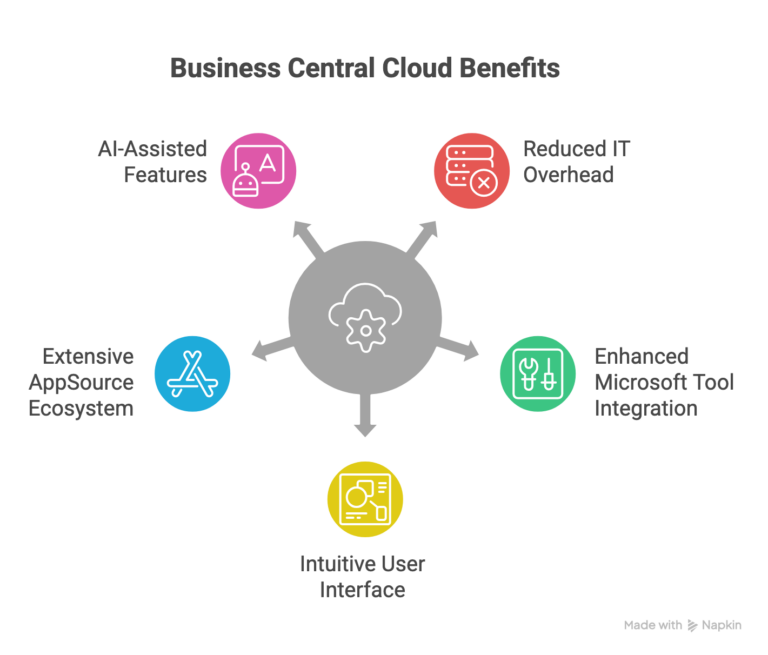
1) Cloud-native foundation (less IT overhead)
With Business Central cloud, you don’t have to worry about physical servers, hardware failures, or patching infrastructure. You typically get:
- Built-in backups and disaster recovery
- Access from anywhere
- Fewer “surprise” maintenance projects
2) Better connection to the Microsoft tools your team already uses
This is where many teams feel the biggest day-to-day improvement:
- Analyzing data in Excel more seamlessly
- Real-time dashboards in Power BI
- Collaborating in Teams
- Workflow automation through Power Automate (approvals, alerts, invoice flows, etc.)
3) A UI your team won’t fight
NAV’s interface is functional, but it can feel dated and training-heavy. Business Central’s UI is more intuitive, and that usually translates into:
- Faster onboarding
- Fewer “How do I find this?” moments
- Better adoption of outside finance
4) Extensions and AppSource ecosystem
Instead of building every feature from scratch, Business Central supports an extension approach, and you can add many capabilities through Microsoft AppSource, inventory, shipping, e-commerce connectors, approvals, reporting packs, and so on.
5) AI-assisted features
Business Central continues to add AI-powered capabilities (depending on licensing and setup), such as assistance with content, matching, and forecasting. The best use case isn’t “AI for everything”; it’s AI where it reduces busywork.
Practical tip before you migrate: audit your NAV customizations first. Many NAV systems have years of “we built it because we had to” logic. Some of that can be replaced by standard Business Central features or existing extensions, saving real time and cost.
Is NAV discontinued? Do you have to move?
You can still run NAV, but the key issue is support.
- NAV mainstream support ended years ago.
- Extended support has ended or is ending, depending on the version (and many versions are already out of support).
When support ends, the risk isn’t theoretical. You may lose:
- Security patches
- Compliance updates (tax/regulatory changes)
- Official Microsoft help if something breaks
Can businesses keep running it anyway? Yes. Some do, until they hit a security audit, a compliance requirement, a hardware failure, or a “we need integration and mobility now” moment.
The real question is usually not “Can we keep NAV?” but “How long do we want to carry the risk and limitations?”
Should you migrate to Business Central?
You should strongly consider migrating if:
- Your NAV version is out of support (or close).
- Performance is slowing, or server capacity is a constant headache.
- Your team needs better remote/mobile access.
- You want real-time reporting and stronger integration with Microsoft tools.
- Upgrades feel painful, so you keep postponing them.
- You’re planning growth and don’t want infrastructure to be the bottleneck.
You may hold off (temporarily) if:
- You’re still under extended support, and things are stable.
- Your ERP processes are simple, and you’re not hitting limits.
- You have strict data-residency requirements (though hybrid/on-prem Business Central may help).
- You’re planning to replace NAV with a totally different ERP in the next 12–24 months.
Most SMBs eventually migrate. The difference is whether you do it proactively (on your timeline) or reactively (when a deadline or incident forces your hand).
What migration typically looks like (and where projects go wrong)
A NAV → Business Central migration doesn’t have to be a nightmare, but it does need structure.
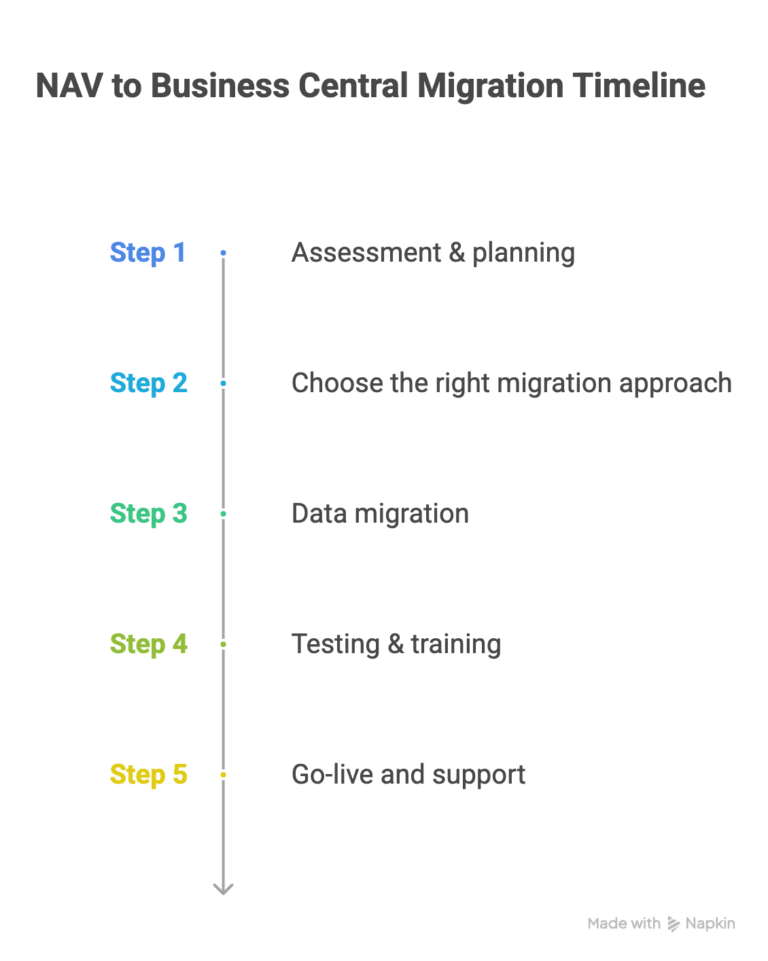
Step 1: Assessment & planning
- Inventory customizations, integrations, and data volume
- Decide what to keep vs. retire
- Align goals: speed, cost, reporting, automation, compliance, scalability
Step 2: Choose the right migration approach.
Most teams pick one of these:
Option A: Technical upgrade / “lift and shift.”
- Moves the database and converts customizations where possible
- Faster to go live
- Risk: You may carry forward old complexity.
Option B: Clean implementation/reimplementation
- Rebuild processes in modern Business Central
- Migrate only needed data (masters + open transactions; optionally history)
- Takes longer, but often results in a cleaner system
In practice, a hybrid approach is common: get live efficiently, then phase out outdated customizations in stages.
Step 3: Data migration
This is where timelines often slip. If NAV data has duplicates, inconsistent formats, and old records, it’ll show up here, so it’s worth budgeting time to clean before you move.
Step 4: Testing & training
- Validate results (often via parallel runs)
- Train users on new workflows (the UI is different, and habits need updating).
- Test integrations early.
Step 5: Go-live and support
- Choose a calm window.
- Monitor closely for the first few weeks
- Keep a feedback loop open for improvements.
Typical timeline: ~3–6 months for a mid-sized business (varies widely based on customizations, integrations, and data quality).
Strong recommendation: Work with a Microsoft partner if you don’t have deep in-house ERP migration experience. The cost usually pays back in fewer surprises and a faster, smoother go-live.
Cost: what you’re really paying for (NAV vs. Business Central)
Cost confusion is common because the models are different:
NAV (on-prem) tends to include:
- Upfront licenses + annual maintenance
- Servers, infrastructure, backups
- IT time (internal or managed services)
- Manual upgrades every few years (often expensive)
- Heavier customization costs
Business Central (cloud) tends to include:
- Predictable subscription per user/month
- No servers to buy or maintain
- Updates included
- Often lower “keep the lights on” IT overhead
- A one-time migration/implementation cost
Many businesses see lower total cost over time with Business Central, especially when you include infrastructure and upgrade costs, but the right answer depends on your user count, customizations, and integration needs.
Common mistakes to avoid
- Treating “cloud” as automatically cheaper without doing TCO (Total Cost of Ownership) math
- Migrating everything as-is (and bringing messy processes along)
- Underestimating data cleanup
- Skipping training (“they’ll figure it out”)
- Not validating integration compatibility early (CRM, e-commerce, shipping, payroll, etc.)
- Going solo without the right expertise (unless you truly have it in-house)
Real-world example
A mid-sized distribution company running NAV (with performance issues, manual upgrades, and limited mobile access) moved to Business Central cloud with a partner-led implementation.
They focused on:
- Simplifying workflows instead of rebuilding every old customization
- Cleaning and structuring data before migration
- Adding Power BI dashboards for real-time visibility
The biggest win wasn’t “we moved to the cloud.” It was less IT firefighting, faster reporting, and better access for teams in the field.
Their biggest regret? Not starting training early enough; those first few weeks are smoother when users feel prepared.
Want results like this for your business?
Conclusion
Migrating doesn’t have to be stressful. With the right plan (and the right partner), it can be an opportunity to simplify processes, improve reporting, reduce IT overhead, and set the business up for growth.
At 2HatsLogic, we help teams migrate from Dynamics NAV to Business Central, from assessment and data migration to customization and integrations (e-commerce, CRM, and third-party apps).
If you’d like, share your NAV version and user count, and we’ll help you sketch a realistic migration path and timeline.
FAQ
Is Dynamics NAV still supported by Microsoft?
Mainstream support ended. Extended support depends on the NAV version, and many NAV versions are now out of support.
How long does a NAV to Business Central migration take?
Commonly 3–6 months for a mid-sized business, depending on customizations, integrations, and data quality.
Will my NAV customizations work in Business Central?
Some can be converted, but many can be replaced with standard Business Central capabilities or AppSource extensions. The best approach is usually “keep what matters, retire what doesn’t.”


Related Articles