Greetings! I'm Aneesh Sreedharan, CEO of 2Hats Logic Solutions. At 2Hats Logic Solutions, we are dedicated to providing technical expertise and resolving your concerns in the world of technology. Our blog page serves as a resource where we share insights and experiences, offering valuable perspectives on your queries.

Quick Summary
This blog explains what email-to-order automation is and how it helps B2B businesses convert emails, PDFs, photos, and other manual order formats into digital orders instantly. It covers why customers still send orders through email, the problems with manual processing, how automation works, and the benefits of using it to improve accuracy, speed, and efficiency.
Email-to-order automation uses software to convert customer order emails into digital orders in your system.
When a customer sends an order through email, PDF, photo, Excel sheet, or typed message, the system reads the document, extracts the details, and creates an order without any manual typing.
In simple words, it automatically turns incoming emails into ready-to-process orders.
Why Many B2B Companies Still Receive Orders Through Email
Many B2B businesses still rely on email for everyday ordering because it fits effortlessly into how their customers work. Even with modern online stores and ERP systems, buyers often prefer sending:
- Regular email orders
- PDFs exported from their internal systems
- Photos of handwritten lists
- Excel or CSV files
- Scanned purchase orders
For buyers, these formats are quick, flexible, and require no learning curve. They can send an order directly from their office, warehouse floor, or even from their phone.
Another reason is that many customers already have their own internal workflows built around these formats. Some use legacy ERPs that automatically generate PDF orders. Others follow long-standing habits: typing an email, forwarding last week’s order, or sending a photo from the warehouse.
This mix of formats creates challenges for suppliers because every order arrives differently. That’s where email-to-order automation becomes valuable. It standardizes all these incoming formats and turns them into accurate, structured orders without manual data entry.
How Email-to-Order Automation Works
Email-to-order automation follows a straightforward process. Instead of manually reading emails and typing order details into your system, the software performs these steps automatically:
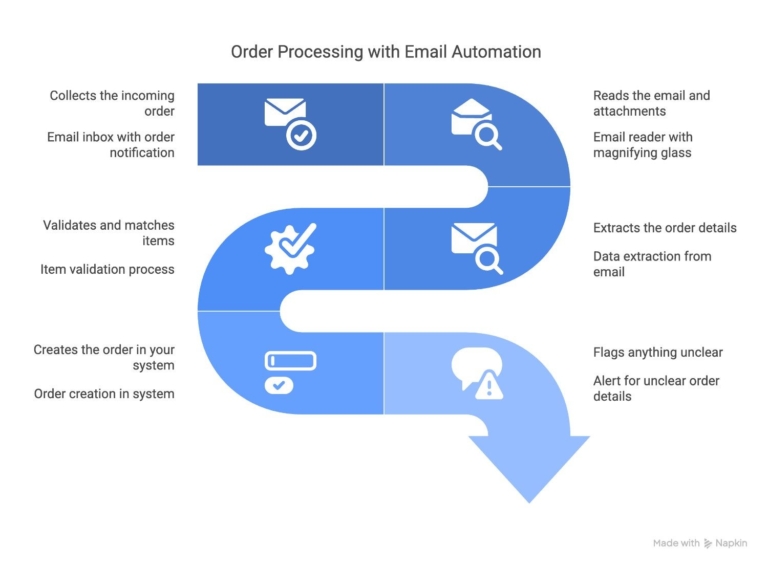
- Collects the incoming order
The system connects to your inbox and captures every email that contains an order or purchase document. - Reads the email and attachments
It scans the email body, PDFs, Excel sheets, photos, or scanned documents to understand the order content. - Extracts the order details
Product names, SKUs, quantities, prices, delivery notes, and customer information are identified using AI and OCR. - Validates and matches items
The extracted data is matched against your product catalog, ensuring the right SKUs and quantities are selected. - Creates the order in your system
A clean, structured order is generated in your e-commerce backend or ERP. - Flags anything unclear
If an item is unreadable or doesn’t match your catalog, the system highlights it so your team can quickly correct it.
Key Components of an Email-to-Order Automation System
A reliable email-to-order automation setup includes several components that work together to turn different kinds of order documents into a clean, structured order. These are the core elements:
1. Inbox Connector
This captures incoming order emails from one or multiple inboxes and forwards them to the automation system. It ensures no order is missed, even when multiple formats or attachments are involved.
2. Document Reader (AI + OCR)
Artificial Intelligence and Optical Character Recognition read and interpret text from PDFs, Excel sheets, scanned purchase orders, and mobile photos. It understands variations in layout, wording, and file quality.
3. Data Extraction Engine
It pulls out product names, SKUs, quantities, customer details, delivery instructions, and any additional notes from the documents.
4. Product and SKU Matching Layer
The extracted data is automatically matched against your product catalog. This ensures the system recognizes correct SKUs, avoids mismatches, and handles item variations.
5. Validation and Error Checks
If an item is unclear, missing, or spelled differently from your catalog, the system flags it for review. This reduces order errors and prevents incorrect entries.
6. Order Creation Module
Once validated, the order is created directly inside your ERP or e-commerce platform. Shopware, Shopify, SAP B1, Odoo, or any connected system.
7. Activity Dashboard
Teams can review processed orders, fix flagged items, and monitor daily order flow without digging through email threads.
Together, these components eliminate manual typing, reduce processing time, and ensure every incoming order, regardless of its format, enters your system in a consistent and accurate way.
Benefits of Email-to-Order Automation
Email-to-order automation brings clear operational advantages, especially for businesses that receive frequent purchase orders through email or attachments. The main benefits include
1. No Manual Data Entry
Your team no longer needs to read emails, copy details, or type orders into the system. This saves hours every week and reduces workload during peak periods.
2. Fewer Order Errors
Manual entry often leads to mistakes. Wrong SKUs, incorrect quantities, or missed notes. Automation captures details accurately and flags anything unclear.
3. Faster Order Processing
Orders move from the inbox to the ERP or e-commerce system within minutes. This means quicker confirmations and faster dispatch times.
4. Standardized Order Workflow
Even if customers send orders in different formats (email, PDF, photo), all of them end up as clean, structured orders in the same format.
5. Better Customer Experience
Faster confirmations and fewer mistakes directly improve customer satisfaction and build stronger relationships.
6. Scalability Without Extra Hiring
As order volume grows, automation handles the increased workload without the need for additional staff.
Overall, this approach helps teams focus on important tasks. This works for things like customer support, fulfillment, and business growth, rather than repetitive data entry.
Manual Problems This Automation Eliminates
Processing orders manually might feel manageable at first, but as order volume grows or formats vary, several problems start affecting accuracy and efficiency. Email-to-order automation removes these common issues:
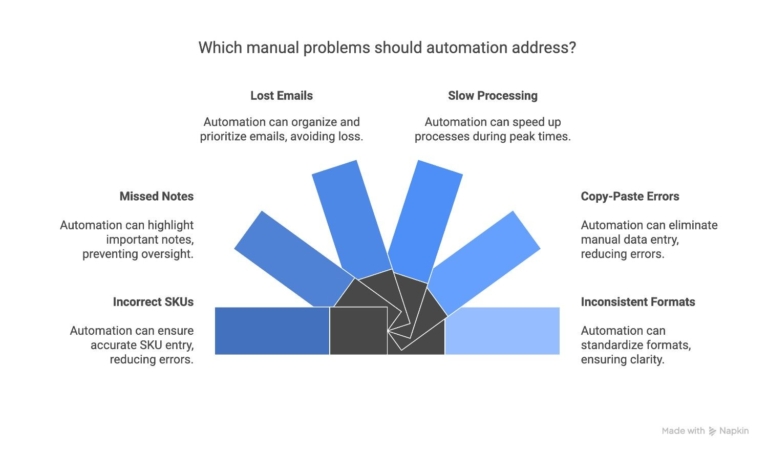
1. Incorrect SKUs and Quantities
Typing errors can lead to wrong items being shipped or incorrect quantities being entered. Automation reads and matches items correctly, reducing mistakes.
2. Missed or Overlooked Notes
Special instructions like delivery dates, packaging requirements, or product variations. It can easily get missed when copying from emails. Automation extracts and highlights all relevant details.
3. Lost or Buried Emails
Order emails can slip through crowded inboxes or get mixed in with other communications. A dedicated automation system ensures every order is captured and processed.
4. Slow Processing During Peak Times
Manually handling every email becomes slow when the volume increases. Automation processes multiple orders instantly, keeping operations smooth.
5. Copy-Paste Errors
Human errors like duplicated lines, wrong prices, or mismatched items are common when copying from PDFs or photos. Automation eliminates this step.
6. Unclear or Inconsistent Formats
Handwritten orders, low-quality photos, or different PDF layouts make manual processing difficult. Automation reads and interprets varied formats with higher accuracy.
By removing these problems, businesses can process orders faster, reduce returns, and maintain a more reliable supply chain.
What Types of Orders Can Be Automated?
Email-to-order automation works with a wide range of order formats. Since B2B customers send orders in different ways, the system is designed to handle almost anything that contains readable order details.
1. Typed Email Orders
Orders written directly in the email body, including simple SKU-quantity lists or detailed purchase instructions.
2. PDF Purchase Orders
PDFs exported from customer ERPs or accounting systems are one of the most common B2B order formats.
3. Excel and CSV Files
Order lists are sent as spreadsheets with product codes, quantities, and price columns.
4. Scanned Documents
Scanned copies of printed purchase orders or documents sent from desktop scanners.
5. Mobile Photos of Handwritten Lists
Photos taken in warehouses, retail stores, or field locations. They often contain SKUs, product names, or handwritten item descriptions.
6. Recurring Weekly or Monthly Orders
Repeated orders sent in the same format each cycle can be captured and processed automatically with minimal review.
Whether the order arrives as a clean digital file or a quick photo from the warehouse floor, the system can extract the required details and convert them into a structured order.
Real-Life Examples of How Businesses Use Email-to-Order Automation
Different industries receive orders in different formats, and automation helps streamline all of them. Here are common real-life scenarios where businesses use this system daily:
1. Wholesale Distributors Receiving PDF Purchase Orders
Distributors often get PDF POs exported from their customers’ ERPs. Automation reads the document, extracts SKUs and quantities, and creates the order instantly.
2. Food & Beverage Suppliers Getting Handwritten Order Photos
Restaurants, cafés, and retail stores sometimes send photos of handwritten lists. The system processes these images and converts them into accurate digital orders.
3. Retailers Sending Reorder Excel Sheets
Retail chains frequently send Excel or CSV files for restocking. Automation reads the sheet and converts it into a structured order without manual effort.
4. Manufacturing Companies Sending Scanned Documents
Factories may send scanned PO documents. The system reads these scans using OCR and matches items against your product catalog.
5. Sales Reps Emailing Orders From the Field
Field sales teams often send order emails directly from customer visits. Automation captures these emails and creates ready-to-process orders immediately.
6. Customers Forwarding Old Orders to Repeat Purchases
Buyers sometimes forward previous emails with minor quantity changes. Automation reads the forwarded message and updates the order accordingly.
Is Email-to-Order Automation Hard to Set Up?
Setting up email-to-order automation depends on your current order formats and backend systems. It usually includes:
- Mapping fields from emails, PDFs, and photos
- Setting up AI extraction rules
- Connecting it to your ERP or eCommerce system
- Testing for accuracy and exceptions
If you don’t want to handle the setup, we can implement the entire AI-powered workflow for you.
Conclusion
Email-to-order automation solves one of the biggest hidden challenges in B2B operations: manually processing orders that come through email, PDFs, photos, and spreadsheets. Even as e-commerce grows, customers still rely on these formats because they’re simple and familiar.
Automation bridges the gap by turning all these unstructured order formats into clean, accurate, and ready-to-process orders inside your ERP or e-commerce system.
The result is a smoother workflow, fewer mistakes, faster processing, and more time for teams to focus on customer service and business growth. For companies handling frequent email orders, this becomes a practical and scalable way to modernize operations without changing how customers prefer to order.
FAQ
How does email order processing work for emails with PDFs, photos, or Excel sheets?
Email order processing automatically reads the attachments, extracts item details, and converts them into a digital order.
What is possible with automated order extraction from emails and PDFs?
Automated order extraction can capture item names, quantities, prices, customer details, and even handwritten notes with high accuracy.
How can AI reduce manual order entry when orders arrive through email?
AI identifies the order format, extracts the data, and sends it directly to your ERP or store.
What is the simplest way to automate email orders without changing how customers order?
You can use email-to-order automation that reads incoming orders as they are (emails, PDFs, photos) and turns them into structured orders instantly.
Table of contents
- Why Many B2B Companies Still Receive Orders Through Email
- How Email-to-Order Automation Works
- Key Components of an Email-to-Order Automation System
- Benefits of Email-to-Order Automation
- Manual Problems This Automation Eliminates
- What Types of Orders Can Be Automated?
- Real-Life Examples of How Businesses Use Email-to-Order Automation
- Is Email-to-Order Automation Hard to Set Up?
- Conclusion


Related Articles