Greetings! I'm Aneesh Sreedharan, CEO of 2Hats Logic Solutions. At 2Hats Logic Solutions, we are dedicated to providing technical expertise and resolving your concerns in the world of technology. Our blog page serves as a resource where we share insights and experiences, offering valuable perspectives on your queries.

Quick Summary
TYPO3 SEO mistakes cost businesses 30-50% of potential traffic. The 10 most common issues include messy URLs, duplicate content, slow loading speeds, missing page titles, no schema markup, poor image optimization, migration problems, language conflicts, lack of monitoring, and untrained content teams.
Most are fixable within days to weeks. Average results: 25-45% traffic increase within 3-6 months. Start with quick content wins, then tackle technical fixes, and establish ongoing monitoring systems.
So, you’ve launched your TYPO3 website. It looks professional. Everything works smoothly. But there’s a problem.
Your website isn’t showing up on Google.
You’re getting barely any traffic. Your competitors are ranking higher. And you’re wondering what went wrong.
Here’s the reality: TYPO3 is powerful for large enterprise websites, but it’s easy to make mistakes that hurt your search rankings. One wrong setting, a missed detail during migration, or overlooked meta tags can cost you 30-50% of your potential visitors.
Sound familiar?
We’ve helped hundreds of businesses fix their TYPO3 SEO problems. And here’s the good news: most issues are surprisingly simple to fix once you know what to look for.
This guide walks you through the 10 most common TYPO3 SEO mistakes we see in 2026 and shows you exactly how to fix them. No confusing jargon. Just practical solutions that work.
Let’s get your website ranking where it deserves to be.
Why TYPO3 SEO Mistakes Cost You More Than You Think
TYPO3 powers websites for major companies and government agencies across the globe. These aren’t simple blog sites. They’re complex platforms with thousands of pages, multiple languages, and sophisticated features.
Here’s the problem: one mistake doesn’t just affect one page.
When something goes wrong with your TYPO3 setup, it spreads across your entire website. A URL problem affects every product page. Missing language tags confuse Google about which country to show your content to. Slow loading speeds hurt every single visitor’s experience.
The bigger issue? By the time you notice your traffic dropping, you’ve already lost weeks or months of potential customers.
But don’t worry. Most TYPO3 SEO mistakes are fixable. And many take less than an hour to resolve once you know what to do.
Top 10 TYPO3 SEO Mistakes (And How to Fix Them)
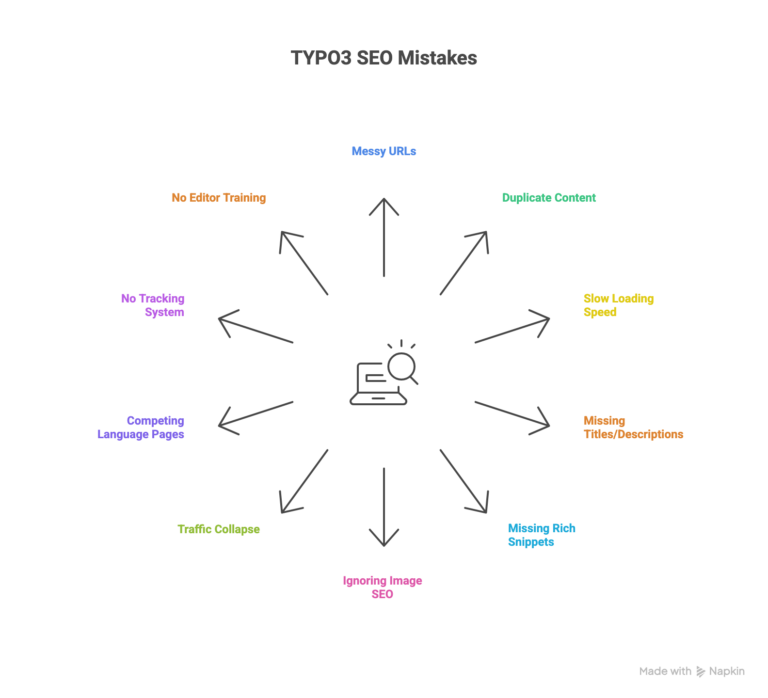
Mistake 1: Confusing Website URLs
Look at your website address. Does it look like this: example.com/index.php?id=123&L=0?
That’s a problem.
Google doesn’t like complicated URLs filled with numbers and symbols. More importantly, your potential customers can’t remember them or understand what the page is about.
Why this happens: Your TYPO3 URL settings weren’t configured properly when the website was built. Or you upgraded from an older version and kept the old messy URL structure.
How to fix it:
Your URLs should be clean and descriptive. Instead of example.com/?id=42, you want example.com/products/wireless-headphones.
Ask your developer to update your TYPO3 routing settings. If you’re on TYPO3 version 9 or newer, the system has built-in tools to create clean URLs automatically.
Important: When you change URLs, make sure to redirect the old ones to the new ones. This preserves your existing Google rankings.
Mistake 2: Duplicate Content Across Multiple Country Websites
Running websites for different countries? You might be accidentally showing the same content on all of them.
This confuses Google. Your German website starts competing with your French website for the same searches. And both end up ranking lower.
Why this happens: Your TYPO3 setup manages multiple country sites, but the system isn’t properly telling Google which content belongs to which country.
How to fix it:
Make sure each country site has its own unique domain or subdomain (like de.example.com for Germany, fr.example.com for France).
Use language tags to tell Google explicitly: “This German page is for German visitors. This French page is for French visitors.”
Your TYPO3 specialist can configure these settings in your website’s backend to prevent your content from competing against itself.
Mistake 3: Painfully Slow Loading Speed
Your homepage takes 5 seconds to load. Maybe longer on mobile phones.
Visitors don’t wait. They hit the back button and visit your competitor instead. Google notices this and pushes your rankings down.
Why this happens: TYPO3 extensions and add-ons aren’t optimized. Your images are too large. Your server isn’t configured to deliver content quickly.
How to fix it:
Start with the basics:
- Compress all images before uploading them (aim for under 200KB each)
- Enable TYPO3’s built-in caching system
- Set images to “lazy load,” so they only load when visitors scroll to them
- Ask your hosting provider about server-level speed optimization
Test your website speed with Google PageSpeed Insights. Aim for a score above 80 on both desktop and mobile.
Quick win: Just optimizing images can improve your loading speed by 40-60% in most cases.
Struggling with TYPO3 SEO technical issues?
Mistake 4: Missing or Identical Page Titles and Descriptions
Look at your website in Google search results. Do all your pages say the same thing? Or worse, do they show nothing useful at all?
Your page title and description are the first things potential customers see. If they’re missing or boring, nobody clicks.
Why this happens: Your marketing team didn’t fill out the SEO fields when creating pages. Or a website migration wiped out all your carefully written titles and descriptions.
How to fix it:
Every single page needs a unique title and description.
In TYPO3’s page editor, there’s an “SEO” section. Make filling this out mandatory for everyone who creates content.
Good title example: “Wireless Headphones – Noise Cancelling | Free Shipping | YourBrand.”
Bad title example: “Product Page” or “TYPO3 Site.”
Make each title 50-60 characters. Keep descriptions under 155 characters. This ensures they display properly in search results.
Mistake 5: Missing Rich Snippets (Schema Markup)
Ever notice how some search results show star ratings, prices, or special formatting? That’s called schema markup or structured data.
Without it, your search listings look plain and boring. With it, you stand out and get more clicks.
Why this happens: TYPO3 doesn’t automatically add this special formatting. You need to set it up manually.
How to fix it:
Ask your developer to add structured data to your pages. The type depends on your content:
- Product pages: Include product name, price, availability, and reviews
- Blog articles: Add author, publish date, and article category
- Local business: Include your address, phone number, and opening hours
After implementation, test your pages with Google’s Rich Results Test tool. This shows you if Google can read your structured data correctly.
Real result: Companies typically see 15-30% higher click-through rates after adding proper schema markup.
Tip: After fixing these five issues, use Google Search Console to monitor improvements. Most businesses see ranking changes within 2-4 weeks of implementing these fixes.
Mistake 6: Ignoring Image SEO
Your website has beautiful images. But they have filenames like “IMG_1234.jpg” and no descriptive text.
Google can’t “see” images. It relies on your descriptions to understand what they show. Without proper image SEO, you’re missing out on image search traffic and slowing down your website.
Why this happens: Content editors upload images directly from cameras or phones without optimization. Nobody takes the time to add descriptions.
How to fix it:
For every image on your website:
- Rename files descriptively before uploading: “black-wireless-headphones.jpg” instead of “IMG_1234.jpg.”
- Add alternative text in TYPO3’s file manager: “Man wearing black wireless headphones while working on a laptop.”
- Compress images: Use free tools like TinyPNG before uploading
- Enable lazy loading: Images only load when visitors scroll to them
This combination improves search rankings AND speeds up your website significantly.
Mistake 7: Traffic Collapse After Website Migration
You migrated from WordPress, Drupal, or another CMS to TYPO3. The new website looks great. But your traffic dropped by 40% overnight.
This is the nightmare scenario, and it’s surprisingly common.
Why this happens: Your old website URLs changed during migration. You didn’t set up proper redirects. Google tries to find your old pages, gets errors, and removes them from search results.
How to fix it:
Before migration:
- Save a complete list of all your current URLs
- Create a mapping document: old URL → new TYPO3 URL
- Note which pages get the most traffic (prioritize these)
After migration:
- Set up redirects for every old URL to its new location
- Use TYPO3’s redirect management module for easy setup
- Monitor Google Search Console for error reports
Recovery timeline: If you act fast, you can recover 90-95% of your traffic within 8-12 weeks.
Real story: A German manufacturing company lost 40% of its traffic after migration. We implemented comprehensive redirects and recovered 97% of their traffic within 10 weeks.
Need help with TYPO3 migration or recovery?
Mistake 8: Language Pages Competing Against Each Other
You have German, French, and English versions of your website. But they’re all showing up in the wrong countries. Your French customers see German pages. Your German customers see French pages.
Both versions compete in search results. Both rank lower than they should.
Why this happens: TYPO3 doesn’t automatically tell Google which language version to show to which country. You need to configure this specifically.
How to fix it:
You need proper language tags (called hreflang tags). These tell Google:
- This page is in German, show it to German searchers
- This page is in French, show it to French searchers
- These pages are translations of each other
Your TYPO3 administrator can configure this in your site settings. Each language needs its own identifier and proper linking between translated versions.
Result: One e-commerce client saw a 28% increase in French traffic and 19% increase in German traffic after fixing language tag issues.
Mistake 9: No System for Tracking SEO Performance
You fixed all the issues above. Great! But three months later, new problems appear. Traffic drops again. And you have no idea why.
Why this happens: TYPO3 websites constantly evolve. Your team adds new content, installs extensions, and makes changes. Without monitoring, problems creep back in.
How to fix it:
Set up a monitoring routine:
Weekly checks:
- Review Google Search Console for errors
- Check for sudden traffic drops in Google Analytics
- Monitor website speed
Monthly audits:
- Run a full website crawl to find broken links
- Review top-performing pages
- Check for duplicate content issues
Tools you need:
- Google Search Console (free)
- Google Analytics 4 (free)
- Website crawler tool (many free options available)
Mistake 10: No Training for Content Editors
Your content team creates great articles and product pages. But they don’t know basic SEO principles. Every page they publish needs fixing later.
Why this happens: SEO is treated as an afterthought. Editors aren’t trained on best practices. The technical team has to fix everything manually.
How to fix it:
Invest in one comprehensive SEO training session for your entire content team:
Cover these basics:
- How to write effective page titles and descriptions
- Image optimization workflow
- Internal linking strategy
- Using TYPO3’s SEO tools
Create checklists:
- Pre-publish SEO checklist for editors
- Monthly content audit checklist
- New page creation guidelines
Investment: One 2-hour training session prevents 80% of common SEO mistakes. The ROI is massive.
What Happens When You Fix These Mistakes
Let’s talk about actual outcomes. Because theory is nice, but you want to know if this actually works.
Case Study: Manufacturing Company
Starting situation:
- TYPO3 website with messy URLs
- 3,000+ duplicate content issues
- No image optimization
- Page speed score: 35/100
What we fixed:
- Clean URL structure implementation
- Duplicate content resolution
- Image compression and optimization
- Caching configuration
Results after 8 weeks:
- 34% increase in organic traffic
- 12 keywords ranking in position #1
- Page speed score: 89/100
- 18% increase in contact form submissions
The pattern is clear: When you systematically fix TYPO3 SEO mistakes, rankings improve. Traffic recovers. And your business grows.
Want similar results for your TYPO3 website?
Conclusion
Still feeling overwhelmed? That’s completely understandable.
Managing TYPO3 SEO for enterprise websites is complex. Between multilingual configurations, technical optimizations, and constantly evolving Google algorithms, it’s easy to miss critical issues or simply not have the time to address them all.
That’s exactly why 2HatsLogic exists.
We’ve spent years optimizing TYPO3 websites for enterprises across Europe and the USA. From initial audits to complete post-migration recovery, we handle every aspect of TYPO3 SEO so you can focus on running your business.
FAQ
How long does it take to see results from TYPO3 SEO fixes?
Quick wins like fixing page titles and optimizing images can show results within 2-4 weeks. More technical fixes like URL restructuring and site speed optimization typically show full results in 8-12 weeks. Migration recovery can take 10-16 weeks for complete traffic restoration.
The timeline depends on your website size, competition level, and how severe the initial problems were.
Do I need a developer to fix these TYPO3 SEO mistakes?
Some fixes you can handle yourself, like writing better page titles, optimizing images, and adding alt text. These require no technical knowledge.
Other fixes like URL structure changes, language tag implementation, and caching configuration require TYPO3 development expertise. You'll need your technical team or an agency to handle these.
How often should I audit my TYPO3 website for SEO issues?
We recommend checking Google Analytics daily for major traffic changes, reviewing Google Search Console weekly for new errors, running a full website crawl monthly, and conducting comprehensive SEO audits quarterly. This proactive approach catches issues before they significantly impact traffic.
What's the biggest SEO advantage TYPO3 has over other CMS platforms?
TYPO3 excels at managing complex, multilingual, enterprise-level websites. Its strengths include superior multilingual capabilities, advanced user permissions for large teams, highly scalable architecture for thousands of pages, and powerful built-in caching for fast performance.
The trade-off is complexity, TYPO3 requires more expertise to configure correctly than simpler platforms. But once properly optimized, it outperforms most alternatives for enterprise SEO.


Related Articles