
Greetings! I'm Aneesh Sreedharan, CEO of 2Hats Logic Solutions. At 2Hats Logic Solutions, we are dedicated to providing technical expertise and resolving your concerns in the world of technology. Our blog page serves as a resource where we share insights and experiences, offering valuable perspectives on your queries.

Customer orders often arrive by email, with product details, quantities, prices, and delivery dates spread across message threads, PDFs, and spreadsheets. Someone then has to transfer that information into the ERP, making sure every detail matches the customer’s request and the business’s records.
This is where order processing errors can creep in. A product code can be misread, a quantity entered in the wrong unit, or a revised order processed twice. Even a small mistake can lead to incorrect shipments, delivery delays, extra administrative work, and invoice discrepancies.
- Wrong Product Match
Understanding where these errors occur is the first step towards preventing them. Here are five common points where manual order processing can go wrong and how businesses can catch these issues before they affect fulfilment.
A customer may refer to a product using an old item code, a shortened name, or a description that differs from the one stored in the ERP. When an employee processes the order manually, they may select a similar product instead of the exact match.
This becomes more difficult when a business sells products with similar names but different sizes, specifications, or variants. A small mismatch can result in the wrong item being picked, packed, and shipped to the customer.
How to prevent it
Product details should be checked against the ERP’s product records before an order is created. Matching should consider more than the product name alone. Item codes, specifications, variants, and customer-specific product references can all help identify the correct item. If the details are unclear or multiple products match, the order should be flagged for review instead of selecting a product based on guesswork.
- Unit of Measure Mix-ups
A customer orders 12 cartons of a product, with each carton containing 24 units. The order is clear, but if someone enters 12 as the total quantity in the ERP instead of accounting for the units per carton, the recorded quantity will be incorrect.
Unit of measure errors can happen when customers order in cartons, cases, packs, or pallets, while the ERP tracks stock in individual units. They can also occur when the unit specified in an email differs from the unit used in the product record.
These mistakes can affect stock availability, picking quantities, order fulfilment, and invoicing. They may also go unnoticed until the warehouse prepares the order or the customer receives the wrong quantity.
How to prevent it
Check the unit of measure specified in the order against the product’s ERP settings, including any applicable pack or carton conversion rules. The order processing workflow should convert quantities where required and flag unclear or unsupported units for review before the order is created.
- Missing or misread delivery dates.
A customer may specify a requested delivery date in the email body, include it in an attached order sheet, or mention it in an earlier message in the thread. If the person processing the order overlooks that detail, the ERP order may end up with the wrong date or no requested delivery date at all.
Date-related errors can also occur when an order mentions more than one date, such as an order placement date and a requested delivery date. Confusing the two can affect delivery planning, warehouse scheduling, and communication with the customer.
How to prevent it
The order processing workflow should identify the requested delivery date and distinguish it from other dates in the order documents or email thread. Missing, conflicting, or ambiguous dates should be flagged for confirmation rather than filled in based on assumptions. This helps the team record the correct information before the order moves to fulfilment.
- Duplicate Orders
A customer may specify a requested delivery date in the email body, include it in an attached order sheet, or mention it in an earlier message in the thread. If the person processing the order overlooks that detail, the ERP order may end up with the wrong date or no requested delivery date at all.
Date-related errors can also occur when an order mentions more than one date, such as an order placement date and a requested delivery date. Confusing the two can affect delivery planning, warehouse scheduling, and communication with the customer.
How to prevent it
The order processing workflow should identify the requested delivery date and distinguish it from other dates in the order documents or email thread. Missing, conflicting, or ambiguous dates should be flagged for confirmation rather than filled in based on assumptions. This helps the team record the correct information before the order moves to fulfilment.
- Price mismatches.
A customer places an order using a price agreed during an earlier negotiation, but the ERP contains a different price. The difference could be due to a recent price update, a customer-specific discount, an outdated quotation, or a misunderstanding about the agreed terms.
When processing orders manually, employees may not always have the context needed to determine which price is correct. Accepting the order price without checking it can lead to incorrect invoices, while automatically replacing it with the ERP price could ignore a valid agreement with the customer.
How to prevent it
Order prices should be checked against the applicable pricing rules, customer-specific agreements, discounts, and valid quotations. If the price in the order differs from the expected value, the discrepancy should be flagged for verification before the order is processed. This allows the team to resolve pricing issues early, rather than discovering them during invoicing or after a customer raises a query.
How Email-to-ERP Automation Helps Prevent Order Errors
Checking every product reference, quantity, delivery date, duplicate, and price manually takes time, especially when orders arrive throughout the day in different formats. As order volumes grow, keeping these checks consistent becomes more difficult.
Email-to-ERP automation helps businesses handle this process more systematically. Instead of relying on employees to read each email and transfer every detail manually, an automated workflow can extract order information from emails and attachments, compare it against ERP records and business rules, and identify details that need attention.
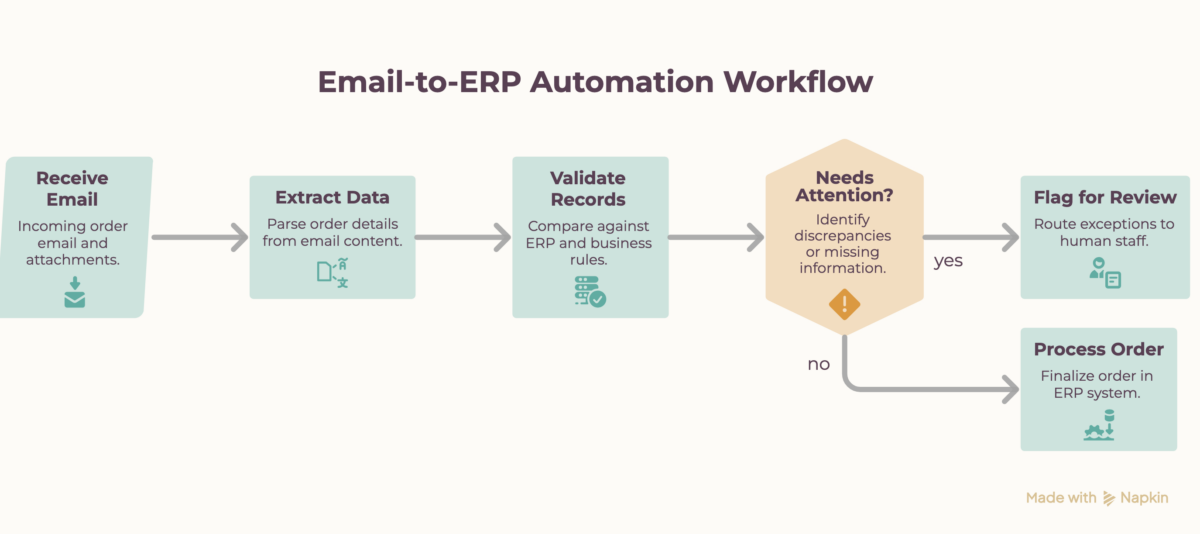
For example, the workflow can:
- Match products: Compare item codes, descriptions, and product references against existing records.
- Validate quantities: Check units of measure and apply the relevant conversion rules.
- Check delivery dates: Identify missing or conflicting dates that need confirmation.
- Detect duplicates: Flag orders that may have already been received or processed.
- Verify prices: Identify discrepancies between the order and applicable pricing rules.
Not every order will require the same level of review. Orders that pass the required checks can proceed through the configured workflow, while missing information, conflicting details, and uncertain matches can be routed to the team for verification.
This approach helps reduce manual data entry and avoidable corrections while giving employees more time to handle exceptions and customer requirements. It also creates a clearer process for getting accurate order information into the ERP.
Conclusion: Get orders right before they reach the ERP
Order processing errors don’t always start with a major system failure. They can come from small mismatches in product details, quantities, delivery dates, duplicate orders, or prices. When these issues go unnoticed during order entry, they can create extra work across warehouse operations, fulfilment, and invoicing.
The key is catching these discrepancies before they become downstream problems. By combining clear validation rules with email-to-ERP automation, businesses can reduce manual data entry, identify exceptions earlier, and make order processing more consistent.
If your team still spends hours transferring customer orders from emails and attachments into your ERP, 2Hats Logic Solutions can help you identify opportunities to automate the process.
Explore our email-to-ERP automation services to simplify order processing and reduce manual effort.

Related Articles