Greetings! I'm Aneesh Sreedharan, CEO of 2Hats Logic Solutions. At 2Hats Logic Solutions, we are dedicated to providing technical expertise and resolving your concerns in the world of technology. Our blog page serves as a resource where we share insights and experiences, offering valuable perspectives on your queries.

Quick Summary
Manual order entry is costing your business hours of work every day. Learn how AI and OCR technology can automate order processing from any channel, email, PDFs, fax, WhatsApp photos, or paper documents, and integrate directly with your ERP system. This guide covers the complete workflow, real ROI calculations, and how to get started.
For many B2B businesses, orders don’t always arrive in neat, structured formats. Your customers may still send purchase orders via email as PDF attachments, fax printouts, scanned documents, or even a quick photo taken on their phone. While these methods are convenient for the buyer, they create a heavy manual workload for your team.
Every order has to be checked, cross-matched with inventory, validated, and then entered into your system. This takes time, increases the chance of mistakes, slows down delivery, and becomes harder to manage as your order volume grows.
This is exactly why more companies are exploring ways to automate order processing. With AI and OCR technologies, you can extract order details from any format, whether it’s a faxed purchase order or a handwritten list in a photo, and convert it into clean, ready-to-process data. The result is faster operations, fewer errors, and less stress on your internal team.
In this guide, we’ll break down how order automation works for different formats and what steps B2B businesses can take to streamline their entire ordering workflow.
If your team is dealing with messy orders daily, we can help you explore simple automation options.
Why B2B Buyers Still Use Email, PDF, Fax & Photo-Based Orders
Even with modern e-commerce platforms and online portals available, many B2B buyers still prefer traditional ordering methods. And it’s not because they’re outdated. It’s because these methods feel familiar, quick, and flexible for them.
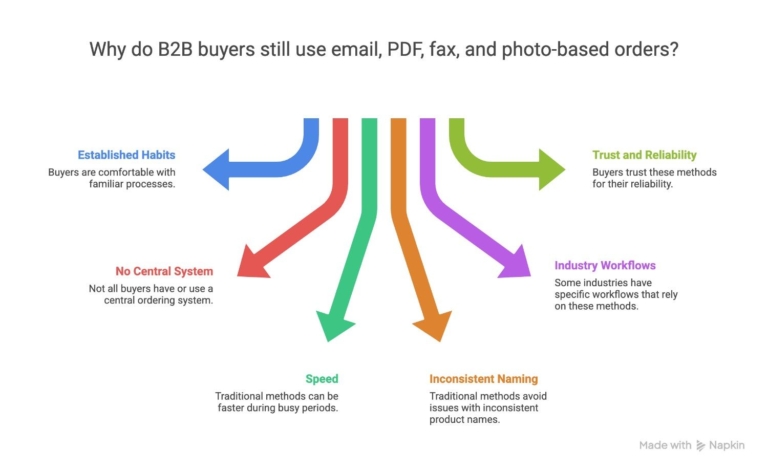
Here are the most common reasons B2B companies continue sending orders through email, PDFs, fax, and even handwritten photos:
1. Long-established purchasing habits
Many buyers have been placing orders the same way for years. They’re used to sending a faxed purchase order or emailing a PDF, and changing that habit takes time.
2. Not all buyers use a central ordering system
Distributors, wholesalers, and field sales teams often work from different devices and locations. Sometimes the easiest option is sending an email or a photo of a handwritten list.
3. Faster for buyers during busy days
A warehouse manager or retail buyer may not have time to log in to a portal. Snapping a photo of the order sheet or forwarding a PDF is quicker and feels effortless.
4. Inconsistent product naming
Some buyers continue using their own internal product codes. Instead of searching for the correct item online, they prefer sending an Excel file, an old PO template, or a fax.
5. Industry-specific workflows
Industries like wholesale, industrial supplies, healthcare, and manufacturing still rely heavily on faxed or scanned purchase orders. It is because that’s how their internal processes are structured.
6. Trust and reliability
For some buyers, especially long-term B2B relationships, a signed PDF or faxed order feels more “official” and reliable than an online cart.
Not sure where to start? Share a few sample orders, and we can guide you on what’s possible.
Common Challenges in Manual Order Processing
When orders arrive in different formats like PDFs, emails, fax printouts, Excel sheets, and handwritten notes. Your team spends hours every week just trying to make sense of them. This slows down operations and increases the chance of errors.
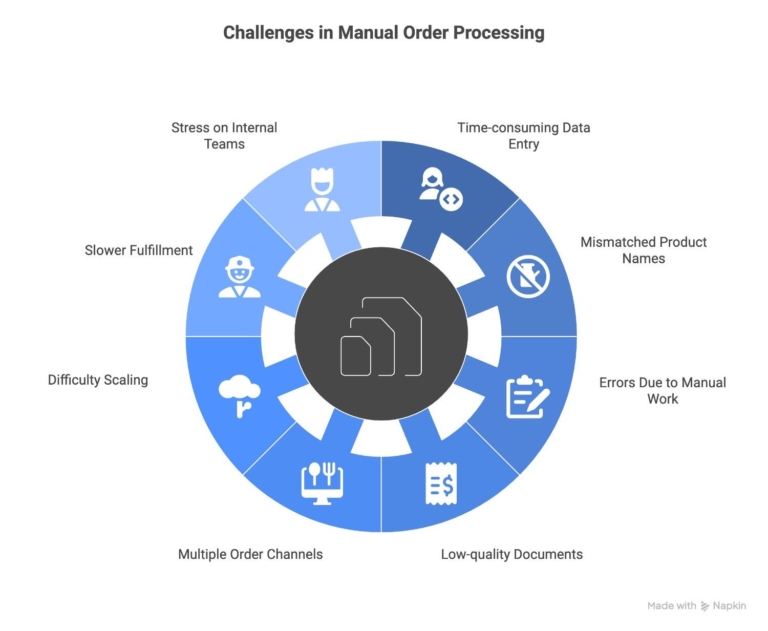
Here are the challenges B2B teams face every day:
1. Time-consuming data entry
Someone has to manually copy product names, quantities, and codes from emails or documents into the ERP or eCommerce system. This can take minutes per order or hours when the volume is high.
2. Mismatched product names and codes
Buyers often use their own internal product codes. Your team needs to cross-check each item to find the matching SKU in your system, which is one of the biggest sources of delay.
3. Errors due to manual work
Typing mistakes, wrong quantities, or missed items are common when dealing with long order lists. Even small errors can disrupt inventory, delivery timelines, and customer relationships.
4. Low-quality documents
Faxed orders, scanned PDFs, or smartphone photos may be blurry or uneven, making it hard for staff to read the details correctly.
5. Multiple order channels creating confusion
Orders come from different inboxes, departments, or devices. Without a centralized system, teams can lose track or accidentally process the same order twice.
6. Difficult to scale as order volume grows
Manually handling 5 orders a day may be manageable. Handling 50 or 100 is not. As your business grows, manual order processing becomes a bottleneck.
7. Slower fulfillment and delayed shipping
Every extra step, like checking codes, retyping data, and validating quantities. This can delay the order from reaching your warehouse or ERP system, affecting delivery times.
8. Stress on internal teams
When teams spend most of their time copy-pasting from PDFs or fixing mistakes, they have less time for customer support, sales conversations, or improving operations.
How Order Automation Works
Order automation may sound complicated, but the process is actually straightforward. The goal is very simple. Take any order format, like email, PDF, fax, scan, or photo, and convert it into clean, structured data that your system can process automatically. Here’s how it works step by step:
1. The system collects orders from all sources
Orders can be pulled from:
- Email inboxes
- Uploaded PDFs
- Fax-to-digital systems
- Scanned documents
- Smartphone photos
- Excel or CSV files
Nothing needs to be opened or checked manually.
2. AI + OCR read and extract the order details
The system automatically reads:
- Product names or codes
- Quantities
- Prices (if included)
- Customer information
- Delivery instructions
Even low-quality scans or faxed documents can be processed.
3. The system matches items with your product catalog
This is one of the biggest time-savers.
If the customer uses different product codes or names, the system maps them to your internal SKUs using:
- AI pattern recognition
- Smart code matching
- Previously saved customer mappings.
So even if the buyer writes “ABC-Red-200ml,” the system knows it corresponds to SKU “P-1420.”
4. The order is validated
The system checks for:
- Missing items
- Invalid codes
- Out-of-stock products
- Quantity inconsistencies
- Duplicate orders
Anything unusual is flagged for review instead of slowing down the process.
5. A clean order is created in your system
Based on your setup, the final order can be created in your:
- ERP
- Shopware store
- Inventory management system
- Accounting tool
- CRM
No manual typing required.
6. Your team only reviews exceptions
Instead of handling every order, your team only looks at
- Items the system couldn’t match
- Extremely low-quality documents
- Special instructions
This reduces workload by 80–95%.
How to Automate Each Type of Order (Email, PDF, Fax, Photo & Excel Orders)
B2B companies receive orders in many different formats, and each one comes with its own challenges. The good news is that AI and OCR can automate all of them, no matter how the customer sends them. Below is a clear breakdown of how automation works for each order type.
Automating Email Orders
Many buyers still place orders directly in the email body or attach a file.
Challenges
- Unstructured text
- Different layouts from different buyers
- Multiple versions of product names or codes
How automation helps
- AI reads the email content and identifies items, quantities, and instructions.
- Extracts data from attachments (PDF, Excel, images)
- Maps product codes to your system
- Creates the order automatically in your ERP/eCommerce
Emails become a clean, error-free order without manual reading or typing.
Automating PDF Purchase Orders
PDFs are the most common B2B order format.
Challenges
- Varying layouts
- Scanned PDFs or low-quality prints
- Customer-specific product codes
How automation helps
- OCR reads the PDF, even if scanned
- AI identifies product lines, quantities, and prices.
- Converts everything into structured order data
- Matches product codes to your SKUs
Your team no longer has to open the PDF, zoom in, or manually type details.
Automating Fax Orders (Including Digital Fax)
Many buyers still use fax, especially in long-established B2B relationships.
Challenges
- Blurry or grainy text
- Crooked or faded printouts
- Handwritten notes on faxed documents
How automation helps
- The fax is converted into a digital image.
- OCR cleans and extracts the data
- AI corrects distortions and identifies product lines.
- The order gets created automatically.
Fax-based ordering can be modernized without forcing buyers to change their habits.
Automating Photo-Based Orders
Buyers often send photos taken on their phone of handwritten lists, printed catalogs, or old order sheets.
Challenges
- Handwriting
- Shadows, angles, glare, or low lighting
- Different formats every time
How automation helps
- AI detects text even from imperfect photos.
- Reads handwriting and uneven lines
- Normalizes text and extracts product info
- Matches items to your product catalog
A blurry photo becomes a structured order in seconds.
Automating Excel, CSV, and Other Digital File Orders
Some buyers send orders in spreadsheets or custom templates.
Challenges
- Different column names
- Customer-specific codes
- Inconsistent formats
How automation helps
- AI reads the file instantly.
- Maps columns to your product and quantity fields
- Matches codes to your SKUs
- Creates the final order automatically
This eliminates manual copy-pasting from Excel tables.
What Tools Do You Need for Order Automation
To automate order processing from emails, PDFs, fax, scans, and photos, you don’t need to overhaul your entire system. You only need a few key components that work together to read, extract, validate, and push data into your ERP or eCommerce platform.
Here are the essential tools involved in the automation workflow:
1. OCR (Optical Character Recognition)
OCR is the technology that reads documents.
It converts text from:
- PDFs
- Fax scans
- Photos
- Printed sheets
- Handwritten notes
Into digital text. Modern OCR is much smarter and can handle low-quality documents, too.
2. AI-Based Data Extraction
This layer understands the meaning of the content, not just the text.
It helps identify:
- Product names
- Product codes
- Quantities
- Prices
- Customer details
- Delivery notes
AI can also adapt to each customer’s unique format and layout.
3. Product Code Matching & Catalog Mapping
This is crucial for B2B companies because buyers often use their own codes.
This tool:
- Maps customer item codes to your internal SKUs
- Remembers past mappings
- Learns new codes automatically
- Reduces manual cross-checking to almost zero
It ensures every order line is matched correctly before creating the final order.
4. Validation Layer (Quality Checks)
Before an order enters your system, the automation tool checks for:
- Out-of-stock items
- Invalid product codes
- Missing quantities
- Duplicate lines
- Unusual order patterns
Anything suspicious gets flagged for human review.
5. Integration with Your ERP or eCommerce System
Once data is extracted and validated, it needs to flow into your system.
Integrations commonly include:
- ERP platforms
- Shopware stores
- Inventory systems
- Accounting or invoicing tools
- CRM systems
This eliminates manual entry.
6. Centralized Dashboard or Workflow Interface
This is optional but helpful.
A dashboard allows your team to:
- Review flagged orders
- Approve or edit exceptions.
- Track order statuses
- Train the system for new customer formats.
Most orders go through automatically; only exceptions need attention.
Step-by-Step Guide to Automating Your Order Process
If you’re new to automation, the process may feel overwhelming. But in reality, you only need to follow a clear, structured path. Here’s a simple step-by-step guide to help you move from manual work to a fully automated order workflow.
Step 1: Identify All Your Order Sources
Start by listing where your orders come from today:
- Emails
- PDF purchase orders
- Fax machines
- Scanned documents
- Photos sent via messaging apps
- Excel/CSV files
Knowing all sources helps you choose the right automation flow.
Step 2: Define What Information You Need From Each Order
Most B2B orders contain:
- Product names or codes
- Quantities
- Customer details
- Delivery notes
- Pricing (optional)
Make sure the automation system knows what data points to extract.
Step 3: Set Up OCR + AI to Read Incoming Documents
This is where the automation begins.
OCR extracts the text, and AI understands the structure, no matter the format or layout.
Once set up, every incoming PDF, fax, or photo is automatically read by the system.
Step 4: Configure Product Code Mapping
Because every customer uses their own product names or codes, this step is crucial.
The system should learn how their codes match your SKUs and remember them for next time.
This eliminates hours of cross-checking.
Step 5: Build Validation Rules
Add rules to ensure accuracy before orders enter your ERP, such as:
- Reject missing quantities
- Flag unmatched product codes
- Highlight out-of-stock items
- Check for duplicate orders.
These rules protect you from errors.
Step 6: Connect Your ERP, Shopware Store, or Inventory System
Once the order is clean, it needs to go somewhere automatically.
You can integrate with:
- ERP platforms
- Shopware
- Inventory or warehouse systems
- Accounting tools
- Invoicing software
This removes manual data entry completely.
Step 7: Set Up an Exception Review Flow
Not every order will be perfect.
Create a simple view where your team can check:
- Items that don’t match
- Blurry scanned lines
- Unusual quantities
- Special notes
Your team only handles exceptions, not every order.
Step 8: Test With Real Customer Orders
Start small.
Pick a few customers and run their incoming orders through the automation.
You’ll see how well the system reads their formats and where refinements are needed.
Step 9: Roll Out Automation Fully
Once you’re confident, expand the automation to all customers and order types.
Most businesses see immediate time savings and cleaner inventory updates.
Step 10: Improve Continuously
AI systems learn over time.
The more orders they process, the smarter they get.
Continue training the system on new formats and occasional edge cases.
Ready to Get Started?
Get in touch with our experts and let's discuss your project.
Conclusion
B2B companies deal with one of the biggest operational challenges today: orders arriving in different formats, emails, PDFs, fax printouts, photos, and spreadsheets. Managing all of this manually is slow, stressful, and highly prone to errors.
But the good news is that you don’t need to change how your buyers place orders. Instead, you can automate order processing on your side and make the entire workflow smooth, accurate, and scalable.
With AI, OCR, product code matching, and system integrations, every incoming order—no matter how messy it looks- can be turned into clean, structured data that goes straight into your ERP or eCommerce platform. Your team saves hours every week, fulfillment becomes faster, inventory stays accurate, and your customers get a more reliable experience.
Order automation is no longer a “nice-to-have” for B2B businesses. It’s becoming essential for reducing manual work, avoiding errors, and staying competitive as order volumes grow.
If your business is facing these challenges and you’re exploring automation options, this is the right time to take the next step. You don’t have to force your customers to change how they order—just make your process smarter.
FAQ
How can I automate order processing for email orders?
You can use AI and OCR tools that read incoming emails, extract order data, validate it, and push it directly into your ERP or store without manual entry.
How do I automate order processing from PDFs or scanned documents?
OCR software can read PDF or scanned order forms, detect line items, quantities, and SKUs, and automatically convert them into structured order data.
Can AI and OCR really automate handwritten or photo-based orders?
Yes. Modern OCR models can detect handwriting, photos of paper orders, and low-quality images, then convert them into digital order lines.


Related Articles