Greetings! I'm Aneesh Sreedharan, CEO of 2Hats Logic Solutions. At 2Hats Logic Solutions, we are dedicated to providing technical expertise and resolving your concerns in the world of technology. Our blog page serves as a resource where we share insights and experiences, offering valuable perspectives on your queries.

One misheard phone number. One misread digit from a fax. One transposed SKU from a photo. Suddenly, you’re shipping 100 units instead of 10, billing the wrong customer, or sending products to an incorrect address.
If this sounds painfully familiar, you’re not alone. Thousands of small and mid-sized businesses lose money daily because manual order capture from multiple channels is slow, error-prone, and impossible to scale.
This guide demonstrates how modern automated order capture works, regardless of whether orders arrive via email, fax, phone call, photo, WhatsApp, or any other channel, and how to seamlessly integrate everything into your ERP system.
The Real Cost of Manual Order Capture
When your team manually handles orders from different sources, error rates average 4-5%, resulting in approximately 1 mistake every 20-25 orders. Phone orders have even higher error rates (7-10%) due to mishearing or unclear connections. Handwritten orders and faxes suffer from readability issues.
Consider a wholesale distributor handling 500 orders monthly:
- 250 email orders (PDFs, Excel attachments)
- 100 fax orders
- 75 phone call orders
- 50 photo/WhatsApp orders
- 25 other methods
With a 5% error rate, that’s 25 incorrect orders monthly. At $400 per error (customer service, returns, rush shipments), you’re losing $10,000 monthly, $120,000 annually.
Time drain varies by channel:
- Email orders: 5-10 minutes each
- Fax orders: 8-15 minutes each
- Phone orders: 10-20 minutes each
- Photo orders: 10-25 minutes each
For 500 orders, that’s 150+ hours monthly just on data entry. Beyond money, you’re losing customer trust. When orders arrive late or wrong, clients start looking elsewhere.
The scalability trap: You can’t double order volume without doubling your data entry team, which destroys profitability and creates a hard limit on growth.
See how much you could save by automating your email, fax, phone & photo orders
Why Email Filters and Basic Rules Aren’t Enough
Maybe you’ve tried email filters, fax-to-email forwarding, or templates for phone notes. Here’s the problem: basic organization doesn’t eliminate manual work. Someone still has to open every email, listen to every voicemail, read every fax, and type everything into your ERP.
Simple rules fail because they only organize; they don’t process. They can’t read PDF attachments, convert fax images to data, understand product codes from phone calls, or extract line items from photos.
You end up with organized chaos: emails in folders, faxes forwarded to inboxes, phone notes in spreadsheets, photos in chat apps, but 60% still requiring full manual processing.
Real automated order capture means: 95%+ of orders flow from any channel directly to your ERP without human typing, regardless of format or source.
What Is Automated Order Capture?
Modern automated order capture uses AI and OCR technology to handle orders from any source, email, fax, phone calls, photos, messaging apps, and convert them into clean, structured data that flows directly into your ERP.
How it works across different channels:
Email Orders
- Monitors inbox 24/7
- Reads PDF attachments using OCR
- Parses Excel spreadsheets automatically
- Extracts data from the email body text
Fax Orders
- Converts fax documents to digital images
- Uses advanced OCR to read blurry or faded text
- Interprets handwritten annotations
- Processes multi-page documents
Phone Call Orders
- Transcribes voice messages and recordings
- Extracts order details from transcriptions
- Identifies the customer from the caller ID
- Captures product codes mentioned verbally
Photo & WhatsApp Orders
- Reads photos of handwritten sheets
- Processes images from messaging apps
- Handles poor lighting and angles
- Interprets handwriting with high accuracy
Text/SMS Orders
- Processes text messages
- Understands conversational language
- Maps informal product names to SKUs
How It Works: The Technical Process
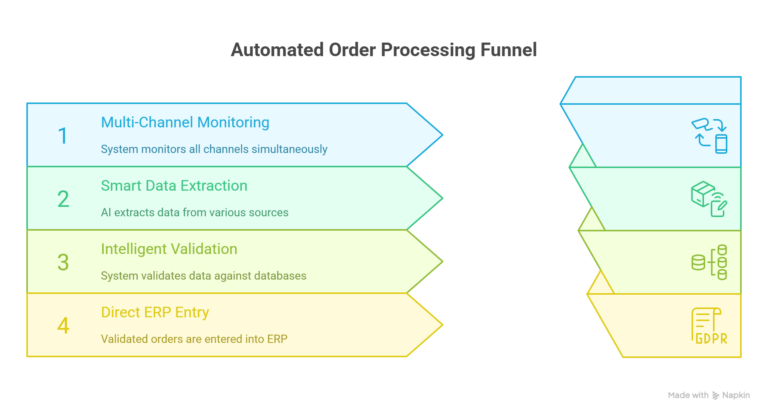
Step 1: Multi-Channel Monitoring
The system continuously monitors all your order channels simultaneously. It connects to email inboxes (Gmail, Outlook), integrates with fax-to-email services, links to VoIP phone systems, monitors WhatsApp Business API, and receives SMS through gateways. No manual checking required, it runs automatically 24/7.
Step 2: Smart Data Extraction
The system uses different AI technologies based on the source:
- For PDFs/Excel: OCR reads text (98% accuracy on clear documents, 85-90% on scanned)
- For faxes: Advanced OCR handles blurry images and handwriting (85-92% accuracy)
- For phone calls: Speech-to-text transcribes voicemails (80-90% accuracy)
- For photos: Mobile OCR reads handwritten orders (85-95% accuracy on clear images)
- For text messages: Natural language processing understands informal language (90-95% accuracy)
Extracted data includes: Customer name, account number, product SKUs, quantities, prices, delivery address, special instructions, and order dates.
Step 3: Intelligent Validation
Before creating an ERP order, the system performs universal checks:
Customer verification: Does this customer exist in your database?
Product matching: Can it map customer codes to your internal SKUs?
Pricing verification: Do prices match your catalog or customer agreements?
Completeness check: Are shipping addresses complete and quantities logical?
This is critical because phone orders use verbal descriptions (“the blue widget, large”), while customers use their own codes in emails and faxes. The AI learns these mappings and remembers them.
When something doesn’t match, the system flags the order for human review instead of processing incorrect data. You receive an alert showing what needs verification and the original source (email, fax image, call recording, or photo).
Step 4: Direct ERP Entry
Once validated, the system automatically creates the order in your ERP, populates all required fields, updates inventory, triggers fulfillment workflows, and maintains a complete audit trail. It stores original source documents (emails, fax PDFs, call recordings, photos) for dispute resolution.
Processing time by channel:
- Email: 2-5 minutes
- Fax: 3-8 minutes
- Phone: 5-10 minutes
- Photo: 3-10 minutes
- Text/SMS: 1-3 minutes
Compare this to 10-30 minutes of manual processing per order.
Pro Tip: Start by automating your highest-volume channel first (usually email), then expand to other channels. This builds confidence and delivers quick ROI.
Real Benefits (With Numbers That Matter)
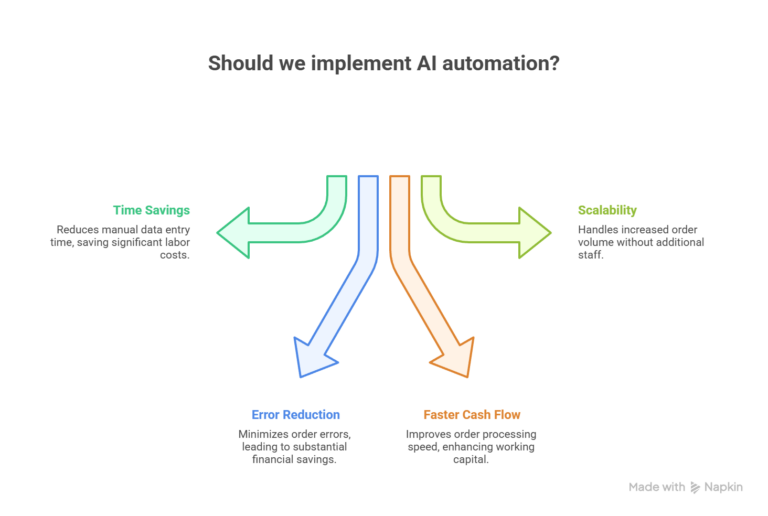
Time Savings: 40-60% Reduction
A 5-person order entry team processing 500 orders monthly spends 125 hours/month on data entry (annual labor cost: $100,000).
After automation, the system processes 95% automatically, reducing manual work to 6 hours/month.
Annual savings: $50,000+. Those employees shift to customer service and sales.
Error Reduction: 95% Fewer Mistakes
Before automation: 25 wrong orders monthly at $400 each = $10,000 monthly loss.
After automation: 1-2 errors monthly = $600 monthly loss.
Annual savings: $112,800.
Faster Cash Flow: 25% Improvement
Orders are processed within minutes instead of sitting for 12-24 hours. Order-to-cash cycle shrinks from 5 days to 3.5 days. For a $2M annual revenue business, this improves working capital by approximately $100,000.
Scalability Without Hiring
The system handles 100 orders or 10,000 orders the same way. A manufacturing supplier grew from 600 to 1,200 orders monthly without adding order entry staff. Their 3-person team focuses on customer relationships while standard orders flow through automatically.
Discuss your order processing challenges and get a custom automation roadmap for your ERP.
ERP Integration: Practical Setup Guide
For Odoo Users
- Install the multi-channel order capture app from the Odoo marketplace
- Connect email, fax-to-email, VoIP system, WhatsApp Business API
- Map extracted fields to Odoo fields (PO Number → Order Reference, SKUs → Products)
- Configure product matching and validation rules
- Test with 20-50 sample orders from each channel
- Go live with monitoring
Setup time: 2-4 days | Accuracy: 95%+ within one month
For SAP Business One / Business Central
- Set up API webhooks (requires IT assistance)
- Install a middleware automation platform
- Connect all order channels and configure field mappings
- Set up channel-specific OCR and transcription settings
- Run parallel testing for 1-2 weeks alongside manual processing
- Full deployment with exception review workflow
Setup time: 4-7 days | Accuracy: 97%+ after training
For QuickBooks / Xentral / Intex
- Install a pre-built plugin from the marketplace
- Connect order channels (email, fax, phone, messaging)
- Review and confirm field mappings
- Configure product catalog sync and validation rules
- Test with real orders from each channel
- Enable automatic processing
Setup time: 1-3 days | Accuracy: 95%+ immediately
Pro Tip: Always run parallel processing for 2 weeks, let automation create draft orders while your team processes normally. This builds confidence before going fully automatic.
Success Stories from SMBs
Case 1: Wholesale Distributor (Odoo)
Processing 500 daily orders (40% email, 30% fax, 20% phone, 10% WhatsApp) with a 4% error rate and 2-day peak season backlogs. After implementing Odoo-integrated automation:
- Error rate dropped from 4% to 0.3% (92% reduction)
- Processing time: 6 minutes → 2 minutes per order
- Freed 2 employees for customer service
- Annual savings: $162,000 | ROI in 4 months
Security and Compliance You Can Trust
Enterprise-grade systems include end-to-end encryption for all channels, SOC 2 Type II certified infrastructure, GDPR and SOX compliant audit trails, and role-based access controls. Every order includes complete source tracking (which channel, timestamp, original document), processing details (AI confidence scores, validation results), and data change history (before/after snapshots).
Channel-specific security: OAuth2 for email (no password storage), encrypted call recordings with automatic payment card redaction, secure fax servers, and end-to-end encrypted WhatsApp handling.
Warning: Always verify your vendor is SOC 2 certified and GDPR compliant. Request security documentation during selection.
Tired of Manual Order Entry?
Conclusion
Your customers will continue ordering via email, fax, phone, WhatsApp, and other channels that work for them. You can’t force them to change, but you can automate your side of the process.
SMBs using Odoo, SAP Business One, QuickBooks, and other ERPs are achieving:
- 95% error reduction across all channels
- 50%+ time savings on order processing
- 25% faster cash flow
- Unlimited scalability without hiring
- 80-95% touchless processing
The technology is proven. The setup is straightforward. The ROI is fast.
FAQ
Can automated order capture handle phone call orders automatically?
Yes. Speech-to-text transcribes calls (85-92% accuracy), then AI extracts order details. Low-confidence transcriptions are flagged for review.
What if customers use their own product codes?
The AI learns mappings between customer codes and your SKUs. After a few orders, it automatically recognizes their codes. For phone orders, it matches verbal descriptions to actual SKUs.
Can automated order capture handle multiple languages?
Yes. Advanced systems support 50+ languages across all channels—email, fax, phone, and text.
Table of contents
- The Real Cost of Manual Order Capture
- Why Email Filters and Basic Rules Aren't Enough
- What Is Automated Order Capture?
- How It Works: The Technical Process
- Real Benefits (With Numbers That Matter)
- ERP Integration: Practical Setup Guide
- Success Stories from SMBs
- Security and Compliance You Can Trust
- Conclusion


Related Articles