Greetings! I'm Aneesh Sreedharan, CEO of 2Hats Logic Solutions. At 2Hats Logic Solutions, we are dedicated to providing technical expertise and resolving your concerns in the world of technology. Our blog page serves as a resource where we share insights and experiences, offering valuable perspectives on your queries.
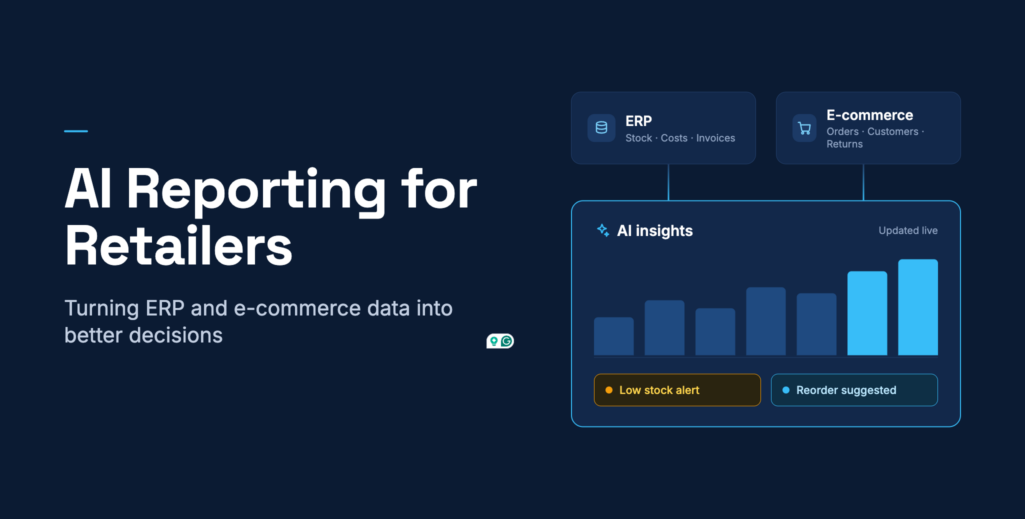
AI Reporting for Retailers: Turning ERP and E-commerce Data into Better Decisions
Want a Quick Summary?


Table of contents
- The Retail Data Problem
- What is AI reporting for retailers?
- AI reporting vs traditional BI dashboards
- How AI turns ERP and e-commerce data into decisions
- 5 retail decisions AI reporting improves
- What data do retailers need for AI reporting?
- Common challenges with AI reporting (and how to solve them)
- How to implement AI reporting: a step-by-step approach
- Turn your retail data into decisions, not spreadsheets
Quick summary
- AI reporting for retailers automatically combines ERP and e-commerce data, spots trends and anomalies, and recommends actions instead of relying on manually built reports.
- It differs from traditional BI because it is proactive: it flags issues and answers plain-language questions, rather than waiting for someone to open a dashboard.
- The biggest gains come in inventory and reordering, pricing and margin, demand forecasting, channel performance, and finance reconciliation.
- You don’t need perfect data to start. You need connected systems, consistent product IDs, and one clear business question.
- A focused rollout usually starts with one use case, proves the value, then expands across teams.
Most retailers don’t have a data problem. They have a joining problem. Your ERP knows what’s in stock, what it cost, and what’s been invoiced. Your e-commerce platform knows what customers clicked, ordered, and returned. But the two rarely agree, and someone on your team spends hours every week exporting, cleaning, and stitching spreadsheets together before anyone can make a decision.
AI reporting for retailers closes that gap. It connects ERP and e-commerce data, keeps it in sync, and turns it into answers, alerts, and recommendations your team can act on the same day.
This guide covers what AI reporting is, how it differs from traditional BI dashboards, which retail decisions it improves, and how to set it up step by step.
The retail data problem: two systems, two versions of the truth
Retailers make poor decisions not because they lack data, but because their ERP and e-commerce data live in separate systems that don’t talk to each other in real time.
A typical mid-sized retailer runs an ERP such as Microsoft Dynamics 365 Business Central, SAP, Odoo, or Xentral for stock, purchasing, and finance. Alongside it sits a storefront on Shopware, Shopify, or Magento for orders, customers, and promotions. Each system is accurate on its own. The trouble starts when you need both at once.
Here’s what that looks like day to day:
- Overselling and stockouts. The store shows items as available that the warehouse has already allocated elsewhere.
- Late reports. Weekly sales and month-end figures take days to compile, so decisions are made on old numbers.
- Margin blind spots. Revenue sits in the store, cost sits in the ERP, so true margin by SKU or channel is hard to see.
- Spreadsheet dependency. One or two people own “the report”, and when they’re away, nobody has the numbers.
- Conflicting answers. Sales, finance, and operations each quote different figures for the same week.
AI reporting fixes the root cause by joining both data sources into one view, then doing the analysis for you.
What is AI reporting for retailers?
AI reporting for retailers is the use of artificial intelligence to automatically combine ERP and e-commerce data, analyze it continuously, and surface trends, anomalies, and recommended actions, instead of relying on manually built reports.
Traditional reporting answers the question “what happened?” once someone builds the report. AI reporting goes further. It tells you why it happened, what is likely to happen next, and what you should do about it.
In practice, an AI reporting setup does four things:
- Unifies data from your ERP, e-commerce platform, marketplaces, and other tools into one consistent model.
- Monitors it continuously, so changes are spotted as they happen, not at month-end.
- Explains patterns in plain language, such as which products drove a margin drop and why.
- Recommends actions, such as reorder quantities, price adjustments, or products to promote.
Many setups also let your team ask questions in plain English, for example: “Which SKUs sold above forecast last week but are below safety stock?” The answer comes back in seconds, without writing a query or waiting for an analyst.
AI reporting vs traditional BI dashboards
The main difference is that traditional BI shows you data when you go looking for it, while AI reporting brings the important findings to you.
| Traditional BI dashboards | AI reporting | |
|---|---|---|
| How insights arrive | You open a dashboard and look | Alerts and summaries come to you |
| Data preparation | Manual exports and spreadsheet clean-up | Automated sync between ERP and e-commerce |
| Questions | Limited to pre-built charts | Ask in plain language, get answers in seconds |
| Focus | What happened | What happened, why, and what to do next |
| Forecasting | Usually separate tools or manual | Built into the analysis |
| Anomaly detection | Spotted by whoever notices | Flagged automatically |
| Who can use it | Analysts and power users | Anyone on the team |
This doesn’t mean you have to replace tools like Power BI. Many retailers keep their existing dashboards and add an AI layer on top that handles data joining, monitoring, and recommendations.
How AI turns ERP and e-commerce data into decisions
AI reporting works in five stages: connect, unify, analyze, alert, and recommend. Each one removes a manual step your team does today.
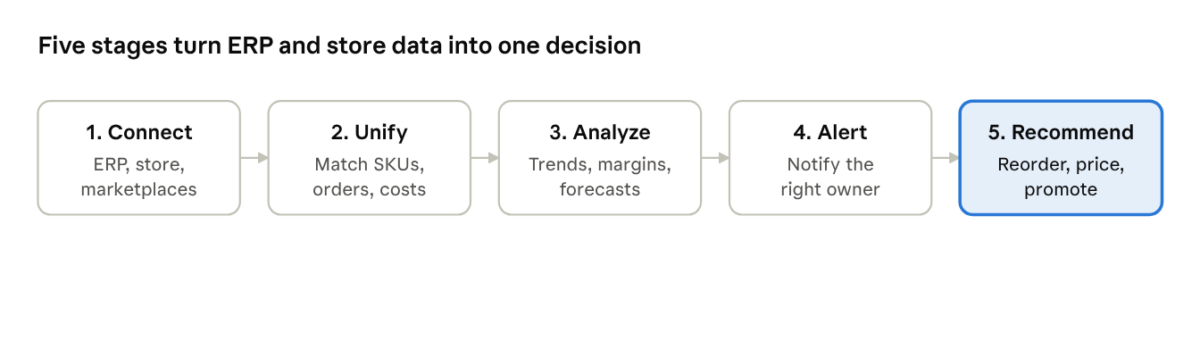
1. Connect your data sources
The first step is linking your ERP and e-commerce platform through APIs or connectors, so data flows automatically instead of being exported by hand. Typical sources include your ERP (Business Central, SAP, Odoo, Xentral), your storefront (Shopware, Shopify), marketplaces, payment providers, and your warehouse system.
2. Clean and unify the data
Next, the data is matched into one model. Product IDs, customer records, order numbers, and currencies are aligned, so a SKU in the store means the same item as the SKU in the ERP. This is where most manual spreadsheet work disappears.
3. Analyze patterns continuously
AI models then review the combined data around the clock. They look for trends in sales, stock movement, returns, and margins, and compare them with history, seasonality, and forecasts.
4. Alert the right people
When something changes, such as a bestseller dropping below safety stock or a channel’s margin falling, the system notifies the person responsible. Nobody has to notice it on a dashboard first.
5. Recommend the next action
Finally, the AI suggests what to do: reorder a quantity, adjust a price, pause a promotion, or move stock between locations. Your team reviews the suggestion and decides. People stay in control, but they start from an answer instead of a blank spreadsheet.
Want to see what AI reporting would look like with your data?
5 retail decisions AI reporting improves
AI reporting helps most with decisions that need ERP and e-commerce data together and are made often. These five are where retailers usually see results first.
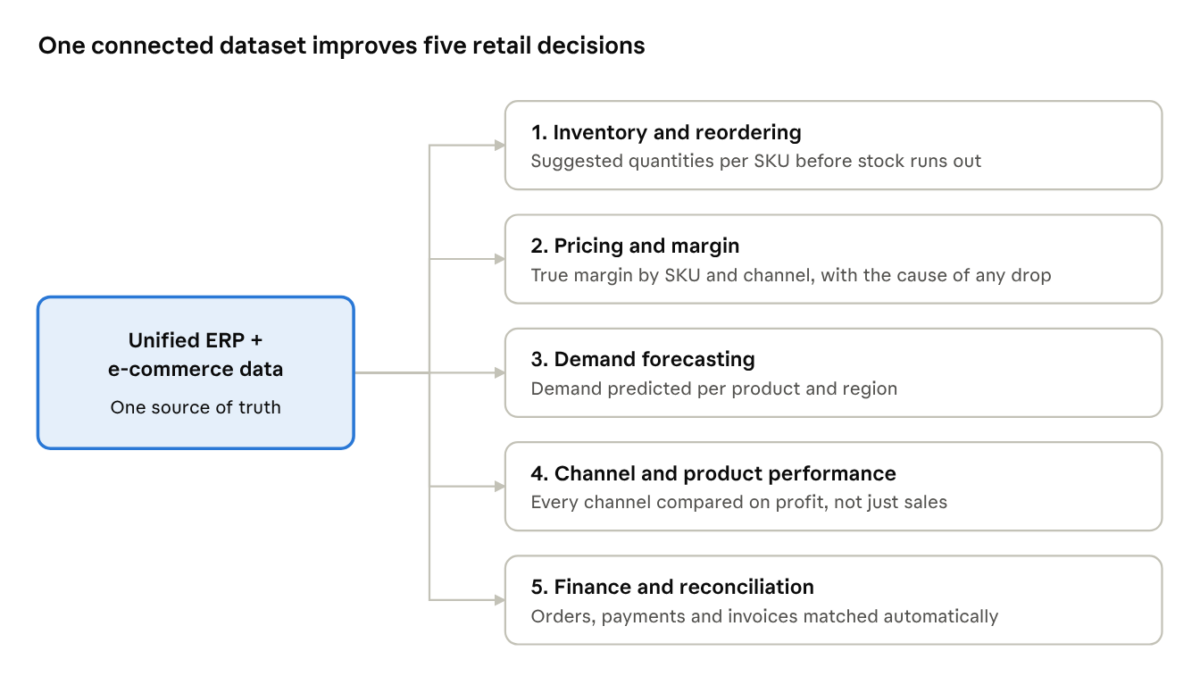
1. Inventory and reordering
AI reporting improves reordering by combining live sales velocity from your store with stock levels, lead times, and open purchase orders from your ERP. Instead of reordering on gut feel or a fixed schedule, buyers get suggested quantities per SKU and per location, and alerts before a bestseller runs out. This pairs naturally with automated purchase order generation and supplier quote comparison.
2. Pricing and margin
When revenue and cost data sit side by side, you can see true margin by SKU, category, and channel, after discounts, shipping, and returns. AI reporting flags products whose margin is slipping and shows the cause, whether that’s a supplier price increase, heavy discounting, or high return rates.
3. Demand forecasting
AI forecasting models use your order history, seasonality, promotions, and trends to predict demand per product and region. Better forecasts mean less cash tied up in slow stock and fewer lost sales during peaks. Learn more about AI demand forecasting and predictive inventory.
4. Channel and product performance
Retailers selling through their own store, marketplaces, and B2B portals often struggle to compare channels fairly. AI reporting puts every channel on the same basis, so you can see which products and channels actually make money, not just which ones sell the most.
5. Finance and reconciliation
Month-end gets faster when orders, payments, refunds, and invoices are matched automatically between your store, payment providers, and ERP. AI flags mismatches for review instead of leaving finance to find them line by line. See how AI invoice processing and auto-reconciliation handles this.
What data do retailers need for AI reporting?
To get started, retailers need access to their core ERP and e-commerce data, plus a consistent way to identify products across both. Perfect data isn’t required. Connected data is.
| Data area | Typical source | Why it matters |
|---|---|---|
| Product catalogue and SKUs | ERP, PIM, storefront | Links every other dataset together |
| Orders and order lines | E-commerce platform, marketplaces | Shows what sells, where and when |
| Stock levels and locations | ERP, warehouse system | Drives reordering and availability |
| Purchase orders and supplier lead times | ERP | Makes reorder suggestions realistic |
| Cost prices and invoices | ERP, accounting | Needed for true margin |
| Returns and refunds | Storefront, ERP | Corrects revenue and flags problem products |
| Promotions and discounts | Storefront, marketing tools | Explains spikes and margin changes |
| Customer data | Storefront, CRM | Supports segment and repeat-purchase analysis |
The single most important item is a shared product identifier. If the same item has different codes in your ERP and your store, fix that mapping first. Everything else builds on it.
Common challenges with AI reporting (and how to solve them)
Most AI reporting projects that stall do so for organizational reasons, not technical ones. Here are the four we see most often.
Messy or inconsistent data. Duplicate SKUs, missing cost prices, and mismatched units are common. Solve it by cleaning the data that feeds your first use case only, rather than trying to fix everything before you start.
Siloed systems with no integration. If your ERP and store aren’t connected, AI has nothing to join. A proper ERP-to-e-commerce integration is the foundation, and it pays off beyond reporting through accurate stock and faster order processing.
No clear owner. Reports without an owner get ignored. Assign each alert and recommendation to a named role, such as the buyer for reorder suggestions or the finance lead for reconciliation flags.
Low trust in AI outputs. Teams won’t act on numbers they can’t explain. Keep a human in the loop, show the data behind every recommendation, and start with suggestions people approve before moving to any automation.
How to implement AI reporting: a step-by-step approach
The fastest way to implement AI reporting is to start with one high-value decision, prove the result, and then expand. Here’s a practical six-step approach.
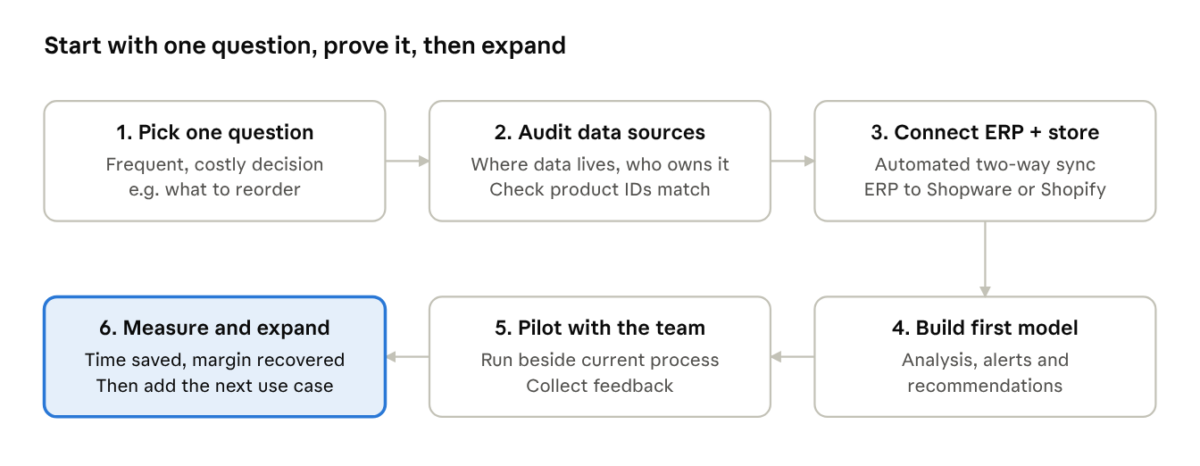
- Pick one business question. Choose a decision that’s frequent and costly when wrong, such as “What should we reorder this week?” or “Which products are losing margin?”
- Audit your data sources. List where the data for that question lives, who owns it, and how clean it is. Check that product IDs match across systems.
- Connect your ERP and e-commerce platform. Set up automated, two-way data flow between systems such as Business Central or SAP and your Shopware or Shopify store.
- Build the first AI model and reports. Configure the analysis, alerts, and recommendations for your chosen question. Keep the output simple and actionable.
- Pilot with the people who make the decision. Run it alongside your current process for a few weeks. Compare results and collect feedback.
- Measure, refine and expand. Track time saved, stockouts avoided, or margin recovered. Once the first use case delivers, add the next one.
Turn your retail data into decisions, not spreadsheets
Your ERP and e-commerce platform already hold the answers to your biggest retail questions. AI reporting connects them, keeps them in sync, and turns them into clear actions on inventory, pricing, forecasting, channels, and finance.
The best place to start is one decision your team makes every week and wishes it made faster or better.
At 2Hats Logic Solutions, we connect ERPs like Business Central, SAP, Odoo, and Xentral with Shopware and other e-commerce platforms, and build the AI reporting and automation layer on top. Explore our AI solutions for retail and e-commerce, or book a free Automation Opportunity Assessment to find out where AI reporting would make the biggest difference for your business.
FAQ
What is AI reporting in retail?
AI reporting in retail uses artificial intelligence to combine data from systems like your ERP and e-commerce platform, analyze it automatically, and deliver insights, alerts and recommendations. It replaces manual spreadsheet reporting with continuous, decision-ready analysis.
How does AI improve retail decision-making?
AI improves decisions by spotting patterns people miss, flagging problems early, and suggesting specific actions. Examples include reorder quantities, products losing margin, and channels underperforming against forecast.
Can AI pull reports directly from my ERP?
Yes. AI reporting tools connect to ERPs such as Microsoft Dynamics 365 Business Central, SAP, Odoo, and Xentral through APIs or connectors. They then combine ERP data with your e-commerce data for a complete view.
Is AI reporting different from Power BI or other BI tools?
Yes. BI tools like Power BI display data in dashboards you build and check yourself. AI reporting adds automated data joining, anomaly detection, forecasting, plain-language questions, and recommendations. Many retailers use both together.
How long does it take to set up AI reporting?
It depends on how connected your systems already are. If your ERP and e-commerce platform are integrated, a first use case can often go live within weeks. If they aren't, integration comes first.
Want a Quick Summary?
Table of contents
- The Retail Data Problem
- What is AI reporting for retailers?
- AI reporting vs traditional BI dashboards
- How AI turns ERP and e-commerce data into decisions
- 5 retail decisions AI reporting improves
- What data do retailers need for AI reporting?
- Common challenges with AI reporting (and how to solve them)
- How to implement AI reporting: a step-by-step approach
- Turn your retail data into decisions, not spreadsheets

Related Articles