Greetings! I'm Aneesh Sreedharan, CEO of 2Hats Logic Solutions. At 2Hats Logic Solutions, we are dedicated to providing technical expertise and resolving your concerns in the world of technology. Our blog page serves as a resource where we share insights and experiences, offering valuable perspectives on your queries.

Beyond Data Extraction: Why B2B Order Processing Needs AI Product Matching
Want a Quick Summary?


Table of contents
Automating B2B order processing involves more than extracting information from incoming purchase orders. Businesses may receive orders via email, PDFs, spreadsheets, and scanned documents, each with different product names, codes, and descriptions.
While data extraction tools can capture details such as product names, quantities, and customer references, identifying the correct product in the ERP system is a separate challenge. Different customers may describe the same product differently, making direct matching difficult.
This is where AI product matching becomes important. By interpreting product descriptions, comparing relevant attributes, and matching them against existing ERP records, businesses can improve how incoming orders are processed.
In this article, we’ll explore why data extraction alone is not enough, where traditional order processing falls short, and how AI product matching helps businesses handle B2B orders more accurately.
What Data Extraction Does in B2B Order Processing
Data extraction is the first step in automating incoming B2B orders. It captures relevant information from purchase orders, emails, PDFs, Excel files, and scanned documents, making the details available for further processing.
Typical information extracted includes:
- Customer details: Customer name, account number, and contact information.
- Product details: Product names, descriptions, item codes, and references.
- Order quantities: Requested quantities, units of measurement, and pack sizes.
- Pricing information: Unit prices, discounts, and total amounts.
- Delivery details: Shipping addresses, requested delivery dates, and delivery instructions.
Once extracted, this information can be structured and passed to the ERP system or the next stage of the order-processing workflow.
However, extracting product information does not automatically identify the corresponding ERP product. A customer might use their own product code or a shortened product description that differs from the internal product catalogue.
Where Data Extraction Alone Falls Short
Even when incoming order information is extracted correctly, businesses can still face problems when identifying the products customers want to purchase. This is particularly common when customers and suppliers use different naming conventions, product codes, or descriptions.
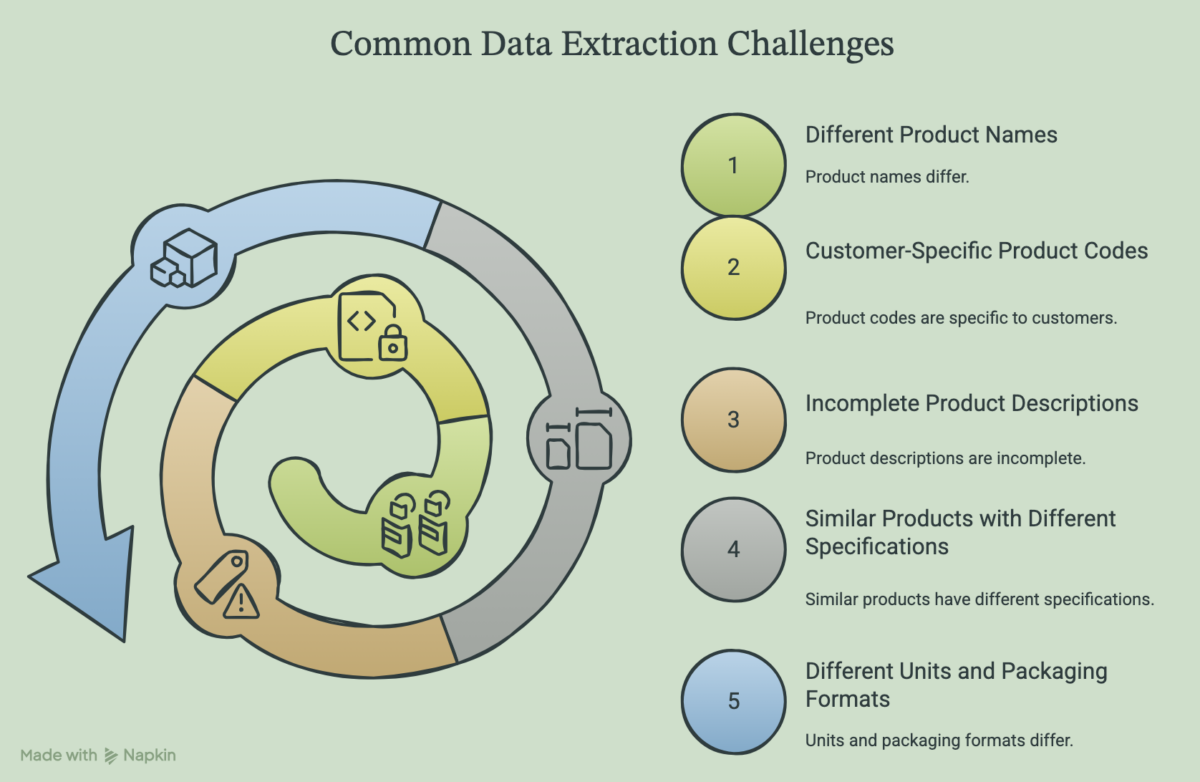
Some common challenges include:
1. Different Product Names
Customers may refer to the same product using different names or abbreviations. An extracted product name may not exactly match the name stored in the ERP product catalogue.
2. Customer-Specific Product Codes
B2B customers often use their own internal item codes when placing orders. These codes may differ from the supplier’s product or SKU numbers, making direct identification difficult.
3. Incomplete Product Descriptions
Purchase orders may contain shortened descriptions or missing product attributes. For example, a customer might mention a product category without specifying its size, material, capacity, or other identifying details.
4. Similar Products with Different Specifications
A product catalogue may contain several variations of the same item. Even if the product names are similar, differences in size, packaging, material, or specifications can make them unsuitable matches.
5. Different Units and Packaging Formats
Customers may order products using different units, such as individual pieces, boxes, cartons, or pallets. The extracted quantity alone may not be enough to identify the correct product configuration.
Why AI Product Matching Matters in B2B Order Processing
AI product matching helps bridge the gap between the product information provided by customers and the product records maintained in a supplier’s ERP system.
Instead of relying only on exact text or code matches, AI can analyse product descriptions, attributes, specifications, and available reference information to identify potential matches.
This is particularly useful when:
- Product names differ: AI can recognise that different descriptions may refer to the same product.
- Customer and supplier codes don’t match: It can use available product references and historical mappings to identify corresponding ERP items.
- Descriptions are incomplete: It can compare the available attributes with existing product records to find potential matches.
- Product variations are similar: It can consider specifications such as size, material, capacity, and packaging to distinguish between products.
For example, a customer might order a product using the description “Industrial Cleaner 5L”, while the supplier’s ERP catalogue lists it as “Heavy-Duty Cleaning Solution – 5 Litre”.
AI product matching can compare the descriptions and product attributes to identify the corresponding ERP record.
However, a potential match should not automatically be treated as a confirmed match. When product details are insufficient or multiple products appear similar, the system should flag the order for human review rather than select a product based on an uncertain match.
This helps businesses reduce manual product identification while maintaining control over order accuracy.
How AI Product Matching Works
AI product matching combines extracted order information with existing product data to identify the correct items in an ERP catalogue. The process typically involves the following steps:
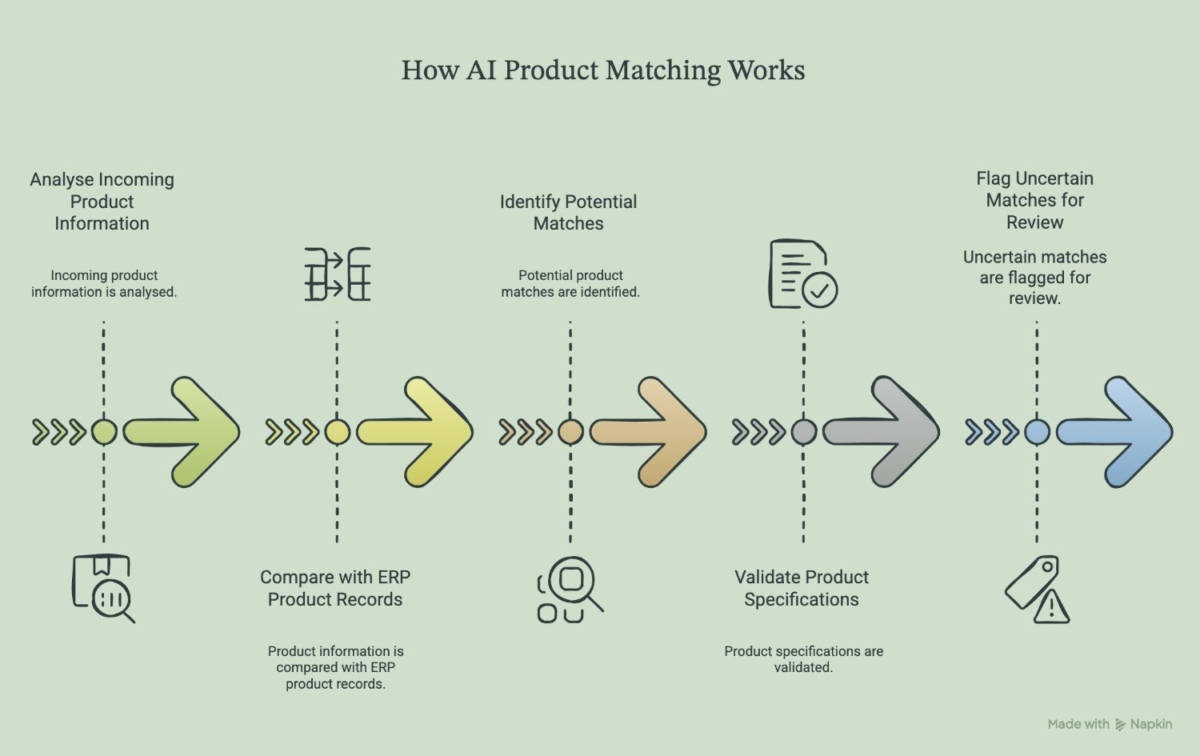
1. Analyse Incoming Product Information
The system examines extracted product names, customer item codes, descriptions, quantities, and other available details from the purchase order.
2. Compare with ERP Product Records
The extracted information is compared against existing ERP product records, including product names, SKUs, descriptions, specifications, and customer-specific product mappings.
3. Identify Potential Matches
AI evaluates similarities between the incoming product information and available ERP records. It can consider different naming conventions, abbreviations, and product attributes rather than depending entirely on exact text matches.
4. Validate Product Specifications
The system checks relevant product attributes, such as dimensions, material, capacity, and packaging, to distinguish between similar products and avoid incorrect selections.
5. Flag Uncertain Matches for Review
If the system cannot identify a sufficiently reliable match, it flags the item for manual verification. Once confirmed, the correct mapping can be used for future orders where applicable.
Combining Data Extraction and AI Product Matching in One Workflow
Data extraction and AI product matching work best when they are part of the same order-processing workflow. Each handles a different task, from capturing incoming information to identifying the correct products in the ERP system.
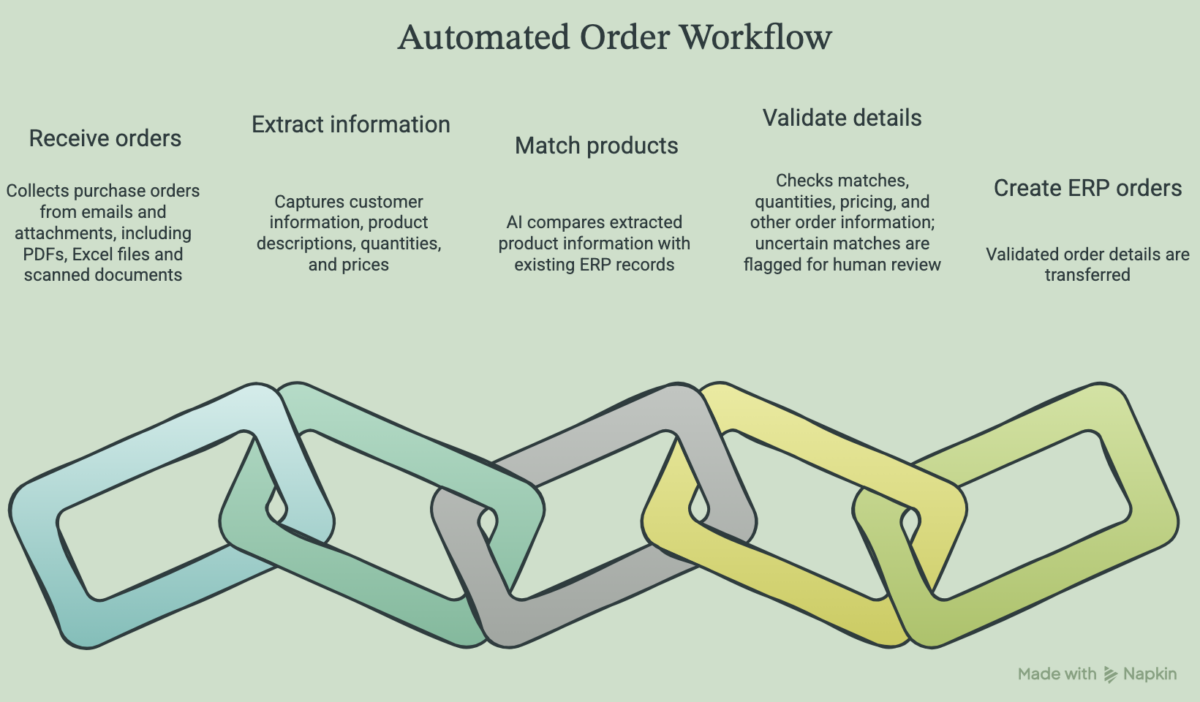
A typical automated workflow looks like this:
1. Receive incoming orders: The system collects purchase orders from emails and attachments, including PDFs, Excel files, and scanned documents.
2. Extract order information: Relevant details such as customer information, product descriptions, quantities, and prices are captured.
3. Match products: AI compares the extracted product information with existing ERP records to identify the corresponding items.
4. Validate order details: Product matches, quantities, pricing, and other order information are checked. Uncertain matches are flagged for human review.
5. Create ERP orders: Once the required information is validated, the order details are transferred.
Conclusion: Move Beyond Basic Order Data Extraction
Extracting information from incoming purchase orders is only the first step towards automating B2B order processing. Businesses also need to identify the correct products, validate order details, and transfer accurate information into their ERP systems.
Combining data extraction with AI product matching helps address these challenges within a connected workflow. It reduces manual product identification, handles different customer naming conventions, and provides a way to flag uncertain matches for review.
At 2Hats Logic Solutions, we help businesses automate order processing by connecting incoming emails, documents, and spreadsheets with their ERP systems. Our email-to-ERP automation service helps convert incoming order information into structured data that can be validated and processed within existing business workflows.
If your team still spends significant time extracting order details and matching products manually, it may be worth exploring how much of this process can be automated.
Talk to our team about automating your B2B order processing.
FAQs
Why data extraction alone not enough for b2b order processing ?
Data extraction captures information such as product names, quantities, prices and customer details from incoming orders. However, it does not always identify the corresponding products in an ERP system. AI product matching helps compare customer descriptions, product codes and specifications with existing ERP records to identify the correct products.
How does AI product matching improve automated b2b order processing ?
AI product matching analyses product descriptions, attributes, customer-specific codes and existing product records to identify potential matches. It helps businesses handle different product naming conventions, reduce manual product identification and improve the accuracy of automated order processing.
Can AI product matching integrate with existing ERP systems.
Yes. AI product matching can be integrated into an existing order-processing workflow to compare incoming product information with ERP catalogue records. Once products are matched and order details are validated, the information can be transferred to the ERP system for order creation and further processing.
Want a Quick Summary?
Table of contents

Related Articles