Greetings! I'm Aneesh Sreedharan, CEO of 2Hats Logic Solutions. At 2Hats Logic Solutions, we are dedicated to providing technical expertise and resolving your concerns in the world of technology. Our blog page serves as a resource where we share insights and experiences, offering valuable perspectives on your queries.

Learn what the 2026 EU guarantee requirements mean for Shopware merchants, including GARAN, the legal guarantee notice, Shopware 6.7.14 support, and the key checks to complete before 27 September 2026.
On 27 September 2026, new EU rules take effect for how guarantee information is shown to consumers online. Two things change: a harmonised legal guarantee notice must appear in the checkout and order confirmation, and products with a qualifying commercial durability guarantee must carry the new GARAN label.
Shopware has built native support for both into version 6.7.14. That covers the mechanics, but it does not cover your store. Whether the notice and label actually appear correctly depends on your Shopware version, your product data, and how customised your storefront is.
With under two weeks left, this guide focuses on what you can realistically still get done: confirming whether you’re in scope, finding the gaps that block the label from showing, and knowing your options if you can’t update to 6.7.14 in time.
Short on time? Send us your shop URL and Shopware version and we'll tell you within one working day what's missing
Who Is Affected by the New Requirements?
The new requirements are particularly relevant to businesses selling goods to consumers in the EU. For Shopware merchants, the first question is therefore not simply whether they use Shopware, but what they sell and who they sell to.
The harmonised legal guarantee notice concerns consumer sales of goods. The GARAN label is different: it applies when a producer offers a qualifying commercial durability guarantee that is provided at no additional cost and lasts for more than two years.
This means a Shopware store selling physical products to EU consumers should review its setup before the 27 September 2026 deadline. However, not every product will necessarily require the GARAN label.
For example, a merchant may have a catalogue where:
- Some products have a qualifying producer durability guarantee.
- Some products only have the standard legal guarantee.
- Different products have different guarantee durations.
- Guarantee information varies by manufacturer or product variant.
This distinction matters when preparing your Shopware catalogue. Merchants remain responsible for determining which products qualify and maintaining the relevant information.
What about B2B stores?
If your Shopware store is purely B2B, the requirements may not apply in the same way as they do to consumer sales. However, businesses running both B2B and B2C sales channels should review how the requirements apply across their individual sales channels.
The important takeaway: Don’t assume that every product in your Shopware catalogue needs a GARAN label. First determine which products and customer-facing sales channels fall within the scope of the requirements.
What Is Shopware Doing About the New Requirements
Shopware has introduced native support for the EU legal guarantee notice and the GARAN label in Shopware 6.7.14, eliminating the need for merchants to build the functionality from scratch. The features are available across Shopware plans, including the Community Edition.
For the legal guarantee notice, Shopware adds the relevant information to the checkout and order confirmation flow. The notice is available in all 24 official EU languages, with Shopware selecting the appropriate language based on the storefront. The display can also be controlled per sales channel.
For the GARAN label, Shopware has added guarantee-related fields to the product administration. Merchants can enter the producer guarantee duration and choose whether the label should appear in the storefront. The label uses existing product information such as the manufacturer and manufacturer product number.
Shopware also supports variant inheritance for guarantee information. When the required information is available and the product meets the technical conditions, the GARAN label can appear on the product page, cart, and order confirmation, as well as alongside relevant products in the order confirmation email.
This means that Shopware merchants do not necessarily need a separate solution simply to add the new functionality. However, native support does not remove the need to review the individual store.
Shopware itself makes this distinction clear: the platform provides the technical functionality, while merchants remain responsible for determining which products qualify and whether the resulting implementation is appropriate for their storefront.
Is Updating Shopware Enough?
Shopware’s native support makes implementing the new requirements easier for merchants. However, updating to a supported Shopware version is not necessarily the end of the process.
Shopware provides the technical functionality, but merchants still need to make sure their product data, storefront, and customer-facing experiences are ready.
Check your product data
The GARAN label relies on information stored in Shopware, including the manufacturer, manufacturer product number, and relevant guarantee duration.
Merchants should therefore review whether this information is complete and accurate for products that qualify for the GARAN label.
For stores with large product catalogues, identifying the relevant products and preparing the required information may require additional work.
- Review your customised storefront
Many Shopware stores use custom themes, product templates or other frontend modifications.
Shopware recommends checking customised product pages and checkout templates after the update. A simple upgrade may therefore not be enough for a heavily customised store.
Review the relevant customer-facing elements to make sure they appear and behave as expected.
- Check checkout and order confirmation emails
The new functionality also affects the checkout and order confirmation experience.
Merchants should verify that the legal guarantee notice and, where applicable, the GARAN label are displayed correctly across the relevant customer touchpoints.
Testing should also include desktop and mobile views, particularly where custom templates are involved.
- Don’t forget your sales channels
Shopware allows the checkout notice to be configured per sales channel.
If you operate multiple storefronts or sales channels, review the settings for each one rather than assuming that a single configuration covers every storefront.
What about headless and PWA stores?
Headless and PWA implementations deserve additional attention because the customer-facing experience may use a separate frontend from the standard Shopware storefront.
If your store uses a headless or PWA setup, verify how the new guarantee information is handled in your frontend before assuming that the native Shopware functionality covers the complete customer experience.
Do You Need a Shopware Extension?
Shopware’s native functionality means merchants do not automatically need a separate extension to support the new EU guarantee requirements.
However, Shopware extensions are already available that offer GARAN and guarantee-related functionality for Shopware stores. Some may provide additional configuration options, placements, or compatibility features that are useful for particular store setups.
Whether an extension makes sense depends on the merchant’s existing Shopware version, storefront configuration, and requirements.
Before installing an extension, merchants should first check what their current Shopware version already provides. They should also consider whether the extension overlaps with native functionality or introduces additional maintenance requirements.
For many standard Shopware stores, the native functionality may be sufficient. For stores with specific requirements or existing customisations, an extension may be worth evaluating.
The important point is not simply to add a plugin because a new regulation has been introduced. First, understand what your store needs, then choose the most appropriate implementation.
What Should a Shopware Merchant Check?
Take a look at the checklist for readiness.
Shopware EU Guarantee Readiness Checklist
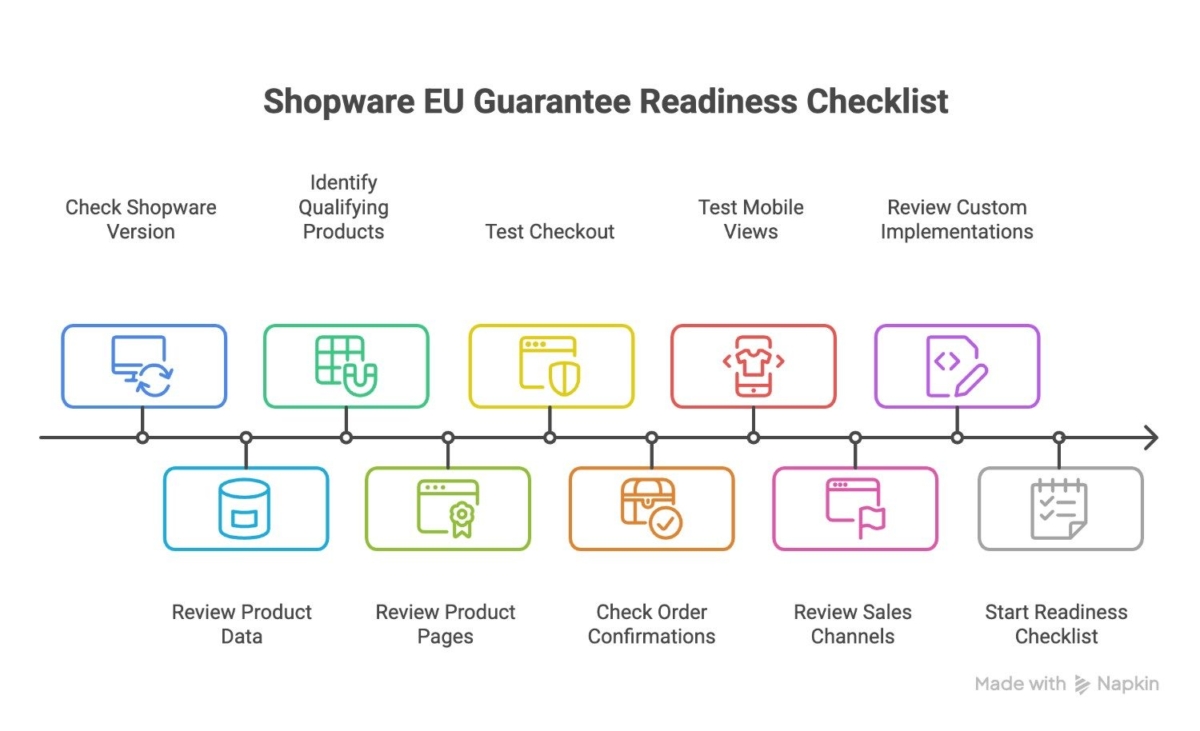
1. Check your Shopware version
Make sure your store is running a version that supports the new functionality and plan your update if necessary.
2. Review your product data
For products that may require the GARAN label, check whether the relevant manufacturer, manufacturer product number, and guarantee information are available and accurate.
3. Identify products that qualify
Don’t assume that every product needs a GARAN label. Review which products have a qualifying producer durability guarantee.
4. Review your product pages
Check how the GARAN label appears on your product pages, particularly if you use a customised theme or product template.
5. Test your checkout
Verify that the legal guarantee notice appears correctly and that any sales-channel-specific settings are configured as intended.
6. Check order confirmations and emails
Review the order confirmation page and email to make sure the relevant information is displayed correctly.
7. Test mobile views
Don’t limit testing to desktop. Check how the relevant information appears across mobile devices as well.
8. Review your sales channels
If you operate multiple storefronts or sales channels, check the configuration for each one individually.
9. Review custom implementations
If your store uses custom themes, customised checkout flows, or headless/PWA architecture, test the implementation after the update.
10. Start before the deadline
Don’t leave the review until September. Identifying missing product information or implementation issues early gives your team time to address them before 27 September 2026.
How Can a Shopware Agency Help?
For a standard Shopware store, the native functionality may cover much of the technical implementation. However, stores with custom themes, customised checkout flows, complex catalogues, or other individual requirements may need additional review and testing.
A Shopware development agency can help merchants:
- Review their current Shopware version and setup.
- Identify potential gaps in product data and storefront implementation.
- Check customised product and checkout templates.
- Review the implementation across relevant customer touchpoints.
- Test the functionality after the Shopware update.
- Implement additional changes where required.
At 2Hats Logic, we can review your existing Shopware setup, identify what needs attention, and help with implementation and testing where required.
Don’t wait until the deadline.
The new requirements take effect on 27 September 2026. Reviewing your Shopware store early gives you time to identify and address any gaps before the deadline.
FAQ
What are the new EU guarantee requirements for Shopware stores?
From 27 September 2026, Shopware merchants selling goods to EU consumers must provide the required guarantee information. This includes the legal guarantee notice and, where applicable, the GARAN label.
Does Shopware support the new EU guarantee requirements?
Yes. Shopware 6.7.14 includes native support for the EU legal guarantee notice and GARAN label. Merchants should still review their product data, storefront and checkout setup.

Related Articles