Greetings! I'm Aneesh Sreedharan, CEO of 2Hats Logic Solutions. At 2Hats Logic Solutions, we are dedicated to providing technical expertise and resolving your concerns in the world of technology. Our blog page serves as a resource where we share insights and experiences, offering valuable perspectives on your queries.

You’re spending 10-30 minutes manually copying each email order into your ERP, and that quickly adds up to 5-9 hours a day just on fulfillment. Manual data entry also increases operational costs because errors like wrong addresses, chargebacks, returns, and inventory mismatches keep piling up. That is often why stores get stuck at around 15 orders a day when everything is still handled manually. Email data extraction to ERP automation removes the manual entry step, cuts errors, and helps you scale beyond 50 orders a day without overwhelming your team. In this guide, you’ll learn how email data extraction to ERP works, which tools to use, and how to set it up for your business.
The Problem: Manual Order Processing
That kind of daily manual effort not only slows your team down, but it also creates the kind of errors and rework that make email order processing expensive.
Am I Spending Too Much Time Manually Copying Email Orders Into My ERP?
Yes, you’re spending 10-30 minutes per order copying customer name, products, quantities, and address into your ERP.
What you experience day to day:
- 8 AM: You check your email inbox, find 12 customer orders
- 8:15 AM: You manually open the first order PDF, copy SKU #12345, quantity 5
- 8:20 AM: You paste into ERP, add customer name, address, phone
- 8:25 AM: You repeat for order 2, 3, 4…
- 5 hours later: You’ve processed 12 orders, still have 8 more
- By noon: You’re burned out, haven’t done marketing, product development, or customer service
Timer shows: 22-35 minutes per order for manual email entry
You’re doing 12 hours of order entry daily. That’s not sustainable.
How Much Money Am I Losing From Order Errors and Slow Processing?
Manual order entry creates 1-5% error rates; you copy the wrong SKU, the wrong quantity, or the wrong address.
Cost of errors:
| Error Type | Cost Per Error | Annual Cost (15 orders/day) |
|---|---|---|
| Wrong SKU shipped | $6.02 | $4,398 |
| Wrong address | $3.61 | $1,807 |
| Wrong quantity | $4.82 | $2,410 |
| Total | $14.46 avg | $8,615/year |
Slow processing costs:
- 10-30 min/order = 3-5 hours/day on fulfillment
- You can’t scale past 15 orders/day (you’re the bottleneck)
- 30% higher operational costs from manual data entry
- Returns, chargebacks, and lost customers from errors
You’re losing ₹700,000+ per year from manual order processing.
Why Can’t I Scale Past 15 Orders Per Day Without Automation?
You’re capped at 15 orders/day because you’re the Human Operating Manual.
The math:
- 15 orders/day × 22 min/order = 330 minutes = 5.5 hours on order entry
- Add packaging, shipping, and customer service = 12-16 hours/day total
- You have no time for marketing, product development, or strategy
- You can’t scale because you’re already at 100% capacity
What happens when you try to scale:
- You get 20 orders/day → 7.3 hours on order entry
- You get 30 orders/day → 11 hours on order entry
- You get 50 orders/day → 18 hours/day (impossible)
- You’re burned out, orders get delayed, and customers are angry
Without automated order entry, you’re stuck at 15 orders/day. This is why you need ERP order automation.
Let us show you how AI can automate your entire email orders-to-ERP workflow.
Solution: How Email Data Extraction to ERP Works
Here’s how the process works from the moment an email arrives to the point where the order is created in your ERP.
How to Automate Email Orders to ERP Entry?
You automate email orders to ERP using email data extraction software that detects incoming emails, extracts data from PDFs, validates against business rules, and creates ERP orders automatically.
Our service sets this up for you:
- We connect your email inbox to our AI extraction platform
- Our AI detects incoming orders and attachment PDFs
- We extract SKUs, quantities, prices, and customer addresses
- Our system validates data against business rules (confidence thresholds 95%+)
- We push clean data directly into your ERP → order created
- You never touch the keyboard; orders flow automatically
Result: Orders processed in <3 minutes instead of 22-35 minutes
What’s the Exact Process: From Email to ERP Order Automatically?
Here’s the exact email-to-ERP automation flow:
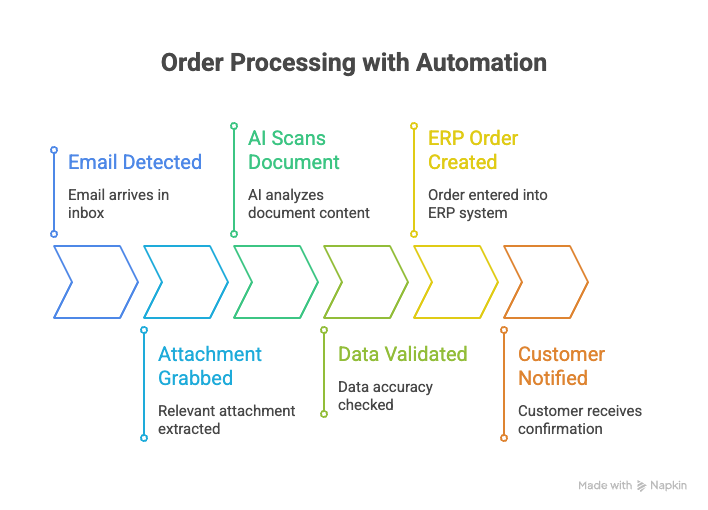
Step 1: Email Detected
- Customer emails order to your store ([email protected])
- Our AI monitors your inbox via SMTP/IMAP
- New email detected instantly
Step 2: Attachment Grabbed
- AI finds PDF attachment (order confirmation, invoice)
- Extracts file from email
Step 3: AI Scans Document
- AI OCR reads PDF content (text, numbers, tables)
- For plain text emails: NLP understands context
- Extracts fields: SKU, quantity, price, customer name, and address
Step 4: Data Validated
- System checks: Is SKU valid? Does quantity match inventory?
- Confidence thresholds: Financial fields 97%+, critical IDs 95%+, standard fields 90%+
- If confidence <95% → route for human review
- If confidence >95% → auto-approve
Step 5: ERP Order Created
- Clean data pushed to Odoo/Xentral/SAP
- ERP order automation creates a sales order automatically
- Inventory updated, shipment ready to create
Step 6: Customer Notified
- Auto-send order confirmation email
- Track shipment in ERP
Total time: <3 minutes per order (vs 22-35 minutes manual)
Can Email Data Extraction Handle PDF Attachments, Fax, and Photos?
Yes, email data extraction handles plain text emails, PDF attachments, fax (converted to PDF), and photos (with OCR + AI).
Supported formats:
| Format | How AI Extracts Data | Accuracy |
| Plain text email | NLP understands context | 95%+ |
| PDF attachment | AI OCR reads text | 95%+ |
| Fax | Converted to PDF → AI OCR | 90%+ |
| Photos | OCR + AI extracts text | 90%+ |
| Excel file | Reads structured data | 97%+ |
What’s different from traditional automation:
- AI handles unstructured data (PDFs with different layouts)
- AI learns over time (improves extraction accuracy)
- Traditional rule-based systems only work on fixed formats
Example:
Customer emails a PDF with the order in table format:
text
| SKU | Qty | Price |
| XYZ123 | 5 | $100 |
| ABC456 | 3 | $150 |
AI extracts:
- Product 1: SKU XYZ123, Quantity 5, Price $500
- Product 2: SKU ABC456, Quantity 3, Price $450
- Total: $950
Auto-creates ERP order: no manual copying.
Types of Automation: Purchase Order & Sales Order
Email order to ERP automation eliminates manual order entry by automatically processing purchase orders and sales orders received via email. The following sections explain how each workflow works and the benefits it delivers.
How To Automate Purchase Orders Coming From Suppliers via Email?
You automate purchase orders from suppliers using purchase order automation that extracts vendor details, items, quantities, and prices from email attachments and pushes them into your ERP procurement module.
How purchase order automation works:
- Supplier emails PO ([email protected] → “Ordering 500 units of Product X”)
- AI detects email + attachment (PDF invoice/PO)
- AI extracts: Vendor name, PO number, SKUs, quantities, prices, delivery date
- Validation: Checks vendor master record, matches to approved suppliers
- ERP creates: Purchase order in procurement module (Odoo/Xentral/SAP/Microsoft Business Central)
- Auto-dispatch: PO sent to vendor via email confirmation
Benefits of purchase order automation:
| Benefit | Impact |
| Streamlines procurement | Save hours per week |
| Reduces errors | 80% fewer errors |
| Improves efficiency | Faster order processing |
| Digitizes manual entry | No copying vendor data |
How Do I Automate Sales Orders From Customers Via Email?
You automate sales orders from customers using sales order automation that extracts customer details, products, quantities, and shipping addresses from email and creates sales orders in your ERP automatically.
How sales order automation works:
- Customer emails order ([email protected] → “I want 10 units of Product Y”)
- AI detects email + attachment (order confirmation PDF)
- AI extracts: Customer name, email, address, phone, SKUs, quantities, prices
- Validation: Checks inventory availability, pricing rules, and customer credit
- ERP creates: Sales order in sales module (Odoo/Xentral/SAP/Microsoft Business Central)
- Auto-fulfillment: Creates shipment, sends confirmation email
Benefits of sales order automation:
| Benefit | Impact |
| Automates order capture | No manual copying |
| Validates inventory | Real-time stock check |
| Applies pricing | Auto-calculates taxes, discounts |
| Creates a sales order | Instant ERP entry |
| Syncs to fulfillment | Auto-creates shipment |
Can All These Purchase Orders and Customer Orders Be Handled Using a Single Platform?
Yes, our email-to-ERP integration handles both purchase orders and customer orders on a single platform. Whether you use Odoo, Xentral, or SAP, all email orders flow into one system, with no need for separate tools.
How it works:
When you set up email-to-ERP automation with our service, we configure one email inbox that captures both:
- Purchase orders from suppliers (email: [email protected])
- Customer orders from buyers (email: [email protected])
Our AI distinguishes between them by:
- Checking sender email address (supplier vs customer)
- Analyzing document type (invoice/PO vs order confirmation)
- Mapping fields correctly (vendor → purchase order, customer → sales order)
Both types auto-create in your ERP; purchase orders go to the procurement module, sales orders go to the sales module. Everything stays in one system.
What you get:
- One platform for all orders (no 2 tools)
- Unified inventory (POs increase stock, SOs decrease stock in the same system)
- Real-time sync (supplier delivery dates match customer shipment dates)
- Single dashboard (see all orders – incoming + outgoing – in one place)
- Simplified accounting (POs = expenses, SOs = revenue in same ERP)
Need a solution that handles both purchase and sales orders?
Example (B2B Wholesale):
Supplier emails PO: “Sending 500 units of Product X”
Customer emails order: “Ordering 100 units of Product X”
With our automation:
- AI reads supplier email → creates purchase order in Odoo/Xentral/SAP → stock increases when delivered
- AI reads customer email → creates sales order in the same ERP → stock decreases when shipped
- Both tracks in one system → you see inventory, deliveries, shipments in the same dashboard
You don’t need 2 platforms. One ERP handles everything. Integrating purchase orders and sales orders into an ERP system simplifies how businesses handle procurement, inventory, and finance.
AI-Powered vs Traditional Automation
Not all automation solutions are built the same. While traditional rule-based systems work well with predictable formats, AI-powered automation can process the wide variety of email orders businesses receive every day with greater accuracy and flexibility.
Why Should I Use AI Instead of Traditional Rule-Based Automation for Email Orders?
You should use AI because AI-based extraction handles unstructured/multi-format data (PDFs with different layouts, photos, faxes) and improves over time, while traditional rule-based automation only works on fixed formats and can’t learn.
AI vs Traditional Automation:
| Feature | AI-Based Extraction | Traditional Rule-Based |
| Unstructured data | Handles PDFs, photos, and fax | Only fixed formats |
| Learning | Improves accuracy over time | Static rules |
| Multi-format | Works on all layouts | One layout only |
| NLP context | Understands email text | No context |
| AI OCR | Reads text from images | Limited OCR |
| Confidence validation | 95%+ accuracy guaranteed | 70-80% accuracy |
| Adaptability | Handles new formats automatically | Manual rule updates |
Why AI is better for email orders:
Email orders vary in format:
- Customer A sends a PDF with a table layout
- Customer B sends a plain-text email
- Customer C sends a photo of the order (Instagram?)
- Supplier D sends fax (converted to PDF)
Traditional automation:
- Needs a fixed rule for each format
- Fails on new layouts
- You manually update rules for every change
AI-based extraction:
- Handles all formats automatically
- Learns from corrections (improves accuracy)
- Adapts to new formats without manual updates
Our AI service uses:
- Agentic AI: Handles complex, dynamic workflows
- AI OCR: Reads unstructured data from PDFs/images
- NLP: Understands context in emails
- Cross-system coordination: email → ERP → e-commerce
Result: 90% faster, 80% fewer errors
Order Management System (OMS) Integration
While email-to-ERP automation handles order processing, businesses with multiple sales channels or warehouses may benefit from an Order Management System (OMS) to streamline inventory management and order fulfillment.
Do I Need an Order Management System (OMS) Between Email and ERP?
You may need an OMS if you sell on multiple channels (Shopify + Amazon + eBay). It acts as a middle layer that routes orders to the right warehouse and syncs inventory across all channels.
What an Order Management System does:
- The middle layer between email and ERP
- Routes orders to the nearest/available warehouse
- Auto-assigns shipping carriers (cheapest/fastest)
- Syncs inventory across Shopify, Amazon, eBay, and ERP
- Tracks shipments in real-time
When you need OMS:
| Scenario | Need OMS? |
| Single channel (Shopify only) | No, ERP handles it |
| Multiple channels (Shopify + Amazon + eBay) | Yes, OMS syncs all |
| Multiple warehouses (Los Angeles + Dallas + New York) | Yes, OMS routes to the nearest |
| High volume (100+ orders/day) | Yes, OMS automates routing |
If you’re small (15-50 orders/day, single channel), you can skip OMS and go straight to email → ERP.
How Does OMS Help Me Sync Inventory and Auto-Route Orders?
OMS syncs inventory in real-time across all channels and auto-routes orders to the nearest warehouse with available stock.
How OMS inventory sync works:
- Customer buys on Shopify: Order sent to OMS
- OMS checks inventory: Which warehouse has stock? (Los Angeles: 50 units, Dallas: 20 units)
- OMS reserves stock: Reduces Shopify inventory by 1 unit
- OMS updates ERP: ERP inventory decreases automatically
- OMS syncs Amazon/eBay: Those channels also show updated inventory
- Result: Real-time sync across all channels, no overselling
How OMS auto-routing works:
- Order received: Customer in New York, ordered Product X
- OMS checks warehouses: Los Angeles (50 units, 2-day ship), Dallas (20 units, 4-day ship), New York (10 units, 1-day ship)
- OMS routes to New York: Fastest delivery, lowest shipping cost
- OMS creates shipment: Auto-assigns carrier (UPS, FedEx)
- OMS updates ERP: Shipment tracked in ERP
- Result: Customer gets product in 1 day, you save 20-40% on shipping
OMS benefits:
| Benefit | Impact |
| Real-time inventory sync | No overselling across channels |
| Faster delivery, lower shipping costs | Faster delivery, lower shipping cost |
| Reduced shipping costs | 20-40% savings |
| Single dashboard | See all orders in one place |
Can Automation Handle Special Cases Like Quotes, Fulfillment, and Partial Stock?
Order automation goes beyond capturing and processing orders. It can also support complex workflows such as quote generation, inventory validation, fulfillment coordination, and backorder management, helping teams handle exceptions without manual effort.
Can Automation Also Help Me Generate Quotes and Handle Fulfillment?
Yes, automation can help you generate quotes and handle fulfillment. Our AI service parses customer email requests, applies pricing rules, checks inventory, generates quote PDFs, and converts approved quotes to orders automatically. You review and send, no manual calculation, no manual order creation. This saves 80% time on quoting and fulfillment workflows.
How quote automation works:
- Customer emails quote request: “Need 500 units of Product X, quote please”
- AI parses email: Reads product names, quantities
- AI maps products: Matches to valid SKUs in ERP
- AI applies pricing: Customer-specific discount (10% wholesale)
- AI checks inventory: Which warehouse has stock?
- AI generates quote PDF: Auto-calculates total (₹50,000 – 10% = ₹45,000)
- Sales rep reviews: Tweak if needed, approve with one click
- Customer approves: Via e-signature or email button
- Auto-convert to order: Quote → sales order in ERP
- Auto-fulfillment: Create shipment in TMS, send confirmation
What you save:
- Manual cost estimation (hours per quote)
- Manual shipping/handling calculation
- Manual quote drafting
- Manual order creation after approval
- 80% time saved on quoting + fulfillment
What Happens If an Order Has Partial Stock or Backorders?
What happens if an order has partial stock or backorders? Our AI checks real-time inventory before creating the order. If stock is partial (e.g., customer ordered 10, you have 5), AI flags partial availability and suggests options: ship partial now, wait for full stock, or suggest an alternative. If the stock is zero, AI creates a backorder status in ERP and notifies you. This prevents silent failures, customers get immediate updates, and you don’t manually check stock for every order.
Scenario 1: Partial Stock Available
Customer orders: 10 units of Product X
Your stock: 5 units available
AI automatically:
- Checks real-time inventory in ERP (Odoo/Xentral/SAP)
- Flags partial availability before the order is created
- Suggests options:
- Option A: Ship 5 now, 5 backordered (notify customer)
- Option B: Ship the full order when stock arrives (delay 7 days)
- Option C: Suggest an alternative product (similar item in stock)
- Sends notification to you: “Partial stock, choose option A/B/C”
- You click → AI auto-sends customer email with chosen option
- Order created in ERP with backorder flag
Result: Customer knows immediately, no silent failure.
Scenario 2: Zero Stock Available
Customer orders: 10 units of Product X
Your stock: 0 units
AI automatically:
- Checks inventory → 0 units
- Flags backorder before order fails
- Suggests:
- Option A: Backorder (notify customer, ship when restocked)
- Option B: Cancel order + auto-refund
- Option C: Suggest an alternative product
- You choose → AI handles customer notification
- Order created in ERP as “backorder” status
Result: Order tracked as backorder, not lost.
What you get:
- No silent failures, partial stock is always flagged
- Auto-notifications to the customer (immediate transparency)
- Backorder tracking in ERP (you know when to ship)
- Alternative suggestions (AI recommends similar products)
- Auto-refunds if the customer cancels the backorder
- You don’t manually check stock for every order
Without automation:
- Orders get stuck in pending
- Customer is angry (no update)
- You manually email for each partial stock
- Backorders lost (no tracking)
ERP Comparison: Odoo vs Xentral vs Microsoft Business Central vs SAP
Once you understand how email data extraction to ERP works, the next question is which ERP should receive the data. The best choice depends on your order volume, business complexity, and the tools your team already uses, so it helps to compare the leading options side by side.
Which ERP Should I Choose for Email Orders to ERP Automation?
The right ERP depends on your order volume, business complexity, and how much integration flexibility you need. Some businesses want a simple and affordable system, while others need stronger multi-channel support, financial controls, or enterprise-grade scalability.
That is why it helps to compare the most common ERP options side by side before choosing one for email data extraction to ERP automation.
ERP Comparison for Email Order Automation
| Feature | Odoo | Xentral | Microsoft Business Central | SAP |
| Best For | Small/mid e-commerce | Mid-market e-commerce brands | SMB to mid-market teams using Microsoft tools | Enterprise e-commerce |
| Email Integration | Native email module + Fetchmail | Built-in email accounts + ticketing | Outlook/Exchange + Power Automate/integration layer | BTP Integration Suite + email adapter |
| Setup Time (With Us) | 2 weeks | 2-3 weeks | 2-4 weeks | 3-4 weeks |
| Pricing | Lower | Mid-range | Mid-range | Enterprise |
| Shopify Integration | Native | 200+ integrations | Available through connectors/integrations | Available |
| Shopware Integration | Available | 200+ integrations | Available through connectors/integrations | Available |
| API Access | REST API | 200+ REST endpoints | APIs + Microsoft ecosystem integrations | BTP Integration Suite |
| Multi-Channel | Yes | Yes | Yes, with integration | Yes |
| Real-Time Inventory Sync | Yes | Yes | Yes | Yes |
| Cloud-Native | Yes | Yes, cloud-only | Yes, cloud-based | Hybrid/cloud options |
| Open-Source Option | Yes | No | No | No |
| Support Quality | Support available | EU/US support | Microsoft partner ecosystem | Enterprise SLA |
| Scalability | 15–100 orders/day | 50–500 orders/day | 100–1000 orders/day | 1000–10,000+ orders/day |
Why Is Odoo Best for Small/Mid E-commerce (15-100 Orders/Day)?
Odoo is a strong choice for small and mid-size e-commerce businesses that need an affordable and flexible ERP. It works well when you want to automate email order entry without taking on the complexity of a larger enterprise system.
If you are running a lean team and want to move fast, Odoo is usually the easiest place to start. Our service sets up Odoo email integration in 2 weeks:
- We configure SMTP/IMAP mail servers in Odoo.
- We set up the Fetchmail add-on for incoming order emails.
- We connect Odoo to Gmail or Office 365.
- We map email fields to Odoo ERP fields such as SKU, product, and quantity.
- We test with 20 sample orders before going live.
Odoo benefits for your store
| Benefit | Impact |
| Native Shopify integration | Seamless sync with your store |
| Affordable pricing | Around ₹1,500-₹5,000/month for cloud setups |
| Open-source option | Free if you are technical |
| India-based support | No timezone issues |
| GST-compliant | Suitable for Indian e-commerce |
Best for you if:
- You process 15-100 orders/day.
- You use Shopify or Shopware.
- You are budget-conscious.
- You need GST compliance in India.
Our Odoo integration includes:
- Email inbox setup with a catchall email.
- SMTP relay configuration.
- Gmail plugin installation.
- Validation rules and confidence thresholds.
Why Is Xentral Best for Mid-Market E-commerce Brands (50-500 Orders/Day)?
Xentral is best for mid-market e-commerce brands that need a more connected, API-first ERP with strong automation and multi-channel support. It works well when your business is already processing a larger volume of orders and needs better coordination across shops, marketplaces, and logistics.
Xentral is especially useful for teams that want real-time integrations without managing infrastructure themselves. If your business is scaling quickly, Xentral gives you the flexibility to automate more of the workflow without moving into SAP-level complexity.
Our service integrates Xentral email automation in 2-3 weeks:
- We configure dedicated email accounts in Xentral.
- We activate the ticketing system for order emails.
- We connect the Xentral API to our extraction platform.
- We set up REST endpoints for real-time data flow.
- We test with real invoices and orders before auto-approval.
Xentral benefits for your store
| Benefit | Impact |
| API-first architecture | 200+ verified integrations |
| Cloud-only | No infrastructure management |
| Multi-channel ready | Shops, marketplaces, and logistics |
| Real-time webhooks | Instant inventory updates |
| AI agent support | Strong automation compatibility |
Best for you if:
- You process 50-500 orders/day.
- You sell on Shopify, Amazon, and eBay.
- You need multi-channel inventory sync.
- You are scaling fast as a mid-market brand.
Our Xentral integration includes:
- Email account setup with a dedicated inbox.
- API endpoint configuration.
- OAuth 2.0 security.
- Real-time webhook setup.
- Validation and error handling.
Why Is Microsoft Business Central a Good Option for SMB and Mid-Market Teams (100-1000 Orders/Day)?
Microsoft Business Central is a strong choice for businesses that want a modern ERP with solid finance, inventory, and operations capabilities. It is especially attractive for companies already using Microsoft 365, Outlook, Teams, or Power Platform, because the integration path is usually smoother.
It also works well for businesses that have outgrown basic accounting tools but are not yet ready for the scale and complexity of SAP. For email data extraction to ERP automation, Business Central can be a practical middle-ground option when you want structured operations with Microsoft-friendly workflows.
Our service integrates Microsoft Business Central email automation in 2-4 weeks:
- We connect Outlook or Exchange inboxes.
- We configure Power Automate or a similar integration layer.
- We map email fields to Business Central order fields.
- We validate extracted data before posting it into the ERP.
Microsoft Business Central benefits for your store
| Benefit | Impact |
| Microsoft ecosystem fit | Works well with Outlook, Teams, and Microsoft 365 |
| Finance-first ERP | Strong accounting and operations control |
| Cloud-based | Easy to maintain and scale |
| Flexible integrations | Works well with Power Automate and APIs |
| Good mid-market fit | A strong step up from basic systems |
Best for you if:
- You process around 100-1000 orders/day.
- Your team already uses Microsoft 365.
- You want a finance-strong ERP with automation potential.
- You need a scalable but not overly complex solution.
Our Business Central integration includes:
- Outlook/Exchange setup.
- Power Automate or integration-layer configuration.
- Email-to-field mapping.
- Validation rules and confidence thresholds.
- Testing with real orders before go-live.
- Ongoing support for workflow tuning.
Why Is SAP Best for Enterprise E-commerce (1000+ Orders/Day)?
SAP is best for enterprise e-commerce because it offers enterprise-grade security, massive scalability, and deep integration options for complex workflows. It is designed for organizations that manage large order volumes, multi-entity operations, and advanced procurement or fulfillment rules.
SAP is a better fit when your business needs strict governance, detailed controls, and global-scale operations. If you are running a large enterprise with complex data and compliance requirements, SAP is usually the strongest long-term choice.
Our enterprise service integrates SAP email automation in 3-4 weeks:
- We configure the BTP Integration Suite email receiver adapter.
- We set the mailbox frequency for inbox checks.
- We connect S/4HANA to our AI extraction platform.
- We map vendor names to SAP vendor master records.
- We handle vendor number and GL account code requirements.
- We test with 50 real invoices before auto-approval.
SAP benefits for your enterprise
| Benefit | Impact |
| Enterprise-grade security | Handles sensitive B2B data |
| Massive scalability | 1000-10,000+ orders/day |
| Robust integration | BTP Integration Suite |
| Multi-currency/multi-language | Global e-commerce ready |
| S/4HANA cloud | Modern enterprise ERP |
Best for you if:
- You process 1000+ orders/day.
- You are a large enterprise with B2B and B2C operations.
- You need multi-currency support.
- You have complex procurement workflows.
Our SAP integration includes:
- BTP email adapter setup.
- Vendor master record validation.
- GL account code mapping.
- Enterprise SLA support.
- Custom validation rules.
- Pilot testing with 50 invoices.
How Do Odoo, Xentral, Microsoft Business Central, and SAP Compare for Email Integration, Setup Time, and Pricing?
Each ERP has a different strength depending on how your business operates. Odoo is the most approachable for smaller teams, Xentral is strong for fast-growing multi-channel brands, Microsoft Business Central is a good middle-ground for Microsoft-heavy businesses, and SAP is built for enterprise complexity.
| Comparison Factor | Odoo | Xentral | Microsoft Business Central | SAP |
| Email Integration | Native + Fetchmail | Built-in + ticketing | Outlook/Exchange + Power Automate | BTP Suite + adapter |
| Setup Time | 2 weeks | 2-3 weeks | 2-4 weeks | 3-4 weeks |
| Pricing | $18–$60/month | Mid-range | Mid-range | Enterprise |
| Best For Order Volume | 15-100 orders/day | 50-500 orders/day | 100-1000 orders/day | 1000+ orders/day |
| Our Recommendation | Small/mid e-commerce | Mid-market brands | Microsoft-centric SMB/mid-market teams | Enterprise |
Which ERP Should You Choose?
| Your Order Volume | Recommended ERP | Why |
| 15-100 orders/day | Odoo | Affordable, native Shopify, GST-compliant |
| 50-500 orders/day | Xentral | Multi-channel, API-first, scalable |
| 100-1000 orders/day | Microsoft Business Central | Strong Microsoft ecosystem fit, finance-first ERP |
| 1000+ orders/day | SAP | Enterprise-grade, massive scale |
How Our Email-to-ERP Integration Service Works
At 2Hats Logic, we automate email-to-ERP integration for e-commerce stores. Our service extracts order data from emails, validates it against business rules, and creates ERP orders automatically. Stores we work with reduce errors by 80%, save 90% time on order processing, and scale past 50 orders/day.
Here’s what we do for you:
- We connect your email inbox to our AI extraction platform
- We configure the email server (SMTP/IMAP)
- We set up a catchall email for order automation
- We connect our platform to your ERP (Odoo/Xentral/SAP)
- We map email fields to ERP fields (SKU → product, quantity → qty)
- We configure validation rules and confidence thresholds (95%+)
- We test with 10-20 sample orders
- We adjust extraction rules based on errors
- We go live, auto-approve 95%+ confidence orders
- We train your team on the monitoring dashboard
- We monitor your automation daily
- We adjust extraction rules if errors occur
Is My Customer and Order Data Safe When Using Email Data Extraction Automation?
Yes, your customer and order data are safe. Our AI extraction platform uses enterprise-grade security: OAuth 2.0 authentication, encrypted data transmission (SSL/TLS), GDPR-compliant data storage, and ISO 27001-certified infrastructure.
What data do we extract:
- Customer name, email, address, phone
- SKUs, quantities, prices
- Order number, delivery date
What we don’t store:
- Payment information (credit cards, bank details)
- Customer passwords
- Sensitive financial data
How Accurate Is AI Email Data Extraction? What If It Misreads an Order?
AI email data extraction is 95%+ accurate with confidence thresholds. What if it misreads an order? You won’t get errors because our system validates every extraction: financial fields 97%+ confidence auto-approve, critical IDs 95%+ confidence auto-approve, standard fields 90%+ confidence auto-approve. Anything below threshold → you review before ERP posting.
How accuracy works:
Confidence Score Thresholds:
| Field Type | Confidence Threshold | Auto-Approve? |
| Financial fields (amount, tax) | 97%+ | Yes |
| Critical IDs (PO number, SKU) | 95%+ | Yes |
| Standard fields (dates, quantities) | 90%+ | Yes |
| Below threshold | <90% | Route for review |
Auto-approve vs human review:
- Auto-approve if: All confidence >95%
- Human review if: Any confidence <95%
95%+ of orders auto-approve; you only review the 5% edge cases.
Example:
Order extracted:
- Amount: $100 (confidence 98%)
- SKU: XYZ123 (confidence 96%)
- Quantity: 5 (confidence 94%)
- Address: “123 Main St” (confidence 92%)
All confidence >90% → auto-approve → ERP order created
Order extracted:
- Amount: $100 (confidence 98%)
- SKU: XYZ123 (confidence 96%)
- Quantity: 5 (confidence 88%)
- Address: “123 Main St” (confidence 92%)
Quantity confidence <90% → route for review → you check before ERP posting
You review the 5% edge cases, auto-approve 95% of orders.
What To Check After Email-to-ERP Integration Is Complete?
After email-to-ERP integration is complete, you should check: monitoring dashboard (order status, confidence scores), error logs (failed orders), inventory sync (stock levels accurate?), and customer notifications (confirmation emails sent?).
After integration checklist:
- Monitor dashboard:
- Order status (auto-approved vs reviewed)
- Confidence scores (95%+ auto-approve)
- Failed orders (route for review)
- Check error logs:
- Orders that failed extraction
- Common errors (missing SKU, wrong quantity)
- Adjust rules if errors persist
- Verify inventory sync:
- Are stock levels accurate in ERP?
- Are orders decreasing inventory correctly?
- No overselling?
- Test customer notifications:
- Confirmation emails sent automatically?
- Are shipment tracking emails working?
- No delays?
- Train your team:
- How to monitor the dashboard
- How to review edge cases (5% low confidence)
- How to adjust rules if needed
Results: Before vs After Automation
How much faster is automated order entry?
Automated order entry is ~90% faster; manual entry takes 10-30 minutes per order; automated processing is under 3 minutes. That lets you scale from ~15 orders/day to 50+ in the same work window.
How much will my order errors decrease?
AI extraction reduces errors by about 80%. Typical manual error rates (1-5%) fall to <0.5% with confidence checks and review workflows, cutting wrong-SKU, wrong-address, and wrong-quantity incidents by ~90%.
Can I really save 30% on operational costs?
Yes. Conservative estimates show ~30% savings on baseline operational costs; when you include reduced returns, lower staffing hours, and less churn, total annual savings can be much higher.
How Do I Start Automating My Email Orders to ERP Today?
Ready to eliminate manual order entry? Start with a consultation and see how email-to-ERP automation can streamline your workflow, reduce errors, and save time. We’ll handle the full setup, including email configuration, ERP mapping, and testing, so you can go live in about 2 weeks.
Book a consultation to review your current workflow, estimate your savings, and create a custom integration plan for your ERP, whether you use Odoo, Xentral, or SAP. With our email data extraction and ERP order automation service, you can move beyond manual copying and scale without adding extra workload.
Ready to automate your email order processing?
FAQ
What if the AI misreads an order? Will I still get errors?
Our system uses confidence thresholds (financial fields 97%+, critical IDs 95%+, standard fields 90%+) so anything below those thresholds is routed for human review before ERP posting. That means about 95%+ of orders auto-approve; you only check the ~5% edge cases. We also monitor the automation daily and adjust extraction rules so you don’t need to troubleshoot.
Can this handle PDF attachments and images from customers?
Yes. Email data extraction supports PDFs, faxes (converted to PDF), photos (OCR + AI), plain-text emails, and Excel files. Typical accuracy is 90–97% depending on format, with PDFs and Excel at the higher end and photos/faxes slightly lower, all processed and validated before posting.
How long does it take to set up email-to-ERP integration?
Typical setup times vary by ERP and complexity, but expect a short project: usually a few days to a few weeks. Simple Odoo/Xentral integrations are often completed in about 1–2 weeks; larger or highly customized SAP projects can take several weeks. Time depends on sample volume, attachment types, custom field mapping, and any approvals you need to provide.
Is this too expensive for my small e-commerce store?
No. The service is cost-effective for small stores; we offer trials and no setup fees. Savings from fewer errors, lower staffing time, and reduced returns typically far exceed the service cost, so most small merchants see a strong positive ROI within months.
Does this work for B2B purchase orders and wholesale email orders?
Yes. The automation extracts vendor name, PO number, SKUs, quantities, prices, and delivery dates from supplier emails and attachments, validates them against vendor master data, and creates purchase orders in your ERP procurement module, reducing manual entry, cutting errors, and speeding procurement.
Table of contents
- The Problem: Manual Order Processing
- Solution: How Email Data Extraction to ERP Works
- What's the Exact Process: From Email to ERP Order Automatically?
- Types of Automation
- AI-Powered vs Traditional Automation
- Order Management System (OMS) Integration
- Can Automation Handle Special Cases Like Quotes, Fulfillment, and Partial Stock?
- ERP Comparison: Odoo vs Xentral vs Microsoft Business Central vs SAP
- How Our Email-to-ERP Integration Service Works
- Is My Customer and Order Data Safe When Using Email Data Extraction Automation?
- How Accurate Is AI Email Data Extraction?
- What To Check After Email-to-ERP Integration Is Complete?
- Results: Before vs After Automation
- How Do I Start Automating My Email Orders to ERP Today?


Related Articles